
PL/SQL — Collections
In this chapter, we will discuss the Collections in PL/SQL. A collection is an ordered group of elements having the same data type. Each element is identified by a unique subscript that represents its position in the collection.
PL/SQL provides three collection types −
- Index-by tables or Associative array
- Nested table
- Variable-size array or Varray
Oracle documentation provides the following characteristics for each type of collections −
| Collection Type | Number of Elements | Subscript Type | Dense or Sparse | Where Created | Can Be Object Type Attribute |
|---|---|---|---|---|---|
| Associative array (or index-by table) | Unbounded | String or integer | Either | Only in PL/SQL block | No |
| Nested table | Unbounded | Integer | Starts dense, can become sparse | Either in PL/SQL block or at schema level | Yes |
| Variablesize array (Varray) | Bounded | Integer | Always dense | Either in PL/SQL block or at schema level | Yes |
We have already discussed varray in the chapter ‘PL/SQL arrays’. In this chapter, we will discuss the PL/SQL tables.
Both types of PL/SQL tables, i.e., the index-by tables and the nested tables have the same structure and their rows are accessed using the subscript notation. However, these two types of tables differ in one aspect; the nested tables can be stored in a database column and the index-by tables cannot.
Index-By Table
An index-by table (also called an associative array) is a set of key-value pairs. Each key is unique and is used to locate the corresponding value. The key can be either an integer or a string.
An index-by table is created using the following syntax. Here, we are creating an index-by table named table_name, the keys of which will be of the subscript_type and associated values will be of the element_type
TYPE type_name IS TABLE OF element_type [NOT NULL] INDEX BY subscript_type; table_name type_name;
Example
Following example shows how to create a table to store integer values along with names and later it prints the same list of names.
DECLARE TYPE salary IS TABLE OF NUMBER INDEX BY VARCHAR2(20); salary_list salary; name VARCHAR2(20); BEGIN -- adding elements to the table salary_list('Rajnish') := 62000; salary_list('Minakshi') := 75000; salary_list('Martin') := 100000; salary_list('James') := 78000; -- printing the table name := salary_list.FIRST; WHILE name IS NOT null LOOP dbms_output.put_line ('Salary of ' || name || ' is ' || TO_CHAR(salary_list(name))); name := salary_list.NEXT(name); END LOOP; END; /
When the above code is executed at the SQL prompt, it produces the following result −
Salary of James is 78000 Salary of Martin is 100000 Salary of Minakshi is 75000 Salary of Rajnish is 62000 PL/SQL procedure successfully completed.
Example
Elements of an index-by table could also be a %ROWTYPE of any database table or %TYPE of any database table field. The following example illustrates the concept. We will use the CUSTOMERS table stored in our database as −
Select * from customers; +----+----------+-----+-----------+----------+ | ID | NAME | AGE | ADDRESS | SALARY | +----+----------+-----+-----------+----------+ | 1 | Ramesh | 32 | Ahmedabad | 2000.00 | | 2 | Khilan | 25 | Delhi | 1500.00 | | 3 | kaushik | 23 | Kota | 2000.00 | | 4 | Chaitali | 25 | Mumbai | 6500.00 | | 5 | Hardik | 27 | Bhopal | 8500.00 | | 6 | Komal | 22 | MP | 4500.00 | +----+----------+-----+-----------+----------+
DECLARE CURSOR c_customers is select name from customers; TYPE c_list IS TABLE of customers.Name%type INDEX BY binary_integer; name_list c_list; counter integer :=0; BEGIN FOR n IN c_customers LOOP counter := counter +1; name_list(counter) := n.name; dbms_output.put_line('Customer('||counter||'):'||name_lis t(counter)); END LOOP; END; /
When the above code is executed at the SQL prompt, it produces the following result −
Customer(1): Ramesh Customer(2): Khilan Customer(3): kaushik Customer(4): Chaitali Customer(5): Hardik Customer(6): Komal PL/SQL procedure successfully completed
Nested Tables
A nested table is like a one-dimensional array with an arbitrary number of elements. However, a nested table differs from an array in the following aspects −
- An array has a declared number of elements, but a nested table does not. The size of a nested table can increase dynamically.
- An array is always dense, i.e., it always has consecutive subscripts. A nested array is dense initially, but it can become sparse when elements are deleted from it.
A nested table is created using the following syntax −
TYPE type_name IS TABLE OF element_type [NOT NULL]; table_name type_name;
This declaration is similar to the declaration of an index-by table, but there is no INDEX BY clause.
A nested table can be stored in a database column. It can further be used for simplifying SQL operations where you join a single-column table with a larger table. An associative array cannot be stored in the database.
Example
The following examples illustrate the use of nested table −
DECLARE TYPE names_table IS TABLE OF VARCHAR2(10); TYPE grades IS TABLE OF INTEGER; names names_table; marks grades; total integer; BEGIN names := names_table('Kavita', 'Pritam', 'Ayan', 'Rishav', 'Aziz'); marks:= grades(98, 97, 78, 87, 92); total := names.count; dbms_output.put_line('Total '|| total || ' Students'); FOR i IN 1 .. total LOOP dbms_output.put_line('Student:'||names(i)||', Marks:' || marks(i)); end loop; END; /
When the above code is executed at the SQL prompt, it produces the following result −
Total 5 Students Student:Kavita, Marks:98 Student:Pritam, Marks:97 Student:Ayan, Marks:78 Student:Rishav, Marks:87 Student:Aziz, Marks:92 PL/SQL procedure successfully completed.
Example
Elements of a nested table can also be a %ROWTYPE of any database table or %TYPE of any database table field. The following example illustrates the concept. We will use the CUSTOMERS table stored in our database as −
Select * from customers; +----+----------+-----+-----------+----------+ | ID | NAME | AGE | ADDRESS | SALARY | +----+----------+-----+-----------+----------+ | 1 | Ramesh | 32 | Ahmedabad | 2000.00 | | 2 | Khilan | 25 | Delhi | 1500.00 | | 3 | kaushik | 23 | Kota | 2000.00 | | 4 | Chaitali | 25 | Mumbai | 6500.00 | | 5 | Hardik | 27 | Bhopal | 8500.00 | | 6 | Komal | 22 | MP | 4500.00 | +----+----------+-----+-----------+----------+
DECLARE CURSOR c_customers is SELECT name FROM customers; TYPE c_list IS TABLE of customerS.No.ame%type; name_list c_list := c_list(); counter integer :=0; BEGIN FOR n IN c_customers LOOP counter := counter +1; name_list.extend; name_list(counter) := n.name; dbms_output.put_line('Customer('||counter||'):'||name_list(counter)); END LOOP; END; /
When the above code is executed at the SQL prompt, it produces the following result −
Customer(1): Ramesh Customer(2): Khilan Customer(3): kaushik Customer(4): Chaitali Customer(5): Hardik Customer(6): Komal PL/SQL procedure successfully completed.
Collection Methods
PL/SQL provides the built-in collection methods that make collections easier to use. The following table lists the methods and their purpose −
Returns TRUE if the nth element in a collection exists; otherwise returns FALSE.
Returns the number of elements that a collection currently contains.
Checks the maximum size of a collection.
Returns the first (smallest) index numbers in a collection that uses the integer subscripts.
Returns the last (largest) index numbers in a collection that uses the integer subscripts.
Returns the index number that precedes index n in a collection.
Returns the index number that succeeds index n.
Appends one null element to a collection.
Appends n null elements to a collection.
Appends n copies of the i th element to a collection.
Removes one element from the end of a collection.
Removes n elements from the end of a collection.
Removes all elements from a collection, setting COUNT to 0.
Removes the n th element from an associative array with a numeric key or a nested table. If the associative array has a string key, the element corresponding to the key value is deleted. If n is null, DELETE(n) does nothing.
Removes all elements in the range m..n from an associative array or nested table. If m is larger than n or if m or n is null, DELETE(m,n) does nothing.
Collection Exceptions
The following table provides the collection exceptions and when they are raised −
| Collection Exception | Raised in Situations |
|---|---|
| COLLECTION_IS_NULL | You try to operate on an atomically null collection. |
| NO_DATA_FOUND | A subscript designates an element that was deleted, or a nonexistent element of an associative array. |
| SUBSCRIPT_BEYOND_COUNT | A subscript exceeds the number of elements in a collection. |
| SUBSCRIPT_OUTSIDE_LIMIT | A subscript is outside the allowed range. |
| VALUE_ERROR | A subscript is null or not convertible to the key type. This exception might occur if the key is defined as a PLS_INTEGER range, and the subscript is outside this range. |
Kickstart Your Career
Get certified by completing the course
Все о коллекциях в Oracle
Коллекции присутствую в том или ином виде в большинстве языков программирования и везде имеют схожую суть в плане использования. А именно – позволяют хранить набор объектов одного типа и проводить над всем набором какие-либо действия, либо в цикле проводить однотипные действия со всеми элементами набора.
Таким же образом коллекции используются и в Oracle.
Содержание статьи
- Общие сведения о коллекциях в pl/sql
- Типы коллекций
- Ассоциативный массив
- Varray
- Nested table
- Set operations с nested tables
- Логические операции с коллекциями
- Методы коллекций
- Delete
- Trim
- Extend
- Exists
- First и Last
- Count
- Limit
- Prior и Next
- Exceptions in forall
Общие сведения о коллекциях в pl/sql
-
Создание коллекции происходит в два этапа
Сначала мы объявляем тип(type) коллекции (конструкции assoc_array_type_def, varray_type_def и nested_table_type_def будут приведены далее) - Затем объявляем переменную этого типа
- Обращение к элементу коллекции имеет следующий синтаксис:
variable_name(index)Типы коллекций
Тип коллекции Количество элементов Тип индекса Плотная или разреженная Без инициализации Где объявляется Использование в SQL Ассоциативный массив
(index by table)Не задано String
Pls_integerПлотная и разреженная Empty PL/SQL block
PackageНет Varray
(variable-size array)Задано Integer Только плотная Null PL/SQL block
Package
Schema levelТолько определенные на уровне схемы Nested table Не задано Integer При создании плотная, может стать разреженной Null PL/SQL block
Package
Schema levelТолько определенные на уровне схемы Плотность коллекции означает, что между элементами коллекции нет пропусков, пустых мест. Некоторые коллекции, как видно из таблицы, могут быть разреженными – т.е. могут иметь разрывы между элементами. Это значит, что в коллекции, например, могут быть элементы с индексом 1 и 4, а с индексом 2 и 3 элементов нет. При этом слоты памяти под 2-й и 3-й элементы будут существовать и будут принадлежать коллекции (в случае nested table), но не содержать при этом объектов и попытка прочитать содержимое этих элементов вызовет ошибку no_data_found.
Подробности можно узнать из видео-лекции в конце статьи.Ассоциативный массив
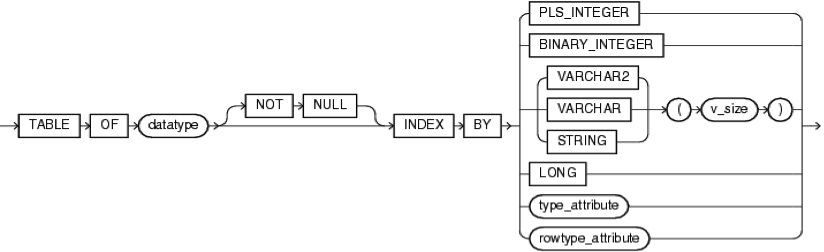
Также его называют index by table или pl/sql table.
Тип описывается следующим образом (assoc_array_type_def):.- Набор пар ключ-значение
- Данные хранятся в отсортированном по ключу порядке
- Не поддерживает DML-операции (не может участвовать в селектах, не может храниться в таблицах)
- При объявлении как константа должен быть сразу инициализирован функцией
- Порядок элементов в ассоциативном массиве с строковым индексом зависит от параметров NLS_SORT и NLS_COMP
- Нельзя объявить тип на уровне схемы, но можно в пакете
- Не имеет конструктора
- Индекс не может принимать значение null (но допускает пустую строку — подробности и ссылка на пример в первом комментарии)
- Datatype – это любой тип данных, кроме ref cursor
- Для помещения в память небольших таблиц-справочников
- Для передачи в качестве параметра коллекции
Restrictions:
При изменении параметров NLS_SORT и NLS_COMP во время сессии после заполнения ассоциативного массива, можем получать неожиданные результаты вызовов методов first, last, next, previous. Также могут возникнуть проблемы при передаче ассоциативного массива в качестве параметра на другую БД с иными настройками NLS_SORT и NLS_COMPVarray

Представляет собой массив последовательно хранящихся элементов

Тип описывается следующим образом (varay_type_def):
- Размер задается при создании
- Индексируется с 1
- Инициализируется конструктором
collection_type ( [ value [, value ]. ] )- Знаем максимально возможное количество элементов
- Доступ к элементам последовательный
Restrictions:
Максимальный размер – 2 147 483 647 элементовNested table

Тип описывается следующим образом (nested_table_type_def):
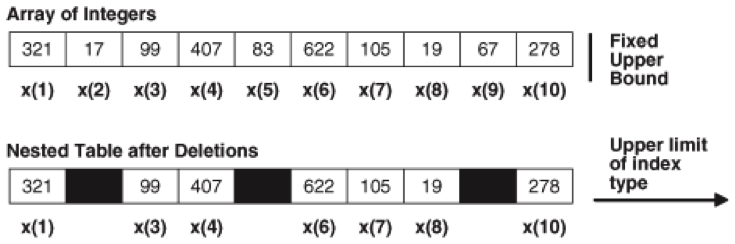
- Размер коллекции изменяется динамически
- Может быть в разряженном состоянии, как показано на картинке
- Инициализируется конструктором
collection_type ( [ value [, value ]. ] )SELECT column_value FROM TABLE(nested_table)В комментариях к этой статье предлагают более предпочтительный вариант — он более универсальный, допускает не только скалярное значение в таблице:
SELECT value(t) x FROM TABLE(nested_table) tSet operations с nested tables
Операции возможны только с коллекциями nested table. Обе коллекции, участвующие в операции, должны быть одного типа.
Результатом операции также является коллекция nested table.Операция Описание MULTISET UNION Возвращает объединение двух коллекций MULTISET UNION DISTINCT Возвращает объединение двух коллекций с дистинктом (убирает дубли) MULTISET INTERSECT Возвращает пересечение двух коллекций MULTISET INTERSECT DISTINCT Возвращает пересечение двух коллекций с дистинктом (убирает дубли) SET Возвращает коллекцию с дистинктом (т.е. коллекцию без дублей) MULTISET EXCEPT Возвращает разницу двух коллекций MULTISET EXCEPT DISTINCT Возвращает разницу двух коллекций с дистинктом (убирает дубли) Небольшой пример
Небольшой пример (обратите внимание на результат операции MULTISET EXCEPT DISTINCT)DECLARE TYPE nested_typ IS TABLE OF NUMBER; nt1 nested_typ := nested_typ(1,2,3); nt2 nested_typ := nested_typ(3,2,1); nt3 nested_typ := nested_typ(2,3,1,3); nt4 nested_typ := nested_typ(1,2,4); answer nested_typ; BEGIN answer := nt1 MULTISET UNION nt4; answer := nt1 MULTISET UNION nt3; answer := nt1 MULTISET UNION DISTINCT nt3; answer := nt2 MULTISET INTERSECT nt3; answer := nt2 MULTISET INTERSECT DISTINCT nt3; answer := SET(nt3); answer := nt3 MULTISET EXCEPT nt2; answer := nt3 MULTISET EXCEPT DISTINCT nt2; END;nt1 MULTISET UNION nt4: 1 2 3 1 2 4 nt1 MULTISET UNION nt3: 1 2 3 2 3 1 3 nt1 MULTISET UNION DISTINCT nt3: 1 2 3 nt2 MULTISET INTERSECT nt3: 3 2 1 nt2 MULTISET INTERSECT DISTINCT nt3: 3 2 1 SET(nt3): 2 3 1 nt3 MULTISET EXCEPT nt2: 3 nt3 MULTISET EXCEPT DISTINCT nt2: empty setЛогические операции с коллекциями
Операция Описание IS NULL (IS NOT NULL) Сравнивает коллекцию со значением NULL Сравнение = Две коллекции nested table можно сравнить, если они одного типа и не содержат записей типа record. Они равны, если имеют одинаковые наборы элементов (не зависимо от порядка хранения элементов внутри коллекции) IN Сравнивает коллекцию с перечисленными в скобках SUBMULTISET OF Проверяет, является ли коллекция подмножеством другой коллекции MEMBER OF Проверяет, является ли конкретный элемент(объект) частью коллекции IS A SET Проверяет, содержит ли коллекция дубли IS EMPTY Проверяет, пуста ли коллекция Небольшой пример использования логический операций с коллекциями
DECLARE TYPE nested_typ IS TABLE OF NUMBER; nt1 nested_typ := nested_typ(1, 2, 3); nt2 nested_typ := nested_typ(3, 2, 1); nt3 nested_typ := nested_typ(2, 3, 1, 3); nt4 nested_typ := nested_typ(); BEGIN IF nt1 = nt2 THEN DBMS_OUTPUT.PUT_LINE('nt1 = nt2'); END IF; IF (nt1 IN (nt2, nt3, nt4)) THEN DBMS_OUTPUT.PUT_LINE('nt1 IN (nt2,nt3,nt4)'); END IF; IF (nt1 SUBMULTISET OF nt3) THEN DBMS_OUTPUT.PUT_LINE('nt1 SUBMULTISET OF nt3'); END IF; IF (3 MEMBER OF nt3) THEN DBMS_OUTPUT.PUT_LINE(‘3 MEMBER OF nt3'); END IF; IF (nt3 IS NOT A SET) THEN DBMS_OUTPUT.PUT_LINE('nt3 IS NOT A SET'); END IF; IF (nt4 IS EMPTY) THEN DBMS_OUTPUT.PUT_LINE('nt4 IS EMPTY'); END IF; END;nt1 = nt2 nt1 IN (nt2,nt3,nt4) nt1 SUBMULTISET OF nt3 3 MEMBER OF nt3 nt3 IS NOT A SET nt4 IS EMPTYМетоды коллекций
Синтаксис вызова методов:
collection_name.methodМетод Тип Описание Index by table Varray Nested table DELETE Процедура Удаляет элементы из коллекции Да Только версия без параметров Да TRIM Процедура Удаляет элементы с конца коллекции (работает с внутренним размером коллекции) Нет Да Да EXTEND Процедура Добавляет элементы в конец коллекции Нет Да Да EXISTS Функция Возвращает TRUE, если элемент присутствует в коллекции Да Да Да FIRST Функция Возвращает первый индекс коллекции Да Да Да LAST Функция Возвращает последний индекс коллекции Да Да Да COUNT Функция Возвращает количество элементов в коллекции Да Да Да LIMIT Функция Возвращает максимальное количество элементов, которые может хранить коллекция Нет Да Нет PRIOR Функция Возвращает индекс предыдущего элемента коллекции Да Да Да NEXT Функция Возвращает индекс следующего элемента коллекции Да Да Да Delete
- Delete удаляет все элементы. Сразу же очищает память, выделенную для хранения этих элементов.
- Delete(n) удаляет элемент с индексом n. Память не освобождает. Элемент можно восстановить (т.е. задать новый) и он займет ту же память, что занимал предыдущий.
- Delete(n, m) удаляет элементы с индексами в промежутке n..m
- Если удаляемого элемента в коллекции нет, ничего не делает.
- Для коллекций типа varray доступна только версия метода без параметров
Пример использования
DECLARE TYPE nt_type IS TABLE OF NUMBER; nt nt_type := nt_type(11, 22, 33, 44, 55, 66); BEGIN nt.DELETE(2); -- Удаляет второй элемент nt(2) := 2222; -- Восстанавливает 2-й элемент nt.DELETE(2, 4); -- Удаляет элементы со 2-го по 4-й nt(3) := 3333; -- Восстанавливает 3-й элемент nt.DELETE; -- Удаляет все элементы END;Результаты:
beginning: 11 22 33 44 55 66 after delete(2): 11 33 44 55 66 after nt(2) := 2222: 11 2222 33 44 55 66 after delete(2, 4): 11 55 66 after nt(3) := 3333: 11 3333 55 66 after delete: empty setTrim
- Trim() – удаляет один элемент в конце коллекции. Если элемента нет, генерирует исключение SUBSCRIPT_BEYOND_COUNT
- Trim(n) – удаляет n элементов в конце коллекции. Если элементов меньше, чем n, генерируется исключение SUBSCRIPT_BEYOND_COUNT
- Работает с внутренним размером коллекции. Т.е. если последний элемент был удален с помощью Delete, вызов Trim() удалит уже удаленный ранее элемент.
- Сразу очищает память, выделенную для хранения этих элементов
- Лучше не использовать в сочетании с Delete()
Пример использования
DECLARE TYPE nt_type IS TABLE OF NUMBER; nt nt_type := nt_type(11, 22, 33, 44, 55, 66); BEGIN nt.TRIM; -- Trim last element nt.DELETE(4); -- Delete fourth element nt.TRIM(2); -- Trim last two elements END;Результат:
beginning: 11 22 33 44 55 66 after TRIM: 11 22 33 44 55 after DELETE(4): 11 22 33 55 after TRIM(2): 11 22 33Extend
- EXTEND добавляет один элемент со значением null в конец коллекции
- EXTEND(n) добавляет n элементов со значением null в конец коллекции
- EXTEND(n,i) добавляет n копий элемента с индексом i в конец коллекции. Если коллекция имеет NOT NULL констрейнт, только этой формой можно пользоваться.
- Если элементы были ранее удалены с помощью метода Delete, Extend не будет использовать сохранившиеся за коллекцией ячейки памяти, а добавит новый элемент (выделит новую память)
Пример использования
DECLARE TYPE nt_type IS TABLE OF NUMBER; nt nt_type := nt_type(11, 22, 33); BEGIN nt.EXTEND(2, 1); -- Append two copies of first element nt.DELETE(5); -- Delete fifth element nt.EXTEND; -- Append one null element END;Результат:
beginning: 11 22 33 after EXTEND(2,1): 11 22 33 11 11 after DELETE(5): 11 22 33 11 after EXTEND: 11 22 33 11Exists
- Для удаленных элементов возвращает false
- При выходе за границы коллекции возвращает false
Пример использования
DECLARE TYPE NumList IS TABLE OF INTEGER; n NumList := NumList(1, 3, 5, 7); BEGIN n.DELETE(2); -- Delete second element FOR i IN 1 .. 6 LOOP IF n.EXISTS(i) THEN DBMS_OUTPUT.PUT_LINE('n(‘||i||') = ' || n(i)); ELSE DBMS_OUTPUT.PUT_LINE('n(‘||i||') does not exist'); END IF; END LOOP; END;First и Last
- Для varray First всегда возвращает единицу, Last всегда возвращает то же значение, что и Count
Пример использования
DECLARE TYPE aa_type_str IS TABLE OF INTEGER INDEX BY VARCHAR2(10); aa_str aa_type_str; BEGIN aa_str('Z') := 26; aa_str('A') := 1; aa_str('K') := 11; aa_str('R') := 18; DBMS_OUTPUT.PUT_LINE('Before deletions:'); DBMS_OUTPUT.PUT_LINE('FIRST = ' || aa_str.FIRST); DBMS_OUTPUT.PUT_LINE('LAST = ' || aa_str.LAST); aa_str.DELETE('A'); aa_str.DELETE('Z'); DBMS_OUTPUT.PUT_LINE('After deletions:'); DBMS_OUTPUT.PUT_LINE('FIRST = ' || aa_str.FIRST); DBMS_OUTPUT.PUT_LINE('LAST = ' || aa_str.LAST); END;Результат:
Before deletions: FIRST = A LAST = Z After deletions: FIRST = K LAST = RCount
Пример использования
DECLARE TYPE NumList IS VARRAY(10) OF INTEGER; n NumList := NumList(1, 3, 5, 7); BEGIN DBMS_OUTPUT.PUT('n.COUNT = ' || n.COUNT || ', '); DBMS_OUTPUT.PUT_LINE('n.LAST = ' || n.LAST); n.EXTEND(3); DBMS_OUTPUT.PUT('n.COUNT = ' || n.COUNT || ', '); DBMS_OUTPUT.PUT_LINE('n.LAST = ' || n.LAST); n.TRIM(5); DBMS_OUTPUT.PUT('n.COUNT = ' || n.COUNT || ', '); DBMS_OUTPUT.PUT_LINE('n.LAST = ' || n.LAST); END;Результат
n.COUNT = 4, n.LAST = 4 n.COUNT = 7, n.LAST = 7 n.COUNT = 2, n.LAST = 2Limit
- Для varray возвращает максимально допустимое количество элементов в коллекции, для остальных коллекций возвращает null
Пример использования
DECLARE TYPE aa_type IS TABLE OF INTEGER INDEX BY PLS_INTEGER; aa aa_type; -- associative array TYPE va_type IS VARRAY(4) OF INTEGER; va va_type := va_type(2, 4); -- varray TYPE nt_type IS TABLE OF INTEGER; nt nt_type := nt_type(1, 3, 5); -- nested table BEGIN aa(1) := 3; aa(2) := 6; aa(3) := 9; aa(4) := 12; DBMS_OUTPUT.PUT_LINE('aa.COUNT = ' || aa.count); DBMS_OUTPUT.PUT_LINE('aa.LIMIT = ' || aa.limit); DBMS_OUTPUT.PUT_LINE('va.COUNT = ' || va.count); DBMS_OUTPUT.PUT_LINE('va.LIMIT = ' || va.limit); DBMS_OUTPUT.PUT_LINE('nt.COUNT = ' || nt.count); DBMS_OUTPUT.PUT_LINE('nt.LIMIT = ' || nt.limit); END;Результат:
aa.COUNT = 4 aa.LIMIT = va.COUNT = 2 va.LIMIT = 4 nt.COUNT = 3 nt.LIMIT =Prior и Next
- Позволяют перемещаться по коллекции
- Возвращают индекс предыдущего/следующего элемента (или null, если элемента нет)
Пример использования
DECLARE TYPE nt_type IS TABLE OF NUMBER; nt nt_type := nt_type(18, NULL, 36, 45, 54, 63); BEGIN nt.DELETE(4); DBMS_OUTPUT.PUT_LINE('nt(4) was deleted.'); FOR i IN 1 .. 7 LOOP DBMS_OUTPUT.PUT('nt.PRIOR(' || i || ') = '); print(nt.PRIOR(i)); DBMS_OUTPUT.PUT('nt.NEXT(' || i || ') = '); print(nt.NEXT(i)); END LOOP; END;Результат:
nt(4) was deleted. nt.PRIOR(1) = nt.NEXT(1) = 2 nt.PRIOR(2) = 1 nt.NEXT(2) = 3 nt.PRIOR(3) = 2 nt.NEXT(3) = 5 nt.PRIOR(4) = 3 nt.NEXT(4) = 5 nt.PRIOR(5) = 3 nt.NEXT(5) = 6 nt.PRIOR(6) = 5 nt.NEXT(6) = nt.PRIOR(7) = 6 nt.NEXT(7) =Bulk Collect
- Возвращает результаты sql-оператора в PL/SQL пачками, а не по одному
- SELECT BULK COLLECT INTO
- FETCH BULK COLLECT INTO [LIMIT]
- RETURNING BULK COLLECT INTO
- Не работает с ассоциативными массивами (кроме тех, что индексированы pls_integer)
Пример использования
DECLARE TYPE NumTab IS TABLE OF employees.employee_id%TYPE; TYPE NameTab IS TABLE OF employees.last_name%TYPE; CURSOR c1 IS SELECT employee_id,last_name FROM employees WHERE salary > 10000 ORDER BY last_name; enums NumTab; names NameTab; BEGIN SELECT employee_id, last_name BULK COLLECT INTO enums, names FROM employees ORDER BY employee_id; OPEN c1; LOOP FETCH c1 BULK COLLECT INTO enums, names LIMIT 10; EXIT WHEN names.COUNT = 0; do_something(); END LOOP; CLOSE c1; DELETE FROM emp_temp WHERE department_id = 30 RETURNING employee_id, last_name BULK COLLECT INTO enums, names; END;Цикл forall
- посылает DML операторы из PL/SQL в SQL пачками, а не по одному
- может содержать только один DML оператор
- для разряженных коллекций используется форма:
FORALL i IN INDICES OF cust_tabFORALL i IN VALUES OF rejected_order_tab- SQL%BULK_ROWCOUNT – коллекция, содержит количество строк, на которые повлиял каждый dml оператор
- SQL%ROWCOUNT – общее количество строк, на которые повлияли dml-операторы в цикле forall
Пример использования
DECLARE TYPE NumList IS TABLE OF NUMBER; depts NumList := NumList(10, 20, 30); TYPE enum_t IS TABLE OF employees.employee_id%TYPE; e_ids enum_t; TYPE dept_t IS TABLE OF employees.department_id%TYPE; d_ids dept_t; BEGIN FORALL j IN depts.FIRST .. depts.LAST DELETE FROM emp_temp WHERE department_id = depts(j) RETURNING employee_id, department_id BULK COLLECT INTO e_ids, d_ids; END;Exceptions in forall
- При возникновении исключения в любом из dml-операторов в цикле, транзакция полностью откатывается
- Если описать обработчик ошибок, в нем можно зафиксировать успешно выполнившиеся операторы dml (это те операторы, которые выполнились до возникновения исключения).
- Конструкция
FORALL j IN collection.FIRST.. collection.LAST SAVE EXCEPTIONSCollection exceptions
- COLLECTION_IS_NULL – попытка работать с неинициализированной коллекцией
- NO_DATA_FOUND – попытка прочитать удаленный элемент
- SUBSCRIPT_BEYOND_COUNT – выход за границы коллекции
- SUBSCRIPT_OUTSIDE_LIMIT – индекс вне предела допустимого диапазона
- VALUE_ERROR – индекс равен null или не конвертируется в integer
Примеры ситуаций, генерирующих исключения
DECLARE TYPE NumList IS TABLE OF NUMBER; nums NumList; BEGIN nums(1) := 1; -- raises COLLECTION_IS_NULL nums := NumList(1, 2); nums(NULL) := 3; -- raises VALUE_ERROR nums(0) := 3; -- raises SUBSCRIPT_BEYOND_COUNT nums(3) := 3; --raises SUBSCRIPT_OUTSIDE_LIMIT nums.Delete(1); IF nums(1) = 1 THEN . -- raises NO_DATA_FOUND END;DBMS_SESSION.FREE_UNUSED_USER_MEMORY
- Процедура DBMS_SESSION.FREE_UNUSED_USER_MEMORY возвращает неиспользуемую более память системе
- В документации Oracle процедуру советуют использовать «редко и благоразумно».
- В случае подключения в режиме Dedicated Server вызов этой процедуры возвращает неиспользуемую PGA память операционной системе
- В случае подключения в режиме Shared Server вызов этой процедуры возвращает неиспользуемую память в Shared Pool
- Большие сортировки, когда используется вся область sort_area_size
- Компиляция больших PL/SQL пакетов, процедур или функций
- Хранение больших объемов данных в индексных таблицах PL/SQL
Пример использования
CREATE PACKAGE foobar type number_idx_tbl is table of number indexed by binary_integer; store1_table number_idx_tbl; -- PL/SQL indexed table store2_table number_idx_tbl; -- PL/SQL indexed table store3_table number_idx_tbl; -- PL/SQL indexed table . END; -- end of foobar DECLARE . empty_table number_idx_tbl; -- uninitialized ("empty") version BEGIN FOR i in 1..1000000 loop store1_table(i) := i; -- load data END LOOP; . store1_table := empty_table; -- "truncate" the indexed table . - dbms_session.free_unused_user_memory; -- give memory back to system store1_table(1) := 100; -- index tables still declared; store2_table(2) := 200; -- but truncated. . END;Видео-запись лекции, по материалам которой и была написана эта статья:
Множество других видео по темам Oracle можно найти на этом канале:
www.youtube.com/c/MoscowDevelopmentTeamДругие статьи по Oracle
Collections in Oracle PL/SQL
Oracle uses collections in PL/SQL the same way other languages use arrays. Oracle provides three basic collections, each with an assortment of methods.
This article was originally written against Oracle 8i, but it includes operators, conditions and functions that were added in later releases.
- Index-By Tables (Associative Arrays)
- Nested Table Collections
- Varrays Collections
- Assignments and Equality Tests
- Collection Methods
- MULTISET Operators
- MULTISET UNION Operator
- MULTISET EXCEPT Operator
- MULTISET INTERSECT Operator
- IS A SET Condition
- IS EMPTY Condition
- MEMBER Condition
- SUBMULTISET Condition
- CARDINALITY Function
- POWERMULTISET Function
- POWERMULTISET_BY_CARDINALITY Function
- SET Function
- Associative Arrays in Oracle 9i
- Bulk Binds (BULK COLLECT & FORALL) and Record Processing in Oracle
Index-By Tables (Associative Arrays)
The first type of collection is known as index-by tables. These behave in the same way as arrays except that have no upper bounds, allowing them to constantly extend. As the name implies, the collection is indexed using BINARY_INTEGER values, which do not need to be consecutive. The collection is extended by assigning values to an element using an index value that does not currently exist.
SET SERVEROUTPUT ON SIZE 1000000 DECLARE TYPE table_type IS TABLE OF NUMBER(10) INDEX BY BINARY_INTEGER; v_tab table_type; v_idx NUMBER; BEGIN -- Initialise the collection. > FOR i IN 1 .. 5 LOOP v_tab(i) := i; END LOOP load_loop; -- Delete the third item of the collection. v_tab.DELETE(3); -- Traverse sparse collection v_idx := v_tab.FIRST; > WHILE v_idx IS NOT NULL LOOP DBMS_OUTPUT.PUT_LINE('The number ' || v_tab(v_idx)); v_idx := v_tab.NEXT(v_idx); END LOOP display_loop; END; / The number 1 The number 2 The number 4 The number 5 PL/SQL procedure successfully completed. SQL>In Oracle 9i Release 2 these have been renamed to Associative Arrays and can be indexed by BINARY INTEGER or VARCHAR2 .
Nested Table Collections
Nested table collections are an extension of the index-by tables. The main difference between the two is that nested tables can be stored in a database column but index-by tables cannot. In addition some DML operations are possible on nested tables when they are stored in the database. During creation the collection must be dense, having consecutive subscripts for the elements. Once created elements can be deleted using the DELETE method to make the collection sparse. The NEXT method overcomes the problems of traversing sparse collections.
SET SERVEROUTPUT ON SIZE 1000000 DECLARE TYPE table_type IS TABLE OF NUMBER(10); v_tab table_type; v_idx NUMBER; BEGIN -- Initialise the collection with two values. v_tab := table_type(1, 2); -- Extend the collection with extra values. > FOR i IN 3 .. 5 LOOP v_tab.extend; v_tab(v_tab.last) := i; END LOOP load_loop; -- Delete the third item of the collection. v_tab.DELETE(3); -- Traverse sparse collection v_idx := v_tab.FIRST; > WHILE v_idx IS NOT NULL LOOP DBMS_OUTPUT.PUT_LINE('The number ' || v_tab(v_idx)); v_idx := v_tab.NEXT(v_idx); END LOOP display_loop; END; / The number 1 The number 2 The number 4 The number 5 PL/SQL procedure successfully completed. SQL>Varray Collections
A VARRAY is similar to a nested table except you must specifiy an upper bound in the declaration. Like nested tables they can be stored in the database, but unlike nested tables individual elements cannot be deleted so they remain dense.
SET SERVEROUTPUT ON SIZE 1000000 DECLARE TYPE table_type IS VARRAY(5) OF NUMBER(10); v_tab table_type; v_idx NUMBER; BEGIN -- Initialise the collection with two values. v_tab := table_type(1, 2); -- Extend the collection with extra values. > FOR i IN 3 .. 5 LOOP v_tab.extend; v_tab(v_tab.last) := i; END LOOP load_loop; -- Can't delete from a VARRAY. -- v_tab.DELETE(3); -- Traverse collection v_idx := v_tab.FIRST; > WHILE v_idx IS NOT NULL LOOP DBMS_OUTPUT.PUT_LINE('The number ' || v_tab(v_idx)); v_idx := v_tab.NEXT(v_idx); END LOOP display_loop; END; / The number 1 The number 2 The number 3 The number 4 The number 5 PL/SQL procedure successfully completed. SQL>Extending the load_loop to 3..6 attempts to extend the VARRAY beyond it’s limit of 5 elements resulting in the following error.
DECLARE * ERROR at line 1: ORA-06532: Subscript outside of limit ORA-06512: at line 12
Assignments and Equality Tests
Assignments can only be made between collections of the same type. Not types of similar structures, or with the same name in different packages, but literally the same type.
The following example shows a successful assignment between two collections of the same type.
DECLARE TYPE table_type IS TABLE OF NUMBER(10); v_tab_1 table_type; v_tab_2 table_type; BEGIN -- Initialise the collection with two values. v_tab_1 := table_type(1, 2); -- Assignment works. v_tab_2 := v_tab_1; END; / PL/SQL procedure successfully completed. SQL>
If we repeat that, but this time use two separate types with similar definitions, we can see the code fails to compile due to the illegal assignment.
DECLARE TYPE table_type_1 IS TABLE OF NUMBER(10); TYPE table_type_2 IS TABLE OF NUMBER(10); v_tab_1 table_type_1; v_tab_2 table_type_2; BEGIN -- Initialise the collection with two values. v_tab_1 := table_type_1(1, 2); -- Assignment causes compilation error. v_tab_2 := v_tab_1; END; / v_tab_2 := v_tab_1; * ERROR at line 11: ORA-06550: line 11, column 14: PLS-00382: expression is of wrong type ORA-06550: line 11, column 3: PL/SQL: Statement ignored SQL>
Collections of the same type can be tested for equality, as shown in the example below.
SET SERVEROUTPUT ON DECLARE TYPE table_type IS TABLE OF NUMBER(10); v_tab_1 table_type; v_tab_2 table_type; BEGIN -- Initialise the collection with two values. v_tab_1 := table_type(1, 2); v_tab_2 := v_tab_1; IF v_tab_1 = v_tab_2 THEN DBMS_OUTPUT.put_line('1: v_tab_1 = v_tab_2'); END IF; v_tab_1 := table_type(1, 2, 3); IF v_tab_1 != v_tab_2 THEN DBMS_OUTPUT.put_line('2: v_tab_1 != v_tab_2'); END IF; END; / 1: v_tab_1 = v_tab_2 2: v_tab_1 != v_tab_2 PL/SQL procedure successfully completed. SQL>Collection Methods
A variety of methods exist for collections, but not all are relevant for every collection type.
- EXISTS(n) — Returns TRUE if the specified element exists.
- COUNT — Returns the number of elements in the collection.
- LIMIT — Returns the maximum number of elements for a VARRAY, or NULL for nested tables.
- FIRST — Returns the index of the first element in the collection.
- LAST — Returns the index of the last element in the collection.
- PRIOR(n) — Returns the index of the element prior to the specified element.
- NEXT(n) — Returns the index of the next element after the specified element.
- EXTEND — Appends a single null element to the collection.
- EXTEND(n) — Appends n null elements to the collection.
- EXTEND(n1,n2) — Appends n1 copies of the n2th element to the collection.
- TRIM — Removes a single element from the end of the collection.
- TRIM(n) — Removes n elements from the end of the collection.
- DELETE — Removes all elements from the collection.
- DELETE(n) — Removes element n from the collection.
- DELETE(n1,n2) — Removes all elements from n1 to n2 from the collection.
MULTISET Operations
MULTISET UNION Operator
The MULTISET UNION operator joins the two collections together, doing the equivalent of a UNION ALL between the two sets. The MULTISET UNION and MULTISET UNION ALL operators are functionally equivalent.
SET SERVEROUTPUT ON DECLARE TYPE t_tab IS TABLE OF NUMBER; l_tab1 t_tab := t_tab(1,2,3,4,5,6); l_tab2 t_tab := t_tab(5,6,7,8,9,10); BEGIN l_tab1 := l_tab1 MULTISET UNION l_tab2; FOR i IN l_tab1.first .. l_tab1.last LOOP DBMS_OUTPUT.put_line(l_tab1(i)); END LOOP; END; / 1 2 3 4 5 6 5 6 7 8 9 10 PL/SQL procedure successfully completed. SQL>
The DISTINCT keyword can be added to any of the multiset operations to removes the duplicates. Adding it to the MULTISET UNION operator makes it the equivalent of a UNION between the two sets.
SET SERVEROUTPUT ON DECLARE TYPE t_tab IS TABLE OF NUMBER; l_tab1 t_tab := t_tab(1,2,3,4,5,6); l_tab2 t_tab := t_tab(5,6,7,8,9,10); BEGIN l_tab1 := l_tab1 MULTISET UNION DISTINCT l_tab2; FOR i IN l_tab1.first .. l_tab1.last LOOP DBMS_OUTPUT.put_line(l_tab1(i)); END LOOP; END; / 1 2 3 4 5 6 7 8 9 10 PL/SQL procedure successfully completed. SQL>
The NOT keyword can be included to get the inverse. For example NOT MULTISET UNION .
MULTISET EXCEPT Operator
The MULTISET EXCEPT operator returns the elements of the first set that are not present in the second set, doing the equivalent of the MINUS set operator. The MULTISET EXCEPT DISTINCT operator will remove any duplicates.
SET SERVEROUTPUT ON DECLARE TYPE t_tab IS TABLE OF NUMBER; l_tab1 t_tab := t_tab(1,2,3,4,5,6,7,8,9,10); l_tab2 t_tab := t_tab(6,7,8,9,10); BEGIN l_tab1 := l_tab1 MULTISET EXCEPT l_tab2; FOR i IN l_tab1.first .. l_tab1.last LOOP DBMS_OUTPUT.put_line(l_tab1(i)); END LOOP; END; / 1 2 3 4 5 PL/SQL procedure successfully completed. SQL>
The NOT keyword can be included to get the inverse. For example NOT MULTISET EXCEPT .
MULTISET INTERSECT Operator
The MULTISET INTERSECT operator returns the elements that are present in both sets, doing the equivalent of the INTERSECT set operator. The MULTISET INTERSECT DISTINCT operator will remove any duplicates.
SET SERVEROUTPUT ON DECLARE TYPE t_tab IS TABLE OF NUMBER; l_tab1 t_tab := t_tab(1,2,3,4,5,6,7,8,9,10); l_tab2 t_tab := t_tab(6,7,8,9,10); BEGIN l_tab1 := l_tab1 MULTISET INTERSECT l_tab2; FOR i IN l_tab1.first .. l_tab1.last LOOP DBMS_OUTPUT.put_line(l_tab1(i)); END LOOP; END; / 6 7 8 9 10 PL/SQL procedure successfully completed. SQL>
The NOT keyword can be included to get the inverse. For example NOT MULTISET INTERSECT .
MULTISET Conditions
IS A SET Condition
The IS A SET condition is used to test if a collection is populated by unique elements, or not. If the collection is not initialized the function will return NULL. An initialised and empty collection will return true.
SET SERVEROUTPUT ON DECLARE TYPE t_tab IS TABLE OF NUMBER; l_null_tab t_tab := NULL; l_empty_tab t_tab := t_tab(); l_set_tab t_tab := t_tab(1,2,3,4); l_not_set_tab t_tab := t_tab(1,2,3,4,4,4); FUNCTION display (p_in BOOLEAN) RETURN VARCHAR2 AS BEGIN IF p_in IS NULL THEN RETURN 'NULL'; ELSIF p_in THEN RETURN 'TRUE'; ELSE RETURN 'FALSE'; END IF; END; BEGIN DBMS_OUTPUT.put_line('l_null_tab IS A SET = ' || display(l_null_tab IS A SET)); DBMS_OUTPUT.put_line('l_null_tab IS NOT A SET = ' || display(l_null_tab IS NOT A SET)); DBMS_OUTPUT.put_line('l_empty_tab IS A SET = ' || display(l_empty_tab IS A SET)); DBMS_OUTPUT.put_line('l_empty_tab IS NOT A SET = ' || display(l_empty_tab IS NOT A SET)); DBMS_OUTPUT.put_line('l_set_tab IS A SET = ' || display(l_set_tab IS A SET)); DBMS_OUTPUT.put_line('l_set_tab IS NOT A SET = ' || display(l_set_tab IS NOT A SET)); DBMS_OUTPUT.put_line('l_not_set_tab IS A SET = ' || display(l_not_set_tab IS A SET)); DBMS_OUTPUT.put_line('l_not_set_tab IS NOT A SET = ' || display(l_not_set_tab IS NOT A SET)); END; / l_null_tab IS A SET = NULL l_null_tab IS NOT A SET = NULL l_empty_tab IS A SET = TRUE l_empty_tab IS NOT A SET = FALSE l_set_tab IS A SET = TRUE l_set_tab IS NOT A SET = FALSE l_not_set_tab IS A SET = FALSE l_not_set_tab IS NOT A SET = TRUE PL/SQL procedure successfully completed. SQL>IS EMPTY Condition
The IS EMPTY condition is used to test if a collection is empty, or not. If the collection is not initialized the function will return NULL.
SET SERVEROUTPUT ON DECLARE TYPE t_tab IS TABLE OF NUMBER; l_null_tab t_tab := NULL; l_empty_tab t_tab := t_tab(); l_not_empty_tab t_tab := t_tab(1,2,3,4,4,4); FUNCTION display (p_in BOOLEAN) RETURN VARCHAR2 AS BEGIN IF p_in IS NULL THEN RETURN 'NULL'; ELSIF p_in THEN RETURN 'TRUE'; ELSE RETURN 'FALSE'; END IF; END; BEGIN DBMS_OUTPUT.put_line('l_null_tab IS EMPTY = ' || display(l_null_tab IS EMPTY)); DBMS_OUTPUT.put_line('l_null_tab IS NOT EMPTY = ' || display(l_null_tab IS NOT EMPTY)); DBMS_OUTPUT.put_line('l_empty_tab IS EMPTY = ' || display(l_empty_tab IS EMPTY)); DBMS_OUTPUT.put_line('l_empty_tab IS NOT EMPTY = ' || display(l_empty_tab IS NOT EMPTY)); DBMS_OUTPUT.put_line('l_not_empty_tab IS EMPTY = ' || display(l_not_empty_tab IS EMPTY)); DBMS_OUTPUT.put_line('l_not_empty_tab IS NOT EMPTY = ' || display(l_not_empty_tab IS NOT EMPTY)); END; / l_null_tab IS EMPTY = NULL l_null_tab IS NOT EMPTY = NULL l_empty_tab IS EMPTY = TRUE l_empty_tab IS NOT EMPTY = FALSE l_not_empty_tab IS EMPTY = FALSE l_not_empty_tab IS NOT EMPTY = TRUE PL/SQL procedure successfully completed. SQL>MEMBER Condition
The MEMBER condition allows you to test if an element is member of a collection.
SET SERVEROUTPUT ON DECLARE TYPE t_tab IS TABLE OF NUMBER; l_tab1 t_tab := t_tab(1,2,3,4,5); BEGIN DBMS_OUTPUT.put('Is 3 MEMBER OF l_tab1? '); IF 3 MEMBER OF l_tab1 THEN DBMS_OUTPUT.put_line('TRUE'); ELSE DBMS_OUTPUT.put_line('FALSE'); END IF; END; / Is 3 MEMBER OF l_tab1? TRUE PL/SQL procedure successfully completed. SQL>The NOT keyword can be included to get the inverse. For example NOT MEMBER . The OF keyword is optional, but makes the code more readable.
SUBMULTISET Condition
The SUBMULTISET condition returns true if the first collection is a subset of the second.
SET SERVEROUTPUT ON DECLARE TYPE t_tab IS TABLE OF NUMBER; l_tab1 t_tab := t_tab(1,2,3,4,5); l_tab2 t_tab := t_tab(1,2,3); l_tab3 t_tab := t_tab(1,2,3,7); BEGIN DBMS_OUTPUT.put('Is l_tab2 SUBMULTISET OF l_tab1? '); IF l_tab2 SUBMULTISET OF l_tab1 THEN DBMS_OUTPUT.put_line('TRUE'); ELSE DBMS_OUTPUT.put_line('FALSE'); END IF; DBMS_OUTPUT.put('Is l_tab3 SUBMULTISET OF l_tab1? '); IF l_tab3 SUBMULTISET OF l_tab1 THEN DBMS_OUTPUT.put_line('TRUE'); ELSE DBMS_OUTPUT.put_line('FALSE'); END IF; END; / Is l_tab2 SUBMULTISET OF l_tab1? TRUE Is l_tab3 SUBMULTISET OF l_tab1? FALSE PL/SQL procedure successfully completed. SQL>Having duplicate values in the main set is fine.
SET SERVEROUTPUT ON DECLARE TYPE t_tab IS TABLE OF NUMBER; l_tab1 t_tab := t_tab(1,2,3,3,4,5); l_tab2 t_tab := t_tab(1,2,3); BEGIN DBMS_OUTPUT.put('Is l_tab2 SUBMULTISET OF l_tab1? '); IF l_tab2 SUBMULTISET OF l_tab1 THEN DBMS_OUTPUT.put_line('TRUE'); ELSE DBMS_OUTPUT.put_line('FALSE'); END IF; END; / Is l_tab2 SUBMULTISET OF l_tab1? TRUE PL/SQL procedure successfully completed. SQL>Having duplicate values in the subset results in false, if those duplicates are not present in the main set.
SET SERVEROUTPUT ON DECLARE TYPE t_tab IS TABLE OF NUMBER; l_tab1 t_tab := t_tab(1,2,3,4,5); l_tab2 t_tab := t_tab(1,2,3,3); BEGIN DBMS_OUTPUT.put('Is l_tab2 SUBMULTISET OF l_tab1? '); IF l_tab2 SUBMULTISET OF l_tab1 THEN DBMS_OUTPUT.put_line('TRUE'); ELSE DBMS_OUTPUT.put_line('FALSE'); END IF; END; / Is l_tab2 SUBMULTISET OF l_tab1? FALSE PL/SQL procedure successfully completed. SQL>If we add the duplicates into both the main set and the subset, it returns true.
SET SERVEROUTPUT ON DECLARE TYPE t_tab IS TABLE OF NUMBER; l_tab1 t_tab := t_tab(1,2,3,4,5,3); l_tab2 t_tab := t_tab(1,2,3,3); BEGIN DBMS_OUTPUT.put('Is l_tab2 SUBMULTISET OF l_tab1? '); IF l_tab2 SUBMULTISET OF l_tab1 THEN DBMS_OUTPUT.put_line('TRUE'); ELSE DBMS_OUTPUT.put_line('FALSE'); END IF; END; / Is l_tab2 SUBMULTISET OF l_tab1? TRUE PL/SQL procedure successfully completed. SQL>An initialised, but empty subset will always return true.
SET SERVEROUTPUT ON DECLARE TYPE t_tab IS TABLE OF NUMBER; l_tab1 t_tab := t_tab(1,2,3,4,5); l_tab2 t_tab := t_tab(); BEGIN DBMS_OUTPUT.put('Is l_tab2 SUBMULTISET OF l_tab1? '); IF l_tab2 SUBMULTISET OF l_tab1 THEN DBMS_OUTPUT.put_line('TRUE'); ELSE DBMS_OUTPUT.put_line('FALSE'); END IF; END; / Is l_tab2 SUBMULTISET OF l_tab1? TRUE PL/SQL procedure successfully completed. SQL>The result is also true if both sets are empty.
SET SERVEROUTPUT ON DECLARE TYPE t_tab IS TABLE OF NUMBER; l_tab1 t_tab := t_tab(); l_tab2 t_tab := t_tab(); BEGIN DBMS_OUTPUT.put('Is l_tab2 SUBMULTISET OF l_tab1? '); IF l_tab2 SUBMULTISET OF l_tab1 THEN DBMS_OUTPUT.put_line('TRUE'); ELSE DBMS_OUTPUT.put_line('FALSE'); END IF; END; / Is l_tab2 SUBMULTISET OF l_tab1? TRUE PL/SQL procedure successfully completed. SQL>The NOT keyword can be included to get the inverse. For example NOT SUBMULTISET . The OF keyword is optional, but makes the code more readable.
MULTISET Functions
CARDINALITY Function
The CARDINALITY function returns the number of elements in the collection, similar to the COUNT method, but it is available from SQL.
CREATE OR REPLACE TYPE t_number_tab AS TABLE OF NUMBER(10); / SELECT CARDINALITY(tab1) FROM (SELECT t_number_tab (1, 2, 3, 4) AS tab1 FROM dual); CARDINALITY(TAB1) ----------------- 4 SQL> SELECT tab1 FROM (SELECT t_number_tab(1, 2, 3, 4) AS tab1 FROM dual) WHERE CARDINALITY(tab1) = 4; TAB1 -------------------------------------------------------------------------------- T_NUMBER_TAB(1, 2, 3, 4) SQL>
From PL/SQL you can use with the COUNT method or the CARDINALITY function.
SET SERVEROUTPUT ON DECLARE TYPE t_tab IS TABLE OF NUMBER; l_tab1 t_tab := t_tab(1,2,3,4,5); BEGIN DBMS_OUTPUT.put_line('COUNT = ' || l_tab1.COUNT); DBMS_OUTPUT.put_line('CARDINALITY = ' || CARDINALITY(l_tab1)); END; / COUNT = 5 CARDINALITY = 5 PL/SQL procedure successfully completed. SQL>POWERMULTISET Function
The POWERMULTISET function accepts a nested table and returns a «nested table of nested tables» containing all the possible subsets from the original nested table.
CREATE OR REPLACE TYPE t_number_tab AS TABLE OF NUMBER(10); / SELECT * FROM TABLE(POWERMULTISET(t_number_tab (1, 2, 3, 4))); COLUMN_VALUE ---------------------------------------- T_NUMBER_TAB(1) T_NUMBER_TAB(2) T_NUMBER_TAB(1, 2) T_NUMBER_TAB(3) T_NUMBER_TAB(1, 3) T_NUMBER_TAB(2, 3) T_NUMBER_TAB(1, 2, 3) T_NUMBER_TAB(4) T_NUMBER_TAB(1, 4) T_NUMBER_TAB(2, 4) T_NUMBER_TAB(1, 2, 4) T_NUMBER_TAB(3, 4) T_NUMBER_TAB(1, 3, 4) T_NUMBER_TAB(2, 3, 4) T_NUMBER_TAB(1, 2, 3, 4) SQL>
POWERMULTISET_BY_CARDINALITY Function
The POWERMULTISET_BY_CARDINALITY function is similar to the POWERMULTISET function, but it allows us to limit the output to just those subsets that have the specified cardinality. In the following example we return only those subsets that have a cardinality of 2.
SELECT * FROM TABLE(POWERMULTISET_BY_CARDINALITY(t_number_tab (1, 2, 3, 4), 2)); COLUMN_VALUE ---------------------------------------- T_NUMBER_TAB(1, 2) T_NUMBER_TAB(1, 3) T_NUMBER_TAB(1, 4) T_NUMBER_TAB(2, 3) T_NUMBER_TAB(2, 4) T_NUMBER_TAB(3, 4) SQL>
SET Function
The SET function returns a collection containing the distinct values from a collection.
CREATE OR REPLACE TYPE t_number_tab AS TABLE OF NUMBER(10); / SET LINESIZE 100 COLUMN basic_out FORMAT A35 COLUMN set_out FORMAT A35 SELECT tab1 AS basic_out, SET(tab1) AS set_out, CARDINALITY(tab1) AS card_out, CARDINALITY(SET(tab1)) AS card_set FROM (SELECT t_number_tab (1, 2, 3, 4, 4, 4) AS tab1 FROM dual); BASIC_OUT SET_OUT CARD_OUT CARD_SET ----------------------------------- ----------------------------------- ---------- ---------- T_NUMBER_TAB(1, 2, 3, 4, 4, 4) T_NUMBER_TAB(1, 2, 3, 4) 6 4 SQL>
This is available from PL/SQL also.
SET SERVEROUTPUT ON DECLARE TYPE t_tab IS TABLE OF NUMBER; l_tab1 t_tab := t_tab(1,2,3,4,4,4); BEGIN DBMS_OUTPUT.put_line('CARDINALITY = ' || CARDINALITY(l_tab1)); DBMS_OUTPUT.put_line('CARDINALITY SET = ' || CARDINALITY(SET(l_tab1))); END; / CARDINALITY = 6 CARDINALITY SET = 4 PL/SQL procedure successfully completed. SQL>Multidimensional Collections
In addition to regular data types, collections can be based on record types, allowing the creation of two-dimensional collections.
SET SERVEROUTPUT ON -- Collection of records. DECLARE TYPE t_row IS RECORD ( id NUMBER, description VARCHAR2(50) ); TYPE t_tab IS TABLE OF t_row; l_tab t_tab := t_tab(); BEGIN FOR i IN 1 .. 10 LOOP l_tab.extend(); l_tab(l_tab.last).id := i; l_tab(l_tab.last).description := 'Description for ' || i; END LOOP; END; / -- Collection of records based on ROWTYPE. CREATE TABLE t1 ( id NUMBER, description VARCHAR2(50) ); SET SERVEROUTPUT ON DECLARE TYPE t_tab IS TABLE OF t1%ROWTYPE; l_tab t_tab := t_tab(); BEGIN FOR i IN 1 .. 10 LOOP l_tab.extend(); l_tab(l_tab.last).id := i; l_tab(l_tab.last).description := 'Description for ' || i; END LOOP; END; /
For multidimentional arrays you can build collections of collections.
DECLARE TYPE t_tab1 IS TABLE OF NUMBER; TYPE t_tab2 IS TABLE OF t_tab1; l_tab1 t_tab1 := t_tab1(1,2,3,4,5); l_tab2 t_tab2 := t_tab2(); BEGIN FOR i IN 1 .. 10 LOOP l_tab2.extend(); l_tab2(l_tab2.last) := l_tab1; END LOOP; END; /
For more information see:
- PL/SQL Collections and Records
- Multiset Operators
- Multiset Conditions
- Associative Arrays in Oracle 9i
- Bulk Binds
- Bulk Binds (BULK COLLECT & FORALL) and Record Processing in Oracle
Hope this helps. Regards Tim.
Created: 2005-05-14 Updated: 2017-11-30
How can I use a collection within an Oracle SQL statement
I want to write an Oracle function that collects some data in multiple steps into a collection variable and use that collection data within a SELECT query like in this very simplified example:
CREATE OR REPLACE FUNCTION TESTFUNC01 RETURN VARCHAR2 AS -- INT_LIST is declared globally as "TYPE INT_LIST IS TABLE OF INTEGER" MyList INT_LIST := INT_LIST(); MyName VARCHAR2(512); BEGIN MyList.Extend(3); MyList(0) := 1; MyList(1) := 2; MyList(2) := 3; SELECT Name INTO MyName FROM Item WHERE ItemId NOT IN MyList; RETURN MyName; END TESTFUNC01;Unfortunately the part «NOT IN MyList» is no valid SQL. Is there a way to achieve this?
asked Sep 27, 2011 at 13:26
2,961 5 5 gold badges 38 38 silver badges 60 60 bronze badges4 Answers 4
What you’re looking for is the table function:
CREATE OR REPLACE FUNCTION TESTFUNC01 RETURN VARCHAR2 AS -- INT_LIST is declared globally as "TYPE INT_LIST IS TABLE OF INTEGER" MyList INT_LIST := INT_LIST(); MyName VARCHAR2(512); BEGIN MyList.Extend(3); MyList(1) := 1; MyList(2) := 2; MyList(3) := 3; SELECT Name INTO MyName FROM Item WHERE ItemId NOT IN (select * from table(MyList)); RETURN MyName; END TESTFUNC01;