
Как установить Windows Movie Maker на Windows 10
Часть 1. Лучшая альтернатива Windows Movie Maker для Windows 10 – Filmora Video Editor
Filmora Video Editorэто очень простая в использовании программа, которая вам понравится использовать для создания видеороликов с разделенным экраном. Это одна из лучших альтернатив Windows Movie Maker.
Программа поставляется со многими функциями, которые помогают персонализировать видео и включают в себя коррекцию цветов видео, персонализированные текстовые фоновые метки, зеленый экран, определение сцен, сдвиг оптической оси, замену лиц, эффект картинка-в-картинке и основные инструменты для редактирования – обрезку, разделение, объединение, кадрирование и вращение видео. Кроме этого есть потрясающие эффекты – переходы, вступительные/заключительные титры, звуковые эффекты, а также фильтры. В любой момент Filmora Video Editor для Mac будет приоритетным выбором для производства видеоролика с разделенным экраном.
Загрузите и попробуйте последнюю версию Filmora!
- — Простой интерфейс, в котором все инструменты для редактирования находятся в одном окне, пользователи легко могут видеть и использовать все их сразу;
- — Поддерживает почти все популярные форматы видео, аудио и изображений. Нет проблем с совместимостью;
- — Отборные фильтры, наложения, анимации, титры. Регулярно добавляются новые эффекты;
- — Экспорт видео в различных форматах или сразу оптимизированных для YouTube, Facebook, Vimeo и записи на ДВД;
- — Отдельные версии для Windows и Mac, совместимые с последними версиями операционных систем.
Часть 2. Где взять Windows Movie Maker для Windows 10
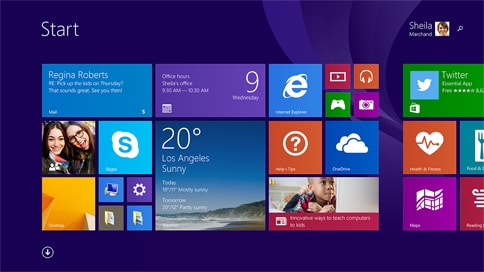
Если вы читаете это, а в то же время приобрели или обновили хотя бы один ваш компьютер до Windows 10 и обнаружили, что нигде не можете найти Windows Movie Maker, ниже вы найдете решение. В настоящее время Microsoft предлагает комплект программ, известный как «Windows Essentials.» Эти программы часто устанавливаются на новый ПК, но если нет, вам придется загрузить Windows Movie Maker, чтобы иметь возможность редактирования видеороликов. Никто не знает наверняка – собирается ли Microsoft запустить новую версию Movie Maker для Windows 10. Похоже, на основании истории Windows Movie Maker, что Windows Movie Maker 2012 (Wave 5) совместим с Windows 10. Вы можете получить Windows Movie Maker для Windows 10 по этой ссылке или загрузить весь пакет Windows Live Essentials, чтобы получить его.
Часть 3. Как загрузить Windows Movie Maker на Windows 10
Windows Movie Maker в настоящее время входит в состав пакета Windows Live Essentials. Чтобы его установить, вам надо загрузить пакет Windows Live Essentials и выбрать Windows Live Movie Maker.
- Чтобы загрузить Windows Live Essentials 2012 перейдите на этот сайт. questo sito.
- Чтобы изменить язык, кликните на кнопку «Change» и выберите желаемый язык. Windows Essentials 2012 доступен на 48 языка включая английский, голландский, французский, японский, упрощенный китайский, испанский, португальский, немецкий и русский.
- Если вы не хотите менять язык по умолчанию, вы можете нажать на кнопку «Download Now» в начальном окне.
- Откроется диалоговое окно с вопросом – хотите вы запустить или сохранить файл загрузки, или даже отменить его. Теперь нажмите на стрелку рядом с «Save» и кликните на «Save As», после этого выберите место, в котором вы хотите сохранить файл на своем компьютере. После этого нажмите «Save» и файл будет загружен в указанное место.
- Чтобы сразу загрузить Windows Movie Maker, нажмите кнопку «Download Now» на вводной странице и начнется загрузка Windows 10 Movie Maker. После этого следуйте шагам по загрузке, перечисленным выше.
Шаг 4. Пошаговые указания по установке Windows Movie Maker
Installation of Windows Movie Maker requires Windows 10 and is intended only for use on PCs where the hardware accelerated version can’t be run.
- Установка Windows Movie Maker требует наличия Windows 10 и предназначена только для ПК, на которых нельзя запустить версию с аппаратным ускорением.
- Кликните два раза на загруженном файле, чтобы запустить его. Если у вас активировано UAC, вам придется ответить – позволите ли вы программе внести изменения на вашем ПК. Кликните «Yes», чтобы продолжить.
- Пакет Windows Live Essentials включает в себя: Photo Gallery, Messenger, Movie Maker, Mail, Writer, Windows Live Mesh, Family Safety, Bing Bar, Microsoft Silverlight, Outlook Connector Pack и Messenger Companion. Отметьте первый вариант, чтобы установить все эти программы.
- В окне установки вы сможете выбрать установку Windows Movie Maker в дополнение к любому другому приложению Windows Live Essentials по вашему желанию. Снимите отметки с любой программы, которую вы не хотите устанавливать. Снимите все другие отметки, если вы хотите установить только Windows Movie Maker.
- Нажмите на «Install» и убедитесь, что выбраны Movie Maker и Photo Gallery.
- Установка начнется, вы можете кликнуть на ней, чтобы увидеть текущий статус.
- После завершения установки, кликните «Close» – все готово. Чтобы запустить Windows Movie Maker 2012, кликните «Start» > «All Programs», а после кликните на «Windows Movie Maker». Теперь вы готовы использовать вашу любимую программу для редактирования видео.
Windows Movie Maker 2024 Free Download
With Windows Movie Maker, you can quickly turn your photos and videos into polished movies. Add special effects, transitions, sound, and captions to help tell your story. Share the movie with friends and family.
Windows Movie Maker 2024
Win Movie Maker App : WinMovie Clips
Win Movie Maker App helps you to create amazing videos as easy as to take photos. Just need several taps to make your own movie. Also you can download latest Windows Movie Maker for Windows 10 and 7/8/XP.
Win Movie Maker App : WinMovie Clips
Windows Movie Maker 2024
For Mac OS Users, please download the Windows Movie Maker for Mac.
Windows Movie Maker is a easy-to-use & powerful video creating/editing software application, designed for latest Windows 11 and Windows 7/8/10. The old version works for Windows Xp and Vista. Windows Movie Maker contains features such as effects, transitions, titles/credits, audio track, timeline narration, and Auto Movie. New effects and transitions can be made and existing ones can be modified using XML code. Windows Movie Maker is also a basic audio track editing program. Windows Movie Maker can apply basic effects to audio tracks such as fade in or fade out. The audio tracks can then be exported in the form of a sound file instead of a video file.
TopWin-Movie-Maker.com is a website to download Windows Movie Maker for Windows XP, Windows Vista, Windows 7, Windows 8, Windows 10, Windows 11. All setup packages are standalone install packages. No need to download files via Internet during the installation. Test Compatible for Windows XP, Vista, 7, 8, 10, 11. Software has been scanned by popular anti-virus software avast! and AVG. Note: We are not affiliated with Microsoft. The windows movie maker software is also available on microsoft official site click here
Windows Movie Maker 2024
Win Movie Maker App : WinMovie Clips
Win Movie Maker App : WinMovie Clips
Windows Movie Maker 2024
[Answered] Does Windows 11 Have Movie Maker & Windows 10/8/7?
This post conceived by MiniTool Software Ltd. mainly answers the question that does Windows operating system (OS) have Windows Movie Maker. It focuses on the latest Windows 11, the past Windows 10, Windows 8.1/8, as well as the old Windows 7.
Windows Movie Maker, also called Windows Live Movie Maker for the 2009 – 2011 releases, is a discontinued video editing software developed by Microsoft. It was first published in Windows Me on September 14, 2000, and in Windows XP on October 25, 2001.
So, does Windows 11 still have a movie maker? Let’s have a look!
![[5 Ways] How to Open Windows Movie Maker Windows 11/10/8/7?](https://moviemaker.minitool.com/images/uploads/2022/10/open-windows-movie-maker-windows-11-thumbnail.png)
[5 Ways] How to Open Windows Movie Maker Windows 11/10/8/7?
How to find and open Windows Movie Maker on your computer running Windows 11, 10, 8, or 7 in different methods?
Does Windows Have Movie Maker?
Sometimes, when we talk about movie makers, we don’t always refer to the Windows Movie Maker application created by Microsoft. We may also mean a tool that can do video editing and video creation. Thus, it can be a third-party video editing software like MiniTool MovieMaker.
If so, the answer for whether Windows operating system has a movie maker is absolute “yes”. And, there are numerous movie makers for different versions of Windows OSes all the time.
However, if you are asking exactly about the Windows Movie Maker app released by Microsoft, the answers vary from different editions of Windows.
Does Windows 11 Have Movie Maker?
Does Windows 11 have a Movie Maker? By default, the answer is “no”. Since Windows Movie Maker was officially discontinued on January 10, 2017, Microsoft doesn’t include it in Win11, you can’t find Windows Movie Maker on your Windows 11 computer.
Luckily, you can make use of the Clipchamp app on Windows 11, which replaced Windows Movie Maker to help you edit and create beautiful videos with powerful features.
![MiniTool MovieMaker – Best Free Windows Movie Maker [Full Review]](https://moviemaker.minitool.com/images/uploads/2020/05/free-windows-movie-maker-thumbnail.jpg)
MiniTool MovieMaker – Best Free Windows Movie Maker [Full Review]
In this article, we will have a full review of the free Windows movie maker — MiniTool MovieMaker. Read it to know more about this video editing option.
Does Windows 10 Have Windows Movie Maker?
Does Windows 10 have a Movie Maker program? The answer depends. Before January 2017, Windows Movie Maker was embedded in Windows 10 since the release of Win10 on July 15, 2015. Yet, after Microsoft Movie Maker was discontinued, the computers that installed the later versions of Windows 10 or its updates won’t have Movie Maker.
Why doesn’t Windows 10 have Movie Maker? It is said above that Windows Movie Maker was abandoned on January 10, 2017. It was succeeded by Microsoft Photos on Windows 10. So, you can take advantage of Photos on Win10.
Does Windows 8 Have Movie Maker?
Does Windows 8 have a Movie Maker? Does Windows 8.1 have Movie Maker? Of course! And, it should be Windows Movie Maker 2012 edition that was added to Windows 8/8.1.
Does Windows 7 Have Movie Maker?
Does Windows 7 operating system have the Windows Movie Maker program built into its system? Yes, Windows 7 has the Windows Movie Maker utility. Yet, only some computer manufacturers had pre-installed Movie Maker on their Win7 PCs. For other Win 7 computers, they can get Windows Movie Maker 2009 from Windows Live Essentials.

Solved – Windows Movie Maker Not Working (Windows 10/8/7)
Windows Movie Maker not working? Now, this article shows how to solve the Movie Maker has stopped working as well as Movie Maker can’t start issue.
Do I Have Windows Movie Maker?
Do I have Windows Movie Maker on my computer? Or, does my computer have Windows Movie Maker? You can easily answer this question by yourself. Just search “Windows Movie Maker” in Windows Search and check whether there is a Windows Movie Maker app in the search result. If there is, it means you have Windows Movie Maker on your device, no matter whether it is self-contained or installed manually. If there isn’t, sorry, currently, you don’t have Windows Movie Maker on your machine.
Why don’t I have Windows Movie Maker? Just as mentioned above, you are probably running the OS that was released after the off-production of Movie Maker. Therefore, your system doesn’t have Movie Maker included. Or, you may accidentally uninstall Windows Movie Maker if you are still running an old Windows like Windows 8 or 7.
Yet, you can manually download and install Windows Movie Maker’s alternative – MiniTool MovieMaker on your PC. It is charge-free and watermark-free!
About The Author
Helen Graduated from university in 2014 and started working as a tech editor in the same year. Her articles focus on video creation, editing, and conversion. She also has a good knowledge of disk management and data backup & recovery. Through an in-depth exploration of computer technology, Helen has successfully helped thousands of users solve their annoying problems.
Movie Maker No Longer Available for Windows 10

Our fingers were not crossed long enough as Microsoft has removed the Windows Movie Maker installer from its website and has deleted all references to a potential new version for Windows 10. If you downloaded Movie Maker to your Windows 10 computer, you are OK to continue using it, though Microsoft will not provide support.
Movie Maker has long been one of the best free video editors, but others are easy to use as well and most importantly FREE. Read about the best free alternatives.
But our finger crossing was good for one thing. Later this year Microsoft plans to launch what some have said is Movie Maker on steroids. It’s called Story Remix, and it looks pretty neat. Check out this website to read more and watch a video about it.
Scott Swanson, Electronic Media Specialist, 701-231-7086
Filed under: Video
Feel free to use and share this content, but please do so under the conditions of our Creative Commons license and our Rules for Use. Thanks.
Student Focused. Land Grant. Research Institution.
311 Morrill Hall, P.O. Box 6050