
Как изменить шрифт placeholder css
У элементов ввода есть атрибут «placeholder». С его помощью можно вывести текст в поле ввода который исчезает при начале заполнения. Браузеры по разному отображают плейсхолдер, а устаревшие — вовсе не поддерживают. Однако, существуют способы обхода всех недостатков этого полезного атрибута. Рассмотрим следующие моменты:
- изменение стиля плейсхолдера;
- скрытие сразу при нажатии на поле;
- отображение в браузерах, которые не поддерживают атрибут.
Для примера возьмём текстовое поле input и будем применять к нему стили.
Изменение цвета placeholder
Браузеры на разных движках по разному отображают плейсхолдер. Чаще всего это чёрный текст с прозрачностью, что в итоге смотрится как серый. Чтобы изменить цвет и прозрачность необходимо в CSS стилях к элементам ввода указывать дополнительные директивы для движков браузеров. Изменим цвет на красный без прозрачности.
Если не указать «opacity», то цвет в браузерах, поддерживающих прозрачность, будет розовым. Так же можно указать для разных полей разные цвета. Для этого используйте классы.
Убираем placeholder при нажатии на поле
По-умолчанию браузеры скрывают плейсхолдер только после начала ввода текста. Но не сложно сделать чтобы он ичезал сразу после установки курсора в поле ввода. Для этого для полей с фокусом напишем стиль, в котором сделаем подсказку полностью прозрачной.
Скрывать плейсхолдер при форкусе можно по разному, например, плавно изменяя прозрачность или цвет. А можно настроить и css анимацию, когда подсказка будет плавно уезжать за пределы поля. Всё это возможно благодаря CSS, но большого смысла я в этом не вижу, так как кроссбраузерность таких прелестей будет страдать, а пользы от этих эффектов практически никакой.
Кроссбраузерность placeholder
Устаревшие браузеры не поддерживают атрибут «placeholder» — он просто не будет отображаться. К таким браузерам относится IE8. Несмотря на прекращение поддержки Internet Explorer, есть «люди» которые им пользуются. Если плейсхолдер не несёт важной информации, то можно забить на его отображение, но если увидеть содержимое подсказки должен каждый, то разработчик обязан позаботиться о полной кроссбраузерности.
Для отображени подсказки в браузерах, которые не поддерживают атрибут, будем использовать jquery плагин.
Скачиваем его и подключаем. Не забываем, что должна быть подключена так же jquery библиотека. Применяем плагин к элементам ввода с атрибутом «placeholder»:
Плагин срабатывает только если браузер не поддерживает плейсхолдеры. В таком случае элементам, к которым он применён, присваивается класс «placeholder», а в «value» записывается текст из атрибута «placeholder». При фокусе «value» очищается. Чтобы текст из атрибута не выглядел точно так же как вводимый текст, оформляем его с помощью стилей, опираясь на устанавливаемый класс. В примере цвет текста неактивного поля будет зелёным. Но увидеть это можно только в IE8 или других устаревших браузерах.
Styling Placeholder Text Using CSS
Placeholder text will automatically inherit the font family and font size of the regular input text, but you may be in a situation where you want to change the placeholder text color. You can accomplish that with the ::placeholder pseudo-element.
In our example, let’s define a custom color for our placeholder text, and let’s also override the inherited font size to have smaller placeholder text. Here’s our base input styling:
And here’s the styling for our placeholder text:
Unfortunately you can see that ::placeholder requires a slew of vendor prefixes at the moment.
Want to learn more? Join the DigitalOcean Community!
Join our DigitalOcean community of over a million developers for free! Get help and share knowledge in our Questions & Answers section, find tutorials and tools that will help you grow as a developer and scale your project or business, and subscribe to topics of interest.
HTML5 Placeholder Styling with CSS
4/25/2011: This attribute is not styleable as of Opera 11. Internet Explorer 10 will introduce placeholder support.
Last week I showed you how you could style selected text with CSS. I’ve searched for more interesting CSS style properties and found another: INPUT placeholder styling. Let me show you how to style placeholder text within INPUT elements with some unique CSS code.
The CSS
Firefox employs a different pattern than Safari and Chrome. Each property name is self-explanatory though:
You will only want to employ the most basic of styles to the placeholder. Color, font-style, and font-variant are probably the styles you will want to employ. Go too far with your placeholder styling and you may create the animated GIF of input styles. Note that Mozilla Firefox doesn’t support placeholder styling until version 4.
Styling elements with the placeholder attribute is something you don’t need to do but could be just another one of those small details that sets your website apart from other websites. Hopefully IE9 and Opera soon follow suit in allowing styling of placeholder text within INPUT elements. or expose their API for doing so!
Как добавить или изменить CSS стиль в «input» для «placeholder»
Приветствую читателей блога BlogGood.ru!
Часто в HTML форму в поле «input» прописывают «placeholder».
В «placeholder» вставляют временный текст-подсказку, который исчезнет при вводе текста пользователем.
Так вот, на этот текст-подсказку, который выводится при помощи «placeholder», я и покажу, как добавлять свои CSS стили, точнее, покажу, как поменять цвет, размер текста и выбрать другой шрифт.
Если у вас нет готового поля с «placeholder» для примера, я его пропишу (скопируйте себе):

Результат:
Сейчас временный текст-подсказка сероватого цвета. А чтобы придать тексту «placeholder» свой стиль, нужно прописать всего пару строк.
Откройте CSS и вставьте вот эти строки:

Надеюсь, в коде все понятно, там ведь есть подсказки. Но, если возникнут вопросы, пишите…
Удачи!
Похожие публикации:
- Как добавить css файл в html
- Как добавить картинку на фон в css
- Как убрать у таблицы границы css
- Как увеличить размер кнопки в css
Как изменить шрифт placeholder css
CSS стили для атрибута placeholder=»» можно задать через псевдокласс ::placeholder и вендорными префиксами для разных браузеров:
- ::-webkit-input-placeholder
- ::-moz-placeholder
- :-moz-placeholder
- :-ms-input-placeholder
Пример использования
Результат:
Placeholder-shown
Также есть псевдокласс :placeholder-shown который позволяет выделить инпут до того как в него будет введен текст.
How to Change Placeholder Text Font with CSS
The placeholder is a text displayed in the input field before user enter the value as a short hint. When you apply a CSS font styles to the input field, the placeholder text will also inherit that properties. But if you only want to change the font styles of the placeholder text but not the input itself, you’ll need a special pseduo-element. We’ll show you about it in this article.
The Problem
So here is our input field with a placeholder text attribute.

Changing the font-family of the input field also affect the placeholder text

The Solution
A ::placeholder pseudo-element is needed. You can apply styles to placeholder directly without impacting input field text styles like this.
This will work for Chrome, Firefox and Safari.
We still have the notorious duo Internet Explorer and Edge which require their own prefix pseudo-element.
For Edge, you’ll need the ::-ms-input-placeholder. However, you can only change the color and some other basic text style but not the font-family nor even font-size. The only way to change the font is to change the entire input field font-family (bummer!)
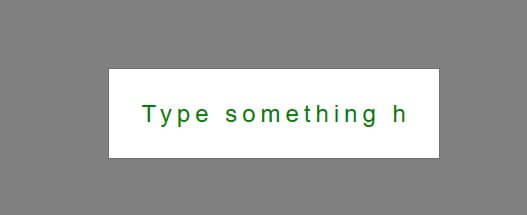
For IE, we can “almost” use the same rule except you’ll need to use single colon notation :-ms-input-placeholder instead of ::-ms-input-placeholder. But unlike Edge, you can change the font and size (at least some good news)
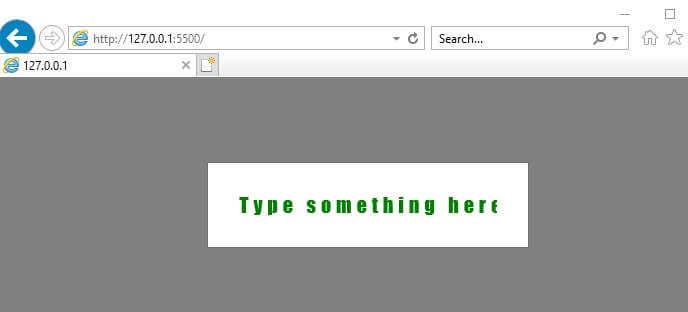
To sum up, in order to separately change the placeholder text font, you’ll need the following CSS
Стилизуем placeholder при помощи CSS. Синтаксис, трюки, поддерживаемые стили в html5

Атрибут placeholder применяется для призыва к действию внутри пустых элементов input и textarea. В этой статье мы рассмотрим возможности стилизации текста placeholder-a, а также некоторые трюки, которые позволят сделать его более удобным и функциональным.
Итак, начнем с примера для тех, кто не знает, что такое placeholder.
Стиль placeholder-a можно изменить с помощью такого набора css правил:
Выглядит страшновато, не правда ли? Дело в том, что этого до сих пор нет в стандартах. Каждый браузер по-своему реализовал поддержку стилизации placeholder-а.
В IE и старых firefox (до 18-го) placeholder считается псевдоклассом, а в новых firefox, webkit и blink – псевдоэлементом.
Смотрим, что получилось:
Нужно сказать, что поддерживаются не все возможные css свойства. Большинство современных браузеров позволяют изменить:
- font (и сопутствующие свойства)
- background (и сопутствующие свойства)
- color
- word-spacing
- letter-spacing
- text-decoration
- vertical-align
- text-transform
- line-height
- text-indent
- text-overflow
- opacity
А если placeholder не вмещается?
Иногда поля для ввода текста сокращаются по ширине из-за особенностей лейаута, в частности на мобильных девайсах. В этом случае длинный текст placeholder-а будет некрасиво обрезан. Чтобы предотвратить это, вы можете использовать text-overflow: ellipsis . Такой синтаксис будет работать во всех новых браузерах.
Как скрыть placeholder при фокусе?
Скрывание placeholder-а происходит по-разному.
- в некоторых браузерах при получении фокуса инпутом
- в других браузерах при наличии хотя бы одного введенного символа
Мне больше нравится первый вариант. Для того, чтобы задать такое поведение во всех браузерах, поддерживающих placeholder, определим следующие css правила:
Скрываем placeholder красиво
Можно также добавить transition для появления и скрытия placeholder-a:
Надеюсь, вам это пригодится. Пишите замечания и предложения в комментариях.
Styling Placeholder Text Using CSS

While we believe that this content benefits our community, we have not yet thoroughly reviewed it. If you have any suggestions for improvements, please let us know by clicking the “report an issue“ button at the bottom of the tutorial.
Placeholder text will automatically inherit the font family and font size of the regular input text, but you may be in a situation where you want to change the placeholder text color. You can accomplish that with the ::placeholder pseudo-element.
In our example, let’s define a custom color for our placeholder text, and let’s also override the inherited font size to have smaller placeholder text. Here’s our base input styling:
And here’s the styling for our placeholder text:
Unfortunately you can see that ::placeholder requires a slew of vendor prefixes at the moment.
If you’ve enjoyed this tutorial and our broader community, consider checking out our DigitalOcean products which can also help you achieve your development goals.
Похожие публикации:
- Где лучше покупать велосипед в спб форум отзывы
- Unable to initialize opengl doom 3 bfg edition что делать
- Как сделать таск в аут
- Как в питоне ввести несколько чисел в одну строку
Как изменить шрифт placeholder css
Change The Placeholder Font For A Textarea Field With CSS
Have you ever wondered why the default font for a form textarea field is different when using a placeholder?
Well, the default fonts for all forms are usually determined by the browser being used and technically it is up to us to define what fonts and/or styles to display via our CSS.
Here is how you can define the annoying discrepancy in font styles when using placeholders for your form, specifically with textarea fields.
Argh! The Textarea & Input Fields Don’t Match!
First thing first, let’s set our default font and color for all of the input and textarea form fields with the below CSS code:
Next Up, Our CSS For The Form Placeholder Text
Now, we want to apply the exact same styling (or something a bit different if you prefer) for the placeholder display using the below CSS code:
Now your form input fields and textarea fields will have the same font as well as the same color for both the user input as well as the placeholder text.
I hope this made your day a bit better, if you are a designer/developer, I know that it’s all about those little helpful bits of advice when coding roadblocks smack you in the face.
Стилизация HTML5 плейсхолдера с помощью CSS
В HTML5 есть замечательный атрибут — placeholder (текст-подсказка для элементов ввода). Задается он следующим образом:
Обычно этот текст отображается серым цветом, но допустим у нас есть необходимость стилизовать этот текст с помощью CSS.
Пока это можно сделать только в Google Chrome, Safari и Firefox, так как в Opera пока еще нет возможность задавать для него стили, а IE не поддерживает его вовсе.
CSS правила для webkit и mozilla:
то CSS правила не будут работать. И обратите внимание, что для webkit надо писать два двоеточия, а для mozilla — одно.
Еще несколько примеров:
/* стили для webkit */
#field2::-webkit-input-placeholder
#field3::-webkit-input-placeholder
#field4::-webkit-input-placeholder
/* стили для mozilla */
#field2:-moz-placeholder
#field3:-moz-placeholder
#field4:-moz-placeholder
Также следует заметить, что разные браузеры по разному поддерживают стили для плейсхолдера. Например в Firefox вы можете задать для него цвет фона, а в Chrome нет.
How to Change Placeholder Text Font with CSS
The placeholder is a text displayed in the input field before user enter the value as a short hint. When you apply a CSS font styles to the input field, the placeholder text will also inherit that properties. But if you only want to change the font styles of the placeholder text but not the input itself, you’ll need a special pseduo-element. We’ll show you about it in this article.
The Problem
So here is our input field with a placeholder text attribute.
Changing the font-family of the input field also affect the placeholder text
The Solution
A ::placeholder pseudo-element is needed. You can apply styles to placeholder directly without impacting input field text styles like this.
This will work for Chrome, Firefox and Safari.
https://amdy.su/wp-admin/options-general.php?page=ad-inserter.php#tab-8
We still have the notorious duo Internet Explorer and Edge which require their own prefix pseudo-element.
For Edge, you’ll need the ::-ms-input-placeholder. However, you can only change the color and some other basic text style but not the font-family nor even font-size. The only way to change the font is to change the entire input field font-family (bummer!)
For IE, we can “almost” use the same rule except you’ll need to use single colon notation :-ms-input-placeholder instead of ::-ms-input-placeholder. But unlike Edge, you can change the font and size (at least some good news)
To sum up, in order to separately change the placeholder text font, you’ll need the following CSS
Styling Placeholder Text Using CSS
While we believe that this content benefits our community, we have not yet thoroughly reviewed it. If you have any suggestions for improvements, please let us know by clicking the “report an issue“ button at the bottom of the tutorial.
Placeholder text will automatically inherit the font family and font size of the regular input text, but you may be in a situation where you want to change the placeholder text color. You can accomplish that with the ::placeholder pseudo-element.
In our example, let’s define a custom color for our placeholder text, and let’s also override the inherited font size to have smaller placeholder text. Here’s our base input styling:
And here’s the styling for our placeholder text:
Unfortunately you can see that ::placeholder requires a slew of vendor prefixes at the moment.
Thanks for learning with the DigitalOcean Community. Check out our offerings for compute, storage, networking, and managed databases.
Похожие публикации:
- Meta что входит в состав
- Ciq сертификат что это
- Как удалить пару из словаря python
- Как зашифровать код python
Расположение шрифта в placeholder по вертикали

В общем, проблема такая: шрифт placeholder должен быть маленьким, а вводимое, большим. Пытался через ::placeholder изменить font , но тогда идет выравнивание по нижней части, как показано на скрине.
body < font-size:15px; >.send_input < padding: 30px; width: 620px; border-radius: 20px; border: none; height: 20px; font-size: 2rem; font-family: 'Archivo Black', sans-serif; >::placeholder
Margin не работают с плэйсхолдером.
Отслеживать
22.4k 10 10 золотых знаков 56 56 серебряных знаков 119 119 бронзовых знаков
задан 21 ноя 2020 в 8:00
ioriSempai ioriSempai
55 8 8 бронзовых знаков
Геморройно это. Лично я видел лишь input c padding:0 внутри div-а, сделанного под input.
21 ноя 2020 в 8:43
1 ответ 1
Сортировка: Сброс на вариант по умолчанию
body < font-size: 15px; >.send_input < padding: 0 30px; width: 620px; border-radius: 20px; border: none; height: calc(2rem + 2.875rem); font-size: 2rem; line-height: 2.875rem; font-family: 'Archivo Black', sans-serif; box-sizing: border-box; >::-webkit-input-placeholder < font-size: .8rem; transform: translateY(-.25rem); >:-moz-placeholder < font-size: .8rem; transform: translateY(-.25rem); >::-moz-placeholder < font-size: .8rem; transform: translateY(-.25rem); >:-ms-input-placeholder
Отслеживать
ответ дан 21 ноя 2020 в 9:15
22.4k 10 10 золотых знаков 56 56 серебряных знаков 119 119 бронзовых знаков
- html
- css
-
Важное на Мете
Похожие
Подписаться на ленту
Лента вопроса
Для подписки на ленту скопируйте и вставьте эту ссылку в вашу программу для чтения RSS.
Дизайн сайта / логотип © 2023 Stack Exchange Inc; пользовательские материалы лицензированы в соответствии с CC BY-SA . rev 2023.11.15.1019
Нажимая «Принять все файлы cookie» вы соглашаетесь, что Stack Exchange может хранить файлы cookie на вашем устройстве и раскрывать информацию в соответствии с нашей Политикой в отношении файлов cookie.