
Интерпретация JSON в Python – как читать файлы JSON
JSON (JavaScript Object Notation – нотация объектов JavaScript) – это популярный способ структурирования данных. Он используется для обмена информацией между веб-приложением и сервером. Но как прочитать файл JSON в Python?
В этой статье я покажу вам, как использовать методы json.loads() и json.load() для интерпретации (или как еще говорят парсинга) и чтения файлов и строк JSON.
Синтаксис JSON
Прежде чем мы приступим к интерпретации и чтению файла JSON, сначала нам нужно разобраться с основным синтаксисом. Подробнее про JSON можно почитать в этой статье. Синтаксис JSON выглядит как объектный литерал JavaScript с парами ключ-значение.
Вот пример данных JSON с данными организации:
Как парсить строки JSON в Python
Python имеет встроенный модуль, который позволяет работать с данными в формате JSON. Вам необходимо будет импортировать модуль json .
import json
Если вам необходимо проинтерпретировать строку JSON, возвращающую словарь, то вы можете воспользоваться методом json.loads() .
import json # assigns a JSON string to a variable called jess jess = '' # parses the data and assigns it to a variable called jess_dict jess_dict = json.loads(jess) # Printed output: print(jess_dict)
Как парсить и читать файлы JSON в Python
В данном примере мы имеем файл в формате JSON с именем fcc.json , который содержит те же данные, что и ранее, касающиеся курсов, которые предлагает сайт.
Если вы хотите прочитать этот файл, то для начала вам нужно использовать встроенную в Python функцию open() с режимом чтения. Мы используем ключевое слово with , чтобы убедиться, что файл закрыт.
with open('fcc.json', 'r') as fcc_file:
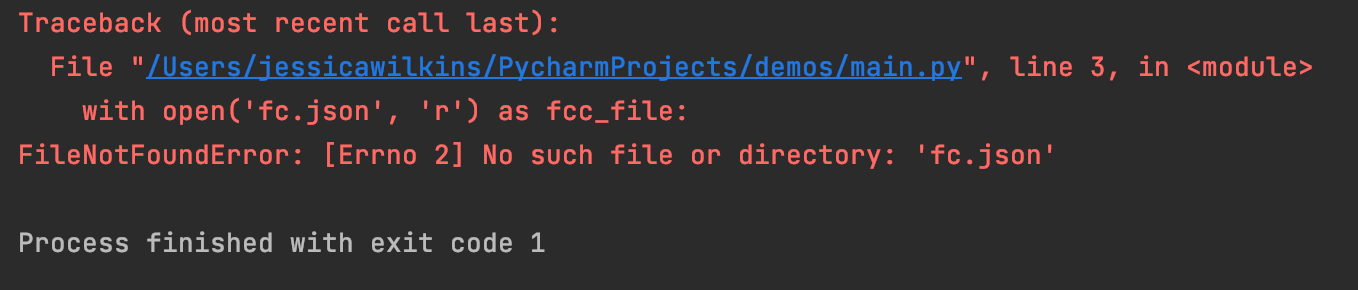
Если файл не может быть открыт, то мы получим ошибку OSError . Это пример ошибки «FileNotFoundError» при опечатке в имени файла fcc.json .
Затем мы можем проинтерпретировать файл, используя метод json.load() и присвоить его переменной с именем fcc_data .
fcc_data = json.load(fcc_file)
И в конце мы должны напечатать результат.
print(fcc_data)
Вот так будет выглядеть полный код:
import json with open('fcc.json', 'r') as fcc_file: fcc_data = json.load(fcc_file) print(fcc_data)
Как красиво напечатать данные JSON в Python
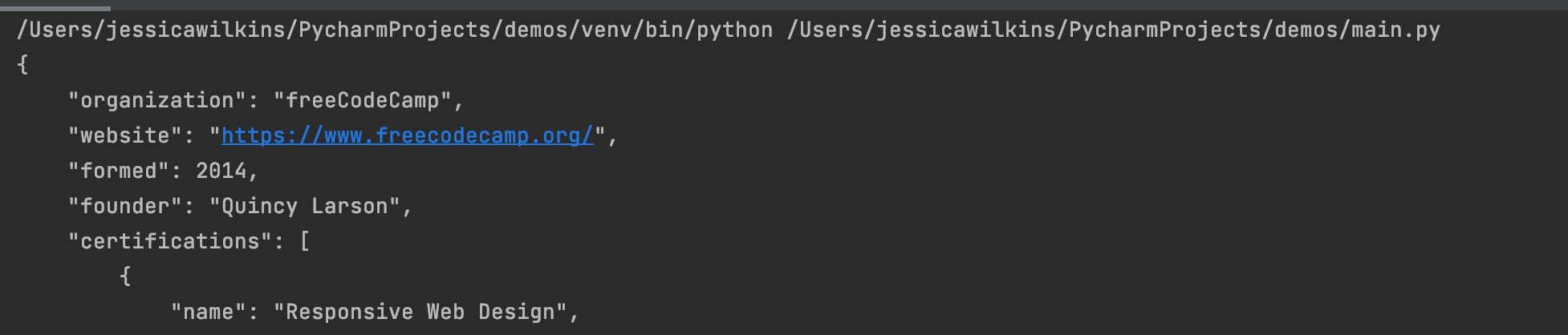
Если мы посмотрим на то, как печатаются данные, то увидим, что все данные JSON печатаются в одной строке.

Однако такой формат вывода может быть затруднительным для чтения. И чтобы это исправить, мы можем реализовать метод json.dumps() с параметром indent (отступ).
В данном примере мы сделаем отступ в 4 пробела и будем печатать данные в более удобном для чтения формате.
print(json.dumps(fcc_data, indent=4))
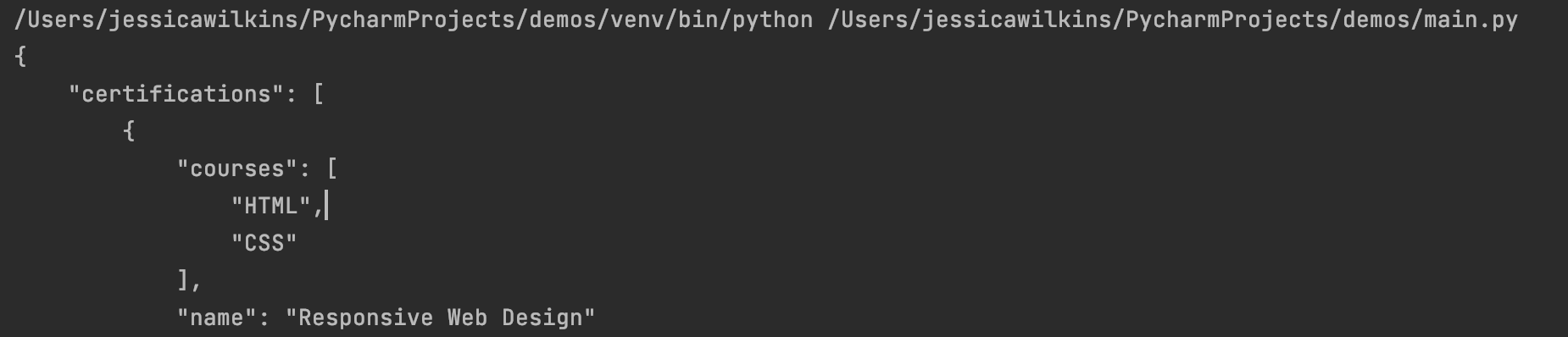
Также мы можем отсортировать ключи в алфавитном порядке, используя параметр sort_keys и установив его значение на True .
print(json.dumps(fcc_data, indent=4, sort_keys=True))
Заключение
JSON – это популярный способ структурирования данных, который используется для обмена информацией между веб-приложением и сервером.
Если вам необходимо проинтерпретировать строку JSON, которая возвращает словарь, то вы можете использовать метод json.loads() .
Если вам необходимо проинтерпретировать файл JSON, который возвращает словарь, то вы можете использовать метод json.load() .
msgspec: быстрый и экономичный парсинг JSON на Python
В библиотеке msgspec много функций, например кодирование, поддержка MessagePack (альтернативный формат, который быстрее JSON) и другие. Если вы регулярно парсите файлы JSON, и у вас проблемы с производительностью или памятью, или просто нужны встроенные схемы, то попробуйте msgspec.
Ниже рассказываем о библиотеке подробнее. Итак, чтобы обработать большой файл JSON на Python без сбоев и аварийного завершения, нужно:
- Убедиться, что используется не слишком много памяти.
- Спарсить файл как можно быстрее.
- В идеале также заранее убедиться, что данные валидны и имеют правильную структуру.
Конечно, можно объединить решения с несколькими библиотеками. А можно — всего с одной. Схемы, быстрый парсинг и хитрые приемы для уменьшения потребления памяти — все это новая библиотека msgspec.
json и orjson
Начнем с двух других библиотек: встроенного модуля json на Python и быстрой библиотеки orjson. Вернемся к примеру из моей статьи о потоковом парсинге JSON и спарсим файл размером ~25 Мб, в котором кодируется список объектов JSON (например, словарей). Это события GitHub и пользователи, выполняющие определенные действия с репозиториями:
[,"repo":,"payload":,"public":true,"created_at":"2015-01-01T15:00:00Z">, . ]Наша цель — выяснить, с какими репозиториями взаимодействовал пользователь.
Вот как это делается со встроенным модулем json стандартной библиотеки Python:
import json with open("large.json", "r") as f: data = json.load(f) user_to_repos = <> for record in data: user = record["actor"]["login"] repo = record["repo"]["name"] if user not in user_to_repos: user_to_repos[user] = set() user_to_repos[user].add(repo) print(len(user_to_repos), "records")А вот так с orjson (отличается двумя строками):
import orjson with open("large.json", "rb") as f: data = orjson.loads(f.read()) user_to_repos = <> for record in data: # . same as stdlib code . Вот сколько памяти и времени занимают эти два варианта:
$ /usr/bin/time -f "RAM: %M KB, Elapsed: %E" python stdlib.py 5250 records RAM: 136464 KB, Elapsed: 0:00.42 $ /usr/bin/time -f "RAM: %M KB, Elapsed: %E" python with_orjson.py 5250 records RAM: 113676 KB, Elapsed: 0:00.28Потребление памяти одинаковое, но orjson быстрее — 280 мс против 420 мс.
Теперь рассмотрим msgspec.
msgspec: декодирование и кодирование на основе схемы для JSON
Вот соответствующий код с msgspec, здесь подход к парсингу несколько отличается:
from msgspec.json import decode from msgspec import Struct class Repo(Struct): name: str class Actor(Struct): login: str class Interaction(Struct): actor: Actor repo: Repo with open("large.json", "rb") as f: data = decode(f.read(), type=list[Interaction]) user_to_repos = <> for record in data: user = record.actor.login repo = record.repo.name if user not in user_to_repos: user_to_repos[user] = set() user_to_repos[user].add(repo) print(len(user_to_repos), "records")Этот код длиннее и подробнее, потому что msgspec позволяет определять схемы для записей, парсинг которых вы выполняете.
Очень полезно: схемы для всех полей не нужны. И, хотя в записях JSON много полей (смотрите в примере выше), мы указываем в msgspec только нужные нам.
Вот результат парсинга с msgspec:
$ /usr/bin/time -f "RAM: %M KB, Elapsed: %E" python with_msgspec.py 5250 records RAM: 38612 KB, Elapsed: 0:00.09Намного быстрее и гораздо меньше памяти.
В итоге у нас три решения и еще одно потоковое — ijson:
| Пакет | Время | ОЗУ | Постоянная память | Схема |
|---|---|---|---|---|
| Stdlib json | 420 мс | 136 Мб | ❌ | ❌ |
| orjson | 280 мс | 114 Мб | ❌ | ❌ |
| ijson | 300 мс | 14 Мб | ✓ | ❌ |
| msgspec | 90 мс | 39 Мб | ❌ | ✓ |
При потоковом решении для парсинга всегда используется постоянный объём памяти. В остальных решениях потребление памяти зависит от размера входных данных. У msgspec потребление памяти значительно меньше, и это решение намного быстрее.
Плюсы и минусы парсинга со схемой
В msgspec, указав схему, можно создавать объекты Python только для нужных нам полей. То есть потребление оперативной памяти меньше, а декодирование быстрее. Не нужно тратить время или память на создание тысяч бесполезных объектов Python.
Кроме того, проверку схемы мы получили просто так. Если в одной из записей не хватает поля или присутствует значение неверного типа, например целочисленного вместо строкового, парсер укажет бы на это, а в стандартных библиотеках JSON проверка схемы выполняется отдельно.
С другой стороны:
- Потребление памяти при декодировании по-прежнему зависит от входного файла. А в потоковых парсерах JSON, таких как ijson, можно использовать постоянную память во время парсинга, каким бы большим ни был входной файл.
- Указание схемы подразумевает написание большего объёма кода и меньшую гибкость при работе с неполными данными.

- Профессия Data Scientist
- Профессия Fullstack-разработчик на Python (16 месяцев)
Краткий каталог курсов
Data Science и Machine Learning
- Профессия Data Scientist
- Профессия Data Analyst
- Курс «Математика для Data Science»
- Курс «Математика и Machine Learning для Data Science»
- Курс по Data Engineering
- Курс «Machine Learning и Deep Learning»
- Курс по Machine Learning
Python, веб-разработка
- Профессия Fullstack-разработчик на Python
- Курс «Python для веб-разработки»
- Профессия Frontend-разработчик
- Профессия Веб-разработчик
Мобильная разработка
- Профессия iOS-разработчик
- Профессия Android-разработчик
Java и C#
- Профессия Java-разработчик
- Профессия QA-инженер на JAVA
- Профессия C#-разработчик
- Профессия Разработчик игр на Unity
От основ — в глубину
- Курс «Алгоритмы и структуры данных»
- Профессия C++ разработчик
- Профессия «Белый хакер»
А также
Работа с файлами в формате JSON#
JSON (JavaScript Object Notation) — это текстовый формат для хранения и обмена данными.
JSON по синтаксису очень похож на Python и достаточно удобен для восприятия.
Как и в случае с CSV, в Python есть модуль, который позволяет легко записывать и читать данные в формате JSON.
Чтение#
"access": [ "switchport mode access", "switchport access vlan", "switchport nonegotiate", "spanning-tree portfast", "spanning-tree bpduguard enable" ], "trunk": [ "switchport trunk encapsulation dot1q", "switchport mode trunk", "switchport trunk native vlan 999", "switchport trunk allowed vlan" ] >
Для чтения в модуле json есть два метода:
- json.load — метод считывает файл в формате JSON и возвращает объекты Python
- json.loads — метод считывает строку в формате JSON и возвращает объекты Python
json.load #
Чтение файла в формате JSON в объект Python (файл json_read_load.py):
import json with open('sw_templates.json') as f: templates = json.load(f) print(templates) for section, commands in templates.items(): print(section) print('\n'.join(commands))
Вывод будет таким:
$ python json_read_load.py access switchport mode access switchport access vlan switchport nonegotiate spanning-tree portfast spanning-tree bpduguard enable trunk switchport trunk encapsulation dot1q switchport mode trunk switchport trunk native vlan 999 switchport trunk allowed vlan
json.loads #
Считывание строки в формате JSON в объект Python (файл json_read_loads.py):
import json with open('sw_templates.json') as f: file_content = f.read() templates = json.loads(file_content) print(templates) for section, commands in templates.items(): print(section) print('\n'.join(commands))
Результат будет аналогичен предыдущему выводу.
Запись#
Запись файла в формате JSON также осуществляется достаточно легко.
Для записи информации в формате JSON в модуле json также два метода:
- json.dump — метод записывает объект Python в файл в формате JSON
- json.dumps — метод возвращает строку в формате JSON
json.dumps #
Преобразование объекта в строку в формате JSON (json_write_dumps.py):
import json trunk_template = [ 'switchport trunk encapsulation dot1q', 'switchport mode trunk', 'switchport trunk native vlan 999', 'switchport trunk allowed vlan' ] access_template = [ 'switchport mode access', 'switchport access vlan', 'switchport nonegotiate', 'spanning-tree portfast', 'spanning-tree bpduguard enable' ] to_json = 'trunk': trunk_template, 'access': access_template> with open('sw_templates.json', 'w') as f: f.write(json.dumps(to_json)) with open('sw_templates.json') as f: print(f.read())
Метод json.dumps подходит для ситуаций, когда надо вернуть строку в формате JSON. Например, чтобы передать ее API.
json.dump #
Запись объекта Python в файл в формате JSON (файл json_write_dump.py):
import json trunk_template = [ 'switchport trunk encapsulation dot1q', 'switchport mode trunk', 'switchport trunk native vlan 999', 'switchport trunk allowed vlan' ] access_template = [ 'switchport mode access', 'switchport access vlan', 'switchport nonegotiate', 'spanning-tree portfast', 'spanning-tree bpduguard enable' ] to_json = 'trunk': trunk_template, 'access': access_template> with open('sw_templates.json', 'w') as f: json.dump(to_json, f) with open('sw_templates.json') as f: print(f.read())
Когда нужно записать информацию в формате JSON в файл, лучше использовать метод dump.
Дополнительные параметры методов записи#
Методам dump и dumps можно передавать дополнительные параметры для управления форматом вывода.
По умолчанию эти методы записывают информацию в компактном представлении. Как правило, когда данные используются другими программами, визуальное представление данных не важно. Если же данные в файле нужно будет считать человеку, такой формат не очень удобно воспринимать.
К счастью, модуль json позволяет управлять подобными вещами.
Передав дополнительные параметры методу dump (или методу dumps), можно получить более удобный для чтения вывод (файл json_write_indent.py):
import json trunk_template = [ 'switchport trunk encapsulation dot1q', 'switchport mode trunk', 'switchport trunk native vlan 999', 'switchport trunk allowed vlan' ] access_template = [ 'switchport mode access', 'switchport access vlan', 'switchport nonegotiate', 'spanning-tree portfast', 'spanning-tree bpduguard enable' ] to_json = 'trunk': trunk_template, 'access': access_template> with open('sw_templates.json', 'w') as f: json.dump(to_json, f, sort_keys=True, indent=2) with open('sw_templates.json') as f: print(f.read())
Теперь содержимое файла sw_templates.json выглядит так:
"access": [ "switchport mode access", "switchport access vlan", "switchport nonegotiate", "spanning-tree portfast", "spanning-tree bpduguard enable" ], "trunk": [ "switchport trunk encapsulation dot1q", "switchport mode trunk", "switchport trunk native vlan 999", "switchport trunk allowed vlan" ] >
Изменение типа данных#
Еще один важный аспект преобразования данных в формат JSON: данные не всегда будут того же типа, что исходные данные в Python.
Например, кортежи при записи в JSON превращаются в списки:
In [1]: import json In [2]: trunk_template = ('switchport trunk encapsulation dot1q', . 'switchport mode trunk', . 'switchport trunk native vlan 999', . 'switchport trunk allowed vlan') In [3]: print(type(trunk_template)) In [4]: with open('trunk_template.json', 'w') as f: . json.dump(trunk_template, f, sort_keys=True, indent=2) . In [5]: cat trunk_template.json [ "switchport trunk encapsulation dot1q", "switchport mode trunk", "switchport trunk native vlan 999", "switchport trunk allowed vlan" ] In [6]: templates = json.load(open('trunk_template.json')) In [7]: type(templates) Out[7]: list In [8]: print(templates) ['switchport trunk encapsulation dot1q', 'switchport mode trunk', 'switchport trunk native vlan 999', 'switchport trunk allowed vlan']
Так происходит из-за того, что в JSON используются другие типы данных и не для всех типов данных Python есть соответствия.
Таблица конвертации данных Python в JSON:
json — JSON encoder and decoder
JSON (JavaScript Object Notation), specified by RFC 7159 (which obsoletes RFC 4627) and by ECMA-404, is a lightweight data interchange format inspired by JavaScript object literal syntax (although it is not a strict subset of JavaScript 1 ).
Be cautious when parsing JSON data from untrusted sources. A malicious JSON string may cause the decoder to consume considerable CPU and memory resources. Limiting the size of data to be parsed is recommended.
json exposes an API familiar to users of the standard library marshal and pickle modules.
Encoding basic Python object hierarchies:
>>> import json >>> json.dumps(['foo', 'bar': ('baz', None, 1.0, 2)>]) '["foo", ]' >>> print(json.dumps("\"foo\bar")) "\"foo\bar" >>> print(json.dumps('\u1234')) "\u1234" >>> print(json.dumps('\\')) "\\" >>> print(json.dumps("c": 0, "b": 0, "a": 0>, sort_keys=True)) >>> from io import StringIO >>> io = StringIO() >>> json.dump(['streaming API'], io) >>> io.getvalue() '["streaming API"]'
>>> import json >>> json.dumps([1, 2, 3, '4': 5, '6': 7>], separators=(',', ':')) '[1,2,3,]'
>>> import json >>> print(json.dumps('4': 5, '6': 7>, sort_keys=True, indent=4)) "4": 5, "6": 7 >
>>> import json >>> json.loads('["foo", <"bar":["baz", null, 1.0, 2]>]') ['foo', ] >>> json.loads('"\\"foo\\bar"') '"foo\x08ar' >>> from io import StringIO >>> io = StringIO('["streaming API"]') >>> json.load(io) ['streaming API']
Specializing JSON object decoding:
>>> import json >>> def as_complex(dct): . if '__complex__' in dct: . return complex(dct['real'], dct['imag']) . return dct . >>> json.loads('', . object_hook=as_complex) (1+2j) >>> import decimal >>> json.loads('1.1', parse_float=decimal.Decimal) Decimal('1.1')
>>> import json >>> class ComplexEncoder(json.JSONEncoder): . def default(self, obj): . if isinstance(obj, complex): . return [obj.real, obj.imag] . # Let the base class default method raise the TypeError . return json.JSONEncoder.default(self, obj) . >>> json.dumps(2 + 1j, cls=ComplexEncoder) '[2.0, 1.0]' >>> ComplexEncoder().encode(2 + 1j) '[2.0, 1.0]' >>> list(ComplexEncoder().iterencode(2 + 1j)) ['[2.0', ', 1.0', ']']
Using json.tool from the shell to validate and pretty-print:
$ echo '' | python -m json.tool "json": "obj" > $ echo '' | python -m json.tool Expecting property name enclosed in double quotes: line 1 column 2 (char 1)
See Command Line Interface for detailed documentation.
JSON is a subset of YAML 1.2. The JSON produced by this module’s default settings (in particular, the default separators value) is also a subset of YAML 1.0 and 1.1. This module can thus also be used as a YAML serializer.
This module’s encoders and decoders preserve input and output order by default. Order is only lost if the underlying containers are unordered.
Basic Usage
json. dump ( obj , fp , * , skipkeys = False , ensure_ascii = True , check_circular = True , allow_nan = True , cls = None , indent = None , separators = None , default = None , sort_keys = False , ** kw ) 
Serialize obj as a JSON formatted stream to fp (a .write() -supporting file-like object ) using this conversion table .
If skipkeys is true (default: False ), then dict keys that are not of a basic type ( str , int , float , bool , None ) will be skipped instead of raising a TypeError .
The json module always produces str objects, not bytes objects. Therefore, fp.write() must support str input.
If ensure_ascii is true (the default), the output is guaranteed to have all incoming non-ASCII characters escaped. If ensure_ascii is false, these characters will be output as-is.
If check_circular is false (default: True ), then the circular reference check for container types will be skipped and a circular reference will result in a RecursionError (or worse).
If allow_nan is false (default: True ), then it will be a ValueError to serialize out of range float values ( nan , inf , -inf ) in strict compliance of the JSON specification. If allow_nan is true, their JavaScript equivalents ( NaN , Infinity , -Infinity ) will be used.
If indent is a non-negative integer or string, then JSON array elements and object members will be pretty-printed with that indent level. An indent level of 0, negative, or «» will only insert newlines. None (the default) selects the most compact representation. Using a positive integer indent indents that many spaces per level. If indent is a string (such as «\t» ), that string is used to indent each level.
Changed in version 3.2: Allow strings for indent in addition to integers.
If specified, separators should be an (item_separator, key_separator) tuple. The default is (‘, ‘, ‘: ‘) if indent is None and (‘,’, ‘: ‘) otherwise. To get the most compact JSON representation, you should specify (‘,’, ‘:’) to eliminate whitespace.
Changed in version 3.4: Use (‘,’, ‘: ‘) as default if indent is not None .
If specified, default should be a function that gets called for objects that can’t otherwise be serialized. It should return a JSON encodable version of the object or raise a TypeError . If not specified, TypeError is raised.
If sort_keys is true (default: False ), then the output of dictionaries will be sorted by key.
To use a custom JSONEncoder subclass (e.g. one that overrides the default() method to serialize additional types), specify it with the cls kwarg; otherwise JSONEncoder is used.
Changed in version 3.6: All optional parameters are now keyword-only .
Unlike pickle and marshal , JSON is not a framed protocol, so trying to serialize multiple objects with repeated calls to dump() using the same fp will result in an invalid JSON file.
json. dumps ( obj , * , skipkeys = False , ensure_ascii = True , check_circular = True , allow_nan = True , cls = None , indent = None , separators = None , default = None , sort_keys = False , ** kw ) 
Serialize obj to a JSON formatted str using this conversion table . The arguments have the same meaning as in dump() .
Keys in key/value pairs of JSON are always of the type str . When a dictionary is converted into JSON, all the keys of the dictionary are coerced to strings. As a result of this, if a dictionary is converted into JSON and then back into a dictionary, the dictionary may not equal the original one. That is, loads(dumps(x)) != x if x has non-string keys.
json. load ( fp , * , cls = None , object_hook = None , parse_float = None , parse_int = None , parse_constant = None , object_pairs_hook = None , ** kw ) 
Deserialize fp (a .read() -supporting text file or binary file containing a JSON document) to a Python object using this conversion table .
object_hook is an optional function that will be called with the result of any object literal decoded (a dict ). The return value of object_hook will be used instead of the dict . This feature can be used to implement custom decoders (e.g. JSON-RPC class hinting).
object_pairs_hook is an optional function that will be called with the result of any object literal decoded with an ordered list of pairs. The return value of object_pairs_hook will be used instead of the dict . This feature can be used to implement custom decoders. If object_hook is also defined, the object_pairs_hook takes priority.
Changed in version 3.1: Added support for object_pairs_hook.
parse_float, if specified, will be called with the string of every JSON float to be decoded. By default, this is equivalent to float(num_str) . This can be used to use another datatype or parser for JSON floats (e.g. decimal.Decimal ).
parse_int, if specified, will be called with the string of every JSON int to be decoded. By default, this is equivalent to int(num_str) . This can be used to use another datatype or parser for JSON integers (e.g. float ).
Changed in version 3.11: The default parse_int of int() now limits the maximum length of the integer string via the interpreter’s integer string conversion length limitation to help avoid denial of service attacks.
parse_constant, if specified, will be called with one of the following strings: ‘-Infinity’ , ‘Infinity’ , ‘NaN’ . This can be used to raise an exception if invalid JSON numbers are encountered.
Changed in version 3.1: parse_constant doesn’t get called on ‘null’, ‘true’, ‘false’ anymore.
To use a custom JSONDecoder subclass, specify it with the cls kwarg; otherwise JSONDecoder is used. Additional keyword arguments will be passed to the constructor of the class.
If the data being deserialized is not a valid JSON document, a JSONDecodeError will be raised.
Changed in version 3.6: All optional parameters are now keyword-only .
Changed in version 3.6: fp can now be a binary file . The input encoding should be UTF-8, UTF-16 or UTF-32.
json. loads ( s , * , cls = None , object_hook = None , parse_float = None , parse_int = None , parse_constant = None , object_pairs_hook = None , ** kw ) 
Deserialize s (a str , bytes or bytearray instance containing a JSON document) to a Python object using this conversion table .
The other arguments have the same meaning as in load() .
If the data being deserialized is not a valid JSON document, a JSONDecodeError will be raised.
Changed in version 3.6: s can now be of type bytes or bytearray . The input encoding should be UTF-8, UTF-16 or UTF-32.
Changed in version 3.9: The keyword argument encoding has been removed.
Encoders and Decoders
class json. JSONDecoder ( * , object_hook = None , parse_float = None , parse_int = None , parse_constant = None , strict = True , object_pairs_hook = None ) 
Simple JSON decoder.
Performs the following translations in decoding by default:
It also understands NaN , Infinity , and -Infinity as their corresponding float values, which is outside the JSON spec.
object_hook, if specified, will be called with the result of every JSON object decoded and its return value will be used in place of the given dict . This can be used to provide custom deserializations (e.g. to support JSON-RPC class hinting).
object_pairs_hook, if specified will be called with the result of every JSON object decoded with an ordered list of pairs. The return value of object_pairs_hook will be used instead of the dict . This feature can be used to implement custom decoders. If object_hook is also defined, the object_pairs_hook takes priority.
Changed in version 3.1: Added support for object_pairs_hook.
parse_float, if specified, will be called with the string of every JSON float to be decoded. By default, this is equivalent to float(num_str) . This can be used to use another datatype or parser for JSON floats (e.g. decimal.Decimal ).
parse_int, if specified, will be called with the string of every JSON int to be decoded. By default, this is equivalent to int(num_str) . This can be used to use another datatype or parser for JSON integers (e.g. float ).
parse_constant, if specified, will be called with one of the following strings: ‘-Infinity’ , ‘Infinity’ , ‘NaN’ . This can be used to raise an exception if invalid JSON numbers are encountered.
If strict is false ( True is the default), then control characters will be allowed inside strings. Control characters in this context are those with character codes in the 0–31 range, including ‘\t’ (tab), ‘\n’ , ‘\r’ and ‘\0’ .
If the data being deserialized is not a valid JSON document, a JSONDecodeError will be raised.
Changed in version 3.6: All parameters are now keyword-only .
Return the Python representation of s (a str instance containing a JSON document).
JSONDecodeError will be raised if the given JSON document is not valid.
Decode a JSON document from s (a str beginning with a JSON document) and return a 2-tuple of the Python representation and the index in s where the document ended.
This can be used to decode a JSON document from a string that may have extraneous data at the end.
class json. JSONEncoder ( * , skipkeys = False , ensure_ascii = True , check_circular = True , allow_nan = True , sort_keys = False , indent = None , separators = None , default = None ) 
Extensible JSON encoder for Python data structures.
Supports the following objects and types by default:
int, float, int- & float-derived Enums
Changed in version 3.4: Added support for int- and float-derived Enum classes.
To extend this to recognize other objects, subclass and implement a default() method with another method that returns a serializable object for o if possible, otherwise it should call the superclass implementation (to raise TypeError ).
If skipkeys is false (the default), a TypeError will be raised when trying to encode keys that are not str , int , float or None . If skipkeys is true, such items are simply skipped.
If ensure_ascii is true (the default), the output is guaranteed to have all incoming non-ASCII characters escaped. If ensure_ascii is false, these characters will be output as-is.
If check_circular is true (the default), then lists, dicts, and custom encoded objects will be checked for circular references during encoding to prevent an infinite recursion (which would cause a RecursionError ). Otherwise, no such check takes place.
If allow_nan is true (the default), then NaN , Infinity , and -Infinity will be encoded as such. This behavior is not JSON specification compliant, but is consistent with most JavaScript based encoders and decoders. Otherwise, it will be a ValueError to encode such floats.
If sort_keys is true (default: False ), then the output of dictionaries will be sorted by key; this is useful for regression tests to ensure that JSON serializations can be compared on a day-to-day basis.
If indent is a non-negative integer or string, then JSON array elements and object members will be pretty-printed with that indent level. An indent level of 0, negative, or «» will only insert newlines. None (the default) selects the most compact representation. Using a positive integer indent indents that many spaces per level. If indent is a string (such as «\t» ), that string is used to indent each level.
Changed in version 3.2: Allow strings for indent in addition to integers.
If specified, separators should be an (item_separator, key_separator) tuple. The default is (‘, ‘, ‘: ‘) if indent is None and (‘,’, ‘: ‘) otherwise. To get the most compact JSON representation, you should specify (‘,’, ‘:’) to eliminate whitespace.
Changed in version 3.4: Use (‘,’, ‘: ‘) as default if indent is not None .
If specified, default should be a function that gets called for objects that can’t otherwise be serialized. It should return a JSON encodable version of the object or raise a TypeError . If not specified, TypeError is raised.
Changed in version 3.6: All parameters are now keyword-only .
default ( o ) 
Implement this method in a subclass such that it returns a serializable object for o, or calls the base implementation (to raise a TypeError ).
For example, to support arbitrary iterators, you could implement default() like this:
def default(self, o): try: iterable = iter(o) except TypeError: pass else: return list(iterable) # Let the base class default method raise the TypeError return json.JSONEncoder.default(self, o)
Return a JSON string representation of a Python data structure, o. For example:
>>> json.JSONEncoder().encode("foo": ["bar", "baz"]>) ''
iterencode ( o ) 
Encode the given object, o, and yield each string representation as available. For example:
for chunk in json.JSONEncoder().iterencode(bigobject): mysocket.write(chunk)
Exceptions
exception json. JSONDecodeError ( msg , doc , pos ) 
Subclass of ValueError with the following additional attributes:
The unformatted error message.
The JSON document being parsed.
The start index of doc where parsing failed.
The line corresponding to pos.
The column corresponding to pos.
New in version 3.5.
Standard Compliance and Interoperability
The JSON format is specified by RFC 7159 and by ECMA-404. This section details this module’s level of compliance with the RFC. For simplicity, JSONEncoder and JSONDecoder subclasses, and parameters other than those explicitly mentioned, are not considered.
This module does not comply with the RFC in a strict fashion, implementing some extensions that are valid JavaScript but not valid JSON. In particular:
- Infinite and NaN number values are accepted and output;
- Repeated names within an object are accepted, and only the value of the last name-value pair is used.
Since the RFC permits RFC-compliant parsers to accept input texts that are not RFC-compliant, this module’s deserializer is technically RFC-compliant under default settings.
Character Encodings
The RFC requires that JSON be represented using either UTF-8, UTF-16, or UTF-32, with UTF-8 being the recommended default for maximum interoperability.
As permitted, though not required, by the RFC, this module’s serializer sets ensure_ascii=True by default, thus escaping the output so that the resulting strings only contain ASCII characters.
Other than the ensure_ascii parameter, this module is defined strictly in terms of conversion between Python objects and Unicode strings , and thus does not otherwise directly address the issue of character encodings.
The RFC prohibits adding a byte order mark (BOM) to the start of a JSON text, and this module’s serializer does not add a BOM to its output. The RFC permits, but does not require, JSON deserializers to ignore an initial BOM in their input. This module’s deserializer raises a ValueError when an initial BOM is present.
The RFC does not explicitly forbid JSON strings which contain byte sequences that don’t correspond to valid Unicode characters (e.g. unpaired UTF-16 surrogates), but it does note that they may cause interoperability problems. By default, this module accepts and outputs (when present in the original str ) code points for such sequences.
Infinite and NaN Number Values
The RFC does not permit the representation of infinite or NaN number values. Despite that, by default, this module accepts and outputs Infinity , -Infinity , and NaN as if they were valid JSON number literal values:
>>> # Neither of these calls raises an exception, but the results are not valid JSON >>> json.dumps(float('-inf')) '-Infinity' >>> json.dumps(float('nan')) 'NaN' >>> # Same when deserializing >>> json.loads('-Infinity') -inf >>> json.loads('NaN') nan
In the serializer, the allow_nan parameter can be used to alter this behavior. In the deserializer, the parse_constant parameter can be used to alter this behavior.
Repeated Names Within an Object
The RFC specifies that the names within a JSON object should be unique, but does not mandate how repeated names in JSON objects should be handled. By default, this module does not raise an exception; instead, it ignores all but the last name-value pair for a given name:
>>> weird_json = » >>> json.loads(weird_json)
The object_pairs_hook parameter can be used to alter this behavior.
Top-level Non-Object, Non-Array Values
The old version of JSON specified by the obsolete RFC 4627 required that the top-level value of a JSON text must be either a JSON object or array (Python dict or list ), and could not be a JSON null, boolean, number, or string value. RFC 7159 removed that restriction, and this module does not and has never implemented that restriction in either its serializer or its deserializer.
Regardless, for maximum interoperability, you may wish to voluntarily adhere to the restriction yourself.
Implementation Limitations
Some JSON deserializer implementations may set limits on:
- the size of accepted JSON texts
- the maximum level of nesting of JSON objects and arrays
- the range and precision of JSON numbers
- the content and maximum length of JSON strings
This module does not impose any such limits beyond those of the relevant Python datatypes themselves or the Python interpreter itself.
When serializing to JSON, beware any such limitations in applications that may consume your JSON. In particular, it is common for JSON numbers to be deserialized into IEEE 754 double precision numbers and thus subject to that representation’s range and precision limitations. This is especially relevant when serializing Python int values of extremely large magnitude, or when serializing instances of “exotic” numerical types such as decimal.Decimal .
Command Line Interface
The json.tool module provides a simple command line interface to validate and pretty-print JSON objects.
If the optional infile and outfile arguments are not specified, sys.stdin and sys.stdout will be used respectively:
$ echo '' | python -m json.tool "json": "obj" > $ echo '' | python -m json.tool Expecting property name enclosed in double quotes: line 1 column 2 (char 1)
Changed in version 3.5: The output is now in the same order as the input. Use the —sort-keys option to sort the output of dictionaries alphabetically by key.
Command line options
The JSON file to be validated or pretty-printed:
$ python -m json.tool mp_films.json [ "title": "And Now for Something Completely Different", "year": 1971 >, "title": "Monty Python and the Holy Grail", "year": 1975 > ]
If infile is not specified, read from sys.stdin .
Write the output of the infile to the given outfile. Otherwise, write it to sys.stdout .
Sort the output of dictionaries alphabetically by key.
New in version 3.5.
—no-ensure-ascii 
Disable escaping of non-ascii characters, see json.dumps() for more information.
New in version 3.9.
Parse every input line as separate JSON object.
New in version 3.8.
—indent , —tab , —no-indent , —compact 
Mutually exclusive options for whitespace control.
New in version 3.9.
Show the help message.
As noted in the errata for RFC 7159, JSON permits literal U+2028 (LINE SEPARATOR) and U+2029 (PARAGRAPH SEPARATOR) characters in strings, whereas JavaScript (as of ECMAScript Edition 5.1) does not.
Table of Contents
- json — JSON encoder and decoder
- Basic Usage
- Encoders and Decoders
- Exceptions
- Standard Compliance and Interoperability
- Character Encodings
- Infinite and NaN Number Values
- Repeated Names Within an Object
- Top-level Non-Object, Non-Array Values
- Implementation Limitations
- Command line options