
com.android.cts.priv.ctsshim — что это на Андроид? (CtsShimPrivPrebuilt.apk)
Приветствую друзья! Иногда на смартфоне мы замечаем неизвестные приложения. Некоторые — рекламные, которые могут быть вшиты прямо в прошивку, поэтому их так просто не удалить. Но бывает, что приложение системное, а антивирусом определяется как опасное.
com.android.cts.priv.ctsshim — что это такое?
com.android.cts.priv.ctsshim или точнее CTS (Compatibility Test Suite) — инструмент разработчиков, позволяющий находить и решать проблемы совместимости с приложениями на разных версиях Android.
Состоит из двух частей:
- Одна выполняется на ПК (Linux или Mac).
- Вторая — на стороне Android-устройства (телефон, планшет).
Данное приложение можно удалить при наличии root-прав. Но если оно не грузит телефон, батарею, то лучше оставить — приложение системное, вреда от него быть не должно. Присутствует в Android 7+.
На форуме Mi Community пишется что CTS — бесплатный набор тестов совместимости. Работать может работать на компьютере и выполнять тестовые задачи на подключенных устройствах.
CTS это набор модульных тестов, предназначенных для интеграции в ежедневный рабочий процесс инженеров, создающих устройство. Задача тестов — выявить несовместимости на ранней стадии, а также обеспечить совместимость ПО во время всего процесса разработки.
Можно сделать вывод, что com.android.cts.priv.ctsshim связано с тестированием устройства. Возможно является служебным компонентов. Также у вас может быть еще com.android.cts.ctsshim (без priv) — видимо тоже связано с тестами. Кстати на форуме Mi Community написано что данное приложение можно заморозить. Для заморозки советую использовать Titanium Backup (необходимы root-права).
Официальная информация на офф сайте:
com.android.cts.priv.ctsshim — вирус?
Антивирус Comodo com.android.cts.priv.ctsshim, а также com.android.cts.ctsshim может расценивать как опасное ПО. Но на самом деле эти приложения входят в состав операционки, они системные. С другой стороны под приложения могут маскироваться вирусы, поэтому при возможности проверить цифровые подписи файлов — будет не лишним. Кстати VirusTotal тоже ругается мол это вирусы:


Странно — разве что и правда вирусы маскируются под эти приложения.
Тем не менее советую просканировать смартфон на вирусы антивирусами ESET NOD32 Mobile Security, Dr.Web, Kaspersky Mobile Security.
Заключение
- com.android.cts.priv.ctsshim или com.android.cts.ctsshim — относится к тестированию телефона/приложений еще на заводе.
- Удалять приложения нет смысла (если они не грузит тел). Заморозить в целях экономии расхода — возможно стоит.
Часть 1. Как включить Orange Pi Zero 2 и установить на ней Андроид
Для работы с устройством по ADB без подключения кабеля к компьютеру (и питания от него же) достаточно установить приложение WiFi_ADB (файл WiFi_ADB_base.apk), которое позволяет переключать канал ADB с USB порта на локальную сеть.
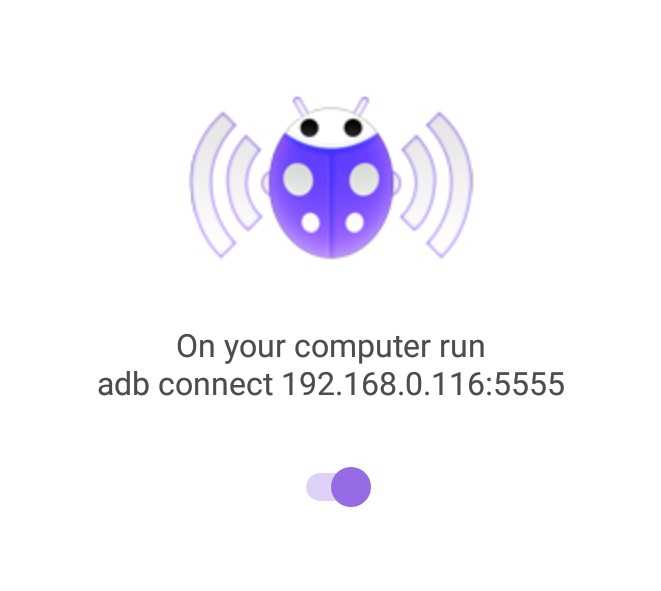
В этом случае устройство подключается по IP-адресу (например, 192.168.0.116:5555) с помощью утилиты ADB.exe (на ПК под Windows) без необходимости устанавливать драйверы и подключать кабель.
C:\adb> adb connect 192.168.0.116
connected to 192.168.0.116:5555
C:\adb> adb devices
List of devices attached
192.168.0.116:5555 device
После подключения можно войти в оболочку
C:\adb>adb shell
и посмотреть, например, использование памяти:
cupid-p2:/ # free
total used free shared buffers
Mem: 1017475072 968957952 48517120 6234112 319488
-/+ buffers/cache: 968638464 48836608
Swap: 763101184 126889984 636211200
или смонтированные файловые системы:
cupid-p2:/ # df -h
Filesystem Size Used Avail Use% Mounted on tmpfs 485M 616K 485M 1% /dev
tmpfs 485M 0 485M 0% /mnt tmpfs 485M 0 485M 0% /apex /dev/block/mmcblk0p11 11M 72K 11M 1% /metadata
/dev/block/dm-0 590M 588M 1.8M 100% /
/dev/block/dm-1 112M 112M 404K 100% /vendor
/dev/block/dm-2 106M 106M 332K 100% /product
/dev/block/mmcblk0p17 27G 1.5G 26G 6% /data
/dev/block/mmcblk0p7 614M 516K 613M 1% /cache
/dev/block/mmcblk0p16 16M 2.0K 16M 1% /Reserve0
/data/media 27G 1.5G 26G 6% /mnt/runtime/default/emulated
/dev/block/vold/public:179,1 128M 8.0M 120M 7% /mnt/media_rw/0000-0000
/mnt/media_rw/0000-0000 128M 8.0M 120M 7% /mnt/runtime/default/0000-0000
С помощью ADB достаточно просто сделать полный бекап всех приложений с их данными командой adb backup:
C:\adb> adb backup -all -apk
Более подробно об этой процедуре рассказано здесь: Резервное копирование данных Android-устройства
Полученный в результате файл архива сохраненной резервной копии orange.ab содержит следующие пакеты приложений (в общей папке APPS):
Каждый из этих пакетов — это папка с таким именем, в которой легко найти APK-файл данного приложения. Они лежат в подпапке \A и имеют имя base.apk. Замечу, что в сохраненный с помощью ADB AB-архив не попадают файлы APK системных приложений (изначально присутствующих в прошивке), а только манифест и данные. Но для приложений, установленных пользователем, создается полный бекап.
Список приложений, которые можно удалять на телефонах Samsung : Android
Список приложений, которые можно удалить (я удалил), приблизительно следующий:
adb shell pm uninstall -k --user 0 com.dsi.ant.sample.acquirechannels adb shell pm uninstall -k --user 0 com.dsi.ant.service.socket adb shell pm uninstall -k --user 0 com.dsi.ant.server adb shell pm uninstall -k --user 0 com.dsi.ant.plugins.antplus
adb shell pm uninstall -k --user 0 com.samsung.android.bixby.wakeup adb shell pm uninstall -k --user 0 com.samsung.android.app.spage adb shell pm uninstall -k --user 0 com.samsung.android.app.routines adb shell pm uninstall -k --user 0 com.samsung.android.bixby.service adb shell pm uninstall -k --user 0 com.samsung.android.visionintelligence adb shell pm uninstall -k --user 0 com.samsung.android.bixby.agent adb shell pm uninstall -k --user 0 com.samsung.android.bixby.agent.dummy adb shell pm uninstall -k --user 0 com.samsung.android.bixbyvision.framework adb shell pm uninstall -k --user 0 com.samsung.systemui.bixby2
adb shell pm uninstall -k --user 0 com.facebook.katana adb shell pm uninstall -k --user 0 com.facebook.system adb shell pm uninstall -k --user 0 com.facebook.appmanager adb shell pm uninstall -k --user 0 com.facebook.services
adb shell pm uninstall -k --user 0 flipboard.boxer.app
из основных (General)
adb shell pm uninstall -k --user 0 com.android.egg adb shell pm uninstall -k --user 0 com.android.dreams.phototable adb shell pm uninstall -k --user 0 com.sec.android.easyonehand adb shell pm uninstall -k --user 0 com.sec.android.widgetapp.samsungapps adb shell pm uninstall -k --user 0 com.sec.android.app.launcher adb shell pm uninstall -k --user 0 com.samsung.android.mateagent adb shell pm uninstall -k --user 0 com.sec.android.easyMover.Agent adb shell pm uninstall -k --user 0 com.android.dreams.basic adb shell pm uninstall -k --user 0 com.samsung.android.app.watchmanagerstub adb shell pm uninstall -k --user 0 com.sec.android.daemonapp adb shell pm uninstall -k --user 0 com.samsung.android.app.social adb shell pm uninstall -k --user 0 com.samsung.android.messaging adb shell pm uninstall -k --user 0 com.samsung.vvm
adb shell pm uninstall -k --user 0 com.google.android.gm adb shell pm uninstall -k --user 0 com.google.android.videos adb shell pm uninstall -k --user 0 com.google.ar.core
adb shell pm uninstall -k --user 0 com.microsoft.skydrive
adb shell pm uninstall -k --user 0 com.android.bips adb shell pm uninstall -k --user 0 com.google.android.printservice.recommendation adb shell pm uninstall -k --user 0 com.android.printspooler
меню Samsung Air Commands
adb shell pm uninstall -k --user 0 com.samsung.android.service.aircommand adb shell pm uninstall -k --user 0 com.samsung.android.aircommandmanager
дисплей ALWAYS-ON
adb shell pm uninstall -k --user 0 com.samsung.android.app.aodservice
приложения SAMSUNG
adb shell pm uninstall -k --user 0 com.samsung.android.wellbeing adb shell pm uninstall -k --user 0 com.samsung.android.da.daagent adb shell pm uninstall -k --user 0 com.samsung.android.service.livedrawing
функция AR Doodles
adb shell pm uninstall -k --user 0 com.samsung.android.ardrawing
adb shell pm uninstall -k --user 0 com.samsung.android.aremoji adb shell pm uninstall -k --user 0 com.sec.android.mimage.avatarstickers adb shell pm uninstall -k --user 0 com.samsung.android.emojiupdater
браузер Samsung
adb shell pm uninstall -k --user 0 com.sec.android.app.sbrowser adb shell pm uninstall -k --user 0 com.samsung.android.app.sbrowseredge
автомобильный режим (Car Mode)
adb shell pm uninstall -k --user 0 com.samsung.android.drivelink.stub
Samsung DEX
adb shell pm uninstall -k --user 0 com.sec.android.app.dexonpc adb shell pm uninstall -k --user 0 com.sec.android.app.desktoplauncher adb shell pm uninstall -k --user 0 com.sec.android.desktopmode.uiservice adb shell pm uninstall -k --user 0 com.samsung.desktopsystemui adb shell pm uninstall -k --user 0 com.sec.android.desktopcommunity
экран Samsung Edge
adb shell pm uninstall -k --user 0 com.samsung.android.service.peoplestripe
почта Samsung
adb shell pm uninstall -k --user 0 com.samsung.android.email.provider adb shell pm uninstall -k --user 0 com.wsomacp
центр управления играми Samsung (лаунчер)
adb shell pm uninstall -k --user 0 com.samsung.android.game.gamehome adb shell pm uninstall -k --user 0 com.enhance.gameservice adb shell pm uninstall -k --user 0 com.samsung.android.game.gametools adb shell pm uninstall -k --user 0 com.samsung.android.game.gos adb shell pm uninstall -k --user 0 com.samsung.android.gametuner.thin
Samsung Gear VR
adb shell pm uninstall -k --user 0 com.samsung.android.hmt.vrsvc adb shell pm uninstall -k --user 0 com.samsung.android.app.vrsetupwizardstub adb shell pm uninstall -k --user 0 com.samsung.android.hmt.vrshell adb shell pm uninstall -k --user 0 com.google.vr.vrcore
Глобальные цели (Global goals)
adb shell pm uninstall -k --user 0 com.samsung.sree
детский режим (Samsung Kids)
adb shell pm uninstall -k --user 0 com.samsung.android.kidsinstaller adb shell pm uninstall -k --user 0 com.samsung.android.app.camera.sticker.facearavatar.preload adb shell pm uninstall -k --user 0 com.sec.android.app.kidshome
Samsung LED Cover
adb shell pm uninstall -k --user 0 com.samsung.android.app.ledbackcover adb shell pm uninstall -k --user 0 com.sec.android.cover.ledcover
Samsung Pay
adb shell pm uninstall -k --user 0 com.samsung.android.samsungpassautofill adb shell pm uninstall -k --user 0 com.samsung.android.authfw adb shell pm uninstall -k --user 0 com.samsung.android.samsungpass adb shell pm uninstall -k --user 0 com.samsung.android.spay adb shell pm uninstall -k --user 0 com.samsung.android.spayfw
«Безопасный Wi-Fi»
adb shell pm uninstall -k --user 0 com.samsung.android.fast
стикеры (Samsung Sticker Center)
adb shell pm uninstall -k --user 0 com.samsung.android.app.camera.sticker.stamp.preload adb shell pm uninstall -k --user 0 com.samsung.android.stickercenter adb shell pm uninstall -k --user 0 com.samsung.android.app.camera.sticker.facearframe.preload adb shell pm uninstall -k --user 0 com.samsung.android.app.camera.sticker.facearexpression.preload adb shell pm uninstall -k --user 0 com.samsung.android.app.camera.sticker.facear.preload
Samsung tips
adb shell pm uninstall -k —user 0 com.samsung.android.app.tips
синтезатор речи (Samsung TTS engine)
adb shell pm uninstall -k --user 0 com.samsung.SMT
голосовая почта (Samsung VoiceMail)
adb shell pm uninstall -k --user 0 com.samsung.vvm.se
█ 20.12.2020 16:09
Вот список, еще не проверял, но интересный
########################### # Phone apps and services # ########################### adb shell "cmd package install-existing com.android.stk" # SIM toolkit adb shell "cmd package install-existing com.android.stk2" # SIM toolkit (maybe for dual-sim devices) adb shell "cmd package install-existing com.sec.android.app.simsettingmgr" # SIM card manager, maybe required, contains configuration and settings for handling dual SIM (give a SIM an icon, a name, and so on) adb shell "pm uninstall -k --user 0 com.samsung.android.smartcallprovider" # The 4th tab in the Phone app for 'local places' adb shell "pm uninstall -k --user 0 com.sec.vsim.ericssonnsds.webapp" # NSDSWebApp. The Non Sim Device Solution (NSDS) is linked to VoLTE and VoWifi (Wifi Calling). NSDS allows connecting non sim devices to IMS core: https://uk.linkedin.com/in/hemant-kumar-dewnarain-2b779679 adb shell "pm uninstall -k --user 0 com.android.cts.ctsshim" # Probably linked to accessibility feature "Captioned Telephone Service. No internet access required adb shell "pm uninstall -k --user 0 com.android.cts.priv.ctsshim" # Probably linked to accessibility feature "Captioned Telephone Service. No internet access required adb shell "pm uninstall -k --user 0 com.samsung.crane" # Phone, with extended features: share rich data (doodles, location, text messages). Couldn't find a way to access it from an official interface adb shell "pm uninstall -k --user 0 com.hiya.star" # Possibly linked to the Phone app "Caller ID and spam protection service" as well as the "Places" feature adb shell "cmd package install-existing com.sec.ims" # IMS (IP Multimedia Subsystem) is linked to VoLTE, WiFi Calling and Rich Communication Services (RCS): https://en.wikipedia.org/wiki/IP_Multimedia_Subsystem adb shell "cmd package install-existing com.sec.imslogger" # ImsLogger (see above for IMS) adb shell "cmd package install-existing com.sec.imsservice" # IMS Service (see above for IMS) adb shell "cmd package install-existing com.samsung.advp.imssettings" # Seem linked to IMS adb shell "cmd package install-existing com.sec.epdg" # ePDG (evolved packet data gateway) could be linked to WiFi Calling and possible VoLTE: http://www.oracle.com/us/industries/communications/wifi-calling-epdg-wp-2874668.pdf ############### # System apps # ############### adb shell "cmd package install-existing com.samsung.accessibility" # Accessibility settings (useful for apps creating virtual buttons such as a pie-menu) adb shell "cmd package install-existing com.samsung.android.app.soundpicker" # The ringtone picker provided by the system for any Alarm app adb shell "cmd package install-existing com.samsung.android.allshare.service.fileshare" # Wi-Fi Direct (bluetooth-wifi sharing of files) adb shell "cmd package install-existing com.samsung.android.allshare.service.mediashare" # Nearby service, maybe related to the previous wifi direct fileshare # Ant+ wireless technology adb shell "pm uninstall -k --user 0 com.dsi.ant.plugins.antplus" # ANT+ Plugins Service adb shell "pm uninstall -k --user 0 com.dsi.ant.sample.acquirechannels" # ANT + DUT adb shell "pm uninstall -k --user 0 com.dsi.ant.server" # ANT+ HAL service adb shell "pm uninstall -k --user 0 com.dsi.ant.service.socket" # ANT Radio Service ################################ # Samsung specific system apps # ################################ adb shell "cmd package install-existing com.samsung.android.lool" # The Setting entry "Device Care" with battery, storage, memory, and security adb shell "cmd package install-existing com.samsung.android.app.aodservice" # Always-on-Display, handles most of the lockscreen adb shell "cmd package install-existing com.samsung.android.MtpApplication" # PC connection doesn't work well without this helper utility adb shell "cmd package install-existing com.wssyncmldm" # Software update: doesn't check OTA updates without adb shell "cmd package install-existing com.sec.android.emergencymode.service" # EmergencyManagerService, linked to the battery's "Maximum power saving" mode adb shell "cmd package install-existing com.sec.android.sdhms" # Samsung Device Health Manager Service, most likely linked to "battery habits" analysis adb shell "pm uninstall -k --user 0 com.sec.android.cover.ledcover" # LED Cover Service adb shell "pm uninstall -k --user 0 com.sec.location.nsflp2" # Samsung Location SDK adb shell "pm uninstall -k --user 0 com.samsung.android.location" # slocation # Maybe Knox-related adb shell "cmd package install-existing com.samsung.ucs.agent.boot" # bootagent, probably linked to "eSE UCS Plugin" below, probably required by Knox adb shell "cmd package install-existing com.samsung.ucs.agent.ese" # eSE UCS Plugin, eSE is for "embedded SEcurity", probably required by Knox adb shell "cmd package install-existing com.samsung.android.smartmirroring" # Smart View, for screen mirroring and Chromecast ################################################## # Samsung user apps, customization, and services # ################################################## adb shell "cmd package install-existing com.samsung.android.contacts" # Samsung "Contacts" app adb shell "cmd package install-existing com.sec.android.app.myfiles" # My Files, file browser adb shell "cmd package install-existing com.samsung.android.video" # Video, the default video player adb shell "pm uninstall -k --user 0 com.samsung.android.themecenter" # Samsung Themes adb shell "pm uninstall -k --user 0 com.samsung.android.themestore" # Galaxy Themes adb shell "pm uninstall -k --user 0 com.sec.android.app.samsungapps" # Galaxy Store adb shell "pm uninstall -k --user 0 com.sec.android.app.sbrowser" # Samsung Galaxy Browser adb shell "pm uninstall -k --user 0 com.samsung.android.rubin.app" # Customization Service adb shell "pm uninstall -k --user 0 com.samsung.daydream.customization" # Some daydream VR customization capability? adb shell "pm uninstall -k --user 0 com.sec.android.app.chromecustomizations" # Chrome browser customization adb shell "pm uninstall -k --user 0 com.samsung.android.scloud" # Samsung Cloud adb shell "pm uninstall -k --user 0 com.samsung.android.mateagent" # Samsung Galaxy Friends adb shell "pm uninstall -k --user 0 com.samsung.android.mobileservice" # Samsung Experience Service, handling the Samsung account and experience, required for Samsung Pay adb shell "pm uninstall -k --user 0 com.samsung.android.weather" adb shell "pm uninstall -k --user 0 com.sec.android.daemonapp" # Weather # Samsing SmartSwitch adb shell "pm uninstall -k --user 0 com.samsung.android.smartswitchassistant" # Samsung SmartSwitch adb shell "pm uninstall -k --user 0 com.sec.android.easyMover" # Related Smart Switch adb shell "pm uninstall -k --user 0 com.sec.android.easyMover.Agent" # Smart Switch Agent adb shell "pm uninstall -k --user 0 com.samsung.android.shortcutbackupservice" # ShortcutBNR, linked to SmartSwitch Samsung Cloud features # Equalizers adb shell "pm uninstall -k --user 0 com.sec.android.app.soundalive" # SoundAlive, responsible for Dobly Atmos and other equalizer stuff (accessible from the Settings app) adb shell "pm uninstall -k --user 0 com.sec.hearingadjust" # Adapt Sound, the sound equalizer in Accessibility services # SmartThings adb shell "pm uninstall -k --user 0 com.samsung.android.beaconmanager" # SmartThings adb shell "pm uninstall -k --user 0 com.samsung.android.ststub" # SmartThings adb shell "pm uninstall -k --user 0 com.samsung.android.easysetup" # SmartThings # Samsung Health adb shell "pm uninstall -k --user 0 com.sec.android.app.shealth" # Samsung Health adb shell "pm uninstall -k --user 0 com.sec.android.service.health" # Health Service, from Samsung # Widgets adb shell "pm uninstall -k --user 0 com.sec.android.widgetapp.easymodecontactswidget" # Favorite Contacts, probably the favourite contacts when enabling the "simple use" senior mode adb shell "pm uninstall -k --user 0 com.sec.android.widgetapp.samsungapps" # Galaxy Essentials Widget adb shell "pm uninstall -k --user 0 com.sec.android.widgetapp.webmanual" # User manual ################################################ # Mandatory Knox apps, and other security apps # ################################################ adb shell "cmd package install-existing com.samsung.android.knox.containeragent" # Knox thing that gets re-enabled at update adb shell "cmd package install-existing com.samsung.android.knox.containercore" # Knox thing that gets re-enabled at update adb shell "pm uninstall -k --user 0 com.samsung.android.knox.analytics.uploader" # Knox Analytics Uploader adb shell "pm uninstall -k --user 0 com.samsung.android.knox.containerdesktop" # KnowContainerDesktop adb shell "pm uninstall -k --user 0 com.knox.vpn.proxyhandler" # Samsung's Work profile for Entreprise proxy adb shell "pm uninstall -k --user 0 com.sec.enterprise.knox.attestation" # Knox-related adb shell "pm uninstall -k --user 0 com.sec.enterprise.knox.cloudmdm.smdms" # Knox Enrollment Service adb shell "pm uninstall -k --user 0 com.samsung.knox.securefolder" # Secure Folder adb shell "pm uninstall -k --user 0 com.samsung.knox.securefolder.setuppage" adb shell "pm uninstall -k --user 0 com.samsung.klmsagent" # KLMS Agent, most likely linked to Knox adb shell "pm uninstall -k --user 0 com.trustonic.teeservice" # TeeService, for Samsung Pay? Trustronic "Trusted Execution Environment": https://www.trustonic.com/news/blog/devices-trustonic-tee/ adb shell "pm uninstall -k --user 0 com.trustonic.tuiservice" # TuiService, for Samsung Pay? Trustronic "Trusted User Interfaces": https://www.trustonic.com/news/blog/devices-trustonic-tee/ adb shell "pm uninstall -k --user 0 com.samsung.android.spay" # Samsung Pay adb shell "pm uninstall -k --user 0 com.samsung.android.spayfw" # Samsung PaymentFramework adb shell "pm uninstall -k --user 0 com.samsung.android.samsungpass" # Samsung Pass adb shell "pm uninstall -k --user 0 com.samsung.android.samsungpassautofill" # Autofill with Samsung Pass ############################### # Samsung camera related apps # ############################### adb shell "cmd package install-existing com.sec.android.app.camera" # Samsung Camera adb shell "cmd package install-existing com.samsung.android.app.interactivepanoramaviewer" # Interactive panorama viewer (taken with the Samsung Camera) adb shell "cmd package install-existing com.samsung.android.app.motionpanoramaviewer" # Motion panorama viewer (taken with the Samsung Camera) adb shell "cmd package install-existing com.samsung.android.app.selfmotionpanoramaviewer" # Self-motion panorama viewer (taken with the Samsung Camera) adb shell "cmd package install-existing com.samsung.app.highlightplayer" # Useful for the Video editor adb shell "cmd package install-existing com.samsung.app.slowmotion" # Slow-motion viewer, taken with the Samsung Camera adb shell "cmd package install-existing com.sec.android.gallery3d" # Samsung Gallery adb shell "cmd package install-existing com.sec.android.mimage.photoretouching" # Photo editor adb shell "cmd package install-existing com.samsung.android.provider.stickerprovider" # If disabled, the "AR Emoji" button crashed the Camera app adb shell "cmd package install-existing com.sec.android.app.vepreload" # Video Editor # Gallery's recognition and identification of content (same "shared user id") adb shell "cmd package install-existing com.samsung.cmh" # CMHProvider (CMHProvider.apk), required by the Gallery. Responsible of face recognition in the Gallery adb shell "cmd package install-existing com.samsung.mlp" # mlp (MediaLearningPlatform.apk), has permissions linked to cmh, and visionintelligence adb shell "cmd package install-existing com.samsung.storyservice" # Gallery stories (StoryService.apk), creates stories from the user photos and videos adb shell "cmd package install-existing com.samsung.faceservice" # (FaceService.apk) adb shell "cmd package install-existing com.samsung.ipservice" # (IPService.apk) adb shell "pm uninstall -k --user 0 com.samsung.android.app.camera.sticker.facear.preload" # Default live sticker adb shell "pm uninstall -k --user 0 com.samsung.android.app.camera.sticker.stamp.preload" # Stamps ################ # Samsung Edge # ################ adb shell "pm uninstall -k --user 0 com.cnn.mobile.android.phone.edgepanel" # CNN edge app adb shell "pm uninstall -k --user 0 com.samsung.android.app.appsedge" # Apps edge adb shell "pm uninstall -k --user 0 com.samsung.android.app.clipboardedge" # Clipboard edge adb shell "pm uninstall -k --user 0 com.samsung.android.app.cocktailbarservice" # Edge screen adb shell "pm uninstall -k --user 0 com.samsung.android.app.sbrowseredge" # Samsung Internet panel adb shell "pm uninstall -k --user 0 com.samsung.android.app.taskedge" # Tasks edge adb shell "pm uninstall -k --user 0 com.samsung.android.service.peoplestripe" # People edge adb shell "pm uninstall -k --user 0 com.samsung.android.widgetapp.yahooedge.finance" # Finance, edge widget adb shell "pm uninstall -k --user 0 com.samsung.android.widgetapp.yahooedge.sport" # Sport, edge widget ################# # Samsung Bixby # ################# adb shell "pm uninstall -k --user 0 com.samsung.android.app.spage" # Bixby Home adb shell "pm uninstall -k --user 0 com.samsung.android.app.settings.bixby" # SettingsBixby adb shell "pm uninstall -k --user 0 com.samsung.android.bixby.agent" adb shell "pm uninstall -k --user 0 com.samsung.android.bixby.agent.dummy" adb shell "pm uninstall -k --user 0 com.samsung.android.bixby.es.globalaction" adb shell "pm uninstall -k --user 0 com.samsung.android.bixby.plmsync" adb shell "pm uninstall -k --user 0 com.samsung.android.bixby.service" adb shell "pm uninstall -k --user 0 com.samsung.android.bixby.voiceinput" adb shell "pm uninstall -k --user 0 com.samsung.android.bixby.wakeup" adb shell "pm uninstall -k --user 0 com.samsung.android.svoice" # SVoice adb shell "pm uninstall -k --user 0 com.samsung.svoice.sync" # Voice Service, S Voice is the ancestor of Bixby adb shell "pm uninstall -k --user 0 com.samsung.systemui.bixby" adb shell "pm uninstall -k --user 0 com.samsung.systemui.bixby2" adb shell "pm uninstall -k --user 0 com.samsung.android.visionintelligence" # Bixby Vision adb shell "pm uninstall -k --user 0 com.samsung.visionprovider" # VisionProvider, maybe linked to Bixby? ############### # Samsung DeX # ############### adb shell "pm uninstall -k --user 0 com.samsung.desktopsystemui" # Samsung DeX System UI adb shell "pm uninstall -k --user 0 com.sec.android.app.desktoplauncher" # Samsung DeX Home adb shell "pm uninstall -k --user 0 com.sec.android.desktopcommunity" # Samsung DeX community adb shell "pm uninstall -k --user 0 com.sec.android.desktopmode.uiservice" # Samsung DeX ####################################### # Hidden apps (debug and diagnostics) # ####################################### # Dialable apps adb shell "cmd package install-existing com.sec.android.app.factorykeystring" # DeviceKeyString (dial *#0283# to open audio LoopbackTest control, dial *#2663# for TSP firmware update) adb shell "cmd package install-existing com.sec.android.app.hwmoduletest" # HwModuleTest, a hardware test app (dial *#0*# to open). Fun low-level stuff to see in there adb shell "cmd package install-existing com.sec.android.app.servicemodeapp" # SysDump, low-level debugging and diagnostics tools (dial *#9900# to open) adb shell "cmd package install-existing com.sec.android.RilServiceModeApp" # Service mode RIL, for diagnostics (dial *#0011# for modem connectivity info, *#9090# for diagnostics control) adb shell "cmd package install-existing com.sec.factory.camera" # Camera Test (dial *#34971539# to open CameraFirmware Standard) adb shell "cmd package install-existing com.sec.usbsettings" # USBSettings, choose from ADB, MTP, RNDIS, ACM, DM (dial *#0808# to open) adb shell "pm uninstall -k --user 0 com.sec.factory.iris.usercamera" # Camera Iris User Test, the test from the *#0*# menu # Other apps adb shell "pm uninstall -k --user 0 com.samsung.android.networkdiagnostic" # Network diagnostic adb shell "pm uninstall -k --user 0 com.sec.bcservice" # Linked to some diagnostics? It mentions TcpDump adb shell "pm uninstall -k --user 0 com.sec.android.app.bluetoothtest" # BluetoothTest, probably a priviledged diagnostics app adb shell "pm uninstall -k --user 0 com.sec.android.diagmonagent" # DiagMonAgent, probably diagnostics data collection from Settings > Biometrics and security > Send diagnostic data adb shell "pm uninstall -k --user 0 com.sec.factory" # DeviceTest adb shell "pm uninstall -k --user 0 com.sec.android.app.wlantest" # WlanTest adb shell "pm uninstall -k --user 0 com.sec.epdgtestapp" # EpdgTestApp, test app for ePDG functionnality? ################ # Game-related # ################ adb shell "pm uninstall -k --user 0 com.enhance.gameservice" adb shell "pm uninstall -k --user 0 com.samsung.android.game.gamehome" adb shell "pm uninstall -k --user 0 com.samsung.android.game.gametools" adb shell "pm uninstall -k --user 0 com.samsung.android.game.gos" # Samsung Game Optimizing Service ############### # Google apps # ############### # Visible apps adb shell "cmd package install-existing com.google.android.apps.docs" # Google Drive adb shell "cmd package install-existing com.google.android.apps.maps" # Google Maps adb shell "pm uninstall -k --user 0 com.google.android.apps.photos" # Google Photos adb shell "pm uninstall -k --user 0 com.google.android.GoogleCamera" # Google Camera adb shell "pm uninstall -k --user 0 com.google.android.gm" # Gmail adb shell "pm uninstall -k --user 0 com.google.android.videos" # Google Movies adb shell "pm uninstall -k --user 0 com.google.android.youtube" # Google's YouTube adb shell "pm uninstall -k --user 0 com.google.android.music" # Google Music # More hidden apps adb shell "cmd package install-existing com.google.ar.core" # Google Play Services for AR (Augmented Reality) adb shell "cmd package install-existing com.google.vr.vrcore" # Google VR (Virtual Reality) Services adb shell "cmd package install-existing com.google.android.tts" # Text-to-speech synthesis adb shell "pm uninstall -k --user 0 com.android.hotwordenrollment.okgoogle" # Enroll for "OK-Google" adb shell "pm uninstall -k --user 0 com.android.hotwordenrollment.xgoogle" # Enroll for something adb shell "pm uninstall -k --user 0 com.google.android.apps.nexuslauncher" # Removes the Google launcher adb shell "pm uninstall -k --user 0 com.google.android.apps.restore" # Restore data from the cloud or transfer it from another device adb shell "pm uninstall -k --user 0 com.google.android.apps.tachyon" adb shell "pm uninstall -k --user 0 com.google.android.backuptransport" adb shell "pm uninstall -k --user 0 com.google.android.ext.shared" adb shell "pm uninstall -k --user 0 com.google.android.feedback" # Market feedback agent adb shell "pm uninstall -k --user 0 com.google.android.gms.policy_sidecar_aps" adb shell "pm uninstall -k --user 0 com.google.android.googlequicksearchbox" # The super fat Google app, handling thousands of things. Required for Android Audo (even disabled is OK) adb shell "pm uninstall -k --user 0 com.google.android.onetimeinitializer" adb shell "pm uninstall -k --user 0 com.google.android.partnersetup" adb shell "pm uninstall -k --user 0 com.google.android.printservice.recommendation" # Print Service Recommendation Service adb shell "pm uninstall -k --user 0 com.google.android.setupwizard" # The initial setup wizard, that can pop later to "finish the setup" with recommended apps adb shell "pm uninstall -k --user 0 com.google.android.syncadapters.calendar" # Google Calendar Sync adb shell "pm uninstall -k --user 0 com.google.android.syncadapters.contacts" # Google Contacts Sync adb shell "pm uninstall -k --user 0 com.google.android.apps.turbo" # Device Health Services #################### # Third-party apps # #################### #adb shell "pm uninstall -k --user 0 com.skype.raider" # Skype adb shell "pm uninstall -k --user 0 com.linkedin.android" # LinkedIn adb shell "pm uninstall -k --user 0 com.microsoft.office.excel" # Microsoft Excel adb shell "pm uninstall -k --user 0 com.microsoft.office.powerpoint" # Microsoft PowerPoint adb shell "pm uninstall -k --user 0 com.microsoft.office.word" # Microsoft Word adb shell "pm uninstall -k --user 0 com.microsoft.skydrive" # Microsoft SkyDrive adb shell "pm uninstall -k --user 0 de.axelspringer.yana.zeropage" # upday adb shell "pm uninstall -k --user 0 flipboard.boxer.app" # Flipboard adb shell "pm uninstall -k --user 0 com.facebook.appmanager" # Facebook adb shell "pm uninstall -k --user 0 com.facebook.katana" # Facebook adb shell "pm uninstall -k --user 0 com.facebook.services" # Facebook adb shell "pm uninstall -k --user 0 com.facebook.system" # Facebook ################ # Unclassified # ################ adb shell "cmd package install-existing com.android.apps.tag" adb shell "cmd package install-existing com.android.emergency" adb shell "cmd package install-existing com.android.keychain" adb shell "cmd package install-existing com.android.nfc" adb shell "cmd package install-existing com.android.providers.blockednumber" adb shell "cmd package install-existing com.android.providers.calendar" adb shell "cmd package install-existing com.android.providers.settings" adb shell "cmd package install-existing com.android.proxyhandler" adb shell "cmd package install-existing com.android.settings.intelligence" adb shell "cmd package install-existing com.android.wallpaperbackup" adb shell "cmd package install-existing com.android.wallpapercropper" adb shell "cmd package install-existing com.sec.android.wallpapercropper2" # Background image and lock-screen cropping tool adb shell "cmd package install-existing com.android.wallpaper.livepicker" adb shell "cmd package install-existing com.samsung.android.app.smartcapture" adb shell "cmd package install-existing com.samsung.android.authfw" adb shell "cmd package install-existing com.samsung.android.bio.face.service" adb shell "cmd package install-existing com.samsung.android.mdm" adb shell "cmd package install-existing com.samsung.android.messaging" adb shell "cmd package install-existing com.samsung.android.providers.context" adb shell "cmd package install-existing com.samsung.android.server.iris" adb shell "cmd package install-existing com.samsung.android.wallpaper.res" adb shell "cmd package install-existing com.samsung.sec.android.application.csc" adb shell "cmd package install-existing com.sec.android.app.clockpackage" adb shell "cmd package install-existing com.sec.android.emergencylauncher" adb shell "cmd package install-existing com.sec.android.ofviewer" adb shell "cmd package install-existing com.sec.android.provider.emergencymode" adb shell "cmd package install-existing com.sec.android.providers.security" adb shell "cmd package install-existing com.sec.modem.settings" adb shell "pm uninstall -k --user 0 android.autoinstalls.config.samsung" adb shell "pm uninstall -k --user 0 com.android.backupconfirm" adb shell "pm uninstall -k --user 0 com.android.bips" # Default print service adb shell "pm uninstall -k --user 0 com.android.bluetoothmidiservice" adb shell "pm uninstall -k --user 0 com.android.bookmarkprovider" adb shell "pm uninstall -k --user 0 com.android.calllogbackup" adb shell "pm uninstall -k --user 0 com.android.captiveportallogin" adb shell "pm uninstall -k --user 0 com.android.chrome" adb shell "pm uninstall -k --user 0 com.android.dreams.basic" adb shell "pm uninstall -k --user 0 com.android.dreams.phototable" adb shell "pm uninstall -k --user 0 com.android.egg" adb shell "pm uninstall -k --user 0 com.android.htmlviewer" # adb shell "pm uninstall -k --user 0 com.android.inputdevices" # Input devices, only contains a receiver named "Android keyboard", possibly for an external keyboard adb shell "pm uninstall -k --user 0 com.android.managedprovisioning" # Work profile setup adb shell "pm uninstall -k --user 0 com.android.mms.service" # MmsService, no activity but a service, with permissions related to carrier connectivity. For receiving MMS? adb shell "pm uninstall -k --user 0 com.android.pacprocessor" adb shell "pm uninstall -k --user 0 com.android.printspooler" # Print spooler adb shell "pm uninstall -k --user 0 com.android.providers.partnerbookmarks" # adb shell "pm uninstall -k --user 0 com.android.sharedstoragebackup" # One service (ObbBackupService), nothing else. No internet access, and might be useful adb shell "pm uninstall -k --user 0 com.android.statementservice" # Intent Filter Verification Service adb shell "pm uninstall -k --user 0 com.diotek.sec.lookup.dictionary" # Dictionary adb shell "pm uninstall -k --user 0 com.galaxyfirsatlari" adb shell "pm uninstall -k --user 0 com.gd.mobicore.pa" adb shell "pm uninstall -k --user 0 com.mobeam.barcodeService" adb shell "pm uninstall -k --user 0 com.monotype.android.font.chococooky" adb shell "pm uninstall -k --user 0 com.monotype.android.font.cooljazz" adb shell "pm uninstall -k --user 0 com.monotype.android.font.foundation" adb shell "pm uninstall -k --user 0 com.monotype.android.font.rosemary" adb shell "pm uninstall -k --user 0 com.osp.app.signin" adb shell "pm uninstall -k --user 0 com.policydm" adb shell "pm uninstall -k --user 0 com.samsung.aasaservice" adb shell "pm uninstall -k --user 0 com.samsung.accessory" adb shell "pm uninstall -k --user 0 com.samsung.accessory.beansmgr" adb shell "pm uninstall -k --user 0 com.samsung.accessory.safiletransfer" adb shell "pm uninstall -k --user 0 com.samsung.android.app.accesscontrol" adb shell "pm uninstall -k --user 0 com.samsung.android.app.advsounddetector" # Sound detectors adb shell "pm uninstall -k --user 0 com.samsung.android.app.assistantmenu" # Assistant menu adb shell "pm uninstall -k --user 0 com.samsung.android.app.color" adb shell "pm uninstall -k --user 0 com.samsung.android.app.filterinstaller" adb shell "pm uninstall -k --user 0 com.samsung.android.app.galaxyfinder" # Finder, the "search in device" feature adb shell "pm uninstall -k --user 0 com.samsung.android.app.ledcoverdream" # LEF icon editor, for LED covers adb shell "pm uninstall -k --user 0 com.samsung.android.app.mirrorlink" # Samsung MirrorLink 1.1, to connect the phone to a car adb shell "pm uninstall -k --user 0 com.samsung.android.app.multiwindow" adb shell "pm uninstall -k --user 0 com.samsung.android.app.notes" adb shell "pm uninstall -k --user 0 com.samsung.android.app.omcagent" # Configuration update, some activities are very suspicious: "Recommended apps" adb shell "pm uninstall -k --user 0 com.samsung.android.app.panel.naver.v" adb shell "pm uninstall -k --user 0 com.samsung.android.app.reminder" # Reminder, does regular network access adb shell "pm uninstall -k --user 0 com.samsung.android.app.simplesharing" # Link sharing adb shell "pm uninstall -k --user 0 com.samsung.android.app.social" # What's new adb shell "pm uninstall -k --user 0 com.samsung.android.app.talkback" # Voice Assistant adb shell "pm uninstall -k --user 0 com.samsung.android.app.watchmanager" adb shell "pm uninstall -k --user 0 com.samsung.android.app.watchmanagerstub" # Wearable Manager Installer adb shell "pm uninstall -k --user 0 com.samsung.android.app.withtv" adb shell "pm uninstall -k --user 0 com.samsung.android.bbc.bbcagent" # BBCAgent adb shell "pm uninstall -k --user 0 com.samsung.android.calendar" # Calendar adb shell "pm uninstall -k --user 0 com.samsung.android.clipboarduiservice" # ClipboardUIService adb shell "pm uninstall -k --user 0 com.samsung.android.coreapps" adb shell "pm uninstall -k --user 0 com.samsung.android.da.daagent" # Dual messenger adb shell "pm uninstall -k --user 0 com.samsung.android.dlp.service" adb shell "pm uninstall -k --user 0 com.samsung.android.dqagent" # DQA (Device Quality Agent), reportedely keeps tabs on Wi-Fi quality throughout the device adb shell "pm uninstall -k --user 0 com.samsung.android.drivelink.stub" # CarmodeStub adb shell "pm uninstall -k --user 0 com.samsung.android.email.provider" adb shell "pm uninstall -k --user 0 com.samsung.android.emojiupdater" adb shell "pm uninstall -k --user 0 com.samsung.android.fingerprint.service" adb shell "pm uninstall -k --user 0 com.samsung.android.fmm" # Find my mobile adb shell "pm uninstall -k --user 0 com.samsung.android.gearoplugin" adb shell "pm uninstall -k --user 0 com.samsung.android.hmt.vrsvc" # Gear VR Service adb shell "pm uninstall -k --user 0 com.samsung.android.keyguardwallpaperupdator" # Keyguard Wallpaper Updator, seems linked to selecting multiple lockscreen wallpapers, features removed in S8 but app stayed adb shell "pm uninstall -k --user 0 com.samsung.android.kidsinstaller" # Kids Home Installer adb shell "pm uninstall -k --user 0 com.samsung.android.oneconnect" adb shell "pm uninstall -k --user 0 com.samsung.android.provider.shootingmodeprovider" adb shell "pm uninstall -k --user 0 com.samsung.android.samsungpositioning" # Samsung Positioning adb shell "pm uninstall -k --user 0 com.samsung.android.sdk.handwriting" # Handwriting Service adb shell "pm uninstall -k --user 0 com.samsung.android.sdk.professionalaudio.app.audioconnectionservice" adb shell "pm uninstall -k --user 0 com.samsung.android.sdk.professionalaudio.utility.jammonitor" adb shell "pm uninstall -k --user 0 com.samsung.android.securitylogagent" adb shell "pm uninstall -k --user 0 com.samsung.android.smartface" # SmartFaceService adb shell "pm uninstall -k --user 0 com.samsung.android.smartfitting" # SmartFittingService adb shell "pm uninstall -k --user 0 com.samsung.android.sm.devicesecurity" # This is the antivirus in Settings -> Device care -> Security # adb shell "pm uninstall -k --user 0 com.samsung.android.sm.policy" # SCPM Client, *might* be used for power savings: https://www.reddit.com/r/GalaxyS6/comments/4cg70v/what_is_scpm_client/d2ij0ep/ but performs network requests # adb shell "pm uninstall -k --user 0 com.samsung.android.spdclient" # Security policy updates, updates the SELinux policies according to Security Enhancements for Android (SE for Android) # adb shell "pm uninstall -k --user 0 com.samsung.android.spdfnote" # Write on PDF adb shell "pm uninstall -k --user 0 com.samsung.android.stickercenter" # StickerCenter, related to Samsung stickers: https://developer.samsung.com/galaxy/stickers adb shell "pm uninstall -k --user 0 com.samsung.android.svcagent" # SVC Agent adb shell "pm uninstall -k --user 0 com.samsung.android.timezone.autoupdate_O" # adb shell "pm uninstall -k --user 0 com.samsung.android.timezone.data_P" # Samsung Time Zone Data # adb shell "pm uninstall -k --user 0 com.samsung.android.timezone.updater" # Time Zone Updater adb shell "pm uninstall -k --user 0 com.samsung.android.universalswitch" # Universal switch, accessibility feature to control the phone: https://www.samsung.com/uk/accessibility/mobile-universal-switch/ adb shell "pm uninstall -k --user 0 com.samsung.android.visioncloudagent" adb shell "pm uninstall -k --user 0 com.samsung.android.voc" # adb shell "pm uninstall -k --user 0 com.samsung.app.newtrim" # Video trimmer adb shell "pm uninstall -k --user 0 com.samsung.clipboardsaveservice" # ClipboardSaveService, probably the clipboard history sometimes accessible adb shell "pm uninstall -k --user 0 com.samsung.dcmservice" adb shell "pm uninstall -k --user 0 com.samsung.enhanceservice" adb shell "pm uninstall -k --user 0 com.samsung.hiddennetworksetting" adb shell "pm uninstall -k --user 0 com.samsung.rcs" # RcsSettings (Rich Communication Services "joyn"), has permissions linked to cmh, and visionintelligence: https://en.wikipedia.org/wiki/Rich_Communication_Services adb shell "pm uninstall -k --user 0 com.samsung.safetyinformation" # Some safety information, telling you not to put your phone in you eyes (I'm serious) adb shell "pm uninstall -k --user 0 com.samsung.SMT" adb shell "pm uninstall -k --user 0 com.sec.android.app.apex" # Samsung ApexService, provides a Motion Photo player/viewer adb shell "pm uninstall -k --user 0 com.sec.android.app.applinker" # AppLinker, talks about firmware update and FeliCa Networks. adb shell "pm uninstall -k --user 0 com.sec.android.app.billing" # Samsung Checkout adb shell "pm uninstall -k --user 0 com.sec.android.app.DataCreate" # adb shell "pm uninstall -k --user 0 com.sec.android.app.magnifier" # Magnifier, uses the phone's camera # adb shell "pm uninstall -k --user 0 com.sec.android.app.parser" # DRParser Mode, maybe linked to IME (Input Method Engine?) Secret Codes # adb shell "pm uninstall -k --user 0 com.sec.android.app.personalization" # Perso, related to read/write phone state according to the app's permissions adb shell "pm uninstall -k --user 0 com.sec.android.app.popupcalculator" adb shell "pm uninstall -k --user 0 com.sec.android.app.quicktool" # Quick tools # adb shell "pm uninstall -k --user 0 com.sec.android.app.ringtoneBR" # ringtonebackup # adb shell "pm uninstall -k --user 0 com.sec.android.app.safetyassurance" # Safety assistance, related to phone-based emergency services. Keep for safety adb shell "pm uninstall -k --user 0 com.sec.android.app.SecSetupWizard" adb shell "pm uninstall -k --user 0 com.sec.android.app.setupwizardlegalprovider" # SetupWizardLegalProvider adb shell "pm uninstall -k --user 0 com.sec.android.app.suwscriptplayer" # SuwScriptPlayer adb shell "pm uninstall -k --user 0 com.sec.android.app.sysscope" adb shell "pm uninstall -k --user 0 com.sec.android.app.voicenote" adb shell "pm uninstall -k --user 0 com.sec.android.AutoPreconfig" # adb shell "pm uninstall -k --user 0 com.sec.android.easyonehand" # Probably the shrinked display for a 1-hand use feature adb shell "pm uninstall -k --user 0 com.sec.android.mimage.gear360editor" # 360° Photo Editor, the photo editor for the Samsung Gear 360 device adb shell "pm uninstall -k --user 0 com.sec.android.preloadinstaller" # Application Installer, the Internet says it's responsible of (re-)installing junk on your mobile adb shell "pm uninstall -k --user 0 com.sec.android.provider.badge" # BadgeProvider # adb shell "pm uninstall -k --user 0 com.sec.android.soagent" # Software update, works along com.wssyncmldm? # adb shell "pm uninstall -k --user 0 com.sec.android.splitsound" # SplitSoundService, probably the capability to play different music on the local device and on a bluetooth speaker adb shell "pm uninstall -k --user 0 com.sec.android.uibcvirtualsoftkey" # UIBCVirtualSoftkey, probably the service to get a software button for accessibility adb shell "pm uninstall -k --user 0 com.sec.app.RilErrorNotifier" # RilNotifier adb shell "pm uninstall -k --user 0 com.sec.automation" # TetheringAutomation, linked to an "always on tethering" option adb shell "pm uninstall -k --user 0 com.sec.downloadablekeystore" adb shell "pm uninstall -k --user 0 com.sec.enterprise.mdm.services.simpin" # Entreprise Sim Pin Service adb shell "pm uninstall -k --user 0 com.sec.enterprise.mdm.vpn" adb shell "pm uninstall -k --user 0 com.sec.mldapchecker" # MLDAPlog adb shell "pm uninstall -k --user 0 com.sec.smartcard.manager" adb shell "pm uninstall -k --user 0 com.sec.spp.push" # Samsung Push Service adb shell "pm uninstall -k --user 0 com.sec.sve" # SecVideoEngineService adb shell "pm uninstall -k --user 0 com.sem.factoryapp" # SEMFactoryApp adb shell "pm uninstall -k --user 0 com.setk.widget" adb shell "pm uninstall -k --user 0 com.skms.android.agent" # SKMSAgentService, Samsung KMS (Key Managment Service?) talks with the eSE device (embedded SEcurity): https://android-apk.org/com.skms.android.agent/ # adb shell "pm uninstall -k --user 0 com.wsomacp" # Configuration message, linked to OMA (Open Mobile Alliance) CP (Client Provisioning) messages: carrier related, but can cause problems: https://gbhackers.com/single-sms-wap-crap-can-break-samsung-galaxy/ adb shell "pm uninstall -k --user 0 com.wssnps" adb shell "pm uninstall -k --user 0 org.simalliance.openmobileapi.service"
█ 20.12.2020 16:10
И еще один. Впечатляет объем мусора в телефоне.
com.samsung.android.bixby.agent
com.samsung.android.bixby.es.globalaction
com.samsung.android.bixby.wakeup
com.samsung.android.bixby.plmsync
com.samsung.android.app.spage
com.samsung.android.visionintelligence
com.samsung.android.bixby.voiceinput
com.samsung.systemui.bixby
com.samsung.android.bixby.agent.dummy
com.ebay.carrier
com.sec.android.widgetapp.easymodecontactswidget
com.sec.android.easyMover.Agent
com.samsung.android.game.gamehome
com.sec.android.app.desktoplauncher
com.samsung.android.widgetapp.yahooedge.finance
de.axelspringer.yana.zeropage
com.samsung.android.drivelink.stub
com.samsung.android.widgetapp.yahooedge.sport
com.android.hotwordenrollment.okgoogle
com.samsung.knox.securefolder
com.samsung.android.app.talkback
com.samsung.android.game.gametools
com.samsung.android.app.reminder
com.sec.android.desktopmode.uiservice
com.samsung.android.app.mirrorlink
com.google.android.tts
com.google.android.syncadapters.calendar
com.sec.android.service.health
com.enhance.gameservice
com.google.vr.vrcore
com.samsung.android.samsungpassautofill
com.sec.android.widgetapp.webmanual
com.microsoft.office.excel
com.microsoft.office.word
com.microsoft.office.powerpoint
com.microsoft.skydrive
com.samsung.knox.securefolder
com.facebook.services
com.facebook.katana
com.facebook.system
com.facebook.appmanager
com.linkedin.android
com.samsung.android.app.sbrowseredge
com.samsung.android.provider.stickerprovider
com.samsung.android.stickercenter
com.cnn.mobile.android.phone.edgepanel
com.samsung.android.app.watchmanagerstub
What Is com.android.cts.priv.ctsshim?
If you are here to find out what is com.android.cts.priv.ctsshim and how does it work, you have come to the right place. In this article, we have explained everything you need to know about it and we have also answered if it can be deleted or not.
Android Package and Name Convention
Before you start reading about the main topic, you should know what does a package mean on Android.
Android apps have a package that contains important files and source code, all packages have a unique package name so the system can check what apps are installed. In other words, a unique name is necessary to identify the app to avoid conflicts and complete basic processes like app updation.
com.android.cts.priv.ctsshim Meaning?
com.android.cts.priv.ctsshim is the Android package of the Compatibility Test Suite (CTS), a free test suit for Android device manufacturers to check for incompatibilities with Android OS throughout the development of the device.
Now you know what com.android.cts.priv.ctsshim is and why is it named like that. Keep in mind there will be two packages: com.android.cts.priv.ctsshim and com.android.cts.ctsshim, the one that has priv in it means it’s a privileged system app located in a priv-app directory of the system partition. Some websites have stated that the priv used here stands for private but it’s completely false.
Is com.android.cts.priv.ctsshim Safe?
Compatibility Test Suite (CTS) is developed by Google so there is no doubt about its safety. Some people think it’s a trojan, malware, or some kind of virus but we can assure you that it’s completely safe.
Should You Delete com.android.cts.priv.ctsshim?
No, com.android.cts.priv.ctsshim does not cause any issues for most people, removing it may create problems.
How to Fix Problems Caused By com.android.cts.priv.ctsshim
This package usually does not cause any errors but if you are facing any problem caused by it, you can follow the steps mentioned below:
- Go to Settings.
- Tap on apps.
- Tap on the ellipsis icon (three vertical dots on the top right corner).
- Tap on System apps.
- Find and tap on com.android.cts.priv.ctsshim.
- Go to its storage and finally tap on Clear data.
When done, repeat the same for com.android.cts.ctsshim.
What to Do If This Method Does Not Fix the Issue?
You can force stop com.android.cts.priv.ctsshim and com.android.cts.ctsshim by following the steps mentione below:
- Go to Settings.
- Tap on apps.
- Tap on the ellipsis icon (three vertical dots on the top right corner).
- Tap on System apps.
- Find and tap on com.android.cts.priv.ctsshim.
- Tap on Force stop.
If force stopping these apps does not fix the issue, you can factory reset your device, factory resetting will change all settings to default and usually fixes all the small bugs but keep in mind factory resetting will wipe your device’s data so make sure you backup your data before doing it.
To factory reset your device Go to Settings > General Management > Reset > Factory data reset.