
Беспроводные стереонаушники с функцией шумоподавления WF-1000XM3
Чтобы функция шумоподавления работала эффективно, выберите вкладыши, которые оптимально подходят для ваших ушей, и носите гарнитуру правильно.
Установите вкладыши.
На левый и правый наушники гарнитуры по умолчанию установлены длинные гибридные вкладыши из силиконового каучука размера M . Выберите и установите вкладыши, которые позволяют слышать минимальное количество окружающих звуков на каждом наушнике. Длинные гибридные вкладыши из силиконового каучука Вкладыши с тройным уровнем комфорта  При замене вкладышей обратите внимание на следующее. Снятие вкладышей
 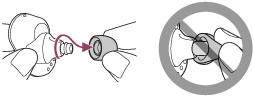 Установка вкладышей
Наденьте гарнитуру.
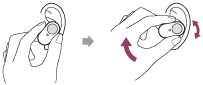
Поверните гарнитуру, чтобы установить вкладыш глубже в ухо.
Совет
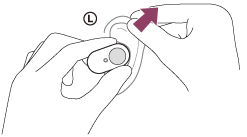
- Вкладыш будет легче вставить глубже в ухо, если слегка потянуть за верхнюю часть уха, поворачивая гарнитуру.
Ношение и снятие гарнитуры
Согласно заводским настройкам, встроенные датчики работают при снятии и установке гарнитуры, позволяя гарнитуре приостанавливать и возобновлять воспроизведение музыки или управлять датчиками касания, индикаторами и голосовым управлением.
Когда гарнитура надета
- Индикаторы гарнитуры выключены.
- Вы можете использовать датчик касания для воспроизведения музыки, выполнения и приема вызовов и т. д.
- Вы услышите голосовое уведомление в соответствии с операцией и статусом.
Когда гарнитура снята
- Когда снят только один наушник, гарнитура приостанавливает воспроизведение музыки. При повторном надевании наушника гарнитура возобновляет воспроизведение музыки.
- Если гарнитура не надета в течение 5 минут после извлечения из зарядного чехла, она автоматически выключится в целях экономии батареи. Гарнитура включится при нажатии датчика касания или при надевании гарнитуры.
- Чтобы избежать неправильного реагирования гарнитуры, вы не сможете воспроизводить музыку, совершать и принимать вызовы и т. д., когда гарнитура не надета, даже при нажатии датчика касания.
Совет
- Вы также можете воспроизводить музыку, совершать и принимать вызовы и т. д. при ношении только одного наушника.
- При использовании приложения “ Sony | Headphones Connect ” вы можете изменить настройки автоматической приостановки и возобновления воспроизведения музыки, а также автоматического отключения гарнитуры.
WF-1000XM3
WF-1000XM3 Wireless Noise-Canceling Headphones / Included components may vary by country or region of purchase: WF-1000XM3R , WF-1000XM3L , BC-WF1000XM3
- Specifications
- Product Highlights
Downloads
Popular Topics
Noise canceling doesn’t work on my earbud headphones (WF-1000XM3)
There is no sound from the earbud headphones, or sound is heard only from one side
The WF-1000XM3 earbud headphones will not charge or power on
Can’t change the volume on the earbud headphones
Will the headphones charge when the message «A USB device has exceeded the power limits» is displayed on the connected computer?
How do I replace the earpads or earbuds on my headphones?
How to use Bluetooth headphones for video calls on a computer
Headphones troubleshooting guide
Product Alerts
Downloads
Select Operating System
- All
- System Software
Release Date
Support by Sony App
Get notifications about the latest firmware updates, product alerts, and more. Download the app today!
Product Repair
Repair information and service assistance
Here you can ask questions and connect with other Sony users
\n \n \n \n \n \n \n \n \n \n \n \n \n \n \n \n \n \n \n \n \n \n \n \n \n \n
Parts & Accessories
Product information and sales assistance
Register a Product
Keep track of all your products in one location
Contact Support
Product support & customer relations
Support by Sony (Mobile App)

Get Support Content on the Go!
Videos
[VIDEO] How to connect Bluetooth headphones to your compatible BRAVIA TV
> Watch this video in the article
[VIDEO] How to adjust the equalizer on compatible Sony headphones and earbuds
> Watch this video in the article
Please accept Youtube cookies to watch this video
Access your cookie preferences below and make sure to switch on the Youtube cookie under the ‘Functional’ section.
Manage cookies
Where To Buy See Authorized Retailers
- Join Now
- Learn More
- Manage Account
- Press Releases
- About Sony
- Product Support
- Electronics Registration
- Electronics Newsletter
- Accessibility
- Professional Products & Solutions
- PlayStation
- Sony Pictures
- Sony Music
- Sony Mobile
- B2B Premium Incentive
WF-1000XM3
WF-1000XM3 Wireless Noise-Canceling Headphones / Included components may vary by country or region of purchase: WF-1000XM3R , WF-1000XM3L , BC-WF1000XM3
- Specifications
- Product Highlights
All
Popular Topics
Noise canceling doesn’t work on my earbud headphones (WF-1000XM3)
There is no sound from the earbud headphones, or sound is heard only from one side
The WF-1000XM3 earbud headphones will not charge or power on
Can’t change the volume on the earbud headphones
Will the headphones charge when the message «A USB device has exceeded the power limits» is displayed on the connected computer?
How do I replace the earpads or earbuds on my headphones?
How to use Bluetooth headphones for video calls on a computer
Headphones troubleshooting guide
Product Alerts
Downloads
Select Operating System
- All
- System Software
Release Date
Support by Sony App
Get notifications about the latest firmware updates, product alerts, and more. Download the app today!
Manuals & Warranty
Help Guide | Headphones Connect
Select a language
- English
- Spanish
Release Date
Purchase Printed Manuals
If you prefer a paper hard copy of a manual listed on this page, you can purchase it from the True Manuals web site.
Questions & Answers
Charging & Power Expand
Device Pairing & Connectivity Expand
Noise Canceling Expand
Compatibility
- Select a category
- Blu-ray Disc Players-Recorders
- Digital Voice Recorders
- Portable Music Players
- Receivers & Amplifiers
- Sound Bars and Surround Speakers
- Turntables
- Xperia
- Other Brand Products (Wiko)
- Other brand product (Apple)
- Other brand product (Google)
- Other brand product (Huawei)
- Other brand product (LG)
- Other brand product (Motorola)
- Other brand product (Nokia)
- Other brand product (OPPO)
- Other brand product (Samsung)
- Other brand product (Vivo)
- Other brand product (Xiaomi)
- Select a product
Как правильно одевать sony fw 1000mx3

Телевизоры

Домашние кинотеатры и саундбары

Проигрыватели Blu-ray и DVD


Аудио высокого разрешения

Беспроводные АС

360 Audio Reality

Аудиосистемы

Аудиокомпоненты

Цифровые средства записи голоса
Домашние кинотеатры и саундбары

Камеры со сменной оптикой


Компактные камеры

Камера для видеоблогов

Cinema Line

Аксессуары для камер
- Платформы для визуализации

Облачный сервис
- Мобильные устройства

- Автомобильные аудиосистемы

Автомобильные аудиосистемы
- Накопители и кабели

Накопители и карты памяти