
Что такое bimx для archicad 16
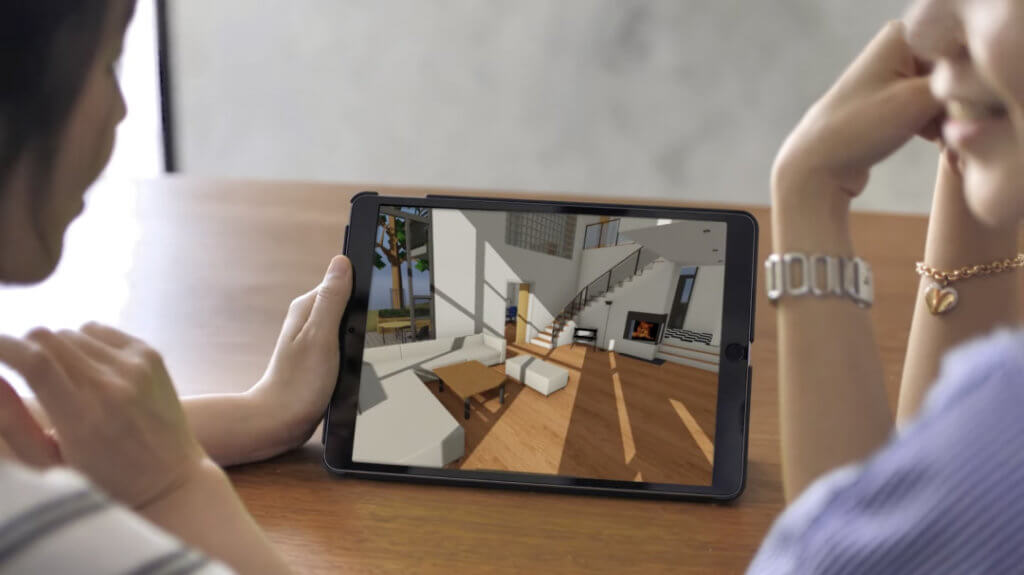
GRAPHISOFT BIMx lets you create an interactive walk-through model out of your ARCHICAD project. The functions needed to create and share a BIMx model are included in ARCHICAD.
The BIMx model is known as a “Hyper-model” (file format .bimx). The BIMx model can contain the full documentation of your ARCHICAD project: the 3D model, plus views, layouts and camera paths.
Open and explore the BIMx model content
• on the free BIMx Desktop Viewer , installed with ARCHICAD
• on the free BIMx mobile app on any mobile device
• on the more sophisticated BIMx PRO mobile app, with extra features
Share the BIMx model
• to the BIMx Model Transfer Site at bimx.graphisoft.com
Что такое bimx для archicad 16
BIMx: замечания относительно Размера модели, Текстур и Теней
Эти советы направлены на оптимизацию модели ARCHICAD перед ее сохранением в BIMx.
Настройки Единиц Модели ARCHICAD (например, Имперские или Метрические) будут использоваться при просмотре модели BIMx.
Если ваша модель BIMx будет просматриваться на портативных устройствах, таких как iPhone, то может потребоваться дальнейшая оптимизация для повышения производительности.
Для получения дополнительной информации воспользуйтесь страницей BIMx на сайте GRAPHISOFT при помощи этой ссылки .
Использование Полей ID Элементов (для Гипермоделей BIMx в Teamwork)
Каждый элемент ARCHICAD имеет идентификатор ARCHICAD ID, назначаемый по умолчанию в панели Классификаций и Свойств диалога Параметров Инструмента. Для наилучшей организации взаимодействия (в среде Teamwork) следует убедиться, что элементам модели ARCHICAD назначены эти ID Элементов.
Фоновое взаимодействие: В режиме Teamwork BIMx поддерживает интеллектуальную обратную связь при выборе нескольких элементов на основе их ID. Если в модели ARCHICAD отсутствуют ID Элементов, то обратная связь в BIMx на основе ID становится недоступна.
Ограничение Элементов Модели
Если вы работаете в условиях использования ограниченной памяти при создании модели BIMx (например, при инициализации Глобального Освещения), постарайтесь уменьшить или совсем убрать следующие компоненты модели. Это поможет оптимизировать размер модели и улучшить производительность BIMx:
• мебель (стулья и т.п.);
• GDL-объекты (например, ручки дверей);
• другие объекты, создаваемые в расширениях (например, деревья, автомобили, люди);
• прочие несущественные элементы.
Как правило, подобные элементы требуют очень больших объемов памяти. Например, один стул может использовать больше памяти, чем все стены проекта.
BIMx поддерживает следующие форматы текстуры поверхностей: jpg, bmp, tif, tga, png, gif.
Если по каким-либо причинам текстуру не удается загрузить, тогда использующий ее объект будет воспроизводиться в цвете покрытия.
BIMx поддерживает спецэффекты альфа-канала для рисунков в формате 32-бит tif, tga и bmp. Чтобы спецэффекты альфа-канала были распознаны внутри BIMx, следует активировать эффект прозрачности для текстуры покрытия ARCHICAD.
Однако прозрачные объекты не обязательно визуализируются с использованием правильного порядка воспроизведения — достижение этого существенно влияет на производительность.
Тени в BIMx визуализируются с использованием расширения Аппаратного ускорения ARB_shadow. Это расширение осуществляет визуализацию сцены с учетом наличия текстуры и характеристик солнца. Накладываемая текстура проецируется в сцену, а Аппаратное ускорение определяет, какие пикселы находятся в тени, а какие нет. Чем больше размер обрабатываемой текстуры, тем выше качество создаваемых теней. Максимальные размер определяется графической картой (наличие графической памяти определяет максимальный допустимый размер текстуры). Некоторые графические карты имеют 256 МБ встроенной памяти, однако допускают обработку текстуры с максимальным размером 4096 x 4096. Текстура тени обычно 24-разрядная.
• Текстура тени размером 8192×8192 использует 200 МБ видеопамяти.
• Текстура тени размером 4096×4096 использует 50 МБ видеопамяти.
• Текстура тени размером 2048×2048 использует 12.5 МБ видеопамяти.
BIMx пытается автоматически сгенерировать самую большую текстуру тени, начиная с размера 8192×8192. Если это не удается, то делается попытка на размере в два раза меньше, и т.д.
Для отключения отбрасывания теней от солнца установите значение яркости теней от солнца приближенным к нулю.
Артефакты теней, отбрасываемых от солнца
В зависимости от размера памяти видеокарты и (физического) размера модели тени, отбрасываемые от солнца, могут содержать артефакты. Это обусловлено тем, что BIMx не может поместить всю модель в видеопамять с учетом достижения хорошего качества. Нужное качество достигается уменьшением модели и увеличением размера памяти видеокарты. Глобальное освещение создает хорошие, но статичные тени.
BIMx
Your ‘best anywhere’
presentation and
collaboration tool
BIMx – Explore, engage, mobilize
Bridge the gap between the design studio, the client’s office, and the construction site with award-winning BIMx, the most popular presentation and coordination app for desktops, mobile devices, and the internet.
Present with powered up BIMx
Drive the design narrative with clients on-site, to accelerate the approval process. Professional presentation solutions let you control the experience.
We’ve got Issues
Use BIMx Issues, to markup any 2D or 3D views during on-site visits or off-site meetings. Issues are BCF compliant, so they stay trackable throughout the entire design process.
Sign in for more BIMx features, at no extra cost
To access additional features in BIMx, just sign in. Most previously Pro features are now available to everyone – all you need is a free Graphisoft Account. Extra collaboration features are available with the new account-based licensing on mobile devices.
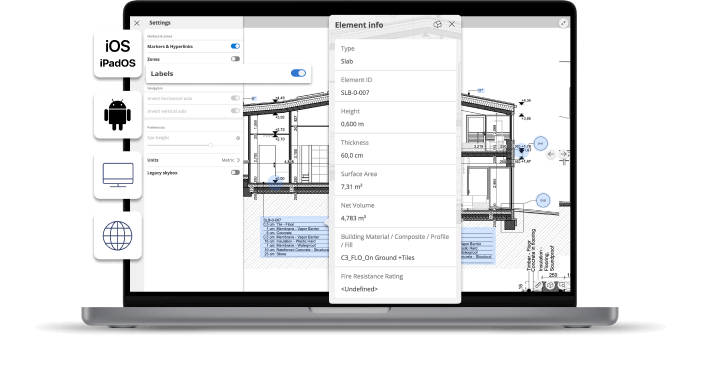
Information at your fingertips
Access the exact specifications of building design elements on the go – without switching back and forth between layouts and 3D views – access 3D element information easily from 2D layouts. And Associative labels make it easy to get the information you need the most.
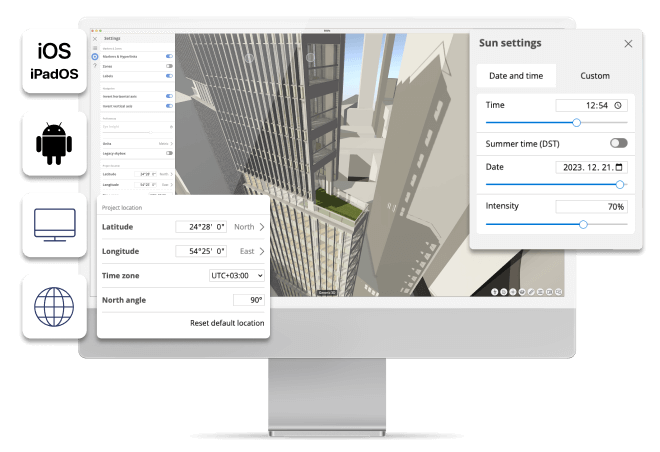
Accurate Sun Positioning in BIMx
Involve your clients in important design decisions. With Accurate Sun Positioning in BIMx, you can make the most of natural light and optimize your design for the environment.
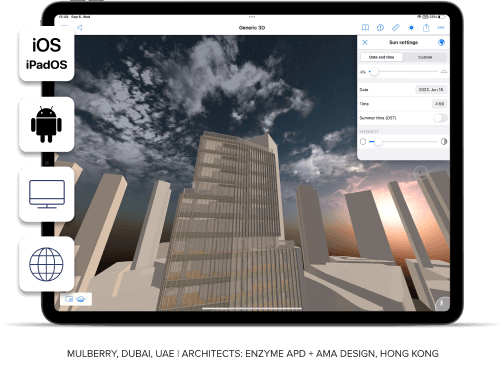
Mulberry, Dubai, UAE | Architects: enzyme APD + AMA Design, Hong Kong
The sky is the limit
Enrich your design presentations with added visual context from the dynamic skybox in BIMx. This precise visualization works with the sun positioning feature to show an impressive, accurate airspace that matches the time of day you set to enhance the realism of your projects!
Explore
Simple, game-like navigation makes BIMx the ‘best anywhere’ presentation and collaboration tool on the market. Drive the design narrative on the building site for fast, specific client feedback.
CASA EL VERGEL
Ecuador
© INAI Arquitectura
BIMx is the way to be connected with the entire world. It’s a universal language.
Paúl Vázquez, CEO, INAI Arquitectura, Ecuador, Ecuador
Paúl Vázquez
CEO
INAI Arquitectura, Ecuador

Game-like experience
Share your design with all your project stakeholders — there’s no need for training — just dive right in!
Complete project documentation
BIMx Hyper-models contain hyperlinks to the complete 2D project documentation and more. No more searching and opening the wrong sheets — hyperlinks will take you to the right one.
2D and 3D explained
Team members or clients not trained in reading 2D plans will instantly understand your design intent when they see the project in 3D.
Next-generation BIMx Web and Desktop apps
Faster loading, smoother navigation, and new customization tools make BIMx Web and Desktop apps a powerful BIM collaboration tool.
BIMx Desktop moved to Stores
Download the latest version of BIMx Desktop Viewer with additional features directly from your app store – and take advantage of automatic updates, faster access to new features and fixes, and an overall improved software delivery experience.
BIMx Presents…
Drive the narrative of your design for faster, specific feedback with BIMx Presenter and Gallery. Perfect for in-person presentations or to invite clients to explore on their own time.
Villa Funk | Architect: Frode Saltkjelvik, Norway
Boost your sales! Promote your design in a unique way by embedding your design on your own website with BIMx Web Viewer.
Engage
A digital model means no more paper on the building site or at client meetings. All the relevant model data is at your fingertips for easy access and sharing.
Mulberry
Dubai, United Arab Emirates
BIMx is a powerful tool to engage with the client.
Eugenio Fontán, BIM Director, co-founder, Enzyme, Hong Kong
Eugenio Fontán
BIM Director, co-founder
Enzyme, Hong Kong

Say goodbye to paper
Save paper using digital documentation that is always up to date and at your fingertips.
3D models with meta-data
Get instant access to all building-element information such as fire-ratings or manufacturer-specific properties.
No project is too big
Engage clients on projects of any size thanks to model streaming technology that works just like a computer game.
Connect to BIM databases
Facility managers and owners can access and integrate Facilities Management databases for streamlined maintenance using the BIM model.
Share models via the BIMx Model Transfer Site
Upload BIMx Hyper-models to the BIMx Model Transfer site and engage your clients using a simple web link — there’s no need to install or download an app. SSA and Graphisoft Forward subscribers can create private models — which can also be embedded on websites — to share with select customers.
Share BIMx Hyper-models privately
Graphisoft Forward and SSA subscribers can create and share private BIMx hyper-models – which can also be embedded on websites – to share with selected customers and clients.
Mobilize
Take it anywhere. Run BIMx on any mobile device without special hardware. Review designs and suggest changes on the go — there’s no need to head back to the office.
Crimson Resort and Spa
Boracay, Philippines
© Aidea
BIMx is the way to be connected with the entire world. It’s a universal language.
Abelardo “Jojo” Tolentino Jr., President & CEO, INAI Arquitectura, Aidea, Philippines
Abelardo “Jojo” Tolentino Jr.
President & CEO
Aidea, Philippines

Get started with BIMx
Download the app to your desktop or mobile device or view the model in your browser right away — it’s free!
Extra BIMx features
Sign in to your Graphisoft account for additional collaboration features.
Ingenuity Centre
Nottingham, United Kingdom
BIMx is an incredibly powerful tool.
Rob Jackson, BIM Manager and Associate Director, Bond Bryan Architects, UK
Rob Jackson
BIM Manager and Associate Director
Bond Bryan Architects, United Kingdom

Download BIMx


Use the BIMx Model Transfer Service
Host, view and download BIMx Hyper-models from BIMx Model Transfer

Start strong with
Archicad Collaborate
Archicad + BIMcloud + BIMx Pro: Better together

Next steps

Get started with Archicad
Download a free 30-day trial version of Archicad! Visit Graphisoft Learn and take a course to get the most out of the latest innovations!
Join the Community
Join the Graphisoft Community to get expert help through a state-of-the-art, user-friendly experience that combines Archicad Talk and Help Center into one, easy-to-search resource.

Get to know BIMcloud
Get secure, real-time collaboration between project team members regardless of the size or complexity of the project, the location of the offices, or the speed of the internet connection. Available in both private and public cloud configurations on standard hardware and software as a service that allows even smaller offices to take advantage of fast, efficient, and secure access to shared projects in real time.