
Статья Как удалить Visual Studio?
1) Стандартным способом удаления Visual Studio является запуск установщика через Панель управления -> Программы -> Программы и компоненты -> Удаление программ.
2) Если по каким-то причинам это сделать не удается, Вы можете форсировать процедуру удаления при наличии установочного диска.
Пример для Visual Studio 2013 Ultimate:
D:\vs_ultimate.exe /uninstall /forceгде D:\ буква диска, куда вставлен дистрибутив Visual Studio.
а имя vs_ultimate.exe — имя главного установочного файла (возможно, это будет работать и с другими версиями, просто поменяйте имя файла на свое).
____________________________________________
Для решения проблем с установкой / удалением Visual Studio 2015, Вы можете обратится к этому руководству:
Saved searches
Use saved searches to filter your results more quickly
Cancel Create saved search
You signed in with another tab or window. Reload to refresh your session. You signed out in another tab or window. Reload to refresh your session. You switched accounts on another tab or window. Reload to refresh your session.
This repository has been archived by the owner on Feb 21, 2019. It is now read-only.
Visual Studio Uninstallation sometimes can be unreliable and often leave out a lot of unwanted artifacts. Visual Studio Uninstaller is designed to thoroughly and reliably remove these unwanted artifacts.
License
microsoft/VisualStudioUninstaller
This commit does not belong to any branch on this repository, and may belong to a fork outside of the repository.
Switch branches/tags
Branches Tags
Could not load branches
Nothing to show
Could not load tags
Nothing to show
Name already in use
A tag already exists with the provided branch name. Many Git commands accept both tag and branch names, so creating this branch may cause unexpected behavior. Are you sure you want to create this branch?
Cancel Create
- Local
- Codespaces
HTTPS GitHub CLI
Use Git or checkout with SVN using the web URL.
Work fast with our official CLI. Learn more about the CLI.
Sign In Required
Please sign in to use Codespaces.
Launching GitHub Desktop
If nothing happens, download GitHub Desktop and try again.
Launching GitHub Desktop
If nothing happens, download GitHub Desktop and try again.
Launching Xcode
If nothing happens, download Xcode and try again.
Launching Visual Studio Code
Your codespace will open once ready.
There was a problem preparing your codespace, please try again.
Latest commit
0444aa5 Feb 20, 2019
Only VS2017 Preview 1 was Burn-based.
Git stats
Files
Failed to load latest commit information.
Latest commit message
Commit time
September 3, 2015 15:49
November 24, 2015 14:53
September 9, 2015 11:12
April 14, 2016 18:21
July 18, 2016 19:49
September 3, 2015 15:49
September 3, 2015 15:49
September 3, 2015 15:49
December 4, 2015 21:39
February 20, 2019 09:33
April 12, 2016 11:42
March 29, 2016 10:41
September 22, 2015 14:56
ReadMe.md
Visual Studio Uninstaller
This executable is designed to clean up and delete Preview, RC and final releases of Visual Studio 2013 and Visual Studio 2015. It is designed to be used as a final resort to clean up a system of remaining artifacts from a non-successful installation, instead of having to reimage the machine.
WARNING: running this application may stop earlier remaining installations of Visual Studio 2012 and earlier from working, because Visual Studio 2012 and below share MSI upgrade code with Visual Studio 2013 and above.
This app finds and uninstall every Preview/RC/RTM release of Visual Studio 2013 and 2015. It will first execute uninstall command on the bundle, and then it will uninstall any stale MSIs. The application contains a master list of Bundle IDs and upgrade codes for every MSI ever chained in by Visual Studio 2013-2015. It will not uninstall MSU or MSIs that marked as ReallyPermanent.
Contributing and building this project
Our goal is to provide a way to thoroughly and reliably remove Visual Studio. This program first attempts to force uninstall Visual Studio from top down, and then remove any remaining MSIs and MSUs. This program will work on any BURN based Visual Studio; that means this program is only capable of removing Visual Studio 2012 — 2015.
How to debug Total Uninstaller remotely?
IMPORTANT: Do not run this on your development machine without setting the DoNotExecuteProcess flag. This will prevent the application from uninstalling the very development environment you are working from.
To get the most out of the debug experience, I recommend the following:
- Create a VM with Dev14 installed.
- Start the 64-bit remote debugger with administrative privileges.
- Copy the debug Bin directory to the VM.
- Run the application with Administrative privileges.
- Create a snapshot of the machine using Hyper-V.
- Start a remote debugging session to your VM and attach.
- Step through to your hearts delight.
- If you find something you don’t like, restore the snapshot and recopy the Bin directory and go to step 6 again.
Using Total Uninstall:
- Download and unzip the zip file to a folder.
- Open cmd.exe with Administrative privileges
- Execute Setup.ForcedUninstall.exe
- Press Y and hit enter to run the application.
- If the application ask to reboot the system, please reboot the system, and rerun this application again.
Commands:
- help or /help or /? : Print usage.
- break : run the application and pause until the user hit any key.
- noprocess : run the application but does not uninstall anything.
- Periodically update of the Total Uninstaller to ensure the data used for uninstallation is up to date with the most recent Visual Studio releases.
Please file an issue request as necessary.
These are general guidelines for source code within this solution:
- Parameters should be declared with SAL annotation.
- Input string parameters should be declared as LPCWSTR.
- Output string parameters should be declared as CStringW& references.
- Class members should not be references or pointers, but be created and destroyed with the owning class.
About
Visual Studio Uninstallation sometimes can be unreliable and often leave out a lot of unwanted artifacts. Visual Studio Uninstaller is designed to thoroughly and reliably remove these unwanted artifacts.
Как полностью удалить Visual Studio Express 2013?
Как полностью удалить Visual Studio Express 2013? Т. е. со всеми компонентами (SQL Server, пакеты локализации и т.д.).
- Вопрос задан более трёх лет назад
- 10924 просмотра
Комментировать
Решения вопроса 0
Ответы на вопрос 3
Control Panel -> Programs and Features -> выбрать нужное -> uninstall
Ответ написан более трёх лет назад

Сергей Кононенко @HackFeed Автор вопроса
Ну это то понятно. Но вот со всеми компонентами как?
Присоединяюсь к вопросу.
Через Control Panel -> Programs and Features -> выбрать нужное -> uninstall
Visual Studio 2013 professional удаляется уже второй день, прогрессбар удаления стоит на месте (при этом процесс не завис).
Ответ написан более трёх лет назад
Комментировать
Нравится Комментировать
Разработчик
Попробуй сначала перед удалением сделать исправить. Я раза 2 — 3 делал исправить потом удалилось. Правда там ещё попутных тентаклей куча, как их безопасно удалить сам не знаю.
Ответ написан более трёх лет назад
Комментировать
Нравится Комментировать
Ваш ответ на вопрос
Войдите, чтобы написать ответ

- Windows
Как изменить цвет выделения в контекстном меню последних версий Windows 10?
- 1 подписчик
- 16 часов назад
- 47 просмотров
Как полностью удалить следы установки Visual Studio Pro 2013, чтобы установить community?
История такая: была установлена VS 13 community, после снес ее, хотел посмотреть на visual studio 2015 ctp 6. Установил, при установке было несколько ошибок, не критичных. Интернеты говорят такая проблема не у меня одного была, ее решения было описано. Поигрался с ней, удалил. Решил заново вернуть VS 13 community, при установке сразу вылезла ошибка, необходимо сначало удалить VS 13 pro, но как так, оно же не устанавливалось вообще. Установил ртиалку VS 13 pro, установка прошла нормально без каких либо ошибок. Снес ее, как и просил инсталятор VS 13 community, ошибка никуда не делась, опять просит удалить сначало VS 13 pro. Все сопутствующие компоненты тоже были удалены во всех случаях. Пробовал чистить реестр как софтом так и вручную, удалил ключи которые нашел софт и я сам, искал по visual studio professional 2013. Гугление не дало ответа на вопрос. Может кто сталкивался? Прошу помочь.
- Вопрос задан более трёх лет назад
- 13888 просмотров
Комментировать
Решения вопроса 0
Ответы на вопрос 4

Человек атомоход
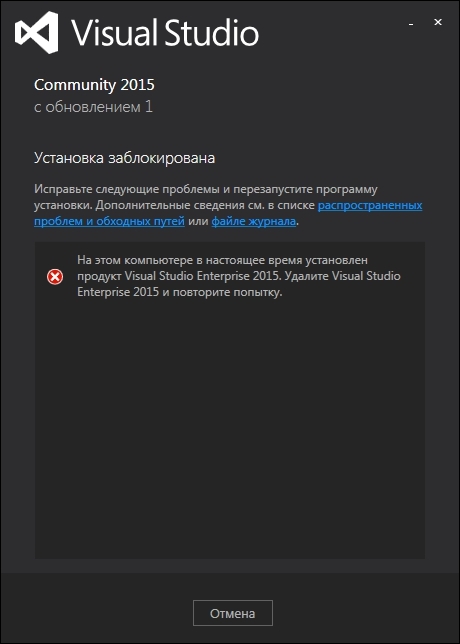
Решал аналогичную проблему при переходе с 2012 с помощью точек восстановления, потом снимками реестра.
Сейчас снимков нет и проблема в следующем:
Она смотрит в реестр и видит зависимости, поэтому не ставится. Пока ищу решение.
Ответ написан более трёх лет назад
Нравится 1 2 комментария
Проделаны следующие действия, но проблема осталась
1. Посмотрел Лог
[1108:1BD0][2016-02-09T19:52:18]i052: Condition ‘(VersionNT = v6.3) AND (netfxfullredist_43_DetectKey < v4.5.25000)' evaluates to false.
[1108:1BD0][2016-02-09T19:52:18]i000: MUX: Stop Block: EnterpriseBlock : На этом компьютере в настоящее время установлен продукт Visual Studio Enterprise 2015. Удалите Visual Studio Enterprise 2015 и повторите попытку.
2. Пнизил версию фреймворка и удалил kb3022398
3. Посмотрел Лог
[1480:0EC8][2016-02-09T20:52:43]i103: Detected related package: , scope: PerMachine, version: 14.0.23107.0, language: 0 operation:
[1480:0EC8][2016-02-09T20:52:43]i052: Condition ‘(VCRedist_D14x86_KeyExists AND VCRedist_D14x86_KeyValue >= «v14.0.23506.00»)’ evaluates to false.
4.Google
https://msdn.microsoft.com/ru-ru/library/bb164659.aspx
https://social.msdn.microsoft.com/Forums/en-US/bf5.
5. Глубокая чистка реестра, в частности, ветка Software
Если у Вас есть соображения на эту тему, поделитесь пожалуйста.

Никита Федотов: Та же ситуация. Была установлена VS 2015 Community она дала сбой, спустя неделю. Ошибки которые описаны в инете (уже не помню) Решил поставит VS 2012 любимую родную. Всё было ок, а через 2 недели вдруг это (The application was unable to start correctly 0xc0000142). Путался делать Recovery — не помогло. Сносил ставил заного — не помогло. Реестры чистил (коряво это было, ну как смог). Также ищу, может кто знает ещё что сделать.