
What is a Snapchat Cameo: How to get, change, and delete your cameo
If you’ve ever wanted to star in your own GIFs, you can now do so, with Snapchat Cameos. The feature allows users to paste their heads over a looping video; and the best part is, there are hundreds of Cameos to choose from! If you thought Bitmoji stickers were personalized, welcome to a whole new ballgame.
Contents show
- What are Snapchat Cameos?
- How to set up Snapchat Cameos
- How to do a two-person cameo on Snapchat
- How to use Snapchat Cameos
- How to change your Cameo
- How to delete your Cameo
What are Snapchat Cameos?
Building on the huge success of Bitmoji stickers, which basically pasted your Bitmoji avatar in relatable situations, Snapchat Cameos are here to bring your messages to a new level of personalized.
Snapchat Cameos require you to take a picture of your head and then stick that image on top of an existing video from Snapchat’s own video bank. So now, instead of using your animated Bitmoji avatar, you can send a personalized GIF-like video to better portray your feeling!
How to set up Snapchat Cameos
The Snapchat Cameo option is already present in your emoji section, but you probably haven’t noticed it yet(yes, there’s a lot going on there). In order to start using Cameos, you first have to set up your Cameo selfie.
To set up a new Cameo selfie, launch the Snapchat app, and open a chat with any user. Now tap the emoji option next to the chatbox. You should see all your regular Bitmoji stickers (if you have linked Bitmoji to Snapchat)
In the bottom panel, tap the option next to ‘Bitmoji’. The icon displays a face with a + sign on it.

Now tap on any video, and get ready to take a selfie. Position your face perfectly within the given cutout (don’t worry, you can always take another selfie if the first one doesn’t work out), and click the picture.

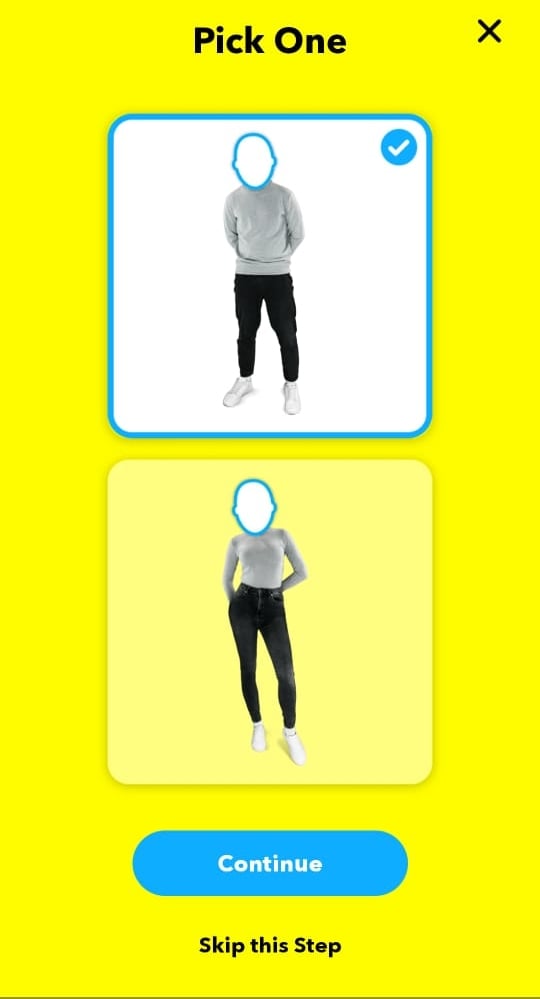
Next, select your gender, and tap ‘Continue’. You can also choose to skip this step. Now, wait and watch while the app creates your own arsenal of you-faced Cameos! If you do not like the selfie you took, you can choose ‘Retake Selfie’ at this point, to go back to the start.

How to do a two-person cameo on Snapchat
Cameos can also feature another person from your contact list! You will automatically be paired with the person you are chatting with. If you don’t want ‘Two-person Cameo’, select the ‘Disable Two-Person Cameos’ option under the OK button. Otherwise, go ahead and finish up! You should now see yourself staring in your own Cameos.

Note: If you disable ‘Two-person Cameo’, and want to enable it at a later point in time, you will have to remove your Cameo selfie, and redo the process. Read on to learn more.
How to use Snapchat Cameos
Snapchat Cameos work in a similar way to Bitmoji stickers. You must first enter a chat with a user in Snapchat. Since Snapchat Cameos do now have a search option, you will need to use the chatbox itself.
Snapchat Cameos are designed to understand what it is you are talking about in your text, and give you related content. So, once you have typed out your message, view your Cameos by tapping on ‘Emoji’. Your Cameos will appear below your Bitmoji stickers. Select the Cameo you would like to send and simply tap it.

Tip: You can even use single words to find Cameos. For example, typing ‘Hello’ in the chatbox, will bring up related Cameos of you saying Hello.
How to change your Cameo
If it has been a while, and you want to change your Cameo selfie, the only way to do it, it by deleting your old selfie. There is no option to ‘take a new Cameo selfie’.
So, to change your cameo on Snapchat, delete your current one first the guide given below, and then create one again as per the guide given above.
How to delete your Cameo
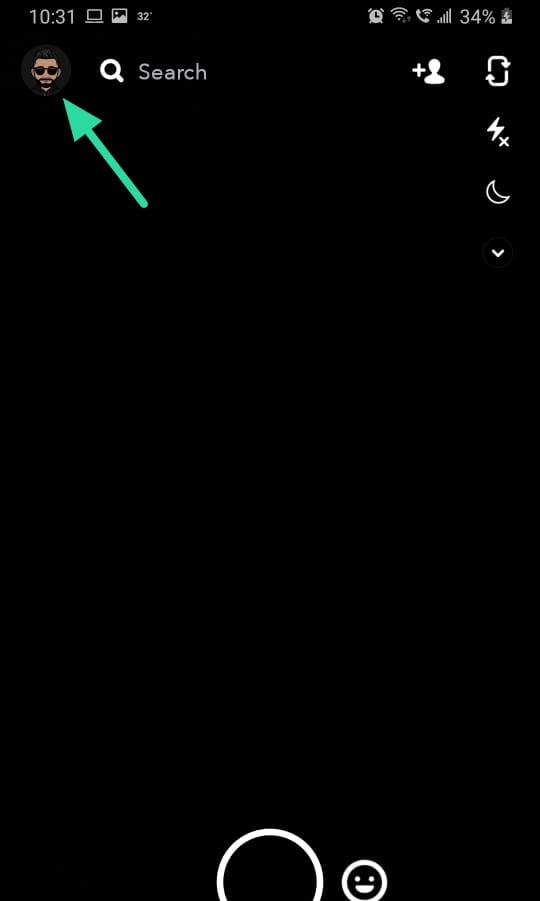
To delete your Cameo selfie, launch the Snapchat app, and tap on your Bitmoji in the top left corner of the screen. Now go to Settings, and scroll down right to the bottom. Select ‘Clear My Cameos Selfie’, then ‘Clear’. Now simply follow the guide above to take a new Cameo selfie.


Well, now you know how to create and send Snapchat Selfies! Have fun!
Related:
- How to take a video on Snapchat without holding the button down
- How to change the emojis on Snapchat [May 2020]
How to Change Your Cameo Picture or Friend in Snapchat
Using your face to create funny clips is one of the latest features on Snapchat. Whenever you want to express how you’re feeling on the platform, there’s no better way than to use Cameos. What’s more, you can even add your friend’s selfies to Cameos to make them laugh. It doesn’t get much better than that.

If you were wondering how to manage your Cameos on Snapchat, we’ve got you covered. This article will explain how to create, modify, and share Cameos with your friends and family.
For cameo troubleshooting, check out this article on what to do if cameos are not showing or available on Snapchat.
How to Change Cameo Picture on Snapchat for Android and iPhone
Since users often want to change their Cameos, Snapchat has simplified this process. Now, you can do it whenever you like.
Once you make the selfie you like, you can save it and use it in future Cameos. When it’s time to change your Cameo, just follow these steps:
- Open the Snapchat app.

- Enter one of the chats.

- Tap on the smiley face icon.

- Tap on the Cameo icon at the bottom of your screen.

- Long-press the cameo you’d like to use.

- Choose Create My Cameo.

- Take the photo and tap Create my Cameo.

Now you can use your new cameo on Snapchat.
How to Change Cameo Friend on Snapchat for Android and iPhone
If you can’t have a shared photo with some of your friends, Snapchat allows you to feature friends in unforgettable two-person Cameos. Not only that, but you can also choose among dozens of backgrounds and then simply add your friend’s selfie to create something unique.

You can choose with whom you want to share your Cameos, but they have to enable you to use theirs. Here’s how the process works:
- Go to My Profile and tap on Settings.

- Under MY ACCOUNT, find and tap on Cameos.

- Find the Who Can and tap on Use My Cameo Selfie.

- You can decide whether Everyone, My Friends, or Only Me has access to your Cameos.

Depending on your choice, you’ll be able to feature your friends in Cameos and vice versa. But if you have blocked someone on Snapchat (or vice versa), the two of you won’t be able to create a two-person Cameo.
How to Delete Your Cameo
Sometimes, we can use one Cameo too often and realize that it’s time to remove it. When that happens, you may decide to delete it. Here’s how:
- Open your Snapchat app.
- Tap on your profile photo and tap Settings.
- Under MY ACCOUNT, click on Cameos.
- Tap Clear My Cameos Selfie and confirm by tapping Clear.

You can also hide your Cameo selfies from everyone if you’d like to get back to them later. Here’s how you can make them private:
- Open Snapchat.
- Find Settings and tap on Cameos.
- Find the Who Can… section and tap on Use My Cameos Selfie . Here, you can choose Only Me , and nobody else will be able to access your cameos.
Frequently Asked Questions
If you have more questions about Snapchat, we’ve included more answers here!
What is a Snapchat Cameo?
A Snapchat Cameo is simply a selfie but with a background. Essentially, you are the cameo in a scene or with your face on an object. Of course, if you have your account set to allow others to use your cameo (as explained above), your friends can add it to their Story too!
The feature is just another fun take on Snapchat’s already fantastic camera/filter lineup.
Can I stop someone from using my cameo?
Yes, but that depends on your privacy settings. If you’ve set your ‘Who can’ settings to ‘Only Me’, then no one can use your cameo.
Of course, as explained above, you can also let only your friends use your cameo or everyone, depending on how confident you are.
Be the Star of Your Profile

Cameos are an excellent way to express yourself or bring your conversations to life. They’re similar to Bitmoji, but they use your real face to make GIF-like videos of your reactions andThey’rens.
Now that you know more about how Cameos work and how to share or hide them from your friends, you can use them in your communication with other Snapchat users. Have you been using Cameos before? What kind of emotion would you express with a Cameo? Would you share them with all your friends or with a select few?
Let us know in the comments section below.
Nachedeu
Морган уходит из X Factor 2023? Что будет после последней серии
November 19, 2023 by nachedeucom
Новость не является официальной и неизвестно, станет ли она официальной, но слухи настойчивы: Морган может покинуть «X Factor» после столкновений и споров последних дней.. Никакой официальной позиции Sky не разглашается – и решение, вероятно, все еще рассматривается руководителями программы и телекомпанией – но слухи о скором прощании с талантом музыканта-тренера множатся. Нападения на Федеса, Амбру … Read more
Генеративный ИИ заставляет перидоты (Niantic) реагировать более естественно и непредсказуемо на реальный мир.
November 19, 2023 by nachedeucom
МАДРИД, 18 ноября (Portaltic/EP) – Перидот Он Ниантик мобильная игра который поощряет заботу о домашних животных и жизненный опыт в дополненной реальности, которая теперь включает в себя генеративный искусственный интеллект (ИИ), так что отношения этих существ с реальным миром становятся гораздо более естественными и непредсказуемыми. Перидоты или точки какие-то причудливые и красочные существа которые имеют … Read more
Тренер Бруно Женезио покидает Ренн, его заменяет Жюльен Стефан
November 19, 2023 by nachedeucom
Футбольный клуб Ренн, занимающий 13-е место в Лиге 1, объявил в воскресенье о расставании со своим тренером Бруно Женезио. из общего соглашения “, и что его заменит Жюльен Стефан, который уже возглавлял команду с конца 2018 года по март 2021 года”. По взаимному согласию с футбольным клубом «Стад Ренне», в частности по личным причинам, Бруно … Read more
Ресторанные ваучеры на покупки продуктов питания: продление до 2024 года будет рассмотрено в этот четверг на Ассамблее
November 19, 2023 by nachedeucom
Оружие покупательной способности. Продление в 2024 году Обещанная правительством возможность оплаты всех покупок продуктов питания ресторанными ваучерами будет рассмотрена в четверг Национальным собранием, заявила в воскресенье президент нижней палаты Яэль Браун-Пиве. Законопроект от групп президентского большинства («Ренессанс», «Модем», «Горизонты») будет рассмотрен «во вторник на комитете и в четверг на открытом заседании», подтвердила г-жа Браун-Пиве в … Read more
Англия: здесь послеобеденный чай в Лондоне становится незабываемым
November 19, 2023 by nachedeucom
Чаепитие на двухэтажном автобусе ЭДостопримечательности Лондона на колесах — красные двухэтажные автобусы. В 2005 году старым Routemasters, которые формировали городской пейзаж с конца 1950-х годов, пришлось расчистить улицу для безбарьерных низкопольных автобусов. С одной стороны наслаждение для пассажиров с инвалидными колясками, колясками или багажом и визуально похожее на своих предшественников, но с другой стороны ужас … Read more
«Поверни кнопку и увидишь, как поезд тронулся»: в Нозе масштабные модели по-прежнему популярны, как никогда
November 19, 2023 by nachedeucom
«Когда я был маленьким, я играл с поездами на чердаке родителей», — восторгается Жан-Бруно, глядя на это зрелище. десятки моделей Представлено в эти выходные в гимназии Пьера-Дюпюи в Нозе. Мне они понравились, я добавила украшений. В то время их легко можно было найти в продаже. » Спустя несколько десятилетий Жан-Бруно возвращается в детство как отец. … Read more
Малоизвестная пьеса Мэттью Перри дала представление о его личной борьбе
November 19, 2023 by nachedeucom
«Конец тоски» — комедия, но в ней затронуты серьезные темы и персонажи, очень близкие сердцу Мэттью Перри. Джек — нераскаявшийся алкоголик, который обращается за помощью только тогда, когда становится ясно, что его жизнь рушится, так же, как это сделал Перри, когда из-за зависимости он серьезно заболел. Нас еженедельно. В самый уязвимый момент пьесы Джек Перри … Read more
Удушающий прием Дреймонда Грина в НБА подвергся непримиримому обращению со стороны SNL
November 19, 2023 by nachedeucom
Последняя запутанная ситуация Дреймонда Грина в НБА теперь находится на территории пародии. Актер «Субботним вечером в прямом эфире» Девон Уокер пародировал непримиримого Грина, реагирующего на его удушающий захват центрового «Миннесота Тимбервулвз» Руди Гобера в скетче шоу «Обновление выходного дня» с Колином Йостом и Майклом Че. Звезда «Голден Стэйт Уорриорз» была дисквалифицирован на пять игр за … Read more
Польша среди производителей сыра. Рекорды бьются из года в год
November 19, 2023 by nachedeucom
Как сказал Марцин Вроньский, заместитель генерального директора Национального центра поддержки сельского хозяйства (KOWR): Начало промышленного производства сыра в нашей стране относится к середине 19 века. и связаны с городом Вепш недалеко от Живца, где была основана первая промышленная сыроварня, но производство сыра в более крупных масштабах фактически началось в послевоенный период. В настоящее время Польша … Read more
Детектив полиции Нью-Йорка, находящийся вне службы, обвинен в нападении на соседа Квинса
November 19, 2023 by nachedeucom
Ан Полиция Нью-Йорка В субботу детективу было предъявлено обвинение в нападении на соседа во время ссоры в свободное от работы время в Квинсе, сообщила полиция в воскресенье. Дет. Дуэйн Джеймс, 45 лет, ветеран полиции Нью-Йорка с 18-летним стажем, приписанный к Служба экстренной помощи, был арестован в субботу вечером в Квинсе и обвинен в нападении и … Read more
How to Do Cameos in Snapchat

Dave Johnson Dave Johnson is a dedicated writer with a strong focus on the ever-evolving social media landscape. Leveraging his comprehensive understanding of these platforms, he breaks down the complexities of social media apps to provide engaging and insightful content. Read more November 17, 2022
Snapchat is one of the best apps for communication because it’s very innovative and different from all the other apps. Snapchat is constantly improving, with many new features being added all the time. One of the most anticipated is the new Cameo feature.

If you’d like to know how to do cameos in Snapchat, you’re in the right place. Keep reading to get some great tips and tricks and learn how to do cameos together with your friends.
That’s right, two-person cameos are also a thing!
What Are Snapchat Cameos?
Is Snapchat allowing its users to star in movies? Well, not exactly. The cameo feature is there to convey a quick video reaction to your Snapchat friends. There are over a hundred simple animated clips to which you can attach your face.
Essentially, a Snapchat cameo is like a selfie you insert into a funny and short animated clip. When you make a Snapchat cameo clip, you can share it with your Snapchat friends via chat. You can also co-star in a Snapchat cameo with your friend, as long as they approve.

Snapchat will remember your selfie (face) and allow you to use it with multiple cameos without the need to keep taking new selfies. Of course, if you want to change the selfie and make a new one, you’re free to do that whenever you please.
Snapchat isn’t the first app that allowed people to do this sort of thing. Some Chinese apps like Zao did something similar. Nonetheless, this is a really fun and goofy feature, and it suits Snapchat very well indeed.

How to Do Snapchat Cameos?
There are two ways to make Snapchat cameos: using your profile page or accessing the option in chat directly. If you prefer to go straight to chat, skip to “Step 5” below, but the profile option is suggested for convenience.
Make or Change Your Snapchat Cameo from Your Profile Page on iOS/Android
- Open “Snapchat,” then access your profile page.
- Scroll down to the bottom and select “Create Cameos Selfie” or choose “Change Cameos Selfie” if one already exists.
- An outlined face appears. Move your camera until your face fits within the outline. Tap on “Create My Cameo” when the button turns blue.

- Choose the “male” or “female” image, then tap on the “Continue” button that turns blue. Your cameo gets created and saved.

- Access “Chat” and select the “friend(s)” that you want to receive your cameo.
- Tap on “
 ” (smiley face icon) next to the chat box.
- On the bottom, choose “
 ” (use cameo icon) for Android or “
 ” for iOS if a cameo already exists and you want to use it. Otherwise, skip to “Step 9” to create a new cameo.
 - When you choose the “use cameo” icon, select the cameo you want from the bottom of the screen, and it will automatically send the clip to your friend with your face in it. You’re done.

- If you want to create a new cameo or don’t have one yet, tap the “
 ” (add cameo icon). If you don’t see it, try reverting to “Steps 1-4” using your profile page.
- Reaccess chat, following “Steps 5-8.” Your cameo clip now gets sent to the recipient. You’re done.
Now that you’ve created your cameo outline, you can keep sending various cameos from the chat window while talking to your friends on Snapchat. You can also create quick cameos from the “Recent” tab since the app will remember your cameo pattern.
You can change this pattern whenever you please by visiting the “Cameo” menu once again and choosing a different Cameo tile. After that, tap the “More” button and choose “New Selfie.” You can also preview your selfie first.
How to Do Two-Person Snapchat Cameos?
Everything on Snapchat is more enjoyable when you do it with friends. Cameos can also be a joint effort. When you first make a cameo, you can enable two-person cameos. Tap on that and enable making them with friends.
This way, you’ll be able to enjoy making a double-feature cameo and have a lot of fun with your besties. For now, only two people can participate in Snapchat cameos, but perhaps that number will grow in the future.
Also, ensure to allow your friends to use your cameo selfie. Otherwise, cameos with friends won’t work.
- Open “Snapchat” and go to your “profile.”

- Select “Settings” and choose “Use my Cameos Selfie.”

- Choose “Everyone” or “My Friends.” If you choose “Only Me,” you won’t be able to take two-person cameos on Snapchat.

Have Fun with Your Friends
Snapchat is a fun platform that keeps on improving. Camoes is a great feature that has got many people interested in Snapchat again. The best way to test cameos is to do as many of them as possible with your friends.
You’ll surely share a laugh and some fun times. Recently, Snapchat said that they’ll be introducing new cameos in the future, so keep your eyes out for the updates. Which cameo on Snapchat is your favorite? Let us know in the comments section below.