
Импорт файла IFC
Данная процедура используется для импорта файла IFC. При выборе файла IFC для импорта указывается, следует ли создавать чертежи в проекте AutoCAD Architecture 2022 toolset или в виде набора автономных чертежей.
-
Выберите Открыть Формат IFC (Industry Foundation Classes).
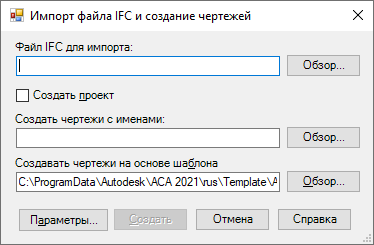
| Если требуется . | то. |
|---|---|
| импортировать файл, а также создать проект и чертежи проекта, | установите флажок «Создать проект» и введите имя папки, в которой будет создаваться проект, либо нажмите кнопку «Обзор», перейдите к нужному файлу и выберите его. Чертежи импортируются со структурой проекта AutoCAD Architecture 2022 toolset . |
| импортировать файл как автономные чертежи, | введите имя чертежа в поле «Создать чертежи с именами»; либо нажмите кнопку «Обзор», перейдите к нужному файлу и выберите его. Если не указано другое, чертеж создается в той же папке, что и файл IFC. |
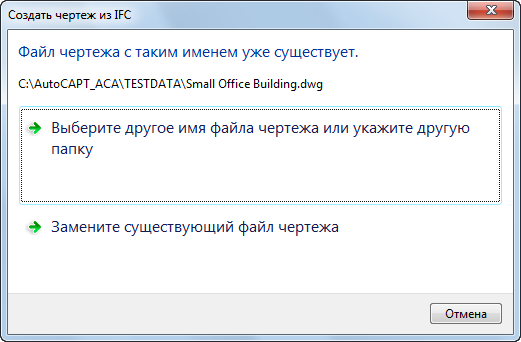
Прим.: Выбранный шаблон становится новым шаблоном, используемым по умолчанию.
| Если требуется . | то. |
|---|---|
| изменить используемый по умолчанию режим импорта всех объектов на режим выбора определённых объектов для импорта, | в окне «Выбрать объекты для импорта из файла IFC» поставьте флажки у объектов, которые требуется импортировать, и снимите флажки у объектов, которые следует пропустить. Для упрощения выбора нажмите «Выбрать все» и «Очистить все». |
| добиться соответствия имени нового созданного стиля каждому экземпляру имени стиля в файле IFC, | выберите «Создать новый стиль с уникальным именем». Если существует несколько экземпляров одного имени стиля, в конце имени добавляется номер, изменяющийся с возрастанием. |
| использовать первый экземпляр имени стиля для всех объектов, | выберите «Использовать первый обнаруженный стиль с таким именем». |
| Если. | то. |
|---|---|
| при импорте файла IFC задается функция «Создать чертежи проекта» | на экране чертежа откроется окно «Диспетчер структуры проекта». Используйте Диспетчер структуры проекта для перехода к чертежам проекта, созданным при импорте. |
| создают автономные чертежи и требуется просмотреть чертёж верхнего уровня, | нажмите «Да». |
| создаются чертежи вне проекта AutoCAD Architecture 2022 toolset и требуется просмотреть другой чертеж, | нажмите «Нет». |
Если имеется компонент объекта, который не отображается после импорта IFC-файла, откройте экранное представление объекта и перейдите на вкладку «Слой/Цвет/Тип линий», включите экранный компонент, выбрав значок горящей лампочки в столбце «Видимость».
- Закрытия всех других приложений.
- Ограничение объектов для импорта в диалоговом окне «Параметры импорта IFC».
- Перехода в 64-разрядную систему.
Понятия, связанные с данным
- Параметры импорта AD-объектов
- Импорт файлов IFC
- Рабочий процесс создания среды проекта
- Экранные представления
Файл с расширением .ifc
Файл содержит информационную модель здания или сооружения и используется для обмена данными о модели между различными системами автоматизированного проектирования, поддерживающими стандарт Building Information Modeling (BIM). Файл включает данные о пространственных элементах, материалах и формах модели строительного объекта. Работу с файлами IFC поддерживают такие программы, как Graphisoft ArchiCAD, Autodesk AutoCAD, FreeCAD и другие.
CAD tip # 13404:


However, the professional AEC versions of AutoCAD — AutoCAD Architecture and AutoCAD MEP, both are also part of the AutoCAD license — do include the standard internal IFCIMPORT command that you can use to import .ifc files. Similarly, beside reading, there is also the export command for writing IFC files.
Prices — CAD eShop:
applies to: AutoCAD � Revit � Navisworks �
| See also: | |
| Tip 12325: | How to display a DWG from Advance Steel including AS objects? (AST viewer) |
| Tip 12184: | Overview of CAD formats supported in Inventor 2020 (import/export/AnyCAD). |
| Tip 10923: | Which Autodesk products do support the IFC format? |
| Tip 9333: | Which CAD and BIM formats are supported in Autodesk Robot Structural Analysis 360? |
| Tip 8549: | CAD file formats supported in Autodesk Navisworks 2013. |
Selected tip: VBA support in Autodesk CAD software applications.
Have we helped you? If you want to support the CAD Forum web service, consider buying one of our CAD applications, or our custom software development offerings, or donating via PayPal (see above). You may also add a link to your web — like this «fan» link:
| Featuring: Export 3D VRML scenes from AutoCAD and Inventor VRMLout |
Please use these tips at your own risk.
Arkance Systems is not responsible for possible problems that may occur as a result of using any of these tips.
CAD Forum — tips, tricks, utilities, help, how-tos and FAQ for AutoCAD, LT, Inventor, Revit, Map, Civil 3D, Fusion 360, Forma, 3ds Max and other Autodesk software (support by Arkance Systems) — see About
Arkance Systems CZ s.r.o. (CAD Studio) — Autodesk Platinum Partner & Training Center & Consulting Services Partner
IFC to DXF Converter
IFC to DXF Converter is an app for fast converting IFC file(s) to DXF file format.
Powered by aspose.com and aspose.cloud
See source code in
Operation in progress
Please wait a moment
Copy & Send download link
Instantly download to your phone
Your files have been processed successfully DOWNLOAD NOW
or continue editing them in another app:

Conversion
maximum 10 files

Viewer
maximum 1 file

Watermark
maximum 10 files

TextExtractor
maximum 10 files

Metadata Extractor
maximum 10 files

Metadata Editor
maximum 10 files

Paper to CAD
maximum 10 files
Other applications.
1000 characters maximum
Press Ctrl + D to store it in your bookmarks in order not to search it again
Share on Facebook
Share on Twitter
Share on LinkedIn
See other apps
Leave a feedback
Bookmark this app
Bookmark this app
Press Ctrl + D to add this page to your favorites or Esc to cancel the action.
Send the download link to
Send us your feedback
Try other conversions:
Work with your documents in other free apps
Aspose.CAD Conversion
You can download the Nuget package or view the sample code at the Demo link in the github repository.
- Cloud API is available for developers;
- On-premise API is available for developers.
- Powered by professional.NET/Java API.
- SDS is available for popular programming languages.
Features
- Up to 10 files per one conversion
- Wide list of supported popular raster and vector formats: PDF, BMP, GIF, JPG, JPEG, JP2, PNG, TIFF, PSD, DICOM, WEBP, SVG, WMF, EMF, DXF, DWFX, DWF and OBJ.
How to use IFC converter app by Aspose.CAD?
- Open free Aspose CAD website and choose IFC to DXF Conversion application.
- Choose the converted file format from a drop-down list (the default is PDF_15); PDF_1.5 is a final-state file format for the end users, with supporting annotations, metadata, hypertext links, and bookmarks which may contain text, images, graphics, video, and audio.
- Click “Convert” for fast conversion to chosen format;
- Click “Download” (appears after the end of the conversion) to get your converted file(s) straight to your device or continue editing your file(s) with our other apps, such as:
- Viewer (1 file per time);
- Watermark (10 files per time);
- TextExtractor (10 files per time);
- Paper to CAD (10 files per time);
Your converted files and the links are stay available on our servers for the next 24 hours!
FAQ
How safe is using Aspose.com/CAD Converter?
All your converted files and the links with the results of the conversion will be deleted after 24 hours.
How fast is IFC to DXF Converter app?
This converter works fast but it depends on a drawing size. A conversion of IFC drawing may take from a few seconds to a minute.
Can I convert a few files per one process?
Yes, our app will fine with a maximum of 10 files during the conversion process.
Can I upload IFC file from my cloud storage?
You are free to use Google Drive or Dropbox to upload your files.
Can I upload IFC files from the different sources for one conversion?
Yes. Upload your files from your device, cloud storage, or use a URL.What People Are Saying
See what users say about Aspose.CAD free app
Thank you for the 12 usable files that were produced Steen! User from San Jose, USA
Superb app fully satisfied ! User from Delhi, India
10 Estrelas . User from Barcelona, Spain
MUITO BOM, E RÁPIDO . User from San Paulo, Brazil
Thanks — it was very helpful — please keep the good service. User from Frankfurt, Germany
Description of formats
IFC
(Industry Foundation Classes)Open file format used for sharing and exchanging building information models (BIMs) between different software applications used in the architecture, engineering, and construction (AEC) industry. It contains detailed information about building elements, materials, geometry, and other properties, enabling efficient collaboration and coordination among different stakeholders in a construction project. IFC is an important standard for BIM interoperability, allowing professionals to work together seamlessly and improve project outcomes.
DXF
(Drawing Interchange Format) or (Drawing Exchange Format)Vector file format for enabling data interoperability between AutoCAD and other programs. DXF is an open-source file format that lets you avoid Autodesk programs. DXF files stay accurate before and after the conversion.
You will need to convert DXF files to an STL format to print them in 3D.
The user needs to know the drawing unit because DXF coordinates are always without dimensions. DXF files are most popular in transferring the design details among parties engaged in designing, building, and maintaining buildings, aircraft, ships, etc.
Other Supported Conversions
You can also convert IFC into many other file formats. Please see the complete list below.
Export to raster formats is Powered by Aspose.Imaging.