
Синтаксис строки подключения
Каждый поставщик данных платформы .NET Framework имеет объект Connection , наследующий из DbConnection, а также из свойства ConnectionString, зависящего от поставщика. Конкретный синтаксис строки подключения для каждого поставщика приведен в его свойстве ConnectionString . В следующей таблице представлен список четырех поставщиков данных, поставляемых в составе платформы .NET Framework.
| Поставщик данных .NET Framework | Описание |
|---|---|
| System.Data.SqlClient | Предоставляет доступ к данным для Microsoft SQL Server. Дополнительные сведения о синтаксисе строки подключения см. в разделе ConnectionString. |
| System.Data.OleDb | Предоставляет доступ к данным источников данных OLE DB. Дополнительные сведения о синтаксисе строки подключения см. в разделе ConnectionString. |
| System.Data.Odbc | Предоставляет доступ к данным источников данных ODBC. Дополнительные сведения о синтаксисе строки подключения см. в разделе ConnectionString. |
| System.Data.OracleClient | Предоставляет доступ к данным Oracle версии 8.1.7 или старше. Дополнительные сведения о синтаксисе строки подключения см. в разделе ConnectionString. |
Построители строк подключения
В ADO.NET 2.0 появились указанные ниже построители строк соединения для поставщиков данных .NET Framework.
- SqlConnectionStringBuilder
- OleDbConnectionStringBuilder
- OdbcConnectionStringBuilder
- OracleConnectionStringBuilder
Построители строк соединения позволяют создавать во время выполнения синтаксически правильные строки соединения, и поэтому в коде не требуется вручную объединять значения строк соединения. Дополнительные сведения см. в статье Connection String Builders (Построители строк подключения).
Проверка подлинности Windows
Для соединения с источниками данных рекомендуется использовать проверку подлинности Windows (которую также называют встроенной безопасностью), если эти источники ее поддерживают. Синтаксис строки подключения зависит от поставщика. В следующей таблице показан синтаксис проверки подлинности Windows, который используется с поставщиками данных платформы .NET Framework.
Значение Integrated Security=true вызывает исключение при работе с поставщиком OleDb .
Строки подключения SqlClient
Синтаксис для строки подключения SqlConnection документирован в свойстве SqlConnection.ConnectionString. Свойство ConnectionString используется для возврата или задания строки подключения для базы данных SQL Server. Если необходимо подключиться к более ранней версии SQL Server, следует использовать поставщик данных .NET Framework для OleDb (System.Data.OleDb). Наиболее распространенные ключевые слова строк соединения также соответствуют свойствам SqlConnectionStringBuilder.
Для ключевого слова Persist Security Info используется значение по умолчанию false . Значение true или yes позволяет получить из строки соединения конфиденциальные данные (в том числе идентификатор пользователя и пароль) после открытия соединения. Задайте для Persist Security Info значение false , чтобы убедиться, что ненадежный источник не сможет получить доступ к конфиденциальным данным строки подключения.
Проверка подлинности Windows при работе с SqlClient.
Все следующие формы синтаксиса используют для подключения к базе данных AdventureWorks, размещенной на локальном сервере, проверку подлинности Windows.
"Persist Security Info=False;Integrated Security=true; Initial Catalog=AdventureWorks;Server=MSSQL1" "Persist Security Info=False;Integrated Security=SSPI; database=AdventureWorks;server=(local)" "Persist Security Info=False;Trusted_Connection=True; database=AdventureWorks;server=(local)" Проверка подлинности SQL Server с использованием SqlClient.
Для соединения с SQL Server предпочтительно использовать проверку подлинности Windows. Однако если требуется проверка подлинности SQL Server, то имя пользователя и пароль указываются с помощью приведенного ниже синтаксиса. В этом примере символы звездочки представляют допустимое имя пользователя и пароль.
"Persist Security Info=False;User Catalog=AdventureWorks;Server=MySqlServer" Если при подключении к Базе данных SQL Azure или хранилищу данных Azure SQL имя входа предоставляется в формате user@servername , значение servername в имени входа должно соответствовать значению, указанному для Server= .
Проверка подлинности Windows имеет приоритет над именами входа SQL Server. Если указать значение Integrated Security=true, а также ввести имя пользователя и пароль, то имя пользователя и пароль не будут учитываться и будет применяться проверка подлинности Windows.
Подключение к именованному экземпляру SQL Server
Чтобы подключиться к именованному экземпляру SQL Server, используйте синтаксис имя_сервера\имя_экземпляра.
"Data Source=MySqlServer\\MSSQL1;" Кроме того, в свойстве DataSource объекта SqlConnectionStringBuilder можно задать имя экземпляра при построении строки подключения. Свойство DataSource объекта SqlConnection доступно только для чтения.
Изменения версий системы типов
Ключевое слово Type System Version в SqlConnection.ConnectionString указывает клиентское представление типов SQL Server. Дополнительные сведения о ключевом слове SqlConnection.ConnectionString см. в разделе Type System Version .
Подключение и присоединение к пользовательским экземплярам SQL Server Express
Пользовательские экземпляры являются одной из возможностей SQL Server Express. Они дают пользователям под учетной записью с минимальными правами возможность присоединить и запустить базу данных SQL Server без прав администратора. Пользовательский экземпляр выполняется с учетными данными пользователя Windows, а не службы.
Использование ключевого слова TrustServerCertificate
Ключевое слово TrustServerCertificate применяется только при подключении к экземпляру SQL Server с допустимым сертификатом. Если ключевому слову TrustServerCertificate присвоено значение true , то транспортный уровень будет использовать протокол SSL для шифрования канала и не пойдет по цепочке сертификатов для проверки доверия.
"TrustServerCertificate=true;" Если ключевому слову TrustServerCertificate присвоено значение true и включено шифрование, то будет использоваться уровень шифрования, заданный на сервере, даже если в строке подключения Encrypt задано значение false . В противном случае соединение не будет установлено.
Включение шифрования
Чтобы включить шифрование, когда на сервере не представлен сертификат, в диспетчере конфигурации SQL Server необходимо настроить параметры Принудительное шифрование протокола и Доверять сертификату сервера. В этом случае шифрование будет использовать самозаверяющий сертификат сервера, не проверяя наличия подтверждаемого сертификата сервера.
Настройки приложения не могут снизить установленный на SQL Server уровень безопасности, но при необходимости могут повысить его. Приложение может затребовать шифрование, присвоив ключевым словам TrustServerCertificate и Encrypt значение true , гарантируя тем самым, что шифрование будет выполняться, даже если сертификат сервера не подготовлен и для клиента не настроен параметр Принудительное шифрование протокола. Но если на клиенте не установлен параметр TrustServerCertificate , то сертификат сервера, тем не менее, потребуется.
В следующей таблице перечислены все случаи.
| Параметр «Принудительное шифрование протокола» на клиенте | Параметр «Доверять сертификату сервера» на клиенте | Строка или атрибут «Шифровать/Использовать шифрование для подключения к данным» | Строка подключения или атрибут «Доверять сертификату сервера» | Результат |
|---|---|---|---|---|
| нет | Н/Д | Нет (по умолчанию) | Не учитывается | Шифрование отсутствует. |
| нет | Н/Д | Да | Нет (по умолчанию) | Шифрование применяется только при наличии подтверждаемого сертификата сервера, в противном случае попытка соединения завершается неудачно. |
| нет | Н/Д | Да | Да | Шифрование производится всегда, однако при этом может использоваться самозаверяющий сертификат сервера. |
| Да | нет | Не учитывается | Не учитывается | Шифрование применяется только при наличии подтверждаемого сертификата сервера, в противном случае попытка подключения завершается сбоем. |
| Да | Да | Нет (по умолчанию) | Не учитывается | Шифрование производится всегда, однако при этом может использоваться самозаверяющий сертификат сервера. |
| Да | Да | Да | Нет (по умолчанию) | Шифрование применяется только при наличии подтверждаемого сертификата сервера, в противном случае попытка подключения завершается сбоем. |
| Да | Да | Да | Да | Шифрование производится всегда, однако при этом может использоваться самозаверяющий сертификат сервера. |
Строки соединения OleDb
Свойство ConnectionString класса OleDbConnection позволяет получить или задать строку подключения для источника данных OLE DB (например, Microsoft Access). Строку подключения OleDb также можно создать во время выполнения с помощью класса OleDbConnectionStringBuilder.
Синтаксис строки соединения OleDb
В строке соединения OleDbConnection необходимо указать имя поставщика. Следующие строки подключения подключают к базе данных Microsoft Access, использующей поставщик Jet. Обратите внимание, что ключевые слова User ID и Password необязательны, если база данных не защищена (по умолчанию).
Provider=Microsoft.Jet.OLEDB.4.0; Data Source=d:\Northwind.mdb;User >Если база данных Jet защищена на уровне пользователя, необходимо указать местоположение файла сведений рабочей группы (MDW-файла). Файл сведений рабочей группы используется для проверки учетных данных, указанных в строке подключения.
Provider=Microsoft.Jet.OLEDB.4.0;Data Source=d:\Northwind.mdb;Jet OLEDB:System Database=d:\NorthwindSystem.mdw;User Сведения о подключении для OleDbConnection можно указать в UDL-файле; однако следует избегать этого. UDL-файлы не подвергаются шифрованию, и строки соединения хранятся в них в виде простого текста. Так как UDL-файл представляет собой внешний файловый ресурс для приложения, его нельзя защитить средствами .NET Framework. UDL-файлы не поддерживаются для SqlClient.
Соединение с Access/Jet с помощью строки замены DataDirectory
Строка замены DataDirectory поддерживается не только клиентом SqlClient . Ее можно также использовать с поставщиками данных .NET для System.Data.OleDb и System.Data.Odbc. В следующем образце строки OleDbConnection приведен синтаксис для подключения к базе данных Northwind.mdb, расположенной в папке приложения app_data. В этой папке также хранится системная база данных (System.mdw).
"Provider=Microsoft.Jet.OLEDB.4.0; Data Source=|DataDirectory|\Northwind.mdb; Jet OLEDB:System Database=|DataDirectory|\System.mdw;" Указывать расположение системной базы данных в строке подключения не требуется, если база данных Access/Jet не защищена. Защита снята по умолчанию, все пользователи соединяются как встроенный пользователь Admin с пустым паролем. База данных Jet остается уязвимой для атаки, даже если правильно реализована безопасность на уровне пользователя. Поэтому в базе данных Access/Jet не рекомендуется хранить конфиденциальные данные, поскольку схема безопасности на основе файловой системы неизбежно обладает определенной уязвимостью.
Соединение с Excel
Поставщик Microsoft Jet используется для подключения с книгой Excel. В следующей строке подключения ключевое слово Extended Properties задает специфические свойства Excel. «HDR=Yes;» показывает, что первая строка содержит имена столбцов, а не данные, а «IMEX=1;» дает указания драйверу всегда считывать «смешанные» столбцы данных как текст.
Provider=Microsoft.Jet.OLEDB.4.0;Data Source=D:\MyExcel.xls;Extended Properties=""Excel 8.0;HDR=Yes;IMEX=1"" Обратите внимание, что двойные кавычки, необходимые для ключевого слова Extended Properties , также должны заключаться в двойные кавычки.
Синтаксис строки подключения с поставщиком Data Shape
При соединении с поставщиком Microsoft Data Shape используются оба ключевых слова: Provider и Data Provider . В следующем примере поставщик Data Shape используется для подключения к экземпляру SQL Server.
"Provider=MSDataShape;Data Provider=SQLOLEDB;Data Source=(local);Initial Catalog=pubs;Integrated Security=SSPI;" Строки подключения ODBC
Свойство ConnectionString класса OdbcConnection позволяет получить или задать строку подключения для источника данных OLE DB. Строки подключения ODBC также поддерживаются построителем OdbcConnectionStringBuilder.
Следующая строка подключения использует текстовый драйвер Microsoft.
Driver=;DBQ=d:\bin Использование строки замены DataDirectory для соединения с Visual FoxPro
Следующий образец строки подключения OdbcConnection демонстрирует использование DataDirectory для соединения с файлом Microsoft Visual FoxPro.
"Driver=; SourceDB=|DataDirectory|\MyData.DBC;SourceType=DBC;" Строки подключения Oracle
Свойство ConnectionString класса OracleConnection позволяет получить или задать строку подключения для источника данных OLE DB. Строки подключения Oracle также поддерживаются построителем OracleConnectionStringBuilder.
Data Source=Oracle9i;User Дополнительные сведения о синтаксисе строки подключения ODBC см. в разделе ConnectionString.
См. также
- Строки подключения
- Подключение к источнику данных
- Общие сведения об ADO.NET
Как составить строку соединения (connection string) с источником данных
При работе с данными часто приходится использовать «строки соединения с источником данных» (connection string). Синтаксис этих строк и набор параметров, которые можно в них использовать, зависит от типа хранилища и версии драйвера. Держать всё это в уме проблематично.
К счастью, есть способ быстро и без ошибок сконструировать такую строку. Редактор для работы со строками соединения уже имеется в Виндоусе.
Создайте пустой файл с расширением «UDL»:
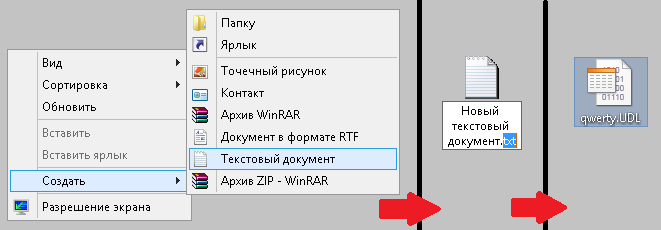
По двойному щелчку на UDL-файле по умолчанию открывается конструктор соединений. Он-то нам и нужен! Здесь мы удобным образом настраиваем все параметры подключения, причём этот редактор использует свой вариант интерфейса для каждого драйвера.
Когда всё настроили, нажмите кнопку проверки соединения, чтобы убедиться, что подключение проходит, а затем кнопку «Ок» для сохранения настроек в файле.
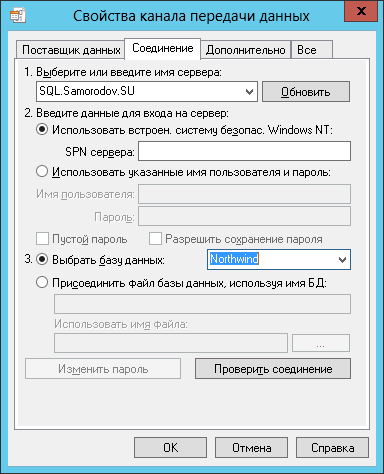
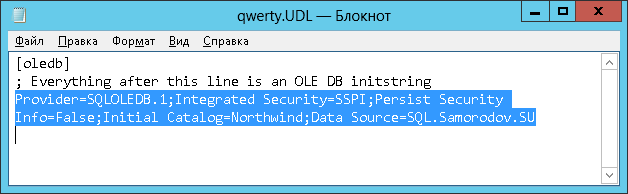
UDL — это обыкновенный текстовый формат. Откройте теперь этот файл блокнотом.

. и получите готовую строку соединения:
Подробнее об этом Вы сможете узнать на курсах SQL Server
Заказ добавлен в Корзину.
Для завершения оформления, пожалуйста, перейдите в Корзину!
Авторизации






Телефон:
+7 (495) 232-32-16

Whatsapp:

Адрес главного офиса:
ул. Бауманская, д. 6, стр. 2, бизнес-центр «Виктория Плаза», 4-й этаж

E-mail:

English version
Sql Connection. Connection String Свойство
Некоторые сведения относятся к предварительной версии продукта, в которую до выпуска могут быть внесены существенные изменения. Майкрософт не предоставляет никаких гарантий, явных или подразумеваемых, относительно приведенных здесь сведений.
Получает или задает строку, используемую для открытия базы данных SQL Server.
public: virtual property System::String ^ ConnectionString < System::String ^ get(); void set(System::String ^ value); >;public: property System::String ^ ConnectionString < System::String ^ get(); void set(System::String ^ value); >;public override string ConnectionString
[System.Data.DataSysDescription("SqlConnection_ConnectionString")] public string ConnectionString
[System.ComponentModel.SettingsBindable(true)] public override string ConnectionString
member this.ConnectionString : string with get, set[] member this.ConnectionString : string with get, set[] member this.ConnectionString : string with get, setPublic Overrides Property ConnectionString As StringPublic Property ConnectionString As StringЗначение свойства
Строка подключения, включающая имя источника базы данных и другие параметры, необходимые для установки исходного подключения. Значение по умолчанию — пустая строка.
Реализации
Исключения
Передан недопустимый аргумент строки подключения, или не задан обязательный аргумент строки подключения.
Примеры
В следующем примере создается SqlConnection и задается ConnectionString свойство перед открытием подключения.
private static void OpenSqlConnection() < string connectionString = GetConnectionString(); using (SqlConnection connection = new SqlConnection()) < connection.ConnectionString = connectionString; connection.Open(); Console.WriteLine("State: ", connection.State); Console.WriteLine("ConnectionString: ", connection.ConnectionString); > > static private string GetConnectionString() < // To avoid storing the connection string in your code, // you can retrieve it from a configuration file. return "Data Source=MSSQL1;Initial Catalog=AdventureWorks;" + "Integrated Security=true;"; >Private Sub OpenSqlConnection() Dim connectionString As String = GetConnectionString() Using connection As New SqlConnection() connection.ConnectionString = connectionString connection.Open() Console.WriteLine("State: ", connection.State) Console.WriteLine("ConnectionString: ", _ connection.ConnectionString) End Using End Sub Private Function GetConnectionString() As String ' To avoid storing the connection string in your code, ' you can retrieve it from a configuration file. Return "Data Source=MSSQL1;Database=AdventureWorks;" _ & "Integrated Security=true;" End Function Комментарии
объект ConnectionString похож на строку подключения OLE DB, но не идентичен. В отличие от OLE DB или ADO, возвращаемая строка подключения совпадает с строкой, заданной ConnectionStringпользователем , за вычетом сведений о безопасности, если для параметра Сохранить сведения о безопасности задано false значение (по умолчанию). Поставщик данных платформа .NET Framework для SQL Server не сохраняет и не возвращает пароль в строке подключения, если для параметра Сохранить сведения для защиты не задано значение true .
Для подключения к базе данных можно использовать ConnectionString свойство . В следующем примере показана типичная строка подключения.
"Persist Security Info=False;Integrated Security=true;Initial Catalog=Northwind;server=(local)" Используйте новый SqlConnectionStringBuilder для создания допустимых строк подключения во время выполнения. Дополнительные сведения см. в статье Connection String Builders (Построители строк подключения).
Присваивать значение свойству ConnectionString можно только тогда, когда соединение закрыто. Многие из значений строки подключения имеют соответствующие свойства, доступные только для чтения. Если задана строка подключения, эти свойства обновляются, за исключением случаев обнаружения ошибки. В этом случае ни одно из свойств не обновляется. SqlConnection свойства возвращают только те параметры, которые содержатся в ConnectionString.
Чтобы подключиться к локальному компьютеру, укажите «(local)» для сервера. Если имя сервера не указано, будет предпринята попытка подключения к экземпляру по умолчанию на локальном компьютере.
При сбросе ConnectionString при закрытом подключении сбрасываются все значения строки подключения (и связанные свойства), включая пароль. Например, если задать строку подключения, включающую «Database= AdventureWorks», а затем сбросить строку подключения в «Data Source=myserver;Integrated Security=true», то свойству Database больше не присваивается значение «AdventureWorks».
Строка подключения анализируется сразу после установки. Если при синтаксическом анализе обнаруживаются ошибки в синтаксисе, создается исключение среды выполнения, например ArgumentException, . Другие ошибки можно найти только при попытке открыть подключение.
Базовый формат строки подключения включает ряд пар «ключевое слово-значение», разделенных точкой с запятой. Знак равенства (=) соединяет каждое ключевое слово и его значение. Чтобы включить значения, содержащие точку с запятой, одинарные или двойные кавычки, значение должно быть заключено в двойные кавычки. Если значение содержит как точку с запятой, так и символ двойной кавычки, значение можно заключить в одинарные кавычки. Одинарные кавычки также полезны, если значение начинается с символа двойной кавычки. И наоборот, двойную кавычку можно использовать, если значение начинается с одной кавычки. Если значение содержит как одинарные, так и двойные кавычки, символ кавычек, используемый для заключения значения, должен удваивать каждый раз, когда оно встречается в значении.
Чтобы включить предыдущие или конечные пробелы в строковое значение, значение должно быть заключено в одинарные кавычки или двойные кавычки. Любые начальные или конечные пробелы вокруг целочисленных, логических или перечисляемых значений игнорируются, даже если они заключены в кавычки. Однако пробелы в ключевом слове или значении строкового литерала сохраняются. Одинарные или двойные кавычки можно использовать в строке подключения без использования разделителей (например, Data Source= my’Server или Data Source= my»Server), если только символ кавычек не является первым или последним символом в значении.
В ключевых словах регистр не учитывается.
В следующей таблице перечислены допустимые имена для значений ключевых слов в ConnectionString.
Если в строке подключения указано значение ключа AttachDBFileName, база данных присоединяется и становится базой данных по умолчанию для подключения.
Если этот ключ не указан и база данных была ранее подключена, база данных не будет повторно подключена. Ранее присоединенная база данных будет использоваться в качестве базы данных по умолчанию для подключения.
Если этот ключ указан вместе с ключом AttachDBFileName, значение этого ключа будет использоваться в качестве псевдонима. Однако если имя уже используется в другой подключенной базе данных, подключение завершится ошибкой.
Путь может быть абсолютным или относительным с помощью строки подстановки DataDirectory. Если используется DataDirectory, файл базы данных должен находиться в подкаталоге каталога, на который указывает строка подстановки. Примечание: Имена путей удаленного сервера, HTTP и UNC не поддерживаются.
Имя базы данных должно быть указано с помощью ключевого слова database (или одного из его псевдонимов), как показано ниже:
Допустимые значения больше или равны 0 и меньше или равны 2147483647.
SQL Server connection strings
Microsoft SqlClient Data Provider for SQL Server
Standard Security
Server = myServerAddress; Database = myDataBase; User Id = myUsername; Password = myPassword;
Trusted Connection
Server = myServerAddress; Database = myDataBase; Trusted_Connection = True;
Connection to a SQL Server instance
The server/instance name syntax used in the server option is the same for all SQL Server connection strings.
Server = myServerName\myInstanceName; Database = myDataBase; User Id = myUsername; Password = myPassword;
Using a non-standard port
If your SQL Server listens on a non-default port you can specify that using the servername,xxxx syntax (note the comma, it’s not a colon).
Server = myServerName,myPortNumber; Database = myDataBase; User Id = myUsername; Password = myPassword;
The default SQL Server port is 1433 and there is no need to specify that in the connection string.
Connect via an IP address
Data Source = 190.190.200.100,1433; Network Library = DBMSSOCN; Initial Catalog = myDataBase; User ID = myUsername; Password = myPassword;
DBMSSOCN=TCP/IP is how to use TCP/IP instead of Named Pipes. At the end of the Data Source is the port to use. 1433 is the default port for SQL Server. Read more here.
Enable MARS
Server = myServerAddress; Database = myDataBase; Trusted_Connection = True; MultipleActiveResultSets = true;
Attach a database file on connect to a local SQL Server Express instance
Server = .\SQLExpress; AttachDbFilename = C:\MyFolder\MyDataFile.mdf; Database = dbname; Trusted_Connection = Yes;
Why is the Database parameter needed? If the named database have already been attached, SQL Server does not reattach it. It uses the attached database as the default for the connection.
Attach a database file, located in the data directory, on connect to a local SQL Server Express instance
Server = .\SQLExpress; AttachDbFilename = |DataDirectory|mydbfile.mdf; Database = dbname; Trusted_Connection = Yes;
Why is the Database parameter needed? If the named database have already been attached, SQL Server does not reattach it. It uses the attached database as the default for the connection.
User Instance on local SQL Server Express
The User Instance feature is deprecated with SQL Server 2012, use the SQL Server Express LocalDB feature instead.
LocalDB automatic instance
Server = (localdb)\v11.0; Integrated Security = true;
The first connection to LocalDB will create and start the instance, this takes some time and might cause a connection timeout failure. If this happens, wait a bit and connect again.
LocalDB automatic instance with specific data file
Server = (localdb)\v11.0; Integrated Security = true; AttachDbFileName = C:\MyFolder\MyData.mdf;
LocalDB named instance
To create a named instance, use the SqlLocalDB.exe program. Example SqlLocalDB.exe create MyInstance and SqlLocalDB.exe start MyInstance
Server = (localdb)\MyInstance; Integrated Security = true;
LocalDB named instance via the named pipes pipe name
The Server=(localdb) syntax is not supported by .NET framework versions before 4.0.2. However the named pipes connection will work to connect pre 4.0.2 applications to LocalDB instances.
Executing SqlLocalDB.exe info MyInstance will get you (along with other info) the instance pipe name such as «np:\\.\pipe\LOCALDB#F365A78E\tsql\query».
LocalDB shared instance
Both automatic and named instances of LocalDB can be shared.
Server = (localdb)\.\MyInstanceShare; Integrated Security = true;
Use SqlLocalDB.exe to share or unshare an instance. For example execute SqlLocalDB.exe share «MyInstance» «MyInstanceShare» to share an instance.
Database mirroring
If you connect with ADO.NET or the SQL Native Client to a database that is being mirrored, your application can take advantage of the drivers ability to automatically redirect connections when a database mirroring failover occurs. You must specify the initial principal server and database in the connection string and the failover partner server.
Data Source = myServerAddress; Failover Partner = myMirrorServerAddress; Initial Catalog = myDataBase; Integrated Security = True;
There is ofcourse many other ways to write the connection string using database mirroring, this is just one example pointing out the failover functionality. You can combine this with the other connection strings options available.
Asynchronous processing
A connection to SQL Server that allows for the issuing of async requests through ADO.NET objects.
Server = myServerAddress; Database = myDataBase; Integrated Security = True; Asynchronous Processing = True;
Using an User Instance on a local SQL Server Express instance
The User Instance functionality creates a new SQL Server instance on the fly during connect. This works only on a local SQL Server instance and only when connecting using windows authentication over local named pipes. The purpose is to be able to create a full rights SQL Server instance to a user with limited administrative rights on the computer.
Data Source = .\SQLExpress; Integrated Security = true; AttachDbFilename = C:\MyFolder\MyDataFile.mdf; User Instance = true;
To use the User Instance functionality you need to enable it on the SQL Server. This is done by executing the following command: sp_configure ‘user instances enabled’, ‘1’. To disable the functionality execute sp_configure ‘user instances enabled’, ‘0’.
Specifying packet size
Server = myServerAddress; Database = myDataBase; User ID = myUsername; Password = myPassword; Trusted_Connection = False; Packet Size = 4096;
By default, the Microsoft .NET Framework Data Provider for SQL Server sets the network packet size to 8192 bytes. This might however not be optimal, try to set this value to 4096 instead. The default value of 8192 might cause Failed to reserve contiguous memory errors as well, read more here.
Always Encrypted
Data Source = myServer; Initial Catalog = myDB; Integrated Security = true; Column Encryption Setting = enabled;
This one is available in .NET Core (as opposed to System.Data.SqlClient).
Always Encrypted with secure enclaves
Data Source = myServer; Initial Catalog = myDB; Integrated Security = true; Column Encryption Setting = enabled; Enclave Attestation Url = http://hgs.bastion.local/Attestation;
This one is available in .NET Core (as opposed to System.Data.SqlClient).
↯ Problems connecting?
Get answer in the SQL Server Q & A forum
.NET Framework Data Provider for SQL Server
Standard Security
Server = myServerAddress; Database = myDataBase; User Id = myUsername; Password = myPassword;
Trusted Connection
Server = myServerAddress; Database = myDataBase; Trusted_Connection = True;
Connection to a SQL Server instance
The server/instance name syntax used in the server option is the same for all SQL Server connection strings.
Server = myServerName\myInstanceName; Database = myDataBase; User Id = myUsername; Password = myPassword;
Using a non-standard port
If your SQL Server listens on a non-default port you can specify that using the servername,xxxx syntax (note the comma, it’s not a colon).
Server = myServerName,myPortNumber; Database = myDataBase; User Id = myUsername; Password = myPassword;
The default SQL Server port is 1433 and there is no need to specify that in the connection string.
Trusted Connection from a CE device
A Windows CE device is most often not authenticated and logged in to a domain but it is possible to use SSPI or trusted connection and authentication from a CE device using this connection string.
Data Source = myServerAddress; Initial Catalog = myDataBase; Integrated Security = SSPI; User ID = myDomain\myUsername; Password = myPassword;
Note that this will only work on a CE device.
Connect via an IP address
Data Source = 190.190.200.100,1433; Network Library = DBMSSOCN; Initial Catalog = myDataBase; User ID = myUsername; Password = myPassword;
DBMSSOCN=TCP/IP is how to use TCP/IP instead of Named Pipes. At the end of the Data Source is the port to use. 1433 is the default port for SQL Server. Read more here.
Enable MARS
Server = myServerAddress; Database = myDataBase; Trusted_Connection = True; MultipleActiveResultSets = true;
Attach a database file on connect to a local SQL Server Express instance
Server = .\SQLExpress; AttachDbFilename = C:\MyFolder\MyDataFile.mdf; Database = dbname; Trusted_Connection = Yes;
Why is the Database parameter needed? If the named database have already been attached, SQL Server does not reattach it. It uses the attached database as the default for the connection.
Attach a database file, located in the data directory, on connect to a local SQL Server Express instance
Server = .\SQLExpress; AttachDbFilename = |DataDirectory|mydbfile.mdf; Database = dbname; Trusted_Connection = Yes;
Why is the Database parameter needed? If the named database have already been attached, SQL Server does not reattach it. It uses the attached database as the default for the connection.
User Instance on local SQL Server Express
The User Instance feature is deprecated with SQL Server 2012, use the SQL Server Express LocalDB feature instead.
LocalDB automatic instance
Server = (localdb)\v11.0; Integrated Security = true;
The first connection to LocalDB will create and start the instance, this takes some time and might cause a connection timeout failure. If this happens, wait a bit and connect again.
LocalDB automatic instance with specific data file
Server = (localdb)\v11.0; Integrated Security = true; AttachDbFileName = C:\MyFolder\MyData.mdf;
LocalDB named instance
To create a named instance, use the SqlLocalDB.exe program. Example SqlLocalDB.exe create MyInstance and SqlLocalDB.exe start MyInstance
Server = (localdb)\MyInstance; Integrated Security = true;
LocalDB named instance via the named pipes pipe name
The Server=(localdb) syntax is not supported by .NET framework versions before 4.0.2. However the named pipes connection will work to connect pre 4.0.2 applications to LocalDB instances.
Executing SqlLocalDB.exe info MyInstance will get you (along with other info) the instance pipe name such as «np:\\.\pipe\LOCALDB#F365A78E\tsql\query».
LocalDB shared instance
Both automatic and named instances of LocalDB can be shared.
Server = (localdb)\.\MyInstanceShare; Integrated Security = true;
Use SqlLocalDB.exe to share or unshare an instance. For example execute SqlLocalDB.exe share «MyInstance» «MyInstanceShare» to share an instance.
Database mirroring
If you connect with ADO.NET or the SQL Native Client to a database that is being mirrored, your application can take advantage of the drivers ability to automatically redirect connections when a database mirroring failover occurs. You must specify the initial principal server and database in the connection string and the failover partner server.
Data Source = myServerAddress; Failover Partner = myMirrorServerAddress; Initial Catalog = myDataBase; Integrated Security = True;
There is ofcourse many other ways to write the connection string using database mirroring, this is just one example pointing out the failover functionality. You can combine this with the other connection strings options available.
Asynchronous processing
A connection to SQL Server that allows for the issuing of async requests through ADO.NET objects.
Server = myServerAddress; Database = myDataBase; Integrated Security = True; Asynchronous Processing = True;
Using an User Instance on a local SQL Server Express instance
The User Instance functionality creates a new SQL Server instance on the fly during connect. This works only on a local SQL Server instance and only when connecting using windows authentication over local named pipes. The purpose is to be able to create a full rights SQL Server instance to a user with limited administrative rights on the computer.
Data Source = .\SQLExpress; Integrated Security = true; AttachDbFilename = C:\MyFolder\MyDataFile.mdf; User Instance = true;
To use the User Instance functionality you need to enable it on the SQL Server. This is done by executing the following command: sp_configure ‘user instances enabled’, ‘1’. To disable the functionality execute sp_configure ‘user instances enabled’, ‘0’.
Specifying packet size
Server = myServerAddress; Database = myDataBase; User ID = myUsername; Password = myPassword; Trusted_Connection = False; Packet Size = 4096;
By default, the Microsoft .NET Framework Data Provider for SQL Server sets the network packet size to 8192 bytes. This might however not be optimal, try to set this value to 4096 instead. The default value of 8192 might cause Failed to reserve contiguous memory errors as well, read more here.
Always Encrypted
Data Source = myServer; Initial Catalog = myDB; Integrated Security = true; Column Encryption Setting = enabled;
Always Encrypted in System.Data.SqlClient is available only for .NET Framework, not .NET Core. To use Always Encrypted in .NET Core switch to Microsoft.Data.SqlClient (NuGet-package).
Always Encrypted with secure enclaves
Data Source = myServer; Initial Catalog = myDB; Integrated Security = true; Column Encryption Setting = enabled; Enclave Attestation Url = http://hgs.bastion.local/Attestation;
Always Encrypted in System.Data.SqlClient is available only for .NET Framework, not .NET Core. To use Always Encrypted in .NET Core switch to Microsoft.Data.SqlClient (NuGet-package).
Microsoft OLE DB Driver for SQL Server
Standard security
Provider = MSOLEDBSQL; Server = myServerAddress; Database = myDataBase; UID = myUsername; PWD = myPassword;
ADO to map new data types
For ADO to correctly map SQL Server new datatypes, i.e. XML, UDT, varchar(max), nvarchar(max), and varbinary(max), include DataTypeCompatibility=80; in the connection string. If you are not using ADO this is not necessary.
Provider = MSOLEDBSQL; DataTypeCompatibility = 80; Server = myServerAddress; Database = myDataBase; UID = myUsername; PWD = myPassword;
Trusted connection
Provider = MSOLEDBSQL; Server = myServerAddress; Database = myDataBase; Trusted_Connection = yes;
Equivalent key-value pair: «Integrated Security=SSPI» equals «Trusted_Connection=yes»
Connecting to an SQL Server instance
The syntax of specifying the server instance in the value of the server key is the same for all connection strings for SQL Server.
Provider = MSOLEDBSQL; Server = myServerName\theInstanceName; Database = myDataBase; Trusted_Connection = yes;
Using a non-standard port
If your SQL Server listens on a non-default port you can specify that using the servername,xxxx syntax (note the comma, it’s not a colon).
Provider = MSOLEDBSQL; Server = myServerName,myPortNumber; Database = myDataBase; UID = myUsername; PWD = myPassword;
The default SQL Server port is 1433 and there is no need to specify that in the connection string.
Enable MARS
Provider = MSOLEDBSQL; Server = myServerAddress; Database = myDataBase; Trusted_Connection = yes; MARS Connection = true;
Encrypt data sent over network
Provider = MSOLEDBSQL; Server = myServerAddress; Database = myDataBase; Trusted_Connection = yes; Encrypt = yes;
Attach a database file on connect to a local SQL Server Express instance
Provider = MSOLEDBSQL; Server = .\SQLExpress; AttachDBFilename = c:\asd\qwe\mydbfile.mdf; Database = dbname; Trusted_Connection = Yes;
Why is the Database parameter needed? If the named database have already been attached, SQL Server does not reattach it. It uses the attached database as the default for the connection.
Database mirroring
If you connect with ADO.NET or the SQL Native Client to a database that is being mirrored, your application can take advantage of the drivers ability to automatically redirect connections when a database mirroring failover occurs. You must specify the initial principal server and database in the connection string and the failover partner server.
Provider = MSOLEDBSQL; Data Source = myServerAddress; Failover Partner = myMirrorServerAddress; Initial Catalog = myDataBase; Integrated Security = True;
There is ofcourse many other ways to write the connection string using database mirroring, this is just one example pointing out the failover functionality. You can combine this with the other connection strings options available.
Availability group and failover cluster
Enable fast failover for Always On Availability Groups and Failover Cluster Instances. TCP is the only supported protocol. Also set an explicit timeout as these scenarios might require more time.
Provider = MSOLEDBSQL; Server = tcp:AvailabilityGroupListenerDnsName,1433; MultiSubnetFailover = Yes; Database = MyDB; Integrated Security = SSPI; Connect Timeout = 30;
MultiSubnetFailover will perform retries in parallell and do it faster than default TCP retransmit intervals. This can not be combined with mirroring, e.g. Failover_Partner=mirrorServer.
Read-Only application intent
Use a read workload when connecting. Enforces read only at connection time, and also for USE database statements.
Provider = MSOLEDBSQL; Server = tcp:AvailabilityGroupListenerDnsName,1433; MultiSubnetFailover = Yes; ApplicationIntent = ReadOnly; Database = MyDB; Integrated Security = SSPI; Connect Timeout = 30;
The result of using ApplicationIntent depends on database configuration. See read-only routing. The default for ApplicationIntent is ReadWrite.
Read-Only routing
You can either use an availability group listener for Server OR the read-only instance name to enforce a specific read-only instance.
Provider = MSOLEDBSQL; Server = aKnownReadOnlyInstance; MultiSubnetFailover = Yes; ApplicationIntent = ReadOnly; Database = MyDB; Integrated Security = SSPI; Connect Timeout = 30;
An availability group must enable read-only routing for this to work.
SQL Server Native Client 11.0 OLE DB Provider
Standard security
Provider = SQLNCLI11; Server = myServerAddress; Database = myDataBase; Uid = myUsername; Pwd = myPassword;
Are you using SQL Server 2012 Express? Don’t miss the server name syntax Servername\SQLEXPRESS where you substitute Servername with the name of the computer where the SQL Server 2012 Express installation resides.
Trusted connection
Provider = SQLNCLI11; Server = myServerAddress; Database = myDataBase; Trusted_Connection = yes;
Equivalent key-value pair: «Integrated Security=SSPI» equals «Trusted_Connection=yes»
Connecting to an SQL Server instance
The syntax of specifying the server instance in the value of the server key is the same for all connection strings for SQL Server.
Provider = SQLNCLI11; Server = myServerName\theInstanceName; Database = myDataBase; Trusted_Connection = yes;
Using a non-standard port
If your SQL Server listens on a non-default port you can specify that using the servername,xxxx syntax (note the comma, it’s not a colon).
Provider = SQLNCLI11; Server = myServerName,myPortNumber; Database = myDataBase; Uid = myUsername; Pwd = myPassword;
The default SQL Server port is 1433 and there is no need to specify that in the connection string.
Prompt for username and password
This one is a bit tricky. First you need to set the connection object’s Prompt property to adPromptAlways. Then use the connection string to connect to the database.
Enable MARS
Provider = SQLNCLI11; Server = myServerAddress; Database = myDataBase; Trusted_Connection = yes; MARS Connection = True;
Encrypt data sent over network
Provider = SQLNCLI11; Server = myServerAddress; Database = myDataBase; Trusted_Connection = yes; Encrypt = yes;
Attach a database file on connect to a local SQL Server Express instance
Provider = SQLNCLI11; Server = .\SQLExpress; AttachDbFilename = c:\asd\qwe\mydbfile.mdf; Database = dbname; Trusted_Connection = Yes;
Why is the Database parameter needed? If the named database have already been attached, SQL Server does not reattach it. It uses the attached database as the default for the connection.
Attach a database file, located in the data directory, on connect to a local SQL Server Express instance
Provider = SQLNCLI11; Server = .\SQLExpress; AttachDbFilename = |DataDirectory|mydbfile.mdf; Database = dbname; Trusted_Connection = Yes;
Why is the Database parameter needed? If the named database have already been attached, SQL Server does not reattach it. It uses the attached database as the default for the connection.
Database mirroring
If you connect with ADO.NET or the SQL Native Client to a database that is being mirrored, your application can take advantage of the drivers ability to automatically redirect connections when a database mirroring failover occurs. You must specify the initial principal server and database in the connection string and the failover partner server.
Provider = SQLNCLI11; Data Source = myServerAddress; Failover Partner = myMirrorServerAddress; Initial Catalog = myDataBase; Integrated Security = True;
There is ofcourse many other ways to write the connection string using database mirroring, this is just one example pointing out the failover functionality. You can combine this with the other connection strings options available.
SQL Server Native Client 10.0 OLE DB Provider
Standard security
Provider = SQLNCLI10; Server = myServerAddress; Database = myDataBase; Uid = myUsername; Pwd = myPassword;
Are you using SQL Server 2008 Express? Don’t miss the server name syntax Servername\SQLEXPRESS where you substitute Servername with the name of the computer where the SQL Server 2008 Express installation resides.
Trusted connection
Provider = SQLNCLI10; Server = myServerAddress; Database = myDataBase; Trusted_Connection = yes;
Equivalent key-value pair: «Integrated Security=SSPI» equals «Trusted_Connection=yes»
Connecting to an SQL Server instance
The syntax of specifying the server instance in the value of the server key is the same for all connection strings for SQL Server.
Provider = SQLNCLI10; Server = myServerName\theInstanceName; Database = myDataBase; Trusted_Connection = yes;
Using a non-standard port
If your SQL Server listens on a non-default port you can specify that using the servername,xxxx syntax (note the comma, it’s not a colon).
Provider = SQLNCLI10; Server = myServerName,myPortNumber; Database = myDataBase; Uid = myUsername; Pwd = myPassword;
The default SQL Server port is 1433 and there is no need to specify that in the connection string.
Prompt for username and password
This one is a bit tricky. First you need to set the connection object’s Prompt property to adPromptAlways. Then use the connection string to connect to the database.
Enable MARS
Provider = SQLNCLI10; Server = myServerAddress; Database = myDataBase; Trusted_Connection = yes; MARS Connection = True;
Encrypt data sent over network
Provider = SQLNCLI10; Server = myServerAddress; Database = myDataBase; Trusted_Connection = yes; Encrypt = yes;
Attach a database file on connect to a local SQL Server Express instance
Provider = SQLNCLI10; Server = .\SQLExpress; AttachDbFilename = c:\asd\qwe\mydbfile.mdf; Database = dbname; Trusted_Connection = Yes;
Why is the Database parameter needed? If the named database have already been attached, SQL Server does not reattach it. It uses the attached database as the default for the connection.
Attach a database file, located in the data directory, on connect to a local SQL Server Express instance
Provider = SQLNCLI10; Server = .\SQLExpress; AttachDbFilename = |DataDirectory|mydbfile.mdf; Database = dbname; Trusted_Connection = Yes;
Why is the Database parameter needed? If the named database have already been attached, SQL Server does not reattach it. It uses the attached database as the default for the connection.
Database mirroring
If you connect with ADO.NET or the SQL Native Client to a database that is being mirrored, your application can take advantage of the drivers ability to automatically redirect connections when a database mirroring failover occurs. You must specify the initial principal server and database in the connection string and the failover partner server.
Provider = SQLNCLI10; Data Source = myServerAddress; Failover Partner = myMirrorServerAddress; Initial Catalog = myDataBase; Integrated Security = True;
There is ofcourse many other ways to write the connection string using database mirroring, this is just one example pointing out the failover functionality. You can combine this with the other connection strings options available.
SQL Native Client 9.0 OLE DB Provider
Standard security
Provider = SQLNCLI; Server = myServerAddress; Database = myDataBase; Uid = myUsername; Pwd = myPassword;
Are you using SQL Server 2005 Express? Don’t miss the server name syntax Servername\SQLEXPRESS where you substitute Servername with the name of the computer where the SQL Server 2005 Express installation resides.
Trusted connection
Provider = SQLNCLI; Server = myServerAddress; Database = myDataBase; Trusted_Connection = yes;
Equivalent key-value pair: «Integrated Security=SSPI» equals «Trusted_Connection=yes»
Connecting to an SQL Server instance
The syntax of specifying the server instance in the value of the server key is the same for all connection strings for SQL Server.
Provider = SQLNCLI; Server = myServerName\theInstanceName; Database = myDataBase; Trusted_Connection = yes;
Using a non-standard port
If your SQL Server listens on a non-default port you can specify that using the servername,xxxx syntax (note the comma, it’s not a colon).
Provider = SQLNCLI; Server = myServerName,myPortNumber; Database = myDataBase; Uid = myUsername; Pwd = myPassword;
The default SQL Server port is 1433 and there is no need to specify that in the connection string.
Prompt for username and password
This one is a bit tricky. First you need to set the connection object’s Prompt property to adPromptAlways. Then use the connection string to connect to the database.
Enable MARS
Provider = SQLNCLI; Server = myServerAddress; Database = myDataBase; Trusted_Connection = yes; MARS Connection = True;
Encrypt data sent over network
Provider = SQLNCLI; Server = myServerAddress; Database = myDataBase; Trusted_Connection = yes; Encrypt = yes;
Attach a database file on connect to a local SQL Server Express instance
Provider = SQLNCLI; Server = .\SQLExpress; AttachDbFilename = c:\mydbfile.mdf; Database = dbname; Trusted_Connection = Yes;
Why is the Database parameter needed? If the named database have already been attached, SQL Server does not reattach it. It uses the attached database as the default for the connection.
Attach a database file, located in the data directory, on connect to a local SQL Server Express instance
Provider = SQLNCLI; Server = .\SQLExpress; AttachDbFilename = |DataDirectory|mydbfile.mdf; Database = dbname; Trusted_Connection = Yes;
Why is the Database parameter needed? If the named database have already been attached, SQL Server does not reattach it. It uses the attached database as the default for the connection.
Database mirroring
If you connect with ADO.NET or the SQL Native Client to a database that is being mirrored, your application can take advantage of the drivers ability to automatically redirect connections when a database mirroring failover occurs. You must specify the initial principal server and database in the connection string and the failover partner server.
Provider = SQLNCLI; Data Source = myServerAddress; Failover Partner = myMirrorServerAddress; Initial Catalog = myDataBase; Integrated Security = True;
There is ofcourse many other ways to write the connection string using database mirroring, this is just one example pointing out the failover functionality. You can combine this with the other connection strings options available.
Microsoft OLE DB Provider for SQL Server
Standard Security
Provider = sqloledb; Data Source = myServerAddress; Initial Catalog = myDataBase; User Id = myUsername; Password = myPassword;
Trusted connection
Provider = sqloledb; Data Source = myServerAddress; Initial Catalog = myDataBase; Integrated Security = SSPI;
Use serverName\instanceName as Data Source to use a specific SQL Server instance. Please note that the multiple SQL Server instances feature is available only from SQL Server version 2000 and not in any previous versions.
Connecting to an SQL Server instance
The syntax of specifying the server instance in the value of the server key is the same for all connection strings for SQL Server.
Provider = sqloledb; Data Source = myServerName\theInstanceName; Initial Catalog = myDataBase; Integrated Security = SSPI;
Using a non-standard port
If your SQL Server listens on a non-default port you can specify that using the servername,xxxx syntax (note the comma, it’s not a colon).
Provider = sqloledb; Server = myServerName,myPortNumber; Database = myDataBase; User Id = myUsername; Password = myPassword;
The default SQL Server port is 1433 and there is no need to specify that in the connection string.
Prompt for username and password
This one is a bit tricky. First set the connection object’s Provider property to «sqloledb». Thereafter set the connection object’s Prompt property to adPromptAlways. Then use the connection string to connect to the database.
oConn.Provider = «sqloledb»
oConn.Properties(«Prompt») = adPromptAlways
oConn.Open «Data Source=myServerAddress;Initial Catalog=myDataBase;»
Connect via an IP address
Provider = sqloledb; Data Source = 190.190.200.100,1433; Network Library = DBMSSOCN; Initial Catalog = myDataBase; User ID = myUsername; Password = myPassword;
DBMSSOCN=TCP/IP. This is how to use TCP/IP instead of Named Pipes. At the end of the Data Source is the port to use. 1433 is the default port for SQL Server. Read more in the article How to define which network protocol to use.
Disable connection pooling
This one is usefull when receving errors «sp_setapprole was not invoked correctly.» (7.0) or «General network error. Check your network documentation» (2000) when connecting using an application role enabled connection. Application pooling (or OLE DB resource pooling) is on by default. Disabling it can help on this error.
Provider = sqloledb; Data Source = myServerAddress; Initial Catalog = myDataBase; User ID = myUsername; Password = myPassword; OLE DB Services = -2;
.NET Framework Data Provider for OLE DB
Use an OLE DB provider from .NET
Provider = any oledb provider’s name; OledbKey1 = someValue; OledbKey2 = someValue;
See the respective OLEDB provider’s connection strings options. The .net OleDbConnection will just pass on the connection string to the specified OLEDB provider. Read more here.
Microsoft ODBC Driver 17 for SQL Server
Standard security
Driver =
Using SQL Server Express? The server name syntax is ServerName\SQLEXPRESS where you substitute ServerName with the name of the server where SQL Server Express is running.
Trusted Connection
Driver =
Equivalent key-value pair: «Integrated Security=SSPI» equals «Trusted_Connection=yes»
Connecting to an SQL Server instance
The syntax of specifying the server instance in the value of the server key is the same for all connection strings for SQL Server.
Driver = ; Server = serverName\instanceName; Database = myDataBase; Trusted_Connection = yes;
Using a non-standard port
If your SQL Server listens on a non-default port you can specify that using the servername,xxxx syntax (note the comma, it’s not a colon).
Driver = ; Server = myServerName,myPortNumber; Database = myDataBase; UID = myUsername; PWD = myPassword;
The default SQL Server port is 1433 and there is no need to specify that in the connection string.
Enable MARS
Driver =
Encrypt data sent over network
Driver =
Attach a database file on connect to a local SQL Server Express instance
Driver =
Why is the Database parameter needed? If the named database have already been attached, SQL Server does not reattach it. It uses the attached database as the default for the connection.
Database mirroring
If you connect to a database that is being mirrored, your application can take advantage of the drivers ability to automatically redirect connections when a database mirroring failover occurs. You must specify the initial principal server and database in the connection string and the failover partner server.
Driver = ; Server = myServerAddress; Failover_Partner = myMirrorServerAddress; Database = myDataBase; Trusted_Connection = yes;
This one is working only on Windows, not on macOS or Linux. There is ofcourse many other ways to write the connection string using database mirroring, this is just one example pointing out the failover functionality. You can combine this with the other connection strings options available.
Please note if you are using TCP/IP (using the network library parameter) and database mirroring, including port number in the address (formed as servername,portnumber) for both the main server and the failover partner can solve some reported issues.
Microsoft ODBC Driver 13 for SQL Server
Standard security
Driver =
Using SQL Server Express? The server name syntax is ServerName\SQLEXPRESS where you substitute ServerName with the name of the server where SQL Server Express is running.
Trusted Connection
Driver =
Equivalent key-value pair: «Integrated Security=SSPI» equals «Trusted_Connection=yes»
Connecting to an SQL Server instance
The syntax of specifying the server instance in the value of the server key is the same for all connection strings for SQL Server.
Driver = ; Server = serverName\instanceName; Database = myDataBase; Trusted_Connection = yes;
Using a non-standard port
If your SQL Server listens on a non-default port you can specify that using the servername,xxxx syntax (note the comma, it’s not a colon).
Driver = ; Server = myServerName,myPortNumber; Database = myDataBase; UID = myUsername; PWD = myPassword;
The default SQL Server port is 1433 and there is no need to specify that in the connection string.
Enable MARS
Driver =
Encrypt data sent over network
Driver =
Attach a database file on connect to a local SQL Server Express instance
Driver =
Why is the Database parameter needed? If the named database have already been attached, SQL Server does not reattach it. It uses the attached database as the default for the connection.
Database mirroring
If you connect to a database that is being mirrored, your application can take advantage of the drivers ability to automatically redirect connections when a database mirroring failover occurs. You must specify the initial principal server and database in the connection string and the failover partner server.
Driver = ; Server = myServerAddress; Failover_Partner = myMirrorServerAddress; Database = myDataBase; Trusted_Connection = yes;
This one is working only on Windows, not on macOS or Linux. There is ofcourse many other ways to write the connection string using database mirroring, this is just one example pointing out the failover functionality. You can combine this with the other connection strings options available.
Please note if you are using TCP/IP (using the network library parameter) and database mirroring, including port number in the address (formed as servername,portnumber) for both the main server and the failover partner can solve some reported issues.
Microsoft ODBC Driver 11 for SQL Server
Standard security
Driver =
Using SQL Server Express? The server name syntax is ServerName\SQLEXPRESS where you substitute ServerName with the name of the server where SQL Server Express is running.
Trusted Connection
Driver =
Equivalent key-value pair: «Integrated Security=SSPI» equals «Trusted_Connection=yes»
Connecting to an SQL Server instance
The syntax of specifying the server instance in the value of the server key is the same for all connection strings for SQL Server.
Driver = ; Server = serverName\instanceName; Database = myDataBase; Trusted_Connection = yes;
Using a non-standard port
If your SQL Server listens on a non-default port you can specify that using the servername,xxxx syntax (note the comma, it’s not a colon).
Driver = ; Server = myServerName,myPortNumber; Database = myDataBase; UID = myUsername; PWD = myPassword;
The default SQL Server port is 1433 and there is no need to specify that in the connection string.
Enable MARS
Driver =
Encrypt data sent over network
Driver =
Attach a database file on connect to a local SQL Server Express instance
Driver =
Why is the Database parameter needed? If the named database have already been attached, SQL Server does not reattach it. It uses the attached database as the default for the connection.
Database mirroring
If you connect to a database that is being mirrored, your application can take advantage of the drivers ability to automatically redirect connections when a database mirroring failover occurs. You must specify the initial principal server and database in the connection string and the failover partner server.
Driver = ; Server = myServerAddress; Failover_Partner = myMirrorServerAddress; Database = myDataBase; Trusted_Connection = yes;
This one is working only on Windows, not on macOS or Linux. There is ofcourse many other ways to write the connection string using database mirroring, this is just one example pointing out the failover functionality. You can combine this with the other connection strings options available.
Please note if you are using TCP/IP (using the network library parameter) and database mirroring, including port number in the address (formed as servername,portnumber) for both the main server and the failover partner can solve some reported issues.
SQL Server Native Client 11.0 ODBC Driver
Standard security
Driver =
Are you using SQL Server 2012 Express? Don’t miss the server name syntax Servername\SQLEXPRESS where you substitute Servername with the name of the computer where the SQL Server 2012 Express installation resides.
Trusted Connection
Driver =
Equivalent key-value pair: «Integrated Security=SSPI» equals «Trusted_Connection=yes»
Connecting to an SQL Server instance
The syntax of specifying the server instance in the value of the server key is the same for all connection strings for SQL Server.
Driver = ; Server = myServerName\theInstanceName; Database = myDataBase; Trusted_Connection = yes;
Using a non-standard port
If your SQL Server listens on a non-default port you can specify that using the servername,xxxx syntax (note the comma, it’s not a colon).
Driver = ; Server = myServerName,myPortNumber; Database = myDataBase; Uid = myUsername; Pwd = myPassword;
The default SQL Server port is 1433 and there is no need to specify that in the connection string.
Prompt for username and password
This one is a bit tricky. First you need to set the connection object’s Prompt property to adPromptAlways. Then use the connection string to connect to the database.
Enable MARS
Driver =
Encrypt data sent over network
Driver =
Attach a database file on connect to a local SQL Server Express instance
Driver =
Why is the Database parameter needed? If the named database have already been attached, SQL Server does not reattach it. It uses the attached database as the default for the connection.
Attach a database file, located in the data directory, on connect to a local SQL Server Express instance
Driver =
Why is the Database parameter needed? If the named database have already been attached, SQL Server does not reattach it. It uses the attached database as the default for the connection.
Database mirroring
If you connect with ADO.NET or the SQL Native Client to a database that is being mirrored, your application can take advantage of the drivers ability to automatically redirect connections when a database mirroring failover occurs. You must specify the initial principal server and database in the connection string and the failover partner server.
Driver = ; Server = myServerAddress; Failover_Partner = myMirrorServerAddress; Database = myDataBase; Trusted_Connection = yes;
There is ofcourse many other ways to write the connection string using database mirroring, this is just one example pointing out the failover functionality. You can combine this with the other connection strings options available.
Please note if you are using TCP/IP (using the network library parameter) and database mirroring, including port number in the address (formed as servername,portnumber) for both the main server and the failover partner can solve some reported issues.
SQL Server Native Client 10.0 ODBC Driver
Standard security
Driver =
Are you using SQL Server 2008 Express? Don’t miss the server name syntax Servername\SQLEXPRESS where you substitute Servername with the name of the computer where the SQL Server 2008 Express installation resides.
Trusted Connection
Driver =
Equivalent key-value pair: «Integrated Security=SSPI» equals «Trusted_Connection=yes»
Connecting to an SQL Server instance
The syntax of specifying the server instance in the value of the server key is the same for all connection strings for SQL Server.
Driver = ; Server = myServerName\theInstanceName; Database = myDataBase; Trusted_Connection = yes;
Using a non-standard port
If your SQL Server listens on a non-default port you can specify that using the servername,xxxx syntax (note the comma, it’s not a colon).
Driver = ; Server = myServerName,myPortNumber; Database = myDataBase; Uid = myUsername; Pwd = myPassword;
The default SQL Server port is 1433 and there is no need to specify that in the connection string.
Prompt for username and password
This one is a bit tricky. First you need to set the connection object’s Prompt property to adPromptAlways. Then use the connection string to connect to the database.
Enable MARS
Driver =
Encrypt data sent over network
Driver =
Attach a database file on connect to a local SQL Server Express instance
Driver =
Why is the Database parameter needed? If the named database have already been attached, SQL Server does not reattach it. It uses the attached database as the default for the connection.
Attach a database file, located in the data directory, on connect to a local SQL Server Express instance
Driver =
Why is the Database parameter needed? If the named database have already been attached, SQL Server does not reattach it. It uses the attached database as the default for the connection.
Database mirroring
If you connect with ADO.NET or the SQL Native Client to a database that is being mirrored, your application can take advantage of the drivers ability to automatically redirect connections when a database mirroring failover occurs. You must specify the initial principal server and database in the connection string and the failover partner server.
Driver = ; Server = myServerAddress; Failover_Partner = myMirrorServerAddress; Database = myDataBase; Trusted_Connection = yes;
There is ofcourse many other ways to write the connection string using database mirroring, this is just one example pointing out the failover functionality. You can combine this with the other connection strings options available.
Please note if you are using TCP/IP (using the network library parameter) and database mirroring, including port number in the address (formed as servername,portnumber) for both the main server and the failover partner can solve some reported issues.
SQL Native Client 9.0 ODBC Driver
Standard security
Driver =
Are you using SQL Server 2005 Express? Don’t miss the server name syntax Servername\SQLEXPRESS where you substitute Servername with the name of the computer where the SQL Server 2005 Express installation resides.
Trusted Connection
Driver =
Equivalent key-value pair: «Integrated Security=SSPI» equals «Trusted_Connection=yes»
Connecting to an SQL Server instance
The syntax of specifying the server instance in the value of the server key is the same for all connection strings for SQL Server.
Driver = ; Server = myServerName\theInstanceName; Database = myDataBase; Trusted_Connection = yes;
Using a non-standard port
If your SQL Server listens on a non-default port you can specify that using the servername,xxxx syntax (note the comma, it’s not a colon).
Driver = ; Server = myServerName,myPortNumber; Database = myDataBase; Uid = myUsername; Pwd = myPassword;
The default SQL Server port is 1433 and there is no need to specify that in the connection string.
Prompt for username and password
This one is a bit tricky. First you need to set the connection object’s Prompt property to adPromptAlways. Then use the connection string to connect to the database.
Enable MARS
Driver =
Encrypt data sent over network
Driver =
Attach a database file on connect to a local SQL Server Express instance
Driver =
Why is the Database parameter needed? If the named database have already been attached, SQL Server does not reattach it. It uses the attached database as the default for the connection.
Attach a database file, located in the data directory, on connect to a local SQL Server Express instance
Driver =
Why is the Database parameter needed? If the named database have already been attached, SQL Server does not reattach it. It uses the attached database as the default for the connection.
Database mirroring
If you connect with ADO.NET or the SQL Native Client to a database that is being mirrored, your application can take advantage of the drivers ability to automatically redirect connections when a database mirroring failover occurs. You must specify the initial principal server and database in the connection string and the failover partner server.
Driver = ; Server = myServerAddress; Failover_Partner = myMirrorServerAddress; Database = myDataBase; Trusted_Connection = yes;
There is ofcourse many other ways to write the connection string using database mirroring, this is just one example pointing out the failover functionality. You can combine this with the other connection strings options available.
Please note if you are using TCP/IP (using the network library parameter) and database mirroring, including port number in the address (formed as servername,portnumber) for both the main server and the failover partner can solve some reported issues.
Microsoft SQL Server ODBC Driver
Standard Security
Driver =
Trusted connection
Driver =
Using a non-standard port
If your SQL Server listens on a non-default port you can specify that using the servername,xxxx syntax (note the comma, it’s not a colon).
Driver = ; Server = myServerName,myPortNumber; Database = myDataBase; Uid = myUsername; Pwd = myPassword;
The default SQL Server port is 1433 and there is no need to specify that in the connection string.
Prompt for username and password
This one is a bit tricky. First you need to set the connection object’s Prompt property to adPromptAlways. Then use the connection string to connect to the database.
.NET Framework Data Provider for ODBC
Use an ODBC driver from .NET
Driver =
See the respective ODBC driver’s connection strings options. The .net OdbcConnection will just pass on the connection string to the specified ODBC driver. Read more here.
SQLXML 4.0 OLEDB Provider
With Microsoft OLE DB Driver for SQL Server (MSOLEDBSQL)
The DataTypeCompatibility=80 is important for the XML types to be recognised by ADO.
Provider = SQLXMLOLEDB.4.0; Data Provider = MSOLEDBSQL; DataTypeCompatibility = 80; Data Source = myServerAddress; Initial Catalog = myDataBase; User Id = myUsername; Password = myPassword;
See also the other options available for MSOLEDBSQL connection strings.
Using SQL Server Native Client provider 11 (SQLNCLI11)
Provider = SQLXMLOLEDB.4.0; Data Provider = SQLNCLI11; Data Source = myServerAddress; Initial Catalog = myDataBase; User Id = myUsername; Password = myPassword;
Using SQL Server Native Client provider 10 (SQLNCLI10)
Provider = SQLXMLOLEDB.4.0; Data Provider = SQLNCLI10; Data Source = myServerAddress; Initial Catalog = myDataBase; User Id = myUsername; Password = myPassword;
Using SQL Server Native Client provider (SQLNCLI)
Provider = SQLXMLOLEDB.4.0; Data Provider = SQLNCLI; Data Source = myServerAddress; Initial Catalog = myDataBase; User Id = myUsername; Password = myPassword;
SQLXML 3.0 OLEDB Provider
Using SQL Server Ole Db
The SQLXML version 3.0 restricts the data provider to SQLOLEDB only.
Provider = SQLXMLOLEDB.3.0; Data Provider = SQLOLEDB; Data Source = myServerAddress; Initial Catalog = myDataBase; User Id = myUsername; Password = myPassword;
Context Connection
Context Connection
Connecting to «self» from within your CLR stored prodedure/function. The context connection lets you execute Transact-SQL statements in the same context (connection) that your code was invoked in the first place.
C#
using(SqlConnection connection = new SqlConnection(«context connection=true»))
connection.Open();
// Use the connection
>
VB.Net
Using connection as new SqlConnection(«context connection=true»)
connection.Open()
‘ Use the connection
End Using
MSDataShape
MSDataShape
Provider = MSDataShape; Data Provider = SQLOLEDB; Data Source = myServerAddress; Initial Catalog = myDataBase; User ID = myUsername; Password = myPassword;