
Выходим из тюрьмы Apple. Установка произвольных приложений на iOS без джейлбрейка
App Store — не единственный способ установки приложений для iOS. Раньше люди специально делали джейлбрейк, чтобы установить каталог Cydia. Но в последнее время появилось несколько сторонних каталогов, которые работают вообще без джейлбрейка. Удивительно, но Apple пока не ставит им палки в колёса.
Эти каталоги приносят реальную пользу, ведь здесь независимые разработчики свободно распространяют свои программы без комиссий и цензуры. Apple не может произвольно отзывать со смартфонов такие приложения. А люди получают более широкий выбор программ, включая эмуляторы Linux, независимость от производителя и реальное право владения.
Мини-приложения на HTML5
Кроме альтернативных каталогов, «бегство из тюрьмы» Apple идёт и другим путём — через платформы внутри других приложений. Например, такие платформы создаются на базе популярных мессенджеров, которые хотят запустить свои внутренние каталоги мини-приложений и свои платёжные системы.
Типичный пример — каталог китайского технологического гиганта Tencent внутри мессенджера WeChat. Это отдельная платформа с мини-приложениями на HTML5 размером меньше 10 мегабайт. То есть неважно, у вас Android, iOS или другая операционная система. Всё равно мини-программы WeChat можно скачать и запустить стандартным способом в едином интерфейсе. По сути, это полноценная платформа, открытая для независимых разработчиков — в каком-то смысле конкурент Google Play и App Store.
Мини-приложения WeChat
Tencent договорилась с Apple, что будет принимать в свой каталог только мини-приложения, соответствующие правилам App Store. Это один из вариантов, как разработчики получают доступ к пользователям iOS в обход Apple.
Сама Apple тоже видит потенциал мини-приложений. В последней версии iOS 14 она представила App Clips — фрагменты приложений, которые запускаются на телефоне без установки полной версии программы.
Альтернативные каталоги
Каталог AltStore запустился в 2019 году. В нём можно найти программы, которые Apple не допускает в App Store по разным причинам.
Как вообще работает AltStore? Дело в том, что Apple разрешает разработчикам для тестирования устанавливать на iOS свои приложения через Xcode для тестирования, а AltStore просто автоматизирует этот процесс и обновляет семидневные таймеры Apple на работу приложений, установленных в обход App Store. То есть каждое приложение пользователь устанавливает как программу якобы личной разработки.
Чтобы загрузить программы из каталога, нужно сначала установить AltServer под macOS 10.14.4+ или Windows 10+. На компьютере должен стоять iTunes, где надо включить синхронизацию со смартфоном по WiFi.
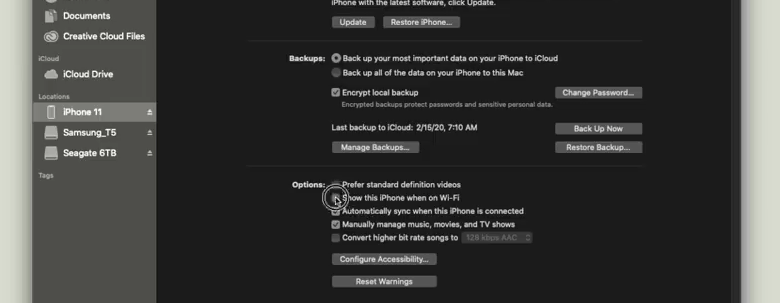
Cинхронизация по WiFi
Затем подключить устройство — и установить туда клиент AltStore через десктопный сервер.
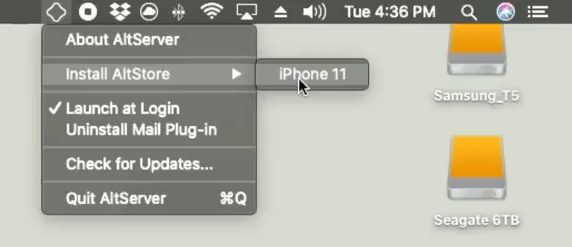
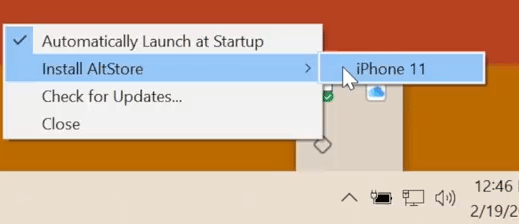
Для работы придётся ввести Apple ID и пароль. Можно зарегистрировать отдельный Apple ID для этих целей.
Чтобы AltStore заработал, требуется установить доверие к новому Apple ID в настройках iOS. После этого можно залогиниться в приложение на смартфоне под тем же Apple ID, что и на десктопе — клиент и сервер работают в связке, словно вы тестируете на смартфоне приложения своей разработки, как программист. То есть установить приложения на смартфон можно только при подключении смартфона к десктопу. Кроме того, у каждого приложения установлен счётчик на 7 дней, а AltStore постоянно обновляет его (тоже требуется соединение с сервером). По этой причине желательно запускать сервер при каждой загрузке ОС на десктопе.
Внутри мобильного AltStore доступен список приложений для установки. Другой вариант — отправлять их с десктопа.
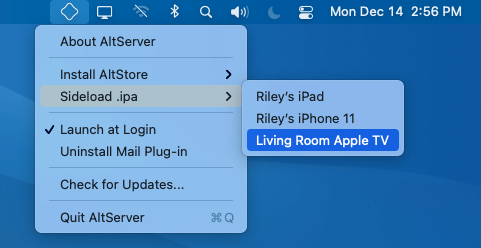
Кстати, можно зайти на unc0ver.dev, скачать и спокойно установить приложение Unc0ver для джейлбрейка, если есть такое желание. Это самый простой способ поставить каталог Cydia с десятками программ, которых нет в App Store.
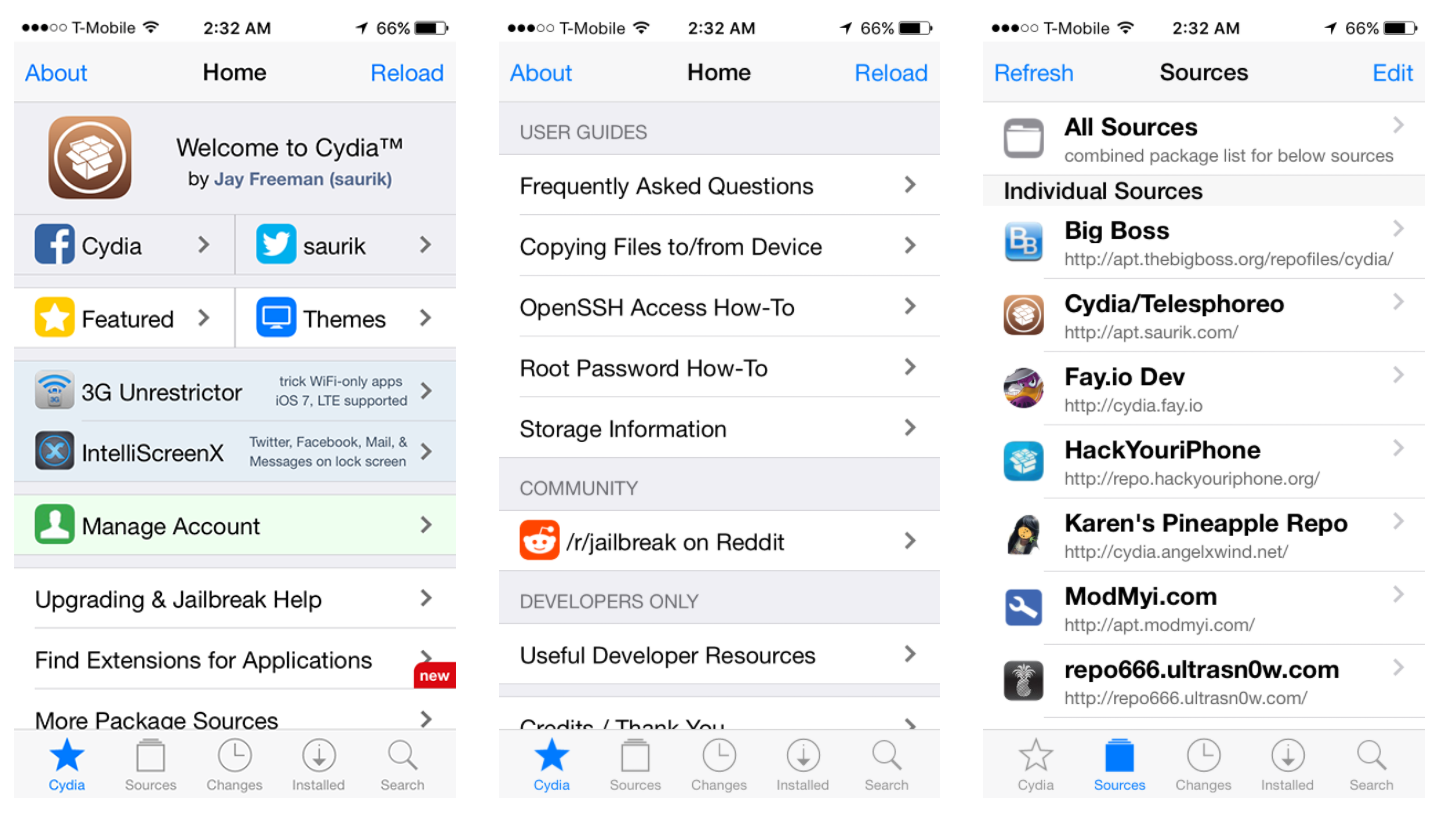
Каталог Cydia
Но это не особо требуется, потому что без всякого джейлбрейка через AltStore на iOS ставится любое приложение в формате *.ipa. Несколько полезных приложений собрано в каталоге AppMarket. Просто скачиваем zip-архив, извлекаем .ipa — и устанавливаем через AltStore.
Одно из интересных приложений iOS — UTM для запуска виртуальных машин. По понятным причинам это и подобные приложения запрещены в App Store. Но это очень крутой инструмент, который эмулирует любой процессор и запускает любую операционную систему. Без проблем на планшете запускается Debian Linux или Windows 7.
Процессор в последних iPad Pro мощнее, чем во многих современных ноутбуках, так что эта идея не лишена смысла.
UTM ставится через AltStore без джейлбрейка, как и сотни других свободных программ, не проходящих цензуру «яблочной компании».
Ещё одно полезное приложение в AltStore (и запрещённое в App Store) — это DolphiniOS, популярный кросс-платформенный эмулятор для запуска любых игр GameCube или Wii с продвинутыми опциями типа повышения разрешения до 1080p и больше (для игры на Apple TV). Как известно, в App Store запрещены любые эмуляторы и консольные приложения (и многое другое).
Также запрещён iSH — полноценный шелл, через который запускаются реальные приложения Linux в нативной консоли.
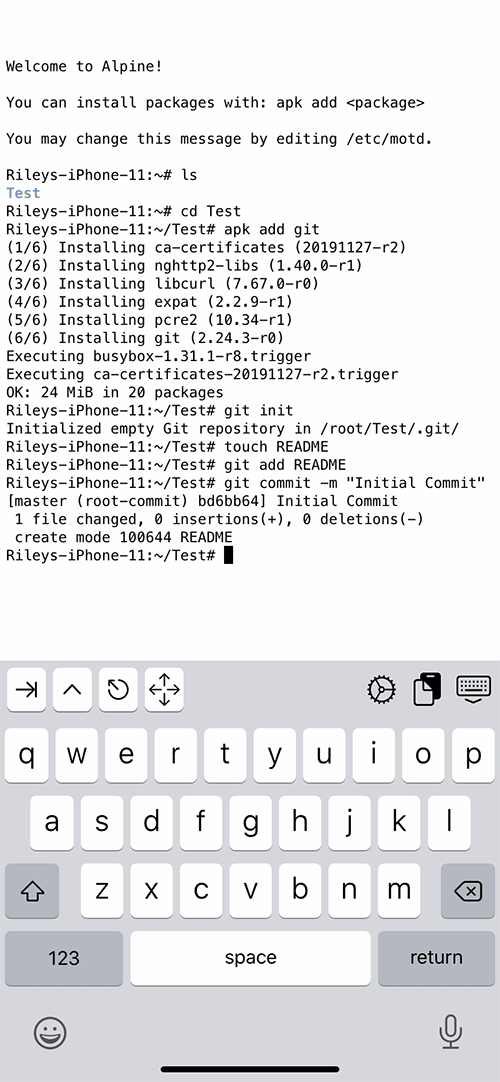
Консоль iSH — одна из многочисленных программ, запрещённых в App Store
Автор AltStore — американский программист Райли Тестут (Riley Testut). Вообще, это приложение появилось в каком-то смысле случайно. Сначала Райли разработал эмулятор Delta для запуска на iOS классических видеоигр Game Boy Advance, Nintendo 64 и Nintendo DS.
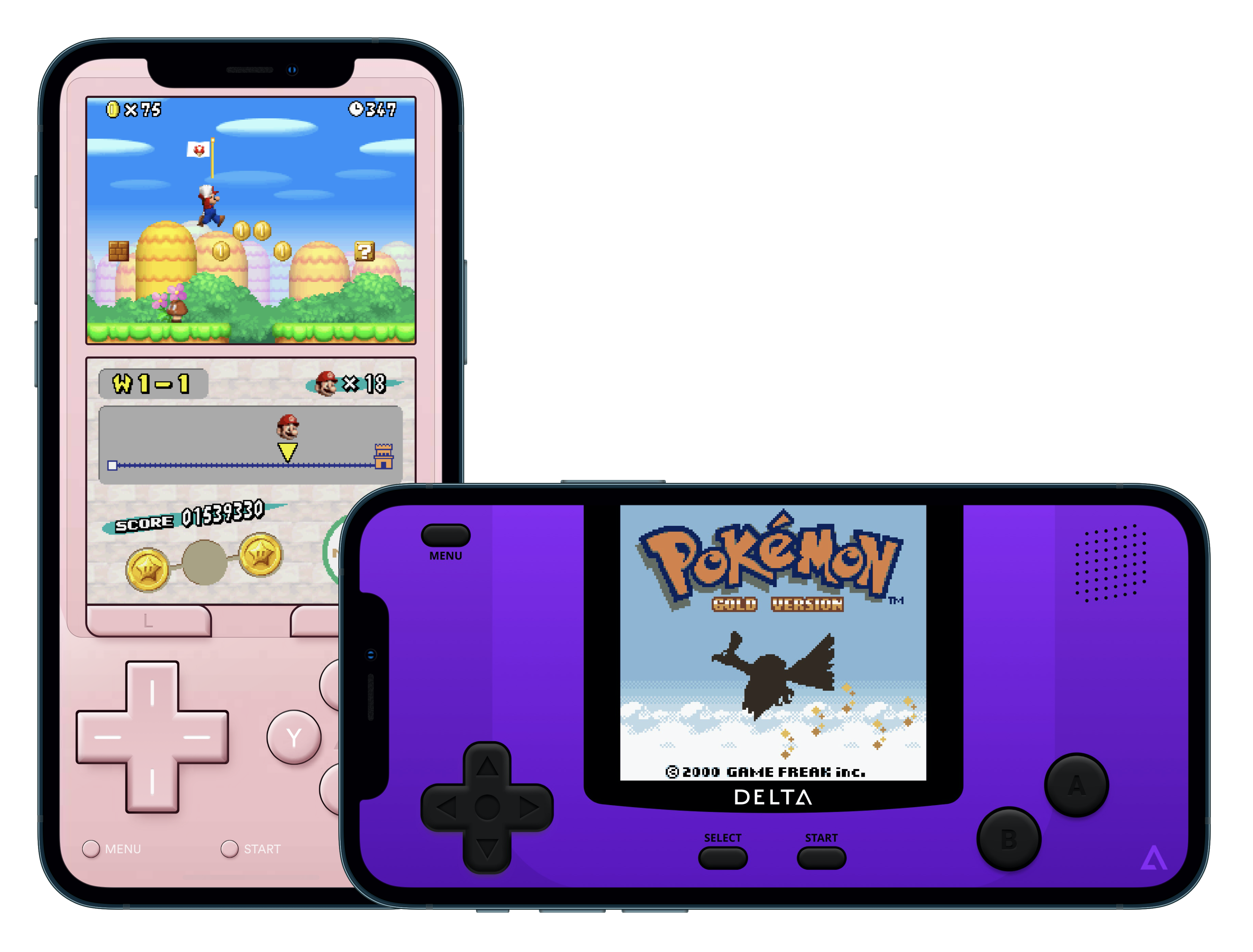
Эмулятор Delta
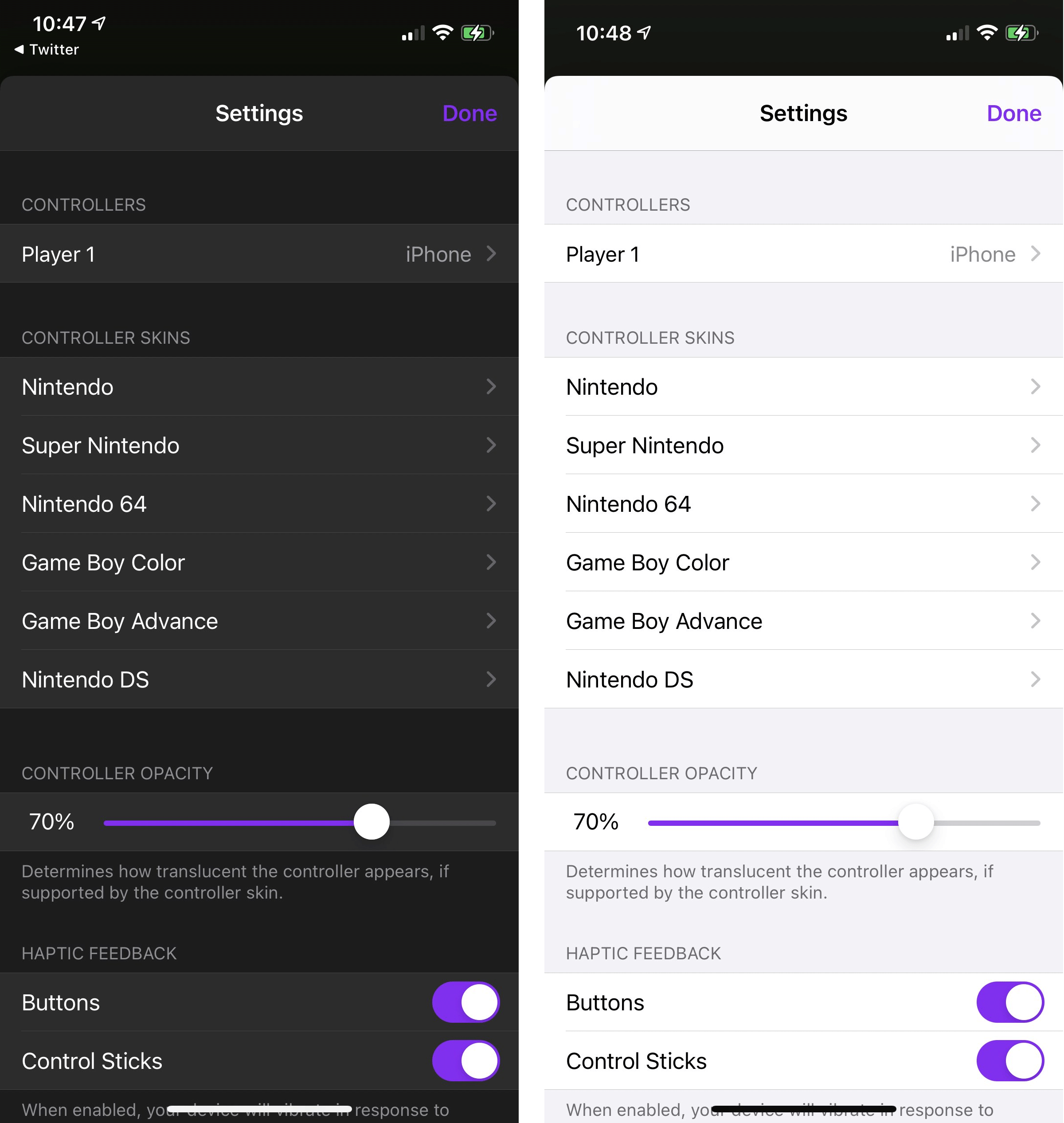
Цензура App Store не пропустила его приложение в официальный каталог — и тогда Райли нашёл способ обойти этот запрет через AltStore. К удивлению многих, Apple не предприняла никаких действий против этого хака.
Airport — ещё один альтернативный каталог, куда принимают независимые программы (форма заявки). Он работает через сервис Apple TestFlight, который предназначен для бета-тестирования программ на широкой аудитории до их официальной публикации.
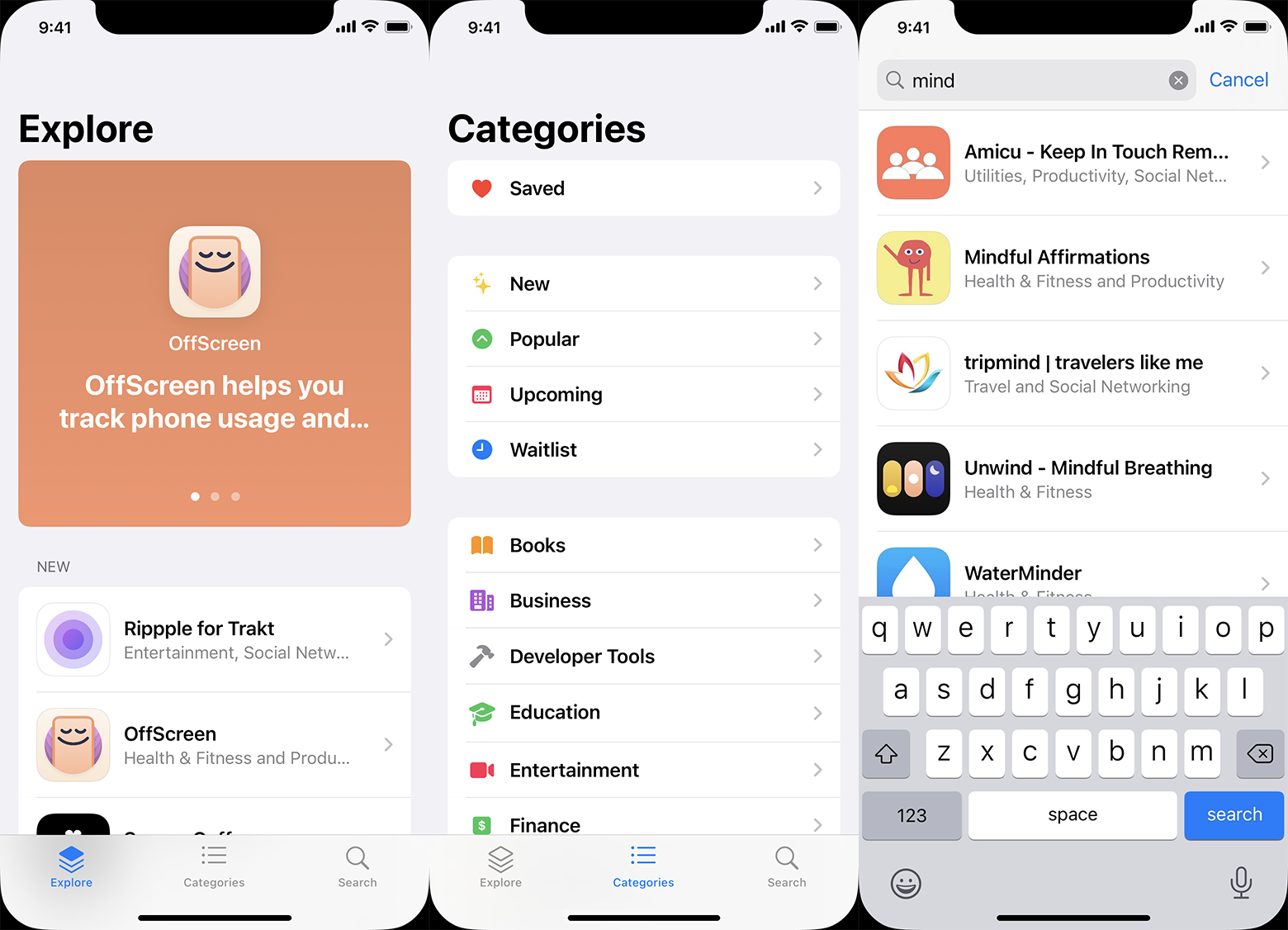
Каталог Airport
По условиям Apple TestFlight, количество бета-тестеров приложения не может превышать 10 000 человек. Вряд ли Airport представляет конкуренцию App Store в нынешнем виде, но это всё равно важный эксперимент. Он даёт разработчикам ещё один способ выйти на аудиторию iOS в обход корпорации Apple, которая контролирует все подступы, считая пользователей как бы своей «собственностью». В июне 2021 года компания опубликовала программный документ «Building a Trusted Ecosystem for Millions of Apps», в котором объясняет запрет на свободную установку программ из сторонних источников (sideloading) заботой о пользователях. Сомнительно, что такое объяснение убедит европейскую антимонопольную комиссию ЕС.
Год назад Apple забанила Fortnite за нарушение правил каталога. В ответ Epic Games подала в суд, обвинив Apple в злоупотреблении монопольным положением (речь о завышенной комиссии 30%). Этот пример показывает, что некоторые разработчики недовольны текущими условиями App Store. Но Apple может ответить: не нравится — не пользуйтесь. Распространяйте свои приложения через альтернативные каталоги, ведь такие действительно существуют.
Если суд примет эти аргументы Apple, то компанию могут заставить поддерживать альтернативные каталоги на своей платформе, как в своё время Microsoft запретили навязывать пользователям свой браузер Internet Explorer, во избежание злоупотребления монопольным положением. Так что судьба альтернативных каталогов во многом зависит от исхода судебного процесса Epic Games v. Apple.
Интересно, что та же Cydia позволяла устанавливать приложения на iPhone ещё до появления App Store в 2008 году. Сейчас она присоединилась к иску против Apple, обвиняя её в злоупотреблении монопольным положением в части запрета свободной установки программ на смартфоны пользователей. Разбирательства по этому вопросу идут также в Европе.
Альтернативные каталоги — это реальный способ распространять свои приложения в экосистеме Apple в обход App Store. Файлы приложений iOS уже сейчас можно спокойно выкладывать на любом хостинге, любом сайте. Возможно, антимонопольные разбирательства против Apple в Европе и США окончательно узаконят такую практику.
- Блог компании ITSumma
- Мессенджеры
- Разработка под iOS
- Законодательство в IT
- Смартфоны
What Is an IPA File?
Tim Fisher has more than 30 years’ of professional technology experience. He’s been writing about tech for more than two decades and serves as the SVP and General Manager of Lifewire.
Updated on June 12, 2023
- File Types
- Apps
- Windows
- MS Office
- Linux
- Google Drive
- Backup & Utilities
- Design
- Cryptocurrency
Trending Videos
What to Know
- An IPA file is an iOS application.
- Install one to your device with iFunbox.
- You can’t convert IPA to APK to install it on an Android.
This article explains what an IPA file is and how they’re used with your Apple devices.
What Is an IPA File?
A file with the IPA file extension is an iOS application. They function as containers (like ZIP) for holding the various pieces of data that make up an iPhone, iPad, or iPod touch app; like for games, utilities, weather, social networking, news, and others.
The structure of an IPA file is the same for every app; a PNG or JPEG is used as the icon for the app, and the Payload folder contains all the app’s data.
:max_bytes(150000):strip_icc()/ipa-files-3fcaa67e204449808ce1788edf7e6ae7.png)
IPA also stands for intelligent peripheral adapter and International Phonetic Alphabet, but neither have anything to do with iOS apps. If you’re not interested in the file format but instead want to convert English to IPA symbols, use Upodn.com.
How to Open an IPA File
IPA files are used by Apple devices — iPhone, iPad, iPod touch, and some Macs. They’re downloaded from the device through the built-in App Store app. Unless you’re a developer, or you’re testing an app that’s been distributed outside the official store, you shouldn’t have to deal with these files manually.
That said, if you do have an IPA file on your computer, and you’re running a modern version of iTunes (12.7 or newer), you might have luck installing it to the iOS device using AltStore or Diawi. M1 Mac users can install IPAs with Apple Configurator.
For computers running an older version of iTunes, the IPA file can be downloaded directly through iTunes. They’re saved to this location so that the device can access them the next time it syncs:
- Windows: C:\Users\[username]\Music\iTunes\iTunes Media\Mobile Applications\
- Mac: ~/Music/iTunes/iTunes Media/Mobile Applications/
These folders are also used as a storage for apps that were downloaded from the device. They’re copied from the device to the iTunes folder after syncing with the computer.
While it’s true that IPA files hold the contents of an iOS app, you can’t use iTunes to open the app on your computer. They’re just used by the program for backup purposes and so that the device can understand which apps you’ve already purchased or downloaded.
More Ways to Open IPA Files
You can open the file outside of iTunes using the free iFunbox program for Windows and Mac. Look for the Install App button in the Apps tab of the My Device section.
:max_bytes(150000):strip_icc()/ifunbox-install-ipa-40a69e6c0ae042e4b158994623485583.png)
Again, this doesn’t let you use the app on your computer, but instead transfers the IPA file to your iPhone or other compatible device, without using iTunes. The program supports lots of other features, too, like importing and exporting ringtones, music, videos, and photos.
Some other tools like iFunbox include Sideloadly and 3uTools.
You can also open one using a free file zip/unzip program like 7-Zip, but doing so will just decompress it to show you its contents; you can’t actually use or run the app by doing this. You’ll find a Payload folder in every iOS app, among many other files and subfolders.
You can’t open an IPA file on an Android device because that system is functionally different from iOS, such that it requires its own format for apps—see what APK files are for a look at Android app files.
How to Convert an IPA File
It’s not possible to convert an IPA file to another format and have it still be usable in iTunes or on your iOS device.
For example, you can’t convert IPA to APK for use on an Android device because not only are the file formats for these applications different, but Android and iOS devices run on two entirely different operating systems.
In the same way, even if an iPhone app has, say, a bunch of videos, music, or even document files, that you want to keep for yourself on your computer, you can’t convert the IPA to MP3, PDF, AVI, or any other format like that. It’s just an archive full of program files that the device uses as software.
You can, however, rename it to use the ZIP file extension so that it opens as an archive. Doing this merely lets you see the files inside, so most people probably won’t find that useful.
Debian software packages (DEB files) are archives that are normally used to store software installation files. Jailbroken or hacked iOS devices use the DEB format in the same way «normal» apps use IPA. See K2DesignLab’s instructions for converting IPA to DEB if that’s something you want to do.
Apple’s Xcode software is one way iOS apps are created. While IPA files are built out of Xcode projects, doing the reverse—converting the file to an Xcode project, isn’t possible. The source code can’t be extracted, even if you convert it to a ZIP file and open its contents.
Still Can’t Open It?
If you’ve tried all of the above, and they aren’t working to open the file, consider that you might be misreading the file extension. This is common, especially with three-letter extensions like this one, and it leads to errors when you try using the file.
For example, IPP is a file extension that looks similar to IPA at a glance, but that suffix is reserved for source code files used by programs like Visual Studio, something very different from an iOS app. IAA is another one, but it’s used by INTUS terminals as an audio file archive.
If you don’t have an IPA file, then you don’t have an iOS application, and you’ll need to research the file extension you see after the file name for specific information on the program you need to open or convert it.
How do you transfer IPA files to your iPhone?
iTunes is the best way to transfer IPA files from a computer to an iOS device. All apps downloaded from the App Store are in IPA files that iTunes can transfer from a computer to an iOS device.
How do you download IPA files?
Apple’s App Store is the only official way to download IPA files (iOS apps). Whenever you download an application on an iOS device or from iTunes, you’re downloading an IPA file.
Как установить IPA-файл на iPhone?
IPA-файл — это формат файла приложения, используемый для устройств iOS, таких как iPhone, iPad и iPod touch. IPA-файлы можно загрузить из App Store, но их также можно найти на других веб-сайтах.
В этой статье мы расскажем, как установить IPA-файл на iPhone.
Как установить IPA-файл на iPhone с помощью iTunes
Это самый простой способ установить IPA-файл на iPhone. Вам понадобится компьютер с установленным iTunes.
Чтобы установить IPA-файл на iPhone с помощью iTunes, выполните следующие действия:
- Подключите свой iPhone к компьютеру с помощью кабеля USB.
- Откройте iTunes.
- В iTunes нажмите на значок своего iPhone.
- В левой части окна iTunes нажмите на вкладку «Приложения».
- Перетащите IPA-файл на окно iTunes.
- В iTunes появится окно подтверждения. Нажмите на кнопку «Открыть».
iTunes загрузит IPA-файл на ваш iPhone и установит его.
Как установить IPA-файл на iPhone без iTunes
Если у вас нет компьютера или вы не хотите использовать iTunes, вы можете установить IPA-файл на iPhone с помощью другого приложения, такого как iMazing.
Чтобы установить IPA-файл на iPhone без iTunes, выполните следующие действия:
- Загрузите и установите приложение iMazing на свой компьютер.
- Подключите свой iPhone к компьютеру с помощью кабеля USB.
- Запустите iMazing.
- В iMazing нажмите на значок своего iPhone.
- В левой части окна iMazing нажмите на вкладку «Приложения».
- Нажмите на кнопку «Импорт приложений».
- Выберите IPA-файл, который вы хотите установить.
- Нажмите на кнопку «Открыть».
iMazing загрузит IPA-файл на ваш iPhone и установит его.
Как установить IPA-файл на iPhone без джейлбрейка
Если у вас нет джейлбрейка, вы можете установить только те IPA-файлы, которые были подписаны Apple. Подписанный IPA-файл — это IPA-файл, который был одобрен Apple и может быть установлен на устройстве iOS без джейлбрейка.
Чтобы найти подписанные IPA-файлы, вы можете посетить веб-сайты, такие как App Store или iTunnes Connect.
Как установить IPA-файл на iPhone с джейлбрейком
Если у вас есть джейлбрейк, вы можете установить любой IPA-файл, включая неподписанные IPA-файлы. Подписанный IPA-файл — это IPA-файл, который не был одобрен Apple и не может быть установлен на устройстве iOS без джейлбрейка.
Чтобы установить неподписанный IPA-файл на iPhone с джейлбрейком, вы можете использовать приложение Cydia Impactor.
Чтобы установить неподписанный IPA-файл на iPhone с джейлбрейком с помощью Cydia Impactor, выполните следующие действия:
- Загрузите и установите приложение Cydia Impactor на свой компьютер.
- Подключите свой iPhone к компьютеру с помощью кабеля USB.
- Запустите Cydia Impactor.
- В Cydia Impactor введите свой Apple ID и пароль.
- Перетащите IPA-файл, который вы хотите установить, на окно Cydia Impactor.
- Cydia Impactor загрузит IPA-файл на ваш iPhone и установит его.
Заключение
Вот и все, что вам нужно знать о том, как установить IPA-файл на iPhone.
International Phonetic Alphabet
We are excited to announce the release of our brand new, responsive, International Phonetic Alphabet chart with sounds.
What Is The International Phonetic Alphabet?

The International Phonetic Alphabet (IPA) is an academic standard created by the International Phonetic Association. IPA is a phonetic notation system that uses a set of symbols to represent each distinct sound that exists in human spoken language. It encompasses all languages spoken on earth. The system was created in 1886 and was last updated in 2005. It consists of 107 letters, 52 diacritics, and four prosodic marks.
To view the chart, and/or hear the sounds associated with each symbol, please go to our IPA chart with sounds. The IPA is based on the Latin alphabet, but includes some non-Latin characters as well. A “diacritical mark” or “diacritical point”, “diacritical signis” is a glyph added to a letter, or basic glyph. Diacritical marks are added above, under or within a letter. They sometimes can also be placed in between two letters. Prosody is a representation of the rhythm, stress, and intonation of speech.
IPA Translators
Try out the all new International Phonetic Alphabet Translators. Convert English, French, Spanish and more to IPA by simply entering the word into a textbox and the algorithm does the rest.
The International Phonetic Alphabet in Voice Acting
- Learn the IPA symbols: Start by familiarizing yourself with the IPA symbols and their corresponding sounds. Numerous resources are available online, including interactive charts and pronunciation guides, to help you understand and practice the IPA.
- Transcribe unfamiliar words: When preparing for a recording session, use the IPA to transcribe any unfamiliar or challenging words in the script. This transcription will serve as a reference during the recording session, helping you pronounce the words correctly.
- Collaborate with language experts: If you are working on a project in a language or dialect you are not familiar with, consult with a language expert who can provide IPA transcriptions for difficult words or phrases. This collaboration ensures that your pronunciation meets the expectations of your client and target audience.
- Develop your own IPA reference guide: Create a personal IPA reference guide containing common symbols and sounds that you frequently encounter in your voice over work. Having this guide readily available during recording sessions can help you quickly reference the correct pronunciation of words.
- By incorporating the International Phonetic Alphabet into their workflow, voice actors can improve their pronunciation accuracy, enhance their versatility, and deliver higher quality voice over recordings. Learning and using the IPA is an investment that can positively impact a voice actor’s skill set and career.
International Phonetic Association
The International Phonetic Association was founded in 1886 and is the oldest organization for phoneticians. The association’s mission is to “promote the scientific study of phonetics”. Link to the association’s official website. Available on the site is membership information, journal back issues, conference schedules and more.
Several important dates in IPA history were recently commemorated. 2011 was the 125th anniversary of the founding of the IPA. In 2013, the International Phonetic Association celebrated 125 years since the first publication of the International Phonetic Alphabet.