
Скачать WhatsApp на смартфон Xiaomi
Китайская компания Xiaomi выпускает множество достойных смартфонов, отличающихся неплохим функционалом и ценовой доступностью. Их производительности вполне достаточно, чтобы установить и успешно запустить популярный мессенджер WhatsApp – даже в том случае, если это смартфоны из бюджетной категории и у них слабые процессоры. Тем более, что в большинстве своем они имеют на борту все необходимые сервисы Google.
Наложение администрацией США санкций привело к тому, что новая версия фирменной оболочки MIUI 12.5 лишилась сервисов Google. Одна маленькая поправка – произошло это на территории Китая, сервисы недоступны только китайским пользователям, смартфоны которых работают на китайской прошивке. На российский же рынок поставляются модели с глобальными прошивками – их санкции не коснутся, опасаться нечего. Проблема отягощается тем, что 30-40% смартфонов Xiaomi ввезены в Россию из Китая. И если на смартфоне установлена китайская прошивка, то сервисы Google в них могут быть заблокированы в любой момент – это уже произошло на некоторых моделях.
В связи с возможной блокировкой сервисов Google на смартфонах с китайской прошивкой, мы приготовили две инструкции по установке WhatsApp. Первая рассчитана на владельцев устройств с глобальной прошивкой, санкционная волна их не затронет – скачать ватсап на смартфон из магазина приложений Play Market. Вторая рассчитана на тех, кто приобрел модель с китайской прошивкой (они стоят заметно дешевле, что подкупает экономных потребителей не в их пользу) – здесь будет использован альтернативный способ установки мессенджера.
Установка WhatsApp на смартфонах Xiaomi с сервисами Google
В число данных смартфонов входят модели с глобальными прошивками, в которых нормально работают все сервисы Google. Поэтому и инструкция здесь стандартная:
- Подключите смартфон к интернету, используя мобильную сеть или Wi-Fi с достаточно высокой скоростью скачивания;
- Откройте Play Market – его узнаваемый ярлычок с тремя треугольниками на белом фоне бросается в глаза сразу;
- Введите в поисковой строке наименование мессенджера – WhatsApp, Ватсап или как-нибудь по-другому, умная система поиска сама найдет нужную страницу с приложением;
- Нажмите «Установить» и ожидайте завершения скачивания, после чего запустится автоматическая установка.
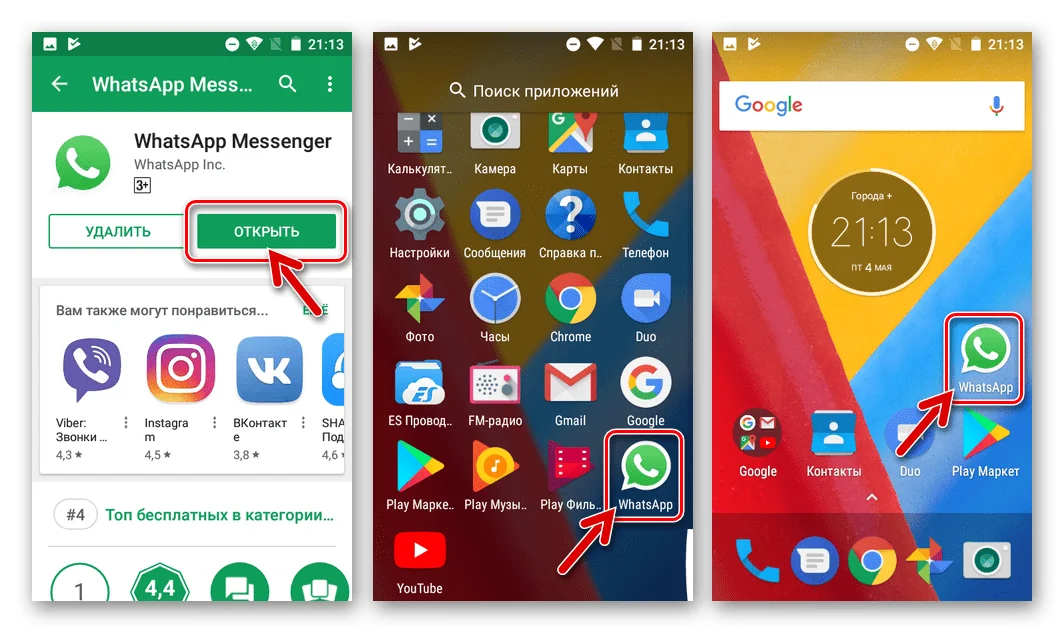
WhatsApp установлен, красноречивым тому свидетельством станет фирменный ярлык на рабочем столе или на общей странице с установленными приложениями. Коснитесь ярлыка и приступайте к регистрации, начав ее со ввода номера мобильного телефона. Если читаете инструкцию со смартфона, можете воспользоваться прямой ссылкой на скачивание WhatsApp из магазина Play Market.
На смартфонах Xiaomi нередко возникают проблемы с отображением уведомлений – при поступлении новых сообщений на экране ничего не появляется. О наличии новых сообщений обычно узнаешь тогда, когда открываешь приложение. Проблема решается тонкой настройкой энергосбережения – необходимо разрешить приложению работать постоянно.
WhatsApp на смартфонах Xiaomi без сервисов Google
Заказывая смартфон на Aliexpress или из любого другого китайского магазина, необходимо удостовериться в том, что выбранная модель поставляется с глобальной прошивкой. В противном случае дело может кончиться блокировкой сервисов Googlе буквально в любую минуту.
При отсутствии сервисов Google воспользуйтесь альтернативной инструкцией по установке WhatsApp. Она включает три шага:
- Откройте имеющийся на смартфоне браузер – подойдет любой;
- Перейдите на официальный сайт WhatsApp, в раздел «Скачать»;
- Нажмите кнопку «Android», далее нажмите «Скачать сейчас».
Файл скачается за 1-2 минуты, в зависимости от скорости соединения с интернетом. Далее коснитесь полученного файла для запуска установки. Завершите установку регистрацией учетной записи.
WhatsApp Messenger


WhatsApp Messenger — это БЕСПЛАТНОЕ приложение для обмена сообщениями на Android и других смартфонах. WhatsApp использует подключение вашего телефона к Интернету (4G/3G/2G/EDGE или WiFi, если он доступен) для обмена сообщениями и звонками с друзьями и родными. Перейдите с SMS на WhatsApp и обменивайтесь текстовыми или голосовыми сообщениями, звонками, фото, видео и документами.
• БЕСПЛАТНЫЙ СЕРВИС. WhatsApp использует подключение к Интернету вашего телефона (4G/3G/2G/EDGE или WiFi, если он доступен) для обмена сообщениями и звонками с друзьями и родными, поэтому вам не нужно платить за сообщения или звонки.* WhatsApp не взимает абонентскую плату.
• ОТПРАВКА МЕДИАФАЙЛОВ. Отправляйте и получайте фото, видео, документы и голосовые сообщения.
• БЕСПЛАТНЫЕ ЗВОНКИ. Звоните своим друзьям и родным совершенно бесплатно с помощью функции «Звонок WhatsApp», даже если они находятся в другой стране.* Звонки в WhatsApp используют подключение телефона к Интернету, а не голосовые минуты вашего тарифного плана. (Примечание. За передачу данных может взиматься дополнительная плата. За информацией обратитесь к своему оператору. Звонки на номер 112 и другие номера экстренных служб не могут осуществляться через WhatsApp.)
• ГРУППОВЫЕ ЧАТЫ. Групповые чаты помогают вам с лёгкостью оставаться на связи с друзьями и родственниками.
• WHATSAPP WEB. Вы также можете отправлять и получать сообщения WhatsApp прямо из браузера своего компьютера.
• БЕЗ МЕЖДУНАРОДНЫХ ТАРИФОВ. WhatsApp не берёт дополнительную плату за отправку сообщений за рубеж. Общайтесь с друзьями по всему миру и не переплачивайте за международные SMS.*
• БЕЗ ЛОГИНОВ И ПАРОЛЕЙ. Зачем запоминать ещё одно имя пользователя и пароль? WhatsApp использует ваш телефонный номер точно так же, как SMS, и прекрасно интегрируется с вашей существующей адресной книгой.
• ВСЕГДА ПОДКЛЮЧЁН. WhatsApp всегда подключён, поэтому вы не пропустите новые сообщения. Вам не придётся думать о том, находитесь ли вы в системе или нет.
• БЫСТРО СВЯЗЫВАЙТЕСЬ СО СВОИМИ КОНТАКТАМИ. WhatsApp использует адресную книгу вашего телефона, чтобы вы могли быстро и легко связаться со своими контактами, у которых также есть приложение WhatsApp. Не нужно больше запоминать имена пользователей.
• СОХРАНЕНИЕ СООБЩЕНИЙ, ПОКА ВЫ НЕ В СЕТИ. Даже если вы пропустите уведомление о сообщении или выключите телефон, WhatsApp сохранит ваши сообщения и доставит их, когда вы снова откроете приложение.
• И МНОГОЕ ДРУГОЕ. Делитесь геопозицией, обменивайтесь контактами, устанавливайте персональные обои и звуки уведомлений, рассылайте сообщения нескольким контактам одновременно и многое другое!
*За передачу данных может взиматься плата. За информацией обратитесь к своему оператору.
———————————————————
Мы всегда рады вашим отзывам! Если у вас есть пожелания, вопросы или жалобы, пожалуйста, напишите нам на электронный адрес:
Или подпишитесь на нас в twitter:
Как установить WhatsApp на телефон Xiaomi Redmi Note 11 Pro Plus 5G

WhatsApp – это самый популярный мессенджер в мире, которым пользуются сотни миллионов людей. Больше всего он востребован владельцами мобильных устройств, где работает через одноименное приложение. А потому важно понимать, как установить WhatsApp на Xiaomi Redmi Note 11 Pro Plus 5G.
Через Google Play
Этот способ является основным и рекомендуется к использованию всем обладателям Xiaomi Redmi Note 11 Pro Plus 5G. На вашем смартфоне, как и на любом другом устройстве на базе Андроид, предустановлен магазин приложений Play Market. Запустите его и при помощи поисковой строки отыщите WhatsApp.
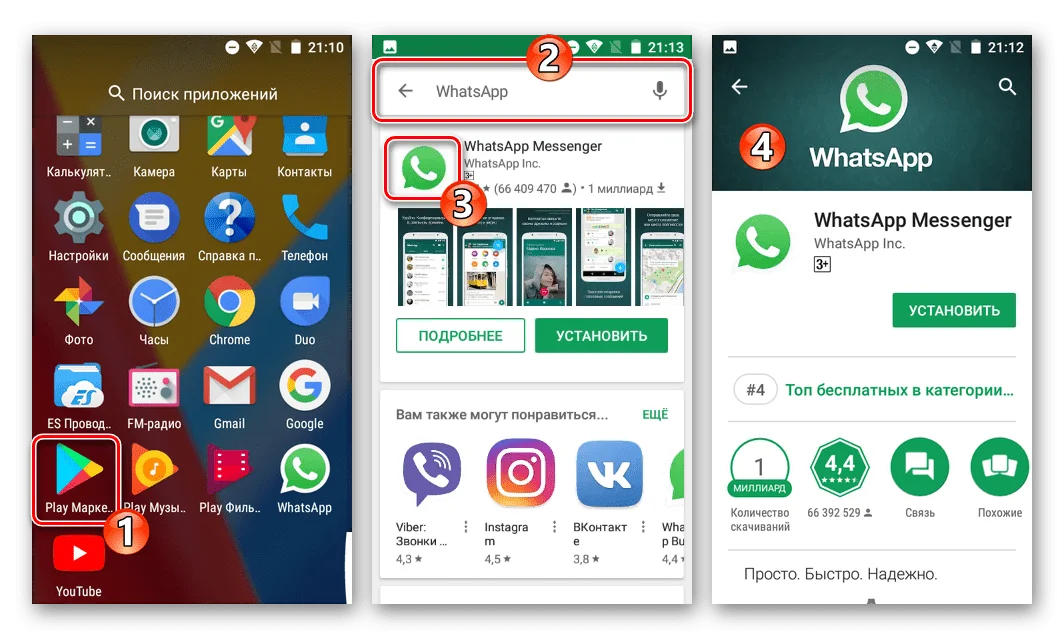
Оказавшись на странице приложения, нажмите на кнопку «Установить». Далее начнется автоматическая загрузка дистрибутива и его инсталляция. За этим процессором вы можете следит, не выходя из Play Market. Но в то же время можно закрыть магазин приложений, занявшись другими делами. Загрузка от этого не прервется.
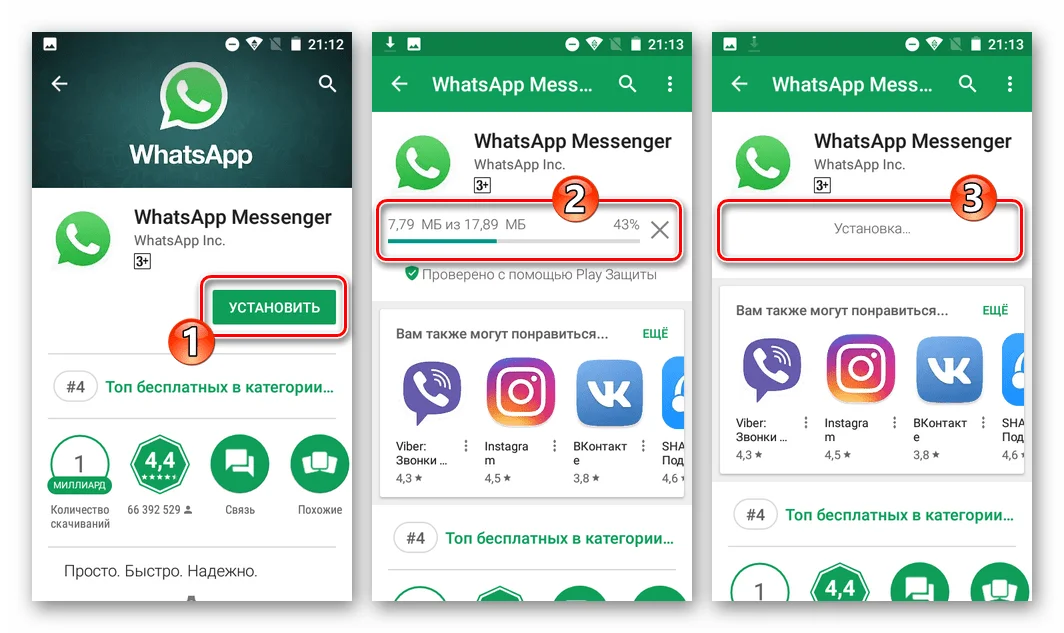
Когда мессенджер установится, на главном экране смартфона или в списке приложений отобразится его иконка, через которую осуществляется запуск программы. Также открыть WhatsApp можно через Play Market, где будет располагаться соответствующая кнопка.
Установка WhatsApp на Xiaomi Redmi Note 11 Pro Plus 5G через APK-файл
Операционная система Андроид славится своей открытостью, а телефон Xiaomi Redmi Note 11 Pro Plus 5G позволяет установить WhatsApp не через Play Market, а встроенными средствами устройства. То есть через инсталлятор, представленный в виде APK-файла. Ссылку на скачивание вы можете найти, обратившись к официальному сайту whatsapp.com.
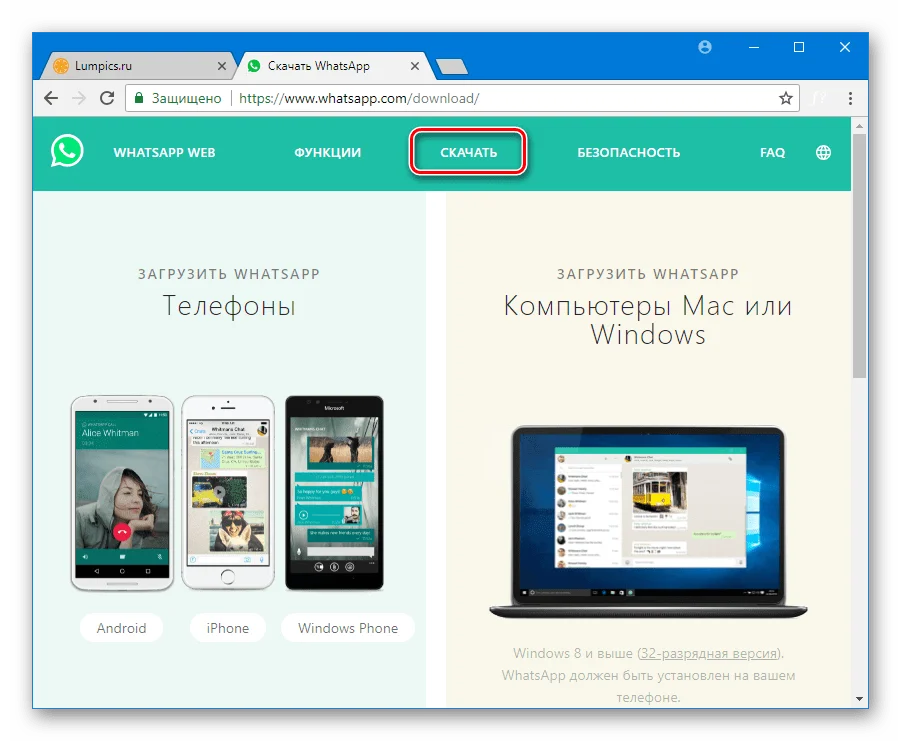
Дистрибутив доступен для загрузки как на компьютер, так и на телефон. Но все-таки лучше сразу скачать его на мобильное устройство.
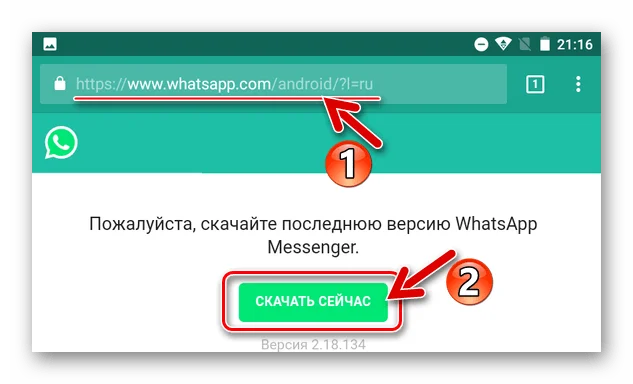
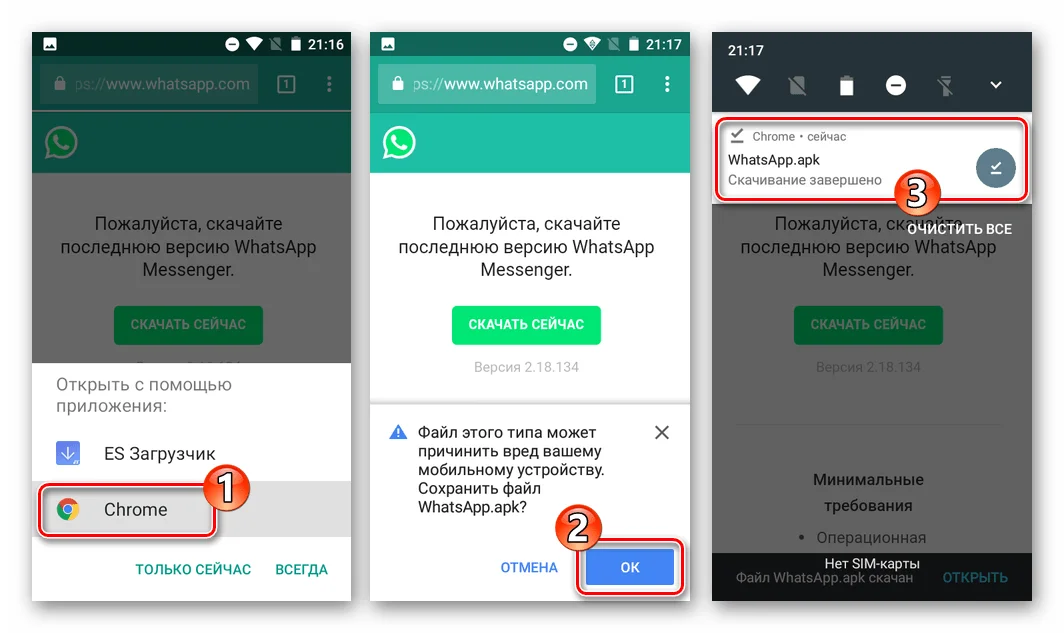
Далее браузер попросит вас выбрать приложение для запуска инсталлятора. Просто выберите Chrome, если он является вашим основным веб-обозревателем. Вы можете увидеть сообщение об опасности загрузки, но не переживайте, ведь вы скачиваете APK-файл через официальный сайт, так что в данном случае нужно нажать на кнопку «ОК» и подтвердить загрузку.
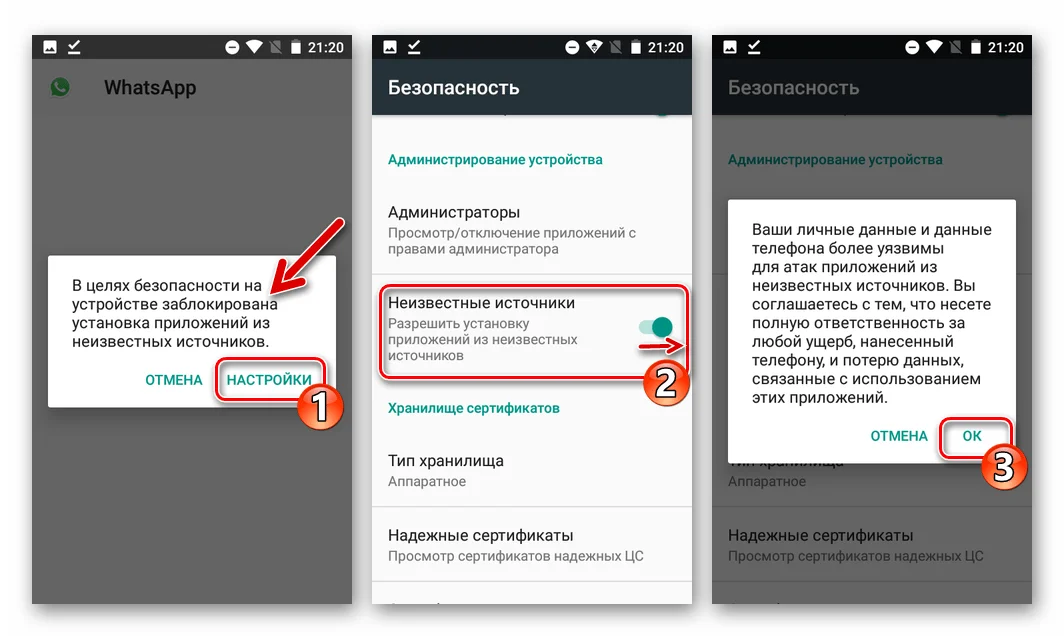
В отличие от Play Market, установка через APK-файл выполняется не автоматически, а вручную. Здесь у пользователей часто возникает проблема, так как Xiaomi Redmi Note 11 Pro Plus 5G нередко блокирует инсталляцию. Поэтому вам необходимо пройти предварительный этап.
Подготовка
Главная задача подготовительного этапа – разрешить установку приложений из непроверенных источников. Для этого нужно открыть настройки Xiaomi Redmi Note 11 Pro Plus 5G, перейти в раздел «Безопасность» и отметить галочкой заветный пункт.
Установка
Теперь все готово к установке, и мы можем вернуться к папке «Загрузки», куда автоматически попадает APK-файл приложения. Сразу же откройте его.
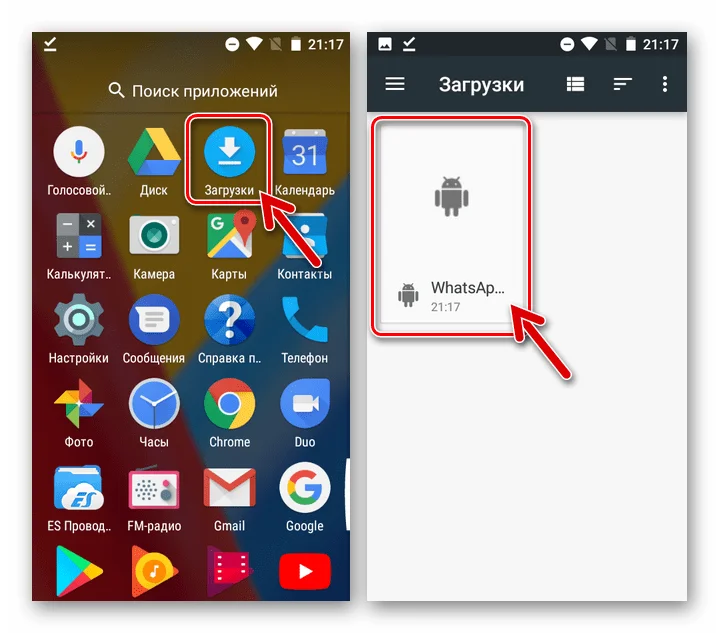
Затем система попросит подтвердить установку. Нажмите на кнопку «ОК», после чего начнется инсталляция.
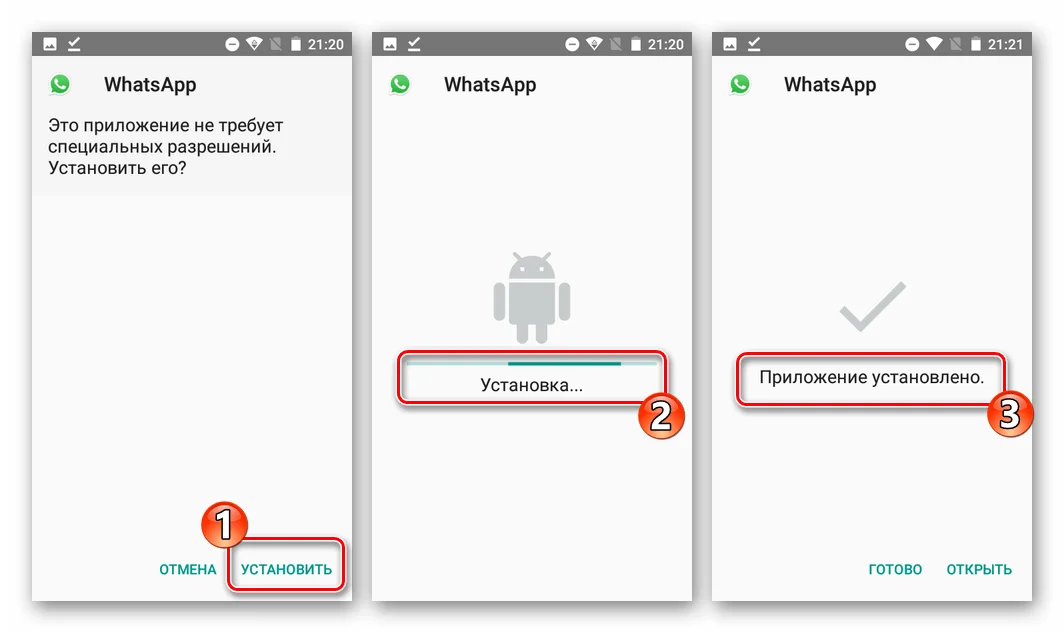
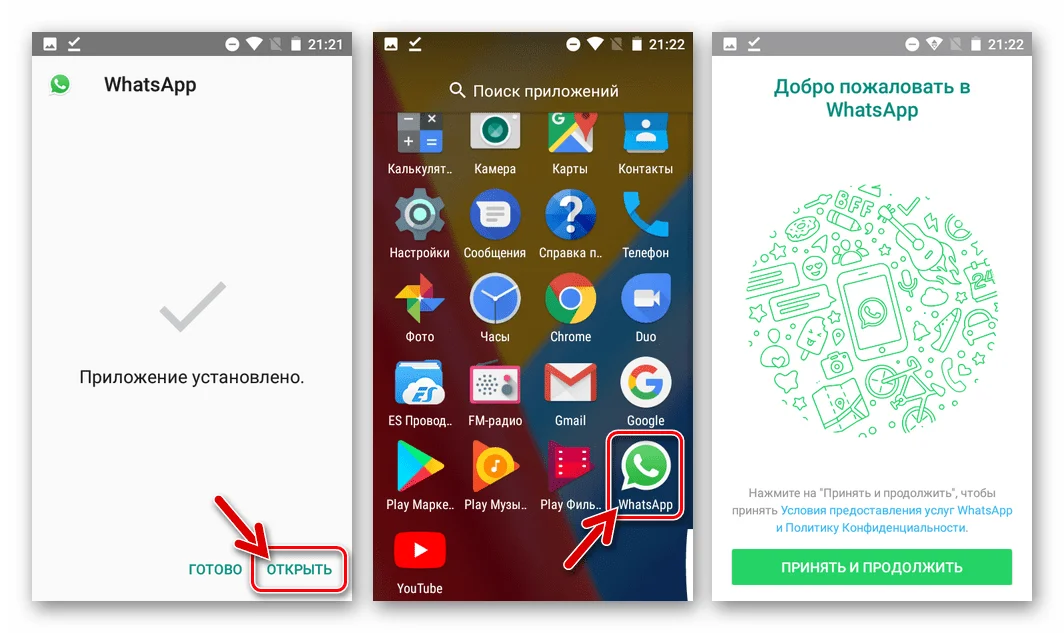
Процесс установки займет несколько секунд. По его окончании вы можете сразу запустить WhatsApp, нажав на кнопку «Открыть», или же осуществить вход через иконку, расположенную на главном экране.
Поделитесь страницей с друзьями:

Hi, There you can download APK file «WhatsApp» for Xiaomi Redmi Pro free, apk file version is 2.23.23.78 to download to your Xiaomi Redmi Pro just click this button. It’s easy and warranty. We provide only original apk files. If any of materials on this site violates your rights, report us
Description of WhatsApp
WhatsApp Messenger is a simple free way to connect with people you love and do business successfully. It’s available for all smartphones. You just need Internet connection to use it, that’s all. It can be 2-4G, EDGE or Wi-Fi. Forget about old-fashioned SMS.
Voice, text messages and calls are available. You also can get and send documents, photo and video files. There are more advantages: you can exchange contacts, select notification sounds and wallpapers, share your location, email chat history and use plenty of other cool functions.
The primary advantages:
- You can communicate, share and receive multimedia content totally for free. There are no fees even for communication with people from abroad.
- Group chats make team conversations and video calls possible. Stay in touch with people wherever they are.
- Not only smartphones. There is a desktop version of app, so you can use it from your computer or laptop.
- No more usernames or endless pin codes. The app applies only your phone number, you’re always logged in. Moreover, all your contacts are on hand, since the application integrates with your phone address book specifically after installation. You can easily get in touch with everyone from your contacts who also has WhatsApp.
The app saves all recent massages until you’re online again — you won’t miss any activities on your chats even when your phone is disconnected or turned off.
Screenshots of WhatsApp
Version history WhatsApp
New in WhatsApp 2.23.23.78
• You can now find and follow Channels to receive updates about topics you care about. Tap the ‘Updates’ tab to get started.
• Notifications for groups now indicate if you were replied to or mentioned
These features will roll out over the coming weeks. Thanks for using WhatsApp!
New in WhatsApp 2.23.21.88
• You can now find and follow Channels to receive updates about topics you care about. Tap the ‘Updates’ tab to get started.
• Notifications for groups now indicate if you were replied to or mentioned
These features will roll out over the coming weeks. Thanks for using WhatsApp!
New in WhatsApp 2.23.21.85
• You can now find and follow Channels to receive updates about topics you care about. Tap the ‘Updates’ tab to get started.
• Notifications for groups now indicate if you were replied to or mentioned
These features will roll out over the coming weeks. Thanks for using WhatsApp!
New in WhatsApp 2.23.19.84
• You can now send higher resolution images in chat. To get started, tap the ‘HD’ button when previewing media before sending.
• Screen sharing is now supported in video calls. Start a video call and tap on the new “screen share” button to get started.
These features will roll out over the coming weeks. Thanks for using WhatsApp!
New in WhatsApp 2.23.19.82
• You can now send higher resolution images in chat. To get started, tap the ‘HD’ button when previewing media before sending.
• Screen sharing is now supported in video calls. Start a video call and tap on the new “screen share” button to get started.
These features will roll out over the coming weeks. Thanks for using WhatsApp!
New in WhatsApp 2.23.18.79
• You can now send higher resolution images in chat. To get started, tap the ‘HD’ button when previewing media before sending.
• Screen sharing is now supported in video calls. Start a video call and tap on the new “screen share” button to get started.
These features will roll out over the coming weeks. Thanks for using WhatsApp!
New in WhatsApp 2.23.17.80
• You can now send higher resolution images in chat. To get started, tap the ‘HD’ button when previewing media before sending.
• Screen sharing is now supported in video calls. Start a video call and tap on the new “screen share” button to get started.
These features will roll out over the coming weeks. Thanks for using WhatsApp!
New in WhatsApp 2.23.17.76
• You can now instantly record and send video messages in chats. To get started, tap on the microphone icon in chats to switch to video.
• Screen sharing is now supported in video calls. Start a video call and tap on the new “screen share” button to get started.
• Added message editing support for media with captions.
• Updated UI with Material 3 Menus and Switches.
New in WhatsApp 2.23.16.76
• Redesigned sticker tray with improved navigation and a larger set of stickers including more Avatars.
These features will roll out over the coming weeks. Thanks for using WhatsApp!
New in WhatsApp 2.23.15.81
• Redesigned sticker tray with improved navigation and a larger set of stickers including more Avatars.
These features will roll out over the coming weeks. Thanks for using WhatsApp!
New in WhatsApp 2.23.15.78
• Redesigned sticker tray with improved navigation and a larger set of stickers including more Avatars.
These features will roll out over the coming weeks. Thanks for using WhatsApp!
New in WhatsApp 2.23.14.79
• You can now natively transfer full account history when switching to a new device. Go to Settings > Chats > Transfer Chats.
• Video calls now support landscape mode.
• You can now silence unknown callers. Go to Settings > Privacy > Calls to get started.
These features will roll out over the coming weeks. Thanks for using WhatsApp!
New in WhatsApp 2.23.13.76
• You can now edit messages up to 15 minutes after sending. Long press a message and choose ‘Edit’ to get started.
• Group chats show the profile photos of their participants.
These features will roll out over the coming weeks. Thanks for using WhatsApp!
New in WhatsApp 2.23.12.78
• Added support for WhatsApp on Wear OS smartwatches
• You can now save important messages for later when using Disappearing Messages. Long press on a message and choose “Keep” to get started.
• Added new text overlay tools for Status including updated fonts and background colors
• GIFs will now play automatically without having to tap them.
New in WhatsApp 2.23.11.77
• Added support for WhatsApp on Wear OS smartwatches
• You can now save important messages for later when using Disappearing Messages. Long press on a message and choose “Keep” to get started.
• Added new text overlay tools for Status including updated fonts and background colors
• GIFs will now play automatically without having to tap them.
New in WhatsApp 2.23.10.77
• You can now use WhatsApp on multiple phones. To link Android phone as a companion, tap the overflow menu in the phone number registration screen and choose “Link to existing account”
• You can let users select only one option in polls and get notified about new votes
These features will roll out over the coming weeks. Thanks for using WhatsApp!
New in WhatsApp 2.23.9.75
• You can now use WhatsApp on multiple phones. To link Android phone as a companion, tap the overflow menu in the phone number registration screen and choose “Link to existing account”
• You can let users select only one option in polls and get notified about new votes
These features will roll out over the coming weeks. Thanks for using WhatsApp!
New in WhatsApp 2.23.8.76
• Increased the group participant limit to 1024
• Easily see groups in common — you can now search for a contact and see the groups you have in common with them.
• Group admins can now control who joins their groups. In Groups, Go to Group Settings > enable ‘Approve new participants’ to get started.
New in WhatsApp 2.23.7.80
• Increased the group participant limit to 1024
• Easily see groups in common — you can now search for a contact and see the groups you have in common with them.
• Group admins can now control who joins their groups. In Groups, Go to Group Settings > enable ‘Approve new participants’ to get started.
New in WhatsApp 2.23.7.78
• Increased the group participant limit to 1024
• Easily see groups in common — you can now search for a contact and see the groups you have in common with them.
• Group admins can now control who joins their groups. In Groups, Go to Group Settings > enable ‘Approve new participants’ to get started.
New in WhatsApp 2.23.5.78
• Introducing Voice Status — you can now record a voice note and share it to Status. Go to Status tab > tap the “pencil” icon > and hold the “microphone” icon to record.
• You can now quickly mute conversations from incoming notifications without opening WhatsApp. Tap on “Mute” in the notifications quick actions and the chat will be muted.
These features will roll out over the coming weeks. Thanks for using WhatsApp!
New in WhatsApp 2.23.4.79
• You can now add captions when sending documents
• Added support for longer group subjects and descriptions to better describe your group
• You can now send up to 100 photos / videos at once (vs. 30 previously)
• You can now create personalized avatars and use them as stickers and profile photos. Go to Settings > Avatar to get started.
New in WhatsApp 2.23.3.79
• You can now add captions when sending documents
• Added support for longer group subjects and descriptions to better describe your group
• You can now send up to 100 photos / videos at once (vs. 30 previously)
• You can now create personalized avatars and use them as stickers and profile photos. Go to Settings > Avatar to get started.
New in WhatsApp 2.23.3.77
• You can now add captions when sending documents
• Added support for longer group subjects and descriptions to better describe your group
• You can now send up to 100 photos / videos at once (vs. 30 previously)
• You can now create personalized avatars and use them as stickers and profile photos. Go to Settings > Avatar to get started.
New in WhatsApp 2.23.2.76
• View Once media now includes screenshot blocking support for added protection
• You can now create personalized avatars and use them as stickers and profile images. Go to Settings > Avatar to get started.
• You can now see who created a status right from the chat list with the new profile rings.
These features will roll out over the coming weeks. Thanks for using WhatsApp!
New in WhatsApp 2.23.1.76
• You can now create a chat with yourself for convenient reminders and note taking. Tap ‘New chat’ and choose ‘Message yourself’ to get started.
• You can now swipe left inside the WhatsApp camera to record video hands free.
• You can now use WhatsApp on your Android Tablet. Tap ‘Linked Devices’ in Settings to link your tablet to your phone.
• Control who can see when you’re online. Go to Settings > Privacy and select “Last seen & Online”.
• You can undo “delete for me” for a few seconds
New in WhatsApp 2.22.24.78
• You can now create and share a link for your WhatsApp call from the Calls tab
• Now only admins will be notified when you leave a group
• Group admins can now delete others’ messages for everyone. All participants can see who deleted it.
• See link previews for links shared via Status.
• You can now easily react to a Status post using Status Reactions.
New in WhatsApp 2.22.23.84
• You can now create and share a link for your WhatsApp call from the Calls tab
• Now only admins will be notified when you leave a group
• Group admins can now delete others’ messages for everyone. All participants can see who deleted it.
• See link previews for links shared via Status.
• You can now easily react to a Status post using Status Reactions.
New in WhatsApp 2.22.23.77
• You can now create and share a link for your WhatsApp call from the Calls tab
• Now only admins will be notified when you leave a group
• Group admins can now delete others’ messages for everyone. All participants can see who deleted it.
• See link previews for links shared via Status.
• You can now easily react to a Status post using Status Reactions.
New in WhatsApp 2.22.22.80
• You can now create and share a link for your WhatsApp call from the Calls tab
• Now only admins will be notified when you leave a group
• Group admins can now delete others’ messages for everyone. All participants can see who deleted it.
• See link previews for links shared via Status.
• You can now easily react to a Status post using Status Reactions.
New in WhatsApp 2.22.20.79
• Sort your chats with an “unread” filter. To get started tap search and choose “Unread”
• You can undo “delete for me” for a few seconds
• See link previews for links shared via Status.
• Now only admins will be notified when you leave a group
• Group admins can now delete others’ messages for everyone. All participants can see who deleted it.
New in WhatsApp 2.22.16.75
* Updates to message reactions including the ability to react with any emoji plus additional improvements and fixes.
* Increased the group participant limit to 512.
* Increased max file size limit to 2GB.
* On group calls, you can mute others or message them by long pressing on their tile.
These features will roll out over the coming weeks. Thanks for using WhatsApp!
New in WhatsApp 2.22.15.74
* Updates to message reactions including the ability to react with any emoji plus additional improvements and fixes.
* Increased the group participant limit to 512.
* Increased max file size limit to 2GB.
* On group calls, you can mute others or message them by long pressing on their tile.
These features will roll out over the coming weeks. Thanks for using WhatsApp!
New in WhatsApp 2.22.12.80
* You can now to react to messages with emojis. Try it out by long pressing a message and choosing from ? ❤️ ? .
* Group voice calls now support up to 32 participants, and include an updated interface with a social audio layout, speaker highlight and waveforms.
These features will roll out over the coming weeks. Thanks for using WhatsApp!
New in WhatsApp 2.22.9.78
* Group voice calls now support up to 32 participants, and an updated interface including social audio layout, speaker highlight, and waveforms.
* New features for voice messages — pause and resume while recording, continue listening to messages outside of chats, waveforms on message bubbles, and more.
New in WhatsApp 2.21.22.26
* You can now join ongoing group calls right inside your WhatsApp groups. Tap the «join» button during an ongoing call to try it out.
* Updated link previews to show richer previews including larger images
* You can now add stickers when editing your media or status
These features will roll out over the coming weeks. Thanks for using WhatsApp!
New in WhatsApp 2.21.21.17
* You can now join ongoing group calls right inside your WhatsApp groups. Tap the «join» button during an ongoing call to try it out.
* Updated link previews to show richer previews including larger images
* You can now add stickers when editing your media or status
These features will roll out over the coming weeks. Thanks for using WhatsApp!
New in WhatsApp 2.21.17.24
* You can now send photos and videos that can only be viewed once by recipients. Tap the new «1» icon that appears next to the caption.
* Archived chats will now stay archived and muted when new messages arrive. You can change the experience in Settings > Chats > Keep Chats Archived.
* You can now leave and rejoin group calls from the calls tab while they are ongoing.
New in WhatsApp 2.21.12.21
* You can now listen to voice messages at different speeds by toggling the 1x/1.5x/2x buttons while a message is playing.
New in WhatsApp 2.21.11.17
* You can now listen to voice messages at different speeds by toggling the 1x/1.5x/2x buttons while a message is playing.
New in WhatsApp 2.21.10.16
* You can now listen to voice messages at different speeds by toggling the 1x/1.5x/2x buttons while a message is playing.
New in WhatsApp 2.21.8.17
* Image and video previews have been updated so you can now see more of the media in chat.
New in WhatsApp 2.21.6.17
* You can now remove sound when sharing videos. Tap the mute icon before hitting send.
New in WhatsApp 2.21.5.17
* You can now remove sound when sharing videos. Tap the mute icon before hitting send.
New in WhatsApp 2.21.4.22
* You can now remove sound when sharing videos. Tap the mute icon before hitting send.
New in WhatsApp 2.21.3.19
* You can now remove sound when sharing videos. Tap the mute icon before hitting send.
New in WhatsApp 2.21.2.18
* Introducing disappearing messages. Now you can set chats to disappear after 7 days.
* Search your stickers with text and emoji or categories.
* Decorate your photos and videos with smoother drawing and new alignment guides.
* Now you can set a custom wallpaper for a chat or set a dark mode wallpaper. Choose from a refreshed wallpaper gallery or new colors over the doodle background.
New in WhatsApp 2.21.1.16
* Introducing disappearing messages. Now you can set chats to disappear after 7 days.
* Search your stickers with text and emoji or categories.
* Decorate your photos and videos with smoother drawing and new alignment guides.
* Now you can set a custom wallpaper for a chat or set a dark mode wallpaper. Choose from a refreshed wallpaper gallery or new colors over the doodle background.
New in WhatsApp 2.21.1.13
* Introducing disappearing messages. Now you can set chats to disappear after 7 days.
* Search your stickers with text and emoji or categories.
* Decorate your photos and videos with smoother drawing and new alignment guides.
* Now you can set a custom wallpaper for a chat or set a dark mode wallpaper. Choose from a refreshed wallpaper gallery or new colors over the doodle background.
New in WhatsApp 2.20.206.24
* New storage management tool makes it easy to bulk delete items and free up space. Go to Settings > Storage and data > Manage storage to get started.
New in WhatsApp 2.20.205.16
* New storage management tool makes it easy to bulk delete items and free up space. Go to Settings > Storage and data > Manage storage to get started.
New in WhatsApp 2.20.202.24
* New storage management tool makes it easy to bulk delete items and free up space. Go to Settings > Storage and data > Manage storage to get started.
New in WhatsApp 2.20.202.18
* Chats can now be muted forever instead of only 1 year.
New in WhatsApp 2.20.201.23
* New search options allow you to filter by author and content type.
* Group calls now support picture-in-picture mode for easier multitasking.
* The attachment menu has been updated to include refreshed icons and add back the camera shortcut.
New in WhatsApp 2.20.201.21
* New search options allow you to filter by author and content type.
* Group calls now support picture-in-picture mode for easier multitasking.
* The attachment menu has been updated to include refreshed icons and add back the camera shortcut.
New in WhatsApp 2.20.200.22
* Group calls now support picture-in-picture mode for easier multitasking.
* The attachment menu has been updated to include refreshed icons and add back the camera shortcut.
New in WhatsApp 2.20.199.14
* WhatsApp now supports animated stickers. You can find the first set of new animated packs in the sticker store.
* Added support for QR codes so you can quickly add contacts and businesses without typing in a phone number. Tap the ‘QR’ icon in Settings to get started.
* When you’re in a group video call, you can now press and hold to maximize a participant’s video.
New in WhatsApp 2.20.198.15
* WhatsApp now supports animated stickers. You can find the first set of new animated packs in the sticker store.
* Added support for QR codes so you can quickly add contacts and businesses without typing in a phone number. Tap the ‘QR’ icon in Settings to get started.
* When you’re in a group video call, you can now press and hold to maximize a participant’s video.
New in WhatsApp 2.20.197.20
* WhatsApp now supports animated stickers. You can find the first set of new animated packs in the sticker store.
* Added support for QR codes so you can quickly add contacts and businesses without typing in a phone number. Tap the ‘QR’ icon in Settings to get started.
* When you’re in a group video call, you can now press and hold to maximize a participant’s video.
New in WhatsApp 2.20.197.17
* WhatsApp now supports animated stickers. You can find the first set of new animated packs in the sticker store.
* Added support for QR codes so you can quickly add contacts and businesses without typing in a phone number. Tap the ‘QR’ icon in Settings to get started.
* When you’re in a group video call, you can now press and hold to maximize a participant’s video.
New in WhatsApp 2.20.196.16
* WhatsApp now supports animated stickers. You can find the first set of new animated packs in the sticker store.
* Added support for QR codes so you can quickly add contacts and businesses without typing in a phone number. Tap the ‘QR’ icon in Settings to get started.
* When you’re in a group video call, you can now press and hold to maximize a participant’s video.
New in WhatsApp 2.20.195.15
* WhatsApp now supports animated stickers. You can find the first set of new animated packs in the sticker store.
* Added support for QR codes so you can quickly add contacts and businesses without typing in a phone number. Tap the ‘QR’ icon in Settings to get started.
* When you’re in a group video call, you can now press and hold to maximize a participant’s video.
New in WhatsApp 2.20.194.16
— Group video and voice calls now support up to 8 participants. All participants need to be on the latest version of WhatsApp.
New in WhatsApp 2.20.193.9
— Group video and voice calls now support up to 8 participants. All participants need to be on the latest version of WhatsApp.
New in WhatsApp 2.20.189
— Group video and voice calls now support up to 8 participants. All participants need to be on the latest version of WhatsApp.
New in WhatsApp 2.20.172
— Group video and voice calls now support up to 8 participants. All participants need to be on the latest version of WhatsApp.
New in WhatsApp 2.20.157
— Group video and voice calls now support up to 8 participants. All participants need to be on the latest version of WhatsApp.
New in WhatsApp 2.20.140
— Group video and voice calls now support up to 8 participants. All participants need to be on the latest version of WhatsApp.
New in WhatsApp 2.20.123
— Dark mode is now available. Try it by going to Settings > Chats > Theme > select ‘Dark’. For users on Android 10, dark mode is enabled automatically when you turn it on in system settings.
New in WhatsApp 2.20.108
— Dark mode is now available. Try it by going to Settings > Chats > Theme > select ‘Dark’. For users on Android 10, dark mode is enabled automatically when you turn it on in system settings.
New in WhatsApp 2.20.89
— Dark mode is now available. Try it by going to Settings > Chats > Theme > select ‘Dark’. For users on Android 10, dark mode is enabled automatically when you turn it on in system settings.
New in WhatsApp 2.20.64
— Dark mode is now available. Try it by going to Settings > Chats > Theme > select ‘Dark’. For users on Android 10, dark mode is enabled automatically when you turn it on in system settings.
New in WhatsApp 2.20.47
— New privacy settings allow you to control who can add you to groups. Go to Settings > Account > Privacy > Groups to get started.
— Added call waiting support so you can choose to accept an incoming WhatsApp call while you’re already on another call.
— You can now require a fingerprint to unlock WhatsApp. Tap Settings > Account > Privacy > Fingerprint lock and enable Unlock with fingerprint.
— Fixed an issue which caused fast battery drain on some devices.
New in WhatsApp 2.20.27
— New privacy settings allow you to control who can add you to groups. Go to Settings > Account > Privacy > Groups to get started.
— Added call waiting support so you can choose to accept an incoming WhatsApp call while you’re already on another call.
— You can now require a fingerprint to unlock WhatsApp. Tap Settings > Account > Privacy > Fingerprint lock and enable Unlock with fingerprint.
— Fixed an issue which caused fast battery drain on some devices.
New in WhatsApp 2.20.11
— New privacy settings allow you to control who can add you to groups. Go to Settings > Account > Privacy > Groups to get started.
— Added call waiting support so you can choose to accept an incoming WhatsApp call while you’re already on another call.
— You can now require a fingerprint to unlock WhatsApp. Tap Settings > Account > Privacy > Fingerprint lock and enable Unlock with fingerprint.
— Fixed an issue which caused fast battery drain on some devices.
New in WhatsApp 2.19.360
— nuove impostazioni di privacy per controllare chi può aggiungerti ai gruppi. Vai a Impostazioni > Account > Privacy > Gruppi
— chiamata in attesa ora supportata per decidere se accettare una chiamata WhatsApp in arrivo durante un’altra chiamata
— ora puoi richiedere un’impronta digitale per sbloccare WhatsApp. Tocca Impostazioni > Account > Privacy > Blocco con impronta digitale e attiva Sblocca con impronta digitale
— risolto un problema di consumo rapido della batteria su alcuni dispositivi
New in WhatsApp 2.19.291
— nuove impostazioni di privacy per controllare chi può aggiungerti ai gruppi. Vai a Impostazioni > Account > Privacy > Gruppi
— chiamata in attesa ora supportata per decidere se accettare una chiamata WhatsApp in arrivo durante un’altra chiamata
— ora puoi richiedere un’impronta digitale per sbloccare WhatsApp. Tocca Impostazioni > Account > Privacy > Blocco con impronta digitale e attiva Sblocca con impronta digitale
— risolto un problema di consumo rapido della batteria su alcuni dispositivi
New in WhatsApp 2.19.274
• Consecutive Voice Messages will now play in sequence, so you don’t have to press play on each message.
New in WhatsApp 2.19.258
• Consecutive Voice Messages will now play in sequence, so you don’t have to press play on each message.
New in WhatsApp 2.19.244
• Consecutive Voice Messages will now play in sequence, so you don’t have to press play on each message.
New in WhatsApp 2.19.230
• Consecutive Voice Messages will now play in sequence, so you don’t have to press play on each message.
New in WhatsApp 2.19.216
• Consecutive Voice Messages will now play in sequence, so you don’t have to press play on each message.
New in WhatsApp 2.19.203
• Consecutive Voice Messages will now play in sequence, so you don’t have to press play on each message.
New in WhatsApp 2.19.188
• Security fix for CVE-2019-3568.
• Consecutive Voice Messages will now play in sequence, so you don’t have to press play on each message.
New in WhatsApp 2.19.175
• Security fix for CVE-2019-3568.
• Consecutive Voice Messages will now play in sequence, so you don’t have to press play on each message.
New in WhatsApp 2.19.159
• Security fix for CVE-2019-3568.
• Consecutive Voice Messages will now play in sequence, so you don’t have to press play on each message.
New in WhatsApp 2.19.150
• Security fix for CVE-2019-3568.
New in WhatsApp 2.19.134
• Security fix for CVE-2019-3568.
New in WhatsApp 2.19.98
• It’s now easier to start group voice and video calls. Just tap the call button in groups or select «New group call» when starting a new call in the calls tab. Group calls support up to 4 participants.
New in WhatsApp 2.19.81
• It’s now easier to start group voice and video calls. Just tap the call button in groups or select «New group call» when starting a new call in the calls tab. Group calls support up to 4 participants.
New in WhatsApp 2.19.69
• It’s now easier to start group voice and video calls. Just tap the call button in groups or select «New group call» when starting a new call in the calls tab. Group calls support up to 4 participants.
New in WhatsApp 2.19.53
• It’s now easier to start group voice and video calls. Just tap the call button in groups or select «New group call» when starting a new call in the calls tab. Group calls support up to 4 participants.
New in WhatsApp 2.19.34
• It’s now easier to start group voice and video calls. Just tap the call button in groups or select «New group call» when starting a new call in the calls tab. Group calls support up to 4 participants.
New in WhatsApp 2.19.17
• It’s now easier to start group voice and video calls. Just tap the call button in groups or select «New group call» when starting a new call in the calls tab. Group calls support up to 4 participants.
New in WhatsApp 2.18.380
• Introducing stickers! You can now download and send expressive stickers in chats. Tap the «emoji» icon while in a chat and then tap the «sticker» icon at the bottom to get started. You can also tap the «+» icon to download more sticker packs. If you’d like to create your own stickers for WhatsApp, visit whatsapp.com/stickers to get started.
• You can now swipe right on a message to reply.
New in WhatsApp 2.18.361
• Introducing stickers! You can now download and send expressive stickers in chats. Tap the «emoji» icon while in a chat and then tap the «sticker» icon at the bottom to get started. You can also tap the «+» icon to download more sticker packs. If you’d like to create your own stickers for WhatsApp, visit whatsapp.com/stickers to get started.
• You can now swipe right on a message to reply.
New in WhatsApp 2.18.341
• Introducing stickers! You can now download and send expressive stickers in chats. Tap the «emoji» icon while in a chat and then tap the «sticker» icon at the bottom to get started. You can also tap the «+» icon to download more sticker packs. If you’d like to create your own stickers for WhatsApp, visit whatsapp.com/stickers to get started.
• You can now swipe right on a message to reply.
New in WhatsApp 2.18.327
• You can now swipe right on a message to reply.
New in WhatsApp 2.18.306
— Group admins can now choose to allow only admins to send messages to a group. Open «Group info» > tap «Group settings». Non-admins will still be able to read messages and respond privately by tapping «Message admin».
New in WhatsApp 2.18.293
— Group admins can now choose to allow only admins to send messages to a group. Open «Group info» > tap «Group settings». Non-admins will still be able to read messages and respond privately by tapping «Message admin».
New in WhatsApp 2.18.277
— Group admins can now choose to allow only admins to send messages to a group. Open «Group info» > tap «Group settings». Non-admins will still be able to read messages and respond privately by tapping «Message admin».
New in WhatsApp 2.18.267
— Group admins can now choose to allow only admins to send messages to a group. Open «Group info» > tap «Group settings». Non-admins will still be able to read messages and respond privately by tapping «Message admin».
New in WhatsApp 2.18.248
— Group admins can now choose to allow only admins to send messages to a group. Open «Group info» > tap «Group settings». Non-admins will still be able to read messages and respond privately by tapping «Message admin».
New in WhatsApp 2.18.217
— Group admins can now choose to allow only admins to send messages to a group. Open «Group info» > tap «Group settings». Non-admins will still be able to read messages and respond privately by tapping «Message admin».
New in WhatsApp 2.18.203
— Group admins can now choose to allow only admins to send messages to a group. Open «Group info» > tap «Group settings». Non-admins will still be able to read messages and respond privately by tapping «Message admin».
New in WhatsApp 2.18.191
• Now you can easily record long Voice Messages. When recording a Voice Message, just swipe up to lock recording so you can continue to record without keeping your finger down.
• If you’re a group admin, you can now remove admin rights from other participants. Select the admin in «Group info» and tap «Dismiss as admin.»
• Group admins can now choose who can change a group’s subject, icon and description by going to «Group info» and tapping «Group settings.»
New in WhatsApp 2.18.177
• Now you can easily record long Voice Messages. When recording a Voice Message, just swipe up to lock recording so you can continue to record without keeping your finger down.
• If you’re a group admin, you can now remove admin rights from other participants. Select the admin in «Group info» and tap «Dismiss as admin.»
• Group admins can now choose who can change a group’s subject, icon and description by going to «Group info» and tapping «Group settings.»
New in WhatsApp 2.18.156
• If you’re a group admin, you can now remove admin rights from other participants. Select the admin in «Group info» and tap «Dismiss as admin.»
• Group admins can now choose who can change a group’s subject, icon and description by going to «Group info» and tapping «Group settings.»
New in WhatsApp 2.18.142
• If you’re a group admin, you can now remove admin rights from other participants. Select the admin in «Group info» and tap «Dismiss as admin.»
• Group admins can now choose who can change a group’s subject, icon and description by going to «Group info» and tapping «Group settings.»
New in WhatsApp 2.18.122
• You can now add a description to a group. Let group members know about important information or the topic of the group. Group descriptions are also visible when inviting someone via the group’s invite link.
• Easily switch between voice and video calls. Just tap the video button while on a call.
• From group info, you can search the list of group participants
New in WhatsApp 2.18.105
• You can now add a description to a group. Let group members know about important information or the topic of the group. Group descriptions are also visible when inviting someone via the group’s invite link.
• Easily switch between voice and video calls. Just tap the video button while on a call.
• From group info, you can search the list of group participants
New in WhatsApp 2.18.92
• You can now add a description to a group. Let group members know about important information or the topic of the group. Group descriptions are also visible when inviting someone via the group’s invite link.
• Easily switch between voice and video calls. Just tap the video button while on a call.
• From group info, you can search the list of group participants
New in WhatsApp 2.18.79
• You can now add a description to a group. Let group members know about important information or the topic of the group. Group descriptions are also visible when inviting someone via the group’s invite link. • Easily switch between voice and video calls. Just tap the video button while on a call. • From group info, you can search the list of group participants
New in WhatsApp 2.18.65
• You can once again set a text-only update in your profile and it’s called About. Tap Settings and then your profile name to edit it. Thanks for the feedback! • Search for the perfect animated GIF right from within WhatsApp. Tap the emoji button in a chat and then tap GIF at the bottom of the emoji panel to get started.
New in WhatsApp 2.18.46
• You can once again set a text-only update in your profile and it’s called About. Tap Settings and then your profile name to edit it. Thanks for the feedback! • Search for the perfect animated GIF right from within WhatsApp. Tap the emoji button in a chat and then tap GIF at the bottom of the emoji panel to get started.
New in WhatsApp 2.18.29
• You can once again set a text-only update in your profile and it’s called About. Tap Settings and then your profile name to edit it. Thanks for the feedback! • Search for the perfect animated GIF right from within WhatsApp. Tap the emoji button in a chat and then tap GIF at the bottom of the emoji panel to get started.
New in WhatsApp 2.18.9
• You can once again set a text-only update in your profile and it’s called About. Tap Settings and then your profile name to edit it. Thanks for the feedback! • Search for the perfect animated GIF right from within WhatsApp. Tap the emoji button in a chat and then tap GIF at the bottom of the emoji panel to get started.
New in WhatsApp 2.17.427
• You can once again set a text-only update in your profile and it’s called About. Tap Settings and then your profile name to edit it. Thanks for the feedback! • Search for the perfect animated GIF right from within WhatsApp. Tap the emoji button in a chat and then tap GIF at the bottom of the emoji panel to get started.
New in WhatsApp 2.17.395
• Now you can delete messages you’ve sent by mistake. Just tap and hold a message you sent in the last 7 minutes, tap delete, and select «Delete for everyone.» The message will be deleted for you and everyone in the chat. Requires the latest version of WhatsApp. • Live location: now you can share your location in real-time with family and friends. Open any chat, tap the attach icon > location, and tap «Share live location» to get started.
New in WhatsApp 2.17.351
• Now you can post text-only updates to your status and they’ll be visible for 24 hours. Just tap the pencil icon in the Status tab, type what you’d like, and pick a background color or font of your choice. • When in a video call, you can tap back to continue the video call in picture-in-picture mode (Android 8.0+).
New in WhatsApp 2.17.323
• Now you can post text-only updates to your status and they’ll be visible for 24 hours. Just tap the pencil icon in the Status tab, type what you’d like, and pick a background color or font of your choice. • When in a video call, you can tap back to continue the video call in picture-in-picture mode (Android 8.0+).
New in WhatsApp 2.17.296
• When you receive multiple photos or videos in a row from the same sender, they’ll now be grouped together as an album. Previous release: • You can now send documents of any type. To send a document, open a chat > tap attach > Document. • . Quickly find the right emoji with emoji search. Tap the emoji icon (. ) in a chat and tap the search icon (. ) in the bottom left. .
New in WhatsApp 2.17.254
• You can now send documents of any type. To send a document, open a chat, tap attach — document. • . Quickly find the right emoji with emoji search. Tap the emoji icon (. ) in a chat and tap the search icon (. ) in the bottom left. . • From the in-app camera, you can now swipe up to see all of your photos and videos. • When typing text in a chat, you can tap and hold to select the text to easily bold, strikethrough, or italicize it. • Various design improvements for voice and video calls.
New in WhatsApp 2.17.253
• If you’re a group admin, you can now remove admin rights from other participants. Select the admin in «Group info» and tap «Dismiss as admin.»
• Group admins can now choose who can change a group’s subject, icon and description by going to «Group info» and tapping «Group settings.»
New in WhatsApp 2.17.223
• Pin chats to the top of your chat list, so you can quickly find them. Just tap and hold on a chat and tap the pin icon at the top of your screen.
New in WhatsApp 2.17.190
• Pin chats to the top of your chat list, so you can quickly find them. Just tap and hold on a chat and tap the pin icon at the top of your screen.
New in WhatsApp 2.17.146
• You can now send multiple contact cards at once • Support for sending GIFs with Google’s GBoard keyboard (Android 7.1+)
New in WhatsApp 2.17.107
• You can once again set a text-only update in your profile and it’s called About. Tap Settings and then your profile name to edit it. Thanks for the feedback! • WhatsApp Status: Post photos, videos, and GIFs to your status and share with your contacts what’s going on throughout your day. Status updates from your contacts appear in the Status tab, and they’ll disappear after 24 hours. Long press on a contact’s name in the Status tab to mute their updates.
New in WhatsApp 2.17.79
• WhatsApp Status: Post photos, videos, and GIFs to your status and share with your contacts what’s going on throughout your day. Status updates from your contacts appear in the Status tab, and they’ll disappear after 24 hours. Long press on a contact’s name in the Status tab to mute their updates. • Quickly access the camera by swiping right from the Chats tab. • Turn on two-step verification in Settings > Account to require a passcode when registering your phone number with WhatsApp.
New in WhatsApp 2.17.65
• Play videos right away without waiting for them to download first. Videos will still be downloaded to your phone as the video is playing. (Android 4.1+ and only works with videos sent from the latest version of the Android app) • Introducing WhatsApp video calling. With free video calls, you can have face-to-face chats with your friends and family around the world. Data charges may apply. (requires Android 4.1+) • You can now send and receive animated GIFs
New in WhatsApp 2.17.24
• Play videos right away without waiting for them to download first. Videos will still be downloaded to your phone as the video is playing. (Android 4.1+ and only works with videos sent from the latest version of the Android app) • Introducing WhatsApp video calling. With free video calls, you can have face-to-face chats with your friends and family around the world. Data charges may apply. (requires Android 4.1+) • You can now send and receive animated GIFs
New in WhatsApp 2.16.396
• Play videos right away without waiting for them to download first. Videos will still be downloaded to your phone as the video is playing. (Android 4.1+ and only works with videos sent from the latest version of the Android app) • Introducing WhatsApp video calling. With free video calls, you can have face-to-face chats with your friends and family around the world. Data charges may apply. (requires Android 4.1+) • You can now send and receive animated GIFs
New in WhatsApp 2.16.392
• Play videos right away without waiting for them to download first. Videos will still be downloaded to your phone as the video is playing. (Android 4.1+ and only works with videos sent from the latest version of the Android app) • Introducing WhatsApp video calling. With free video calls, you can have face-to-face chats with your friends and family around the world. Data charges may apply. (requires Android 4.1+) • You can now send and receive animated GIFs
New in WhatsApp 2.16.382
• Play videos right away without waiting for them to download first. Videos will still be downloaded to your phone as the video is playing. (Android 4.1+ and only works with videos sent from the latest version of the Android app) • Introducing WhatsApp video calling. With free video calls, you can have face-to-face chats with your friends and family around the world. Data charges may apply. (requires Android 4.1+) • You can now send and receive animated GIFs
New in WhatsApp 2.16.352
• Introducing WhatsApp video calling. With free video calls, you can have face-to-face chats with your friends and family around the world. Data charges may apply. (requires Android 4.1+) • You can now send and receive animated GIFs
New in WhatsApp 2.16.310
• Now you can draw or add text and emojis to photos and videos you capture within WhatsApp. You can also pick a brush size or font style by dragging left on the color selector • In groups, you can now mention specific people by typing the @ symbol • Group admins can now invite people to join a group by sharing a link. From group info, just tap Add participants > Invite to group via link • New emoji. And sending a single emoji will now appear larger in chats.
New in WhatsApp 2.16.297
• Now you can draw or add text and emojis to photos and videos you capture within WhatsApp. You can also pick a brush size or font style by dragging left on the color selector • In groups, you can now mention specific people by typing the @ symbol • Group admins can now invite people to join a group by sharing a link. From group info, just tap Add participants > Invite to group via link • New emoji. And sending a single emoji will now appear larger in chats.
New in WhatsApp 2.16.275
• When sharing or forwarding messages, you can now send to multiple chats at once • Chats you frequently contact now appear when forwarding or sharing messages • While recording videos, slide your finger up or down to zoom in and out • A new front-facing flash helps you capture selfies in the dark
New in WhatsApp 2.16.259
• When sharing or forwarding messages, you can now send to multiple chats at once • Chats you frequently contact now appear when forwarding or sharing messages • While recording videos, slide your finger up or down to zoom in and out • A new front-facing flash helps you capture selfies in the dark
New in WhatsApp 2.16.225
• When placing a WhatsApp call, you can now quickly leave a voice message if your call isn’t answered, just like voicemail. • Missed calls now show up in chats.
New in WhatsApp 2.16.207
Reply to specific messages in any chat. Just tap and hold on any message and tap the reply button at the top of the screen. You can even tap on the quoted part of the message to scroll up to the original message.
New in WhatsApp 2.16.133
Reply to specific messages in any chat. Just tap and hold on any message and tap the reply button at the top of the screen. You can even tap on the quoted part of the message to scroll up to the original message.